Moving Accounts to Another PHP Version
When a PHP version reaches end of life, its accounts have to move. PHP → Migrate moves them in a batch, one account at a time. Before and after each switch, CorePanel reads every site of the account and watches its PHP error log. An account whose sites broke goes back to the old version by itself, and the batch carries on.
Starting a batch
Section titled “Starting a batch”On PHP, every installed version that has accounts shows a Migrate button. The dialog has three steps:
- Target: the version to move to. It defaults to the nearest supported version above the current one. Leave Put back an account whose sites break on unless you want to see the breakage for yourself.
- Check: a dry run that changes nothing. It reads every site once and lists:
- Extensions the old version loads and the new one lacks. One the repository offers has an Install button, and the batch cannot start until it is installed. One that does not exist for the new version, such as an old ionCube loader, is only a warning.
- Accounts, all ticked. Each one is marked when it is suspended (moved without checking its sites), has no website (skipped), has a site that is already failing (so the migration is not blamed for it), or has cron jobs that call the old PHP binary directly (those keep running the old version).
- Sites that stay: sites set to the old version on their own, each with the account it belongs to. The batch moves accounts, so these keep the old version until you change them on that account’s websites.
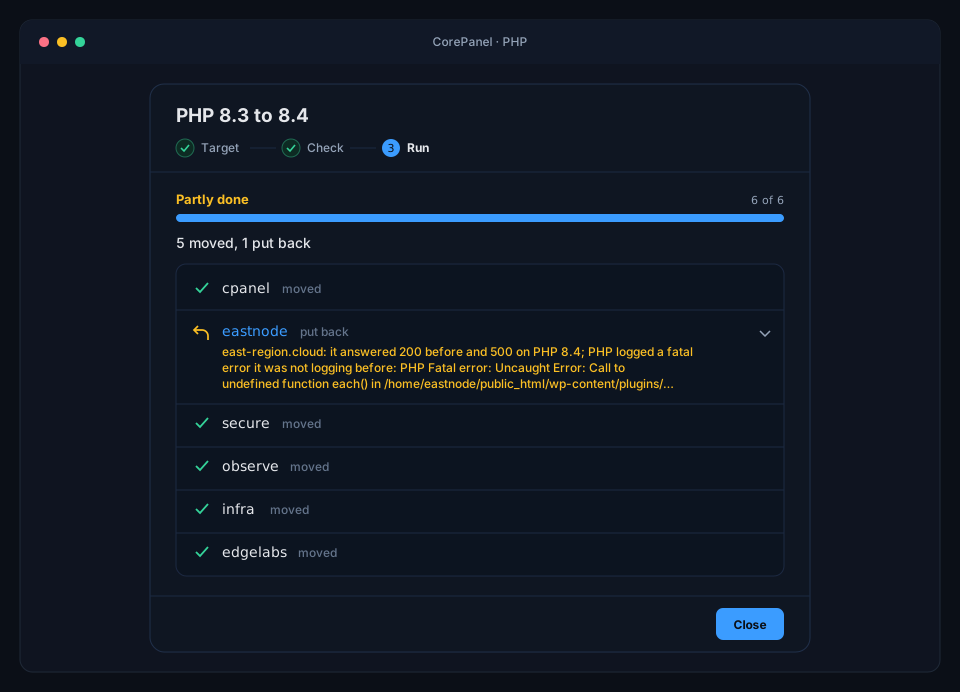
- Run: one row per account, updated live. You can close the dialog: the batch runs on the server, and a strip on the PHP page reopens it.
Recent migrations on the same page lists past batches, each with its accounts and what was seen on them.
When an account goes back
Section titled “When an account goes back”For each account, CorePanel compares every site’s homepage before and after the switch. The account goes back to the old version if, after the switch, a site:
- answers a 5xx error, or stops answering;
- answers a 4xx where it answered normally before;
- shows a “loader missing” page (ionCube, Zend Guard and similar);
- logs a PHP fatal error that it was not logging before.
A site that was already failing before the switch does not count, and neither does a fatal error the account was already logging. A new fatal anywhere in the account’s log does count, even if it came from a page other than the homepage. Expand an account’s row to see the reason and the new PHP errors.
With Put back an account whose sites break off, a broken account stays on the new version and is marked failed, so you can look at it there.
Two more rules protect the server:
- Three accounts in a row that go back or fail stop the batch. At that point the problem is the target version, not the sites.
- If putting an account back fails, the batch stops at once and that account is shown in red: it is on the new version and broken, and needs your attention.
Stop after this account lets the account in flight finish (or go back) and skips the rest.
While a batch runs
Section titled “While a batch runs”Only one batch runs at a time. While it runs, CorePanel refuses PHP installs and extension changes, a manual PHP change on an account in the batch, and creating, importing or restoring accounts onto the old version.
A batch does not start while a PHP install, an extension change or the nightly PHP
update is running: each of them restarts PHP. The nightly update in turn waits for the
next night while a batch runs. If something else restarts PHP mid-check (an account
created on the new version, dnf run by hand), a healthy account can look broken for a
moment and is put back: run the batch again for the accounts that went back.
If corepanel-core restarts in the middle of a batch, the accounts it had not reached
are skipped and the batch ends as Interrupted. The account it was moving is put
back on the old version, or left on the new one if you turned the put-back option off;
either way its sites were not checked. If that cannot be done straight away, the batch
keeps showing as running while CorePanel retries for up to 30 minutes; if it still
cannot, the account is marked failed and you move it to another version and back in
Edit account.
From the command line
Section titled “From the command line”The same batch runs from the terminal with
corepanel php migrate, including a --dry-run that prints
the Check step.