Quotas and Usage
An account carries a set of numbers: disk, monthly transfer, mailboxes, databases, FTP accounts, domains, applications. They do not all work the same way, and the difference matters the first time a customer says “my site stopped saving files”.
Some are enforced by the kernel, some at creation time by CorePanel, and some are measured and reported but enforce nothing at all. Knowing which is which is the whole of this page.
What enforces what
Section titled “What enforces what”| Limit | Enforced by | When it acts |
|---|---|---|
| Disk quota | The Linux kernel, per account uid | Continuously — a write is refused |
| Email accounts, MySQL databases, FTP accounts, aliases, addon domains, subdomains, applications | CorePanel | At creation time — the request is refused |
| Mailbox quota (per mailbox) | Dovecot | At delivery — the message is refused and bounces |
| Monthly bandwidth | Nothing | Measured for billing; nothing is cut off |
| Reseller ceilings (total accounts, total disk) | CorePanel | At creation, transfer and quota change — the request is refused |
Everywhere in CorePanel, 0 means unlimited — with one deliberate exception,
Applications, where 0 means none. See
Resource limits.
The disk quota
Section titled “The disk quota”This is the only limit that stops an account in its tracks, and the only one that needs
something outside CorePanel to work: the kernel’s per-uid quota accounting on the
filesystem that holds /home.
What it counts
Section titled “What it counts”The quota is keyed on the account’s uid, not on a directory. It therefore counts every file that user owns on that filesystem, wherever it is — and does not count files owned by somebody else, even inside the account’s own home.
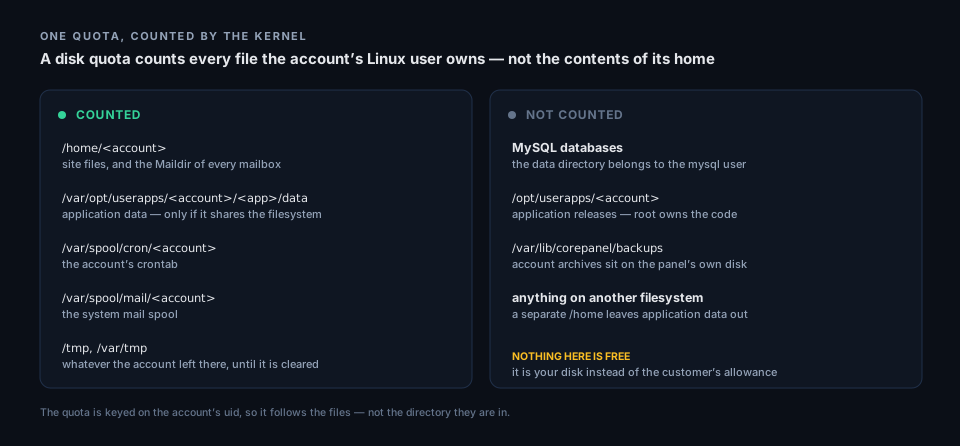
Two consequences are worth reading twice:
- Mail is inside the quota. Every mailbox stores its messages under the account’s home, so a full mailbox and a full account are the same event. This is what actually bounds mail on a CorePanel server.
- Databases are outside it. The MySQL data directory belongs to the
mysqluser and no per-uid quota can see it. An account sold 1 GB can hold 1 GB of files and a 20 GB database. The panel shows both figures and deliberately never adds them up — only one of them is enforced.
The other items on the right-hand side are the same story from your side of the ledger:
application releases, and backup archives taken from the client panel,
land on your disk rather than against the customer’s allowance. Size /opt and
/var/lib/corepanel/backups with that in mind.
Turning it on
Section titled “Turning it on”Quota accounting is a property of how the filesystem was mounted, so it is never switched on by an upgrade. Until you run it, CorePanel stores the quota an account was sold and nothing measures or enforces it — the panel says so when you save one.
corepanel quota status # what the kernel is doing right nowcorepanel quota enable # accounting + enforcement, then apply every stored limit| Filesystem | What happens | Reboot |
|---|---|---|
| ext2/3/4 | the option is added to /etc/fstab and the filesystem is remounted | no |
XFS, separate /home | unmounted and mounted again, when nothing holds it open | only if busy |
XFS on / | configured on the kernel command line with grubby | yes |
On the usual server layout — XFS on / — nothing is measured or limited until the machine
reboots. The command says configured, not active, and it means it. Full details of every
subcommand are in the CLI reference.
Soft limit, hard limit, grace
Section titled “Soft limit, hard limit, grace”CorePanel writes two limits per account, and the difference decides whether an account that goes over keeps working.
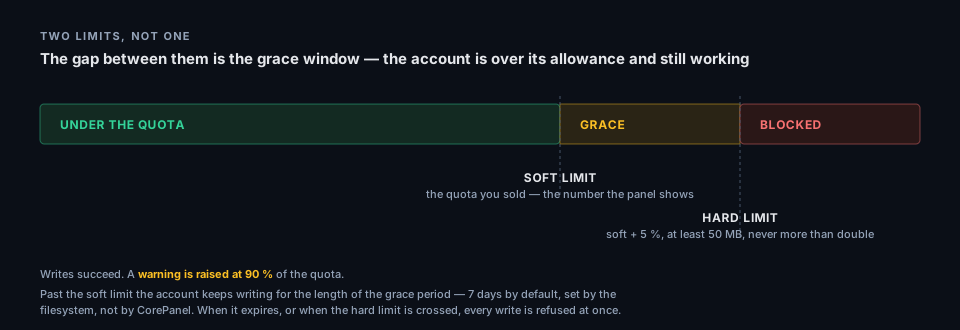
The margin is not generosity. At exactly 100 % the failures are indirect and ugly, so the account is pushed slightly past its stated size on purpose — far enough that someone reads the warning before the server starts breaking around it.
CorePanel does not set the grace period. It belongs to the filesystem’s own quota configuration, so it is whatever ext4 or XFS ships — 7 days for both. Inspect or change it per filesystem:
# ext4 — show, then set to 7 days (in seconds)setquota -t /homesetquota -t 604800 604800 /home
# XFSxfs_quota -x -c 'timer -u 7days' /home
What actually breaks when an account is over
Section titled “What actually breaks when an account is over”Reading is unaffected: the site keeps serving, the existing mail is still there, FTP still lists and downloads. It is writes that stop, and they fail in places that rarely look like a disk problem:
| Websites | PHP cannot write session files or caches; uploads fail; a CMS may show a blank page or a 500 |
| Dovecot cannot deliver, so incoming mail to existing mailboxes bounces | |
| FTP and the file manager | Uploads and saves are refused |
| Cron jobs | Run, but produce half-written output or empty log files |
| Databases | Unaffected — they are not in the quota |
The account recovers by getting back under the soft limit: free up space and writes resume with the grace timer reset. Raising the quota has the same effect, immediately.
How usage is measured, and how often
Section titled “How usage is measured, and how often”| Disk usage | Read from the kernel’s quota accounting, hourly, on the hour |
| Database size | Queried from MySQL at 00:00, 06:00, 12:00 and 18:00 |
| Monthly transfer | Polled from the web server every 5 minutes |
corepanel quota refresh forces a disk pass instead of waiting for the hour. When quotas
are inactive nothing is measured and the stored figures are left alone rather than
zeroed — “cannot measure” must never be recorded as “uses nothing”.
An account crossing 90 % of its quota raises a warning notification; at 100 % it raises a critical one, which reaches the administrator as well as the reseller and the owner.
Lowering a quota below what an account uses
Section titled “Lowering a quota below what an account uses”This is refused like any other limit, unless you ask for it explicitly — a plan downgrade,
or the tidy-up after a migration. The account goes over quota the moment you save, and if
it is already past the hard limit its writes stop straight away rather than in a week. The
panel’s confirmation and the CLI’s --force are covered in
Editing an Account.
Mailbox quotas
Section titled “Mailbox quotas”Each mailbox carries its own quota in MB (0 = unlimited), set when it is created and
editable afterwards from the mailbox’s Overview, which also shows how full it is.
The limit is applied by Dovecot at delivery. A message addressed to a mailbox that is
already full is refused with 552 5.2.2 Quota exceeded, and Postfix bounces it to the
sender — so mail is never silently dropped. The mailbox keeps working otherwise: it still
authenticates, and everything already in it is still readable. Deleting messages brings it
back under the limit and delivery resumes.
The quota reaches Dovecot at login, so a limit you change takes effect on the mailbox’s next authentication rather than needing anything restarted.
Two quotas apply to a mailbox, not one
Section titled “Two quotas apply to a mailbox, not one”The mailbox quota is the smaller cage inside a larger one. Mail is stored in the account’s home, so every message also counts against the account’s disk quota. Whichever runs out first stops delivery:
| The mailbox is full | Mail to that mailbox bounces. Other mailboxes on the account are unaffected |
| The account is over its disk quota | Mail to every mailbox of the account bounces, and the websites stop writing too |
So the sum of the mailbox quotas you sell is not bounded by anything: five 5 GB mailboxes on a 10 GB account is a legal configuration, and the account quota is what actually decides. Size the account quota as the real limit, and per-mailbox quotas as how you divide it up.
Monthly bandwidth
Section titled “Monthly bandwidth”The account’s Overview shows what it has transferred this month, next to its disk usage. It is a billing figure, not a limit: CorePanel never suspends or throttles an account for passing it.
Two things to know before you bill on it: it counts what the web server carried and only that — mail, FTP and anything an application opens for itself are not in it — and the month resets at the start of the month UTC, not at the server’s local midnight, so the period is the same one on every server you run. The detail is in Monthly transfer.
The counted limits
Section titled “The counted limits”Mailboxes, databases, FTP accounts, aliases, addon domains, subdomains and applications are checked when the thing is created: the account is at its limit, so the request is refused. Nothing is ever deleted or disabled to make a limit true afterwards.
They are counted against reality rather than against a stored counter — opening the account editor recounts what the account actually holds, and saving writes those counts back, which is why figures in the panel correct themselves as a side effect of an edit.
That is also why a counted limit cannot be set below current usage: there is no equivalent of the disk quota’s forced downgrade, because honouring it would mean deleting a customer’s mailbox. Free the resources first, then lower the limit.
Limits above the account: the reseller’s totals
Section titled “Limits above the account: the reseller’s totals”If the server hosts for resellers, each one carries two totals across every account it owns — how many accounts, and how much disk — and both are enforced. An account creation, an import, a transfer into that reseller, or a raise of one customer’s disk quota is refused when it would cross a ceiling, and the message names the ceiling and what has been used of it.
The disk total counts what each account was assigned, not what it is measured to be using, which is the opposite of everything else on this page. It is the right number for a sale — ten accounts of 10 GB are 100 GB the day they are created — and it is the only one that still works on a server whose filesystem has no active quotas, where the measured figure is zero.
One consequence follows from that: a reseller that has a disk ceiling cannot be given an account with no quota, because an unlimited account adds nothing to the total and would exempt the reseller from its own ceiling for good. Give the account a quota, or let the reseller oversell.
The full rules, including what overselling does and does not lift, are in what the two ceilings do.
On a server migrated from cPanel, both totals come across with the reseller, so a reseller capped at 25 accounts and 50 GB on the old panel is capped at 25 accounts and 50 GB here.
Troubleshooting
Section titled “Troubleshooting”The panel shows a quota, but nothing is enforcing it
Section titled “The panel shows a quota, but nothing is enforcing it”Quotas were never turned on for this filesystem, or they are configured and waiting for a
reboot. corepanel quota status separates the three layers — accounting, enforcement, and
configured but not yet mounted. On XFS on /, “configured” means the server has to be
restarted before anything is measured or limited.
A container can never carry quotas at all: the kernel that owns the block device is the
host’s. quota status says so instead of offering to enable something that cannot work.
Every account reports the same usage it did days ago
Section titled “Every account reports the same usage it did days ago”Accounting is off. The stored figures are the last ones that could be measured and are
deliberately not zeroed. Turn quotas on, then corepanel quota refresh.
An account is over quota but its home is much smaller than the figure
Section titled “An account is over quota but its home is much smaller than the figure”The classic one, and the reason corepanel quota inspect exists. A user quota counts every
file the uid owns on the filesystem, so an account can be charged for files it cannot see,
cannot list and cannot delete.
corepanel quota inspect example.comcorepanel quota inspect example.com --deep # sweeps the whole filesystem; minutesThe report separates the places an account owns files by design (application data, the
cron and mail spools) from the ones where files end up by accident — /tmp, /var/tmp, and
whatever a --deep sweep turns up. Anything it cannot place is reported as unexplained,
which is the signal to run the deep pass.
The usual culprits are an interrupted migration, a restore run as the wrong user, or an archive extracted while root was working in the account’s home. Those files are yours to fix — the account cannot.
Uploads and mail fail, but df shows plenty of free space
Section titled “Uploads and mail fail, but df shows plenty of free space”Free space on the filesystem and an account’s allowance are unrelated. The account is past
its hard limit, or past its soft limit with the grace period expired. corepanel quota list
shows usage against the limit for every account, largest first.
An account fills the disk without ever going over quota
Section titled “An account fills the disk without ever going over quota”Its databases are growing. Database size is not part of the quota and cannot be made part of
it: the data directory belongs to the mysql user. corepanel quota list shows disk and
database sizes in separate columns for exactly this case.
The same applies to application releases under /opt/userapps and to customer backup
archives under /var/lib/corepanel/backups: both land on your disk, bounded by release
retention and by the two-archives-per-customer rule rather than by any account’s quota.
Application data does not appear in an account’s usage
Section titled “Application data does not appear in an account’s usage”/var/opt/userapps is on a different filesystem from the homes — which is what a tidy
separate /home partition produces. corepanel quota status reports it as
App data counted: no. The usage figures then understate reality by whatever the account’s
applications hold.
A quota was saved but the kernel was never told
Section titled “A quota was saved but the kernel was never told”Account creation does not fail when a quota cannot be applied — it must not depend on the operator having rebooted — so a limit can exist in CorePanel’s database with nothing behind it. This is also the state of every account on a server whose accounts predate quotas.
corepanel quota apply --dry-run # what would change, and who is already overcorepanel quota applyMail bounces, and nothing else is wrong
Section titled “Mail bounces, and nothing else is wrong”Two quotas can cause it, and the bounce says which. 552 5.2.2 Quota exceeded is the
mailbox being full — only that address is affected. When every mailbox of the account
bounces at once, it is the account’s disk quota instead, and the give-away is that the
websites have stopped writing too.
Check the account’s disk usage before anything in the mail stack. A blocked account cannot accept delivery, and this looks nothing like a quota problem from the outside: the site is still up, IMAP still logs in, and only new mail fails.
A customer says they deleted files and nothing changed
Section titled “A customer says they deleted files and nothing changed”Deleted files still count while a process holds them open — a long-running PHP worker or a
mail client’s session will do it. Usage also refreshes hourly, so the panel can lag by up to
an hour; corepanel quota refresh settles that question immediately.
From the CLI
Section titled “From the CLI”corepanel quota status # what the kernel is doingcorepanel quota enable # turn accounting + enforcement oncorepanel quota list # usage per account, largest firstcorepanel quota inspect <account> [--deep] # where an account's bytes actually arecorepanel quota set <account> <MB> # 0 removes the limitcorepanel quota apply [--dry-run] # push every stored limit to the kernelcorepanel quota refresh # measure now instead of on the hourEvery subcommand is documented in the CLI reference.