Moving an Account to Another Server
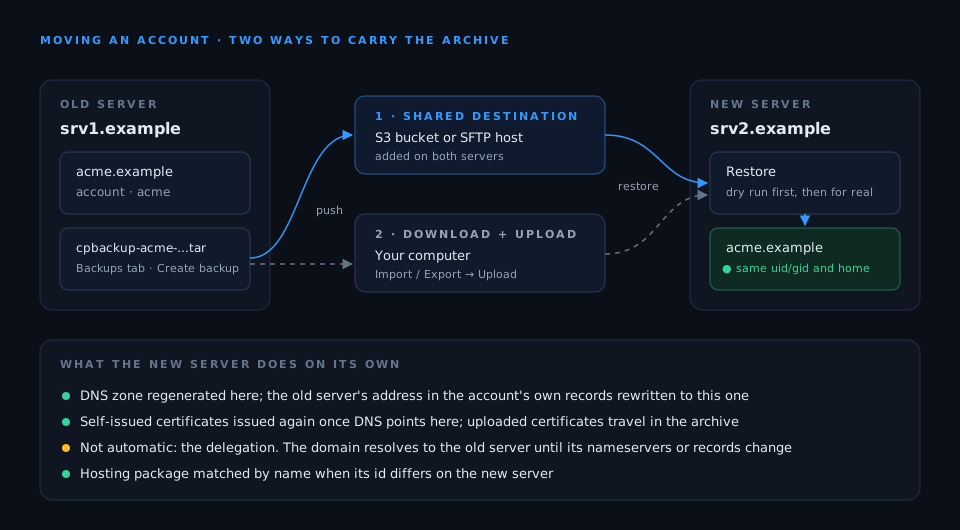
The archive is self-contained, so rebuilding an account elsewhere is just a restore on the other machine. The account’s uid/gid, home path and limits come from the archive, and its hosting package is re-mapped by name if the ID differs on the target. What is left to decide is how the archive gets there. (Coming from cPanel rather than CorePanel? See Transferring accounts.)
1 · Through a shared destination
Section titled “1 · Through a shared destination”If both servers can reach the same destination, nothing has to be copied by hand. Take the backup on the old server with Copy to pointing at it, add the same destination on the new server, list what is stored there, and restore the archive you want:
corepanel backup-destination add offsite --type s3 --endpoint ... --bucket ...corepanel backup-destination archives offsitecorepanel account restore --dest offsite --remote-key cpbackup-pxdemo-20260802T031500Z-j42.tar --dry-run --waitcorepanel account restore --dest offsite --remote-key cpbackup-pxdemo-20260802T031500Z-j42.tar --waitRestoring from a destination works on every edition, so the new server does not need Pro or Business just to read the archive — only the old one needed it to push.
2 · Through your computer
Section titled “2 · Through your computer”Otherwise, Download archive from the backup’s menu on the old server, and
upload it on the new one: it appears on the Import / Export
tab, with Restore from this backup in its menu. Or skip the
browser: copy the .tar across yourself (scp, rsync) and restore it from its path
with the CLI.
Either way, run the restore as a dry run first: a domain that already exists on the new server is the collision you want to find before, not during.
After the restore
Section titled “After the restore”The DNS zone is regenerated by the new server, so its records point at the new machine rather than the old one, and the records the account added are merged back in — with the old server’s address rewritten to the new one’s. What is not automatic is the delegation: the domain keeps resolving to the old server until its nameservers or records are changed.
Certificates the old server issued itself are not carried; the new server issues its own once the domain’s DNS points at it. Uploaded certificates travel with the archive.
Until the delegation changes, both servers hold a copy of the account and the old one is still the one receiving mail and visitors. Anything written there after the backup — new mail, new orders, a changed file — is not on the new server. Change the DNS soon after the restore, and suspend or delete the old account only once the new one is the one answering.