Access Protection
Mail, FTP and SSH are the doors on a hosting server that face the whole internet and accept a password. Until now, what came through them left no trace you could read: a rejected IMAP login was a line in a log file nobody opens, and “when did this mailbox last work?” had no answer at all.
Security → Access protection is that answer. CorePanel’s authentication broker checks every mail and FTP credential on this server, so it is the one process that sees each attempt with the client’s real address attached — and it now records them, acts on them, and lets you undo what it did. It reads sshd’s log too, for every user including root, which is what the SSH guard acts on.
Like an account’s workspace, the section keeps its views in a sidebar, grouped by what you come for:
| Group | View | What it is for |
|---|---|---|
| Monitoring | Overview | Where the section opens: is anything happening, and is protection on |
| Monitoring | Login activity | The audit trail: every attempt, filterable, newest first |
| Monitoring | Top attackers | The addresses with the most rejections in the window, worst first |
| Blocks | Blocked addresses | The working list — what is being refused right now, and the way back in |
| Blocks | Trusted addresses | The addresses you released for good, which are never refused |
| Mail & FTP | Blocking | Whether the broker may refuse an address, and for how long |
| Mail & FTP | Detection | The counting that decides an address is attacking |
| SSH | SSH guard | Whether addresses that keep failing SSH logins are banned from SSH |
| SSH | Detection | The counting that decides an address is attacking SSH |
What is never recorded
Section titled “What is never recorded”No password material is ever written to the audit trail: not the value, not a hash, not its length, not a hint at how close it was. This is a rule the store is built on rather than a setting you can change, and there is no field to enable.
What each event carries is: when, which service, which account name, the source address,
the country that address resolves to, whether it was accepted, and — on a rejection —
the broker’s reason for it (wrong_password, unknown_user, account_suspended).
The four numbers
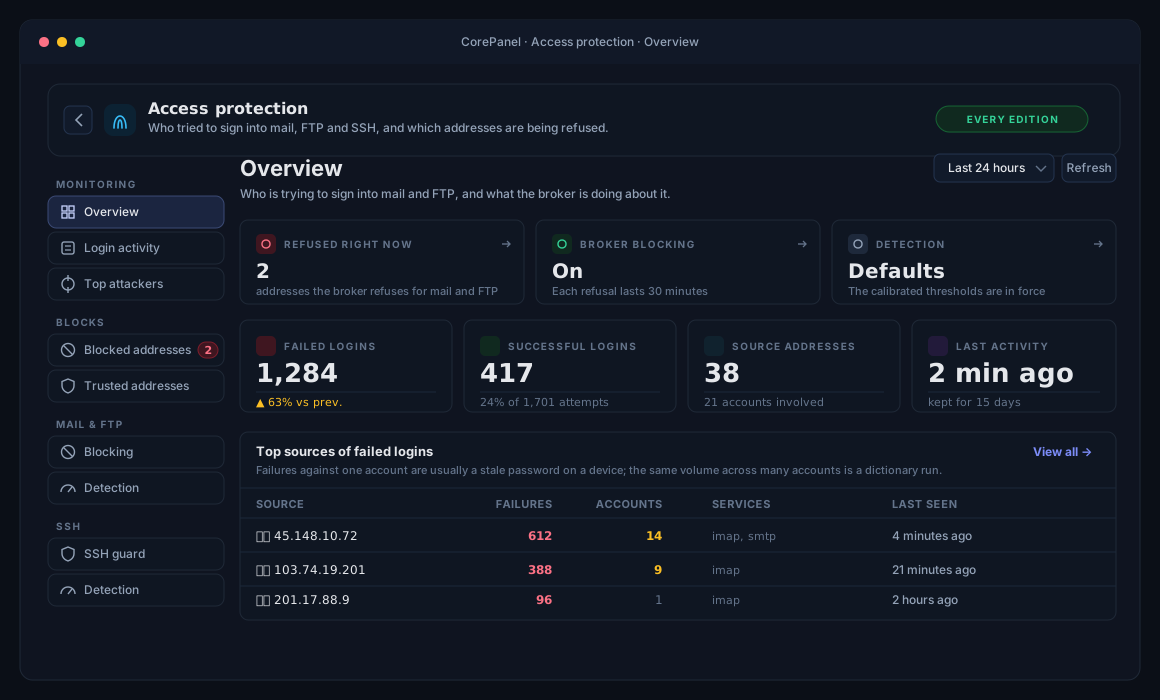
Section titled “The four numbers”The cards on the Overview cover the selected window (24 hours, 7 days or 30 days), each compared against the equal span before it:
| Card | What it counts |
|---|---|
| Failed logins | Rejected sign-in attempts, with the change against the previous window |
| Successful logins | Accepted ones, and what share of all attempts they are |
| Source addresses | Distinct addresses seen, and how many accounts they touched between them |
| Last activity | How long ago the most recent event landed |
All four count login attempts only. The broker also handles directory lookups and certificate requests, and folding those in would make the headline number jump every time a domain was edited.
Top sources: one account or many
Section titled “Top sources: one account or many”The Overview shows the worst five addresses in the window; Top attackers shows the whole ranking. The column that decides what to do about a row is not Failures but Accounts:
- Failures against one account are almost always a phone or mail client left with a password that has since changed. Blocking that address at the firewall would cut off whoever owns the device — often the customer themselves, and often their whole office.
- The same volume spread across many accounts is a dictionary run: someone working through a list of mailboxes. From three accounts up, CorePanel highlights the count in amber, because that is the shape that justifies blocking the address outright.
Sorting by failure count alone would put those two cases side by side with nothing to tell them apart, which is why the column is there.
Selecting the filter icon on a row opens Login activity scoped to that address, over the same window you were reading.
What happens to the addresses that keep guessing
Section titled “What happens to the addresses that keep guessing”Seeing an attack is half of it. CorePanel also acts on one, and the three things it does are deliberately very different in weight.
The delay, on every edition
Section titled “The delay, on every edition”Once an address has made 10 rejected guesses in five minutes, its rejections start arriving two seconds late. That is all: a pause before the “no” it was going to get anyway.
It costs a real person nothing, because a successful login is never delayed. That is what makes it safe on the address a whole office shares — the one phone with last month’s password waits two seconds it cannot perceive, and the fifty people working next to it never wait at all. It needs no licence, no configuration and no firewall: it works on Personal, on a server with automatic blocking switched off, and on one where firewalld is not running.
Worth knowing where it does the most good. Dovecot already slows repeated mail failures down on its own — two seconds to begin with, escalating to fifteen for an address that keeps at it — so on IMAP, POP3 and SMTP the CorePanel delay is a small addition to a much larger one that was always there. FTP had nothing of the kind, and that is where these two seconds are the whole of the protection. What the delay adds on every protocol is the counting: one place that sees all of them, which is what the decision below is made from.
The number of delayed responses in flight at once is capped, and past the cap the delay is skipped rather than queued. A tarpit that became the resource exhaustion would have changed sides.
The block, on every edition
Section titled “The block, on every edition”When an address clears the bar in the table below, CorePanel’s authentication broker stops
answering its credential questions altogether. Mail and FTP: no such user, immediately, for
half an hour by default. The same answer reaches one more door: a hosting account’s SSH
password from that address is refused too, since it is the same kind of guess. Nothing
else — the connection is still accepted, the TLS handshake still happens, the panel, SSH
keys and root’s own SSH are never touched, and every website on the server keeps serving
that address normally.
That limited reach is exactly why it can run everywhere. It cannot take a server off the internet and it cannot lock you out of the page you would undo it from, so it needs no licence, no firewalld and no adoption — and on a server without those, it is the whole of the enforcement. Before it existed, an attack on such a server was detected, reported, recorded on this page, and then left to continue.
The addresses being refused are listed under Blocked addresses, and you can let any of them back in.
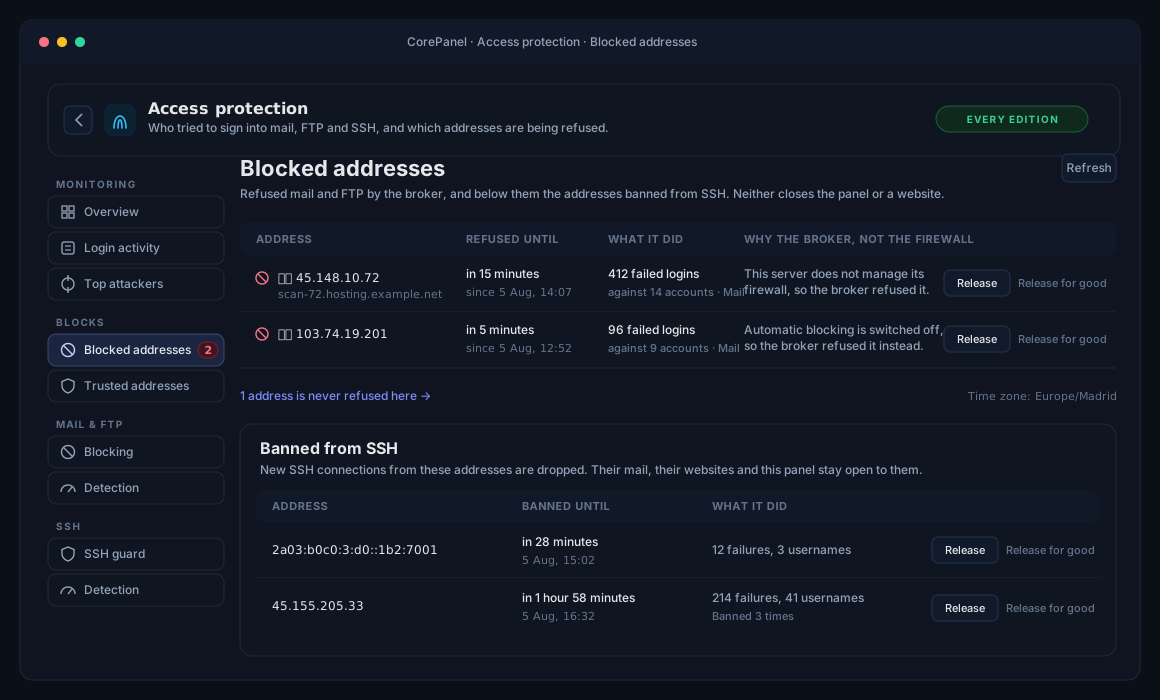
The Why the broker, not the firewall column is the one to read first: every row is there because the firewall did not ban the address, and the reason is always something about this server — its configuration, its firewalld — rather than something about the address.
A release comes in two flavours, and the difference matters when the address belongs to somebody real:
- Release lets it back in now. If it is still guessing it will be blocked again within minutes, which is the correct outcome for an address that is actually attacking.
- Release for good also exempts it: it will never be blocked here again, however much it fails. From this list that exemption covers mail and FTP; the same button on an SSH ban exempts the address from both. This is the one to use for a customer’s office whose devices all hold the wrong password — the case where the failures are real and the attacker is not.
Exempt addresses leave the blocked list and move to Trusted addresses, where the only action is Undo exemption: the address becomes ordinary again and can be refused like any other. There is no form to add one ahead of time — an exemption is the answer to a specific address that was refused and turned out to be somebody real.
Each entry carries the address’s country and its reverse DNS name, resolved in the background so the list is ready when you open it. Treat the name as a hint, not an identity: it is published by whoever controls the address, which on this page usually means the attacker.
The ban, once the firewall is adopted
Section titled “The ban, once the firewall is adopted”Reporting an address to the host firewall is the same decision enforced somewhere far less forgiving, and it therefore carries an extra bar of its own. A delay costs one guess two seconds. A block costs one address its mail and FTP. A firewall ban costs the whole address mail, FTP, SSH, the panel and every website on the server, for up to seven days — and if that address is a shared office or a mobile carrier, “the whole address” is a lot of people who did nothing.
When the firewall bans an address, the broker does not also block it: two rows to release instead of one buys nothing on top of a kernel-level rule that already covers both ports. The broker acts on the cases the firewall does not — a server that never adopted firewalld, automatic blocking switched off, a firewalld that would not take the rule — and never on the addresses that must not be touched at all, which are the same in both: the loopback, this server’s own addresses, private and carrier-NAT ranges, and anything on your bastion allowlist.
So all of the following have to be true at once:
| Condition | Why it is there |
|---|---|
| No successful login from that address in seven days | One person collecting their mail proves a human being is behind it — on carrier NAT, possibly thousands of them. Nothing outweighs that |
| At least three different accounts failed | One mailbox failing forever is a stale password on a device. Many is a dictionary run |
| Enough volume for the shape it has — 10 guesses against accounts that do not exist here, or 60 against accounts that do, in five minutes; or 20 against accounts that do not exist spread over 24 hours | See below: the shapes are not the same evidence, and neither are the speeds |
| A globally routable address | Never the container network, the provider’s LAN, carrier NAT, the loopback or this server’s own addresses |
| The audit trail agrees | Before anything is sent, the case is re-derived from the recorded events — the same rows on this page |
Why two volumes. A mail client asks for the mailbox it was configured with. A broken one asks for a mailbox that exists, with the wrong password. Only somebody working through a list asks, over and over, for mailboxes that were never created here — so that shape has no legitimate explanation and needs far less of it before CorePanel acts: at one attempt every two seconds, twenty seconds of guessing is enough.
The other tier keeps a wide margin on purpose, because there its two cases are indistinguishable. An attacker working from a leaked list of real addresses and an office whose mailboxes all hold the wrong password produce identical rows — and if every mailbox is broken, nobody there can sign in to prove otherwise. Banning that customer would add the loss of FTP, SSH, the panel and their websites to a mail outage they already have, and lock them out of the page they would fix it from. A slower attacker on that tier is left to the delay and to your own eyes, which is the right trade when the alternative is guessing wrong about somebody real.
Why a day-long window as well. Both counts above are measured over five minutes, and on a real server almost nothing trips them. Six days of a production mail server: 1,873 rejected logins, every single one against a mailbox that was never created there, from 38 addresses — and not one of them ever exceeded three failures in any five-minute window. Eight of them were a coordinated /24 pacing themselves at roughly one attempt per window each, so that no burst counter anywhere would ever see them. Those five-minute rules would have reported none of the 38.
Attackers pace themselves precisely because rate limits are common. So CorePanel also asks the audit trail a slower question, every five minutes: which addresses have made 20 guesses against 5 or more accounts that do not exist here, at any speed, in the last 24 hours. That one catches 34 of those 38. It is deliberately restricted to accounts that do not exist — over a day, an office with several broken clients would reach any volume bar against its own mailboxes, but nobody reaches one against mailboxes that were never created.
It changes nothing about the safety rules: an address raised this way goes through every condition in the table above, including the sign-in immunity. On that production server, the addresses that succeeded and the addresses that failed did not overlap at all.
That last row of the table is worth understanding, because it is what makes this page the answer to “why was this address blocked”. The running counters only propose; the decision is then rebuilt from the stored events, and if they do not support it — including which shape they support — nothing is reported. It also means a restart can never cause a ban on evidence it no longer holds.
Everything else the firewall decides — how long, whether the operator trusts this signal source, and the addresses that must never be banned — lives in the firewall’s own policy, not here.
Some failures are not counted as guesses at all: a suspended mailbox whose owner’s client keeps polling (the password may well be correct), a client that sent no credentials, and every failure caused by CorePanel itself being unavailable. If those counted, restarting a service would look like an attack coming from every mail client on the internet.
The alert that reaches you
Section titled “The alert that reaches you”An address that clears the bar is also worth an email, and the alert goes out on every edition whether or not anything banned it — twenty mailboxes tried from one address is worth knowing on a server that has not adopted its firewall, and it is the same sentence either way.
The message names both enforcement points, because they answer independently:
Repeated failed mail logins from 178.16.55.216
20 failed logins against 20 different mailboxes in the last 24 hours.
The address is blocked at the authenticator for 30 minutes: it cannot sign in tomail or FTP while that lasts.The firewall did not ban it: CorePanel does not manage this server's firewall.
The middle line is the answer to “was anything done about it”. The firewall’s half on its own is not that answer: on a server that never runs one it reads as “nothing was done” forever, while the address is in fact being refused every credential it asks for. When the firewall does ban the address, the alert says that instead, with the length of the ban and how many offences it counted.
The alert is administrator-only — a brute-force run against the server is not a hosting account’s business — and repeated reports about the same address fold into a single entry with a counter rather than one email each. Which severities reach your inbox at all is under notification settings.
SSH: the guard
Section titled “SSH: the guard”SSH is attacked harder than anything else on a server, and root most of all. The SSH guard reads sshd’s own log — for every user, root included — and bans an address that keeps failing from SSH alone: its new connections to the SSH port are dropped, and nothing else changes for it. It is on by default, on every edition.
That narrow reach is the point. An address banned from SSH still loads its websites, still collects its mail, and still reaches this panel — so an administrator who locks themselves out can open Blocked addresses from the same address and release it. A session that was already open from it is not cut either.
The ban lives in an nftables table of its own, inet corepanel_sshguard, so it works the
same whether firewalld is adopted, running unmanaged, stopped or not installed: reloading or
stopping firewalld does not touch it, and after a reboot CorePanel puts every ban still in
force back within a minute. An SSH attacker is never banned at the
host firewall, even where CorePanel manages one.
What is never banned, checked every time before a ban is made:
- this server’s own addresses, the loopback, link-local and private ranges, and
carrier-grade NAT (
100.64.0.0/10, which can be thousands of mobile customers); - the WAF’s trusted IPs, and the firewall’s allowlist once it is adopted — if that list cannot be read, nothing is banned;
- an address where an administrator is logged in over SSH right now —
root, or a member of the localwheelgroup in/etc/group— fighting the attack from the same network as the attacker. A connection that is still guessing does not count, so a bot keeping several open is banned like any other, and neither does a hosting account’s SFTP session: a customer cannot shelter an attack on root behind their own login. An administrator whose sudo comes from somewhere else (a directory such as FreeIPA, or a sudoers line rather thanwheel) is not recognised: put their address in the WAF’s trusted IPs instead. Putting a hosting account inwheelmakes it an administrator here too — accounts carried over from cPanel keep the groups WHM gave them, so checkgetent group wheelafter a transformation; - an address that logged in successfully to any service in the last seven days —
except when it is guessing
root’s password. Then only a successful login as root over SSH from that address, in the last seven days, protects it. A customer who signs in to their own SFTP account, or reads their mail, from an address and then tries root’s password from it is banned like anybody else; - an address you released for good.
How long. The first ban lasts 30 minutes and each return doubles it, up to seven days — the same ladder, cooldown and switches as automatic blocking, whose SSH logins source is what feeds the guard.
What decides it
Section titled “What decides it”SSH → Detection holds the counting, with the same rule as the mail settings: an empty field uses the default shown in it.
| Default | Meaning |
|---|---|
| 10 failed connections in 10 minutes | The normal bar |
| 5, when they name users this server does not have | Guessing names is the cheap signal |
| 20 in 24 hours, across 3 or more unknown usernames | The slow attack that stays under every short window |
20 root passwords in 24 hours | The same slow attack on the one account every server has |
| 7 days | How long a successful login protects its address (against guessing root, only a root login does) |
It differs from mail on purpose. One account is enough — a bot hammering root alone
is the attack, where one mailbox failing is usually a stale phone. And a connection counts
once: an SSH agent that offers five keys before the right one has not failed five times.
There is no delay either, since sshd is read after each attempt, not asked during it.
Three switches, one answer
Section titled “Three switches, one answer”SSH → SSH guard shows which state the guard is in:
| State | What it means |
|---|---|
| Banning SSH attackers | Detecting and banning. The count of addresses banned right now and the port(s) watched, read from sshd |
| On, but not enforcing | Automatic blocking, or its SSH source, is off. Bans are kept but not applied, and none are made |
| Off | Attacks are still detected and recorded, nobody is banned — and every ban was released when it was switched off |
Switching the guard off is the emergency release: every SSH ban goes at once. It does not revoke the password logins granted to hosting accounts, which need all three switches on to be granted — the confirmation reminds you, because grants still in force then have nothing stopping an attacker guessing them.
The banned addresses are listed under Blocked addresses, below the broker’s own list, with Release (it can connect again; if it keeps guessing it is banned again within minutes) and Release for good (released and exempted: never reported for SSH again, and never refused mail or FTP by the broker).
From a console, when the panel is out of reach:
corepanel auth ssh-guard statuscorepanel auth ssh-guard release 203.0.113.7 # add --permanent to exempt itcorepanel auth ssh-guard disable --yes # releases every SSH bannft delete table inet corepanel_sshguard also lets everyone in at once, but the guard
puts the table back within a minute unless it is switched off. See the
CLI reference for bans, enable and
corepanel auth ssh-detection.
Tuning the detection
Section titled “Tuning the detection”Every number above is a setting, on every edition, split across the two views of the Mail & FTP group: Detection holds the counting windows, the thresholds measured inside them and how long the delay is; Blocking holds whether the broker may refuse at all and how long a block lasts (5 minutes to 24 hours, 30 by default). Each view saves on its own. You can also turn the delay or the blocking off entirely and keep everything else — the counting, the page, the reporting to the firewall.
Most servers should change none of it. These defaults are not conservative guesses; they were measured against real production mail logs and chosen so that the thing they refuse to do is block somebody real. Lowering a threshold costs a customer their mail far more often than it costs an attacker their afternoon, and the failure is quiet: they simply stop receiving, and open a ticket about something else.
Two of them cannot be lowered past a floor, whatever you type:
- At least three different accounts. One mailbox failing forever is a stale password on a phone; blocking the address it comes from is the exact mistake this whole design exists to avoid.
- The seven-day sign-in immunity applies regardless. It is not a threshold and it is not optional.
Every field left empty uses the detector’s own default, and the greyed number in it is what that default is — so a form with one number typed into it changes one thing. What the screen shows back is what the broker reports it is running, not what you asked for: the two differ when a value was clamped, and being told is the point.
The values are stored on the server, so they survive a reinstall of the authentication broker, and a change reaches it immediately. If a value refuses to change, an environment variable in the broker’s unit file is holding it — the field is marked Pinned and says so, and that override deliberately wins, so a server whose panel cannot be reached can still be fixed from the shell.
Filtering the log
Section titled “Filtering the log”The table lists individual events, newest first, and filters by service, account, source address, country and result. Two details are worth knowing:
- The default scope is “Logins only”. Switching it to Everything the broker saw adds the directory lookups, certificate requests and mail-map operations the store also keeps. Useful when tracing a mail delivery problem, noise the rest of the time.
- The country column can be empty. Country is enrichment, resolved from a local database; if that database is missing, the column stays blank and everything else keeps working. The page says so rather than leaving you to wonder.
Pagination, page size and the timezone footnote work exactly as on the WAF event log — the two security tables are deliberately the same table.
Per mailbox: recent access
Section titled “Per mailbox: recent access”Open any mailbox and go to its Security section: under the password and status controls there is a Recent access block with that mailbox’s own record — last successful sign-in, last rejection, how many rejections in total, how many distinct addresses, and the countries they came from, above the last few events.
This is what answers the support ticket that reads “my email stopped working”. Whether the last accepted sign-in was ten minutes or three months ago, and whether there have been rejections since, usually settles the question before anyone touches a setting.
The summary spans the mailbox’s whole retained history, not just the events listed — “last successful sign-in” would be worthless if it only meant “within the eight rows shown”.
On the dashboard
Section titled “On the dashboard”The dashboard carries a Failed logins (24 h) card naming the worst few source addresses, so a brute-force run is visible without anyone going looking for it. When one address is working through several accounts, the card says so in words. Selecting an address opens this page filtered to it.
The card removes itself when there is nothing to say — a server whose broker keeps no audit trail shows no tile at all, rather than a broken one.
Retention, and why the numbers are a floor
Section titled “Retention, and why the numbers are a floor”Events are kept for 15 days, or up to 500,000 events, whichever comes first. A server under sustained attack hits the event ceiling long before the time limit, and the page says so when it does, naming how far back the history actually reaches.
There is one more honesty note worth understanding. Recording an event must never delay a login, so when the audit trail falls behind, it drops events rather than making anyone wait at the mail server. If that has happened, the page tells you — and every count on it is then a floor, not a total. It is the right trade, but only if you know it was made.
From the command line
Section titled “From the command line”The audit trail is available over SSH, which is where you will want it when the panel itself is what you are worried about:
corepanel auth stats # the window's aggregates, store health, detectorcorepanel auth attackers # worst source addressescorepanel auth events --result fail # the raw feed, filterablecorepanel auth user info@example.com # one mailbox's recordcorepanel auth stats also prints what the detector did — how many responses it delayed,
how many addresses it reported, and how many reports it withheld and why. “Nothing was
blocked” has several very different meanings — no attack, no entitlement, an address with a
real user behind it — and they are listed separately rather than added up. It prints the
slow tier’s last sweep beside them: how many addresses were caught working through accounts
that do not exist on this server, and when it last looked.
See the CLI reference for every flag.
The broker’s deny list, its release and its settings are panel-only for now — the SSH
guard has its own commands, above. There is no corepanel auth release, and the shell escape hatch is the calibration rather than the
list: the COREPANEL_AUTH_* variables in the broker’s unit file will move a threshold or
switch the tarpit off, but nothing there lets an address back in early. What makes that
tolerable is the ceiling — a broker deny lasts at most 24 hours and 30 minutes by default,
and it never touches the panel you would undo it from.