Editing an Account
An account is not fixed at the numbers it was sold. A customer upgrades, a plan changes, an owner’s email was mistyped. Accounts → the account → Overview → Edit account changes all of it in one step.
What you can change:
| Limits | Disk quota, monthly bandwidth, mailboxes, MySQL databases, FTP accounts, domain aliases, addon domains, subdomains, applications |
| Hosting package | Apply a package (its limits become the account’s), or detach from it |
| Owner details | Owner name, owner email, description |
| PHP version | Move the account onto another version installed on the server |
The primary domain is not editable — it is fixed for the life of the account. Passwords are changed from the account’s Access section, not here.
A limit of 0 means unlimited
Section titled “A limit of 0 means unlimited”Everywhere in CorePanel, 0 is not “none” — it is “no limit”. An account with
0 mailboxes can create as many as it wants. This is the same convention used when
creating an account and when defining a hosting package.
Each field in the editor shows what the account currently uses underneath it, so you can see the headroom you are giving or taking away before saving.
Limits below current usage are refused
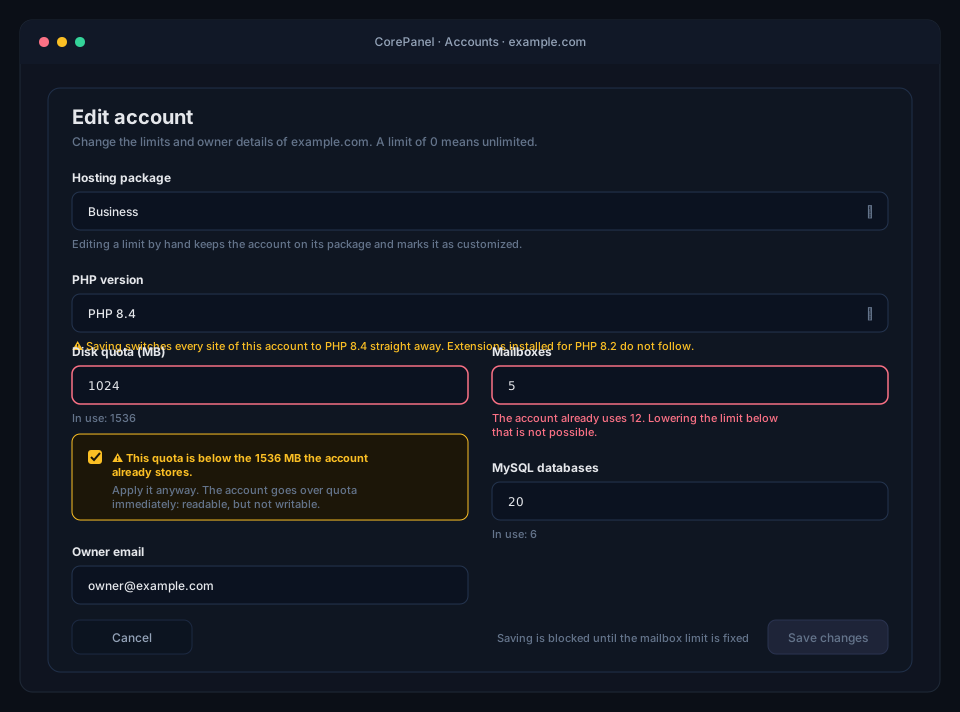
Section titled “Limits below current usage are refused”You cannot set a limit below what the account already holds. An account with 12 mailboxes does not accept a limit of 5, and the panel says so on the field itself as you type:
The account already uses 12. Lowering the limit below that is not possible.
This is deliberate. The alternative would be for CorePanel to delete a customer’s mailboxes, databases or domains to make the account fit the new number, and no control panel should ever do that quietly. Free the resources first, then lower the limit.
The refusal is enforced by the server, not just by the form: the whole edit is rejected and nothing is written, so a form with one bad field never applies the other fields halfway. The error names every resource that is in the way, not just the first one.
The disk quota is the one exception
Section titled “The disk quota is the one exception”Disk space works differently, because the kernel accepts a user being over their limit: that is what the quota grace period exists for. Lowering an account’s disk quota below what it currently stores is therefore possible — but only on purpose.
Type a quota smaller than current usage and the panel refuses it like any other limit, plus a checkbox:
This quota is below the 1536 MB the account already stores. Apply it anyway. The account goes over quota immediately: it can still be read, but not written to until it is back under the limit.
Use it for a real plan downgrade or right after a migration, and tell the customer. Do not use it to “make room” in a hurry.
What “over quota” actually does, and for how long
Section titled “What “over quota” actually does, and for how long”CorePanel does not write one limit per account but two, and the difference decides whether the account keeps working:
| Soft limit | The quota you sold. This is the number shown everywhere in the panel. |
| Hard limit | Soft + 5 %, with a floor of 50 MB and never more than double the soft limit. |
Between the two, the account is over its allowance but still writing, for as long as the grace period lasts. Past the hard limit, every write is refused immediately — there is no grace period above it.
This matters for a forced downgrade, because that is usually the case you land in. An account storing 1536 MB that you cap at 1024 MB has a hard limit of 1075 MB, so it is already above it: writes stop the moment you save, not a week later.
The grace period is 7 days by default, and CorePanel does not set it. It belongs to the filesystem’s quota configuration, so the default is whatever ext4 or XFS ships — 7 days for both. Inspect or change it per filesystem on the server:
# ext4 — show and set the block grace periodsetquota -t /homesetquota -t 604800 604800 /home     # 7 days, in seconds
# XFSxfs_quota -x -c 'timer -u 7days' /home
When the grace period expires with the account still above the soft limit, the soft limit starts behaving like a hard one: writes are refused from then on, exactly as if the hard limit had been crossed.
Once writes are refused, the failures are spread out and rarely look like a disk problem: uploads fail, PHP cannot write session files, cron jobs produce half-written output, and mail to existing mailboxes bounces because Dovecot cannot deliver it. Reading is unaffected — the site keeps serving and the existing mail is still there.
The account recovers by getting back under the soft limit: free up space and writes resume, with the grace timer reset. Raising the quota again has the same effect.
What the quota counts in the first place, and how to find bytes an account cannot account for, is in Quotas and Usage.
Changing the PHP version
Section titled “Changing the PHP version”The PHP version field at the top of the editor lists the versions installed on this server. Pick another one, save, and the account is on it — no new account, no backup restore, no downtime.
Each version carries a badge saying how long PHP still supports it — Supported, Security fixes only or End of life — so the choice is made with that in front of you rather than after the fact. An end-of-life version can still be selected: an imported account may need one. See How long each version is supported.
It is the one field in this form that is not a number CorePanel stores. Saving it changes the running server:
- The account’s php-fpm pool is written on the new version and starts listening.
- Every site of the account is re-pointed at the new pool, in a single reload.
- The pool on the old version is retired, once nothing routes to it any more.
That order is the reason the sites keep serving throughout: no site is ever pointed at a pool that does not exist yet, and the old pool only goes away after the last site has left it. If any step fails, the account stays on the version it had and the rest of the edit is refused with it — you retry the same form rather than discovering that the limits went through and the version did not.
The switch covers the whole account, not just the web:
| Every domain | Primary, aliases, addon domains and subdomains, except a site set to a version of its own, which stays where it is |
| Cron jobs | A bare php in a cron command resolves to the new version, or to the version of the site the script belongs to |
| SSH | The account’s php on the command line follows too |
| Webmail | Not affected — Roundcube runs on its own version, whatever the account runs |
Nothing about the customer’s data changes: the same files, the same databases, the same sessions on disk. Only the interpreter running them.
From the CLI:
corepanel account update 7 --php 8.4A version the server does not have is refused, and the error names the ones that are
installed. Add a new version to the server with dnf install from the CorePanel PHP
stack — see Server maintenance.
Applying a hosting package
Section titled “Applying a hosting package”Choosing a package in the editor re-applies it: the package’s limits become the account’s limits, replacing whatever was there. The individual limit fields switch to the package’s values and are locked while it is selected, so you see exactly what is about to be stored — including whether the package is too small for what the account already holds, which is refused just like a hand-typed limit.
Choosing No package (custom limits) detaches the account from its package. Detaching changes nothing about the account’s limits — it only stops recording which package they came from.
Editing a limit by hand keeps the package
Section titled “Editing a limit by hand keeps the package”An account created from Business that you then edit by hand stays a Business account, shown as Business · customized. CorePanel keeps the link on purpose:
- you still know which plan the account was sold on;
- re-selecting the package puts the account back on the standard limits in one step;
- the accounts list can still be read by plan.
If you want the account to stop claiming a plan, detach it explicitly.
Moving an account to another reseller
Section titled “Moving an account to another reseller”If this server hosts for resellers, an account can change hands:
corepanel account transfer alice --to "Acme Hosting"Ownership is the only thing that changes. Nothing on the server knows which reseller owns an account — the Linux user, the home directory, the websites, the databases, the mail and the certificates all belong to the account — so no service is restarted and no site goes down for a moment. The account keeps its own limits, its own password and its own suspension state.
Two things do change, and the command reports both:
- The hosting package is cleared. A package belongs to a reseller, and the account is leaving that catalog. Its limits are untouched — this is exactly what No package (custom limits) does above — so what is lost is the label, not the allowance. Put the account on one of the new owner’s packages afterwards if you want it back on a plan.
- Past notifications stay behind. Alerts raised while the old reseller owned the account remain that reseller’s, because they are a record of what happened, not a view of who owns what today.
This is what makes deleting a reseller safe. corepanel seller delete is refused while the
reseller still owns anything and there is no cascade, so cancelling a reseller contract can
never delete customer hosting accounts: you move the customers first, then remove the empty
organisation.
Three transfers are refused
Section titled “Three transfers are refused”- Into a reseller that has no room for it. A transfer raises the destination’s totals by exactly what creating an account does — one account, and the disk that account was assigned — so it is held to the same ceilings. Raise the ceiling, or pick another destination.
- Into a suspended reseller. An organisation that is not trading must not take on customers: the account would serve normally under an owner whose staff cannot sign in to support it.
- An account that is down because its reseller is suspended. The record of which
customers to put back lives on the reseller you would be moving it away from, so the new
owner would inherit a customer they cannot bring back — carrying a reason that stops being
true the moment it lands. Lift that one account first with
corepanel account unsuspend, which is you deciding it comes back online, and then transfer it.
An account suspended in its own right moves normally and stays suspended, with its own reason intact. That state is the customer’s, not the reseller’s.
From the CLI
Section titled “From the CLI”# Upgrade: more mailboxes and more diskcorepanel account update 7 --max-emails 100 --quota 20480
# Move the account onto a package, then override one of its limitscorepanel account update 7 --package 3 --max-subdomains 50
# Plan downgrade below what the account currently storescorepanel account update 7 --quota 1024 --forceOnly the flags you pass are changed; every other limit is left exactly as it is. Since
0 means unlimited, omitting a flag is not the same as passing it with 0 — a limit
you do not mention is untouched, while --max-emails 0 grants unlimited mailboxes.
--max-apps is the exception in both directions: --max-apps 0 revokes the application
runtime, and --max-apps 5 is the only way to grant it.
Resolve an account id with corepanel account list. The full flag list is in the
CLI reference.
When a quota is stored but not enforced
Section titled “When a quota is stored but not enforced”If the server is not enforcing disk quotas yet, a new quota is still stored and the panel warns that nothing is acting on it. The limit takes effect as soon as quotas are enabled — you do not have to re-enter it. See Resource limits.