Antispam
Incoming mail is scored by Rspamd. Every message accumulates points from dozens of checks — reputation, DNS blocklists, SPF/DKIM/DMARC results, content, greylisting — and the total decides what happens to it.
CorePanel adds its own phishing protection on top of that, and exposes two controls: thresholds and allow/deny lists, each settable at three levels.
The server-wide settings live at Email → Spam filter, which only super-administrators can open: they apply to every account on the server. A mailbox’s own settings are on the Spam tab of that mailbox.
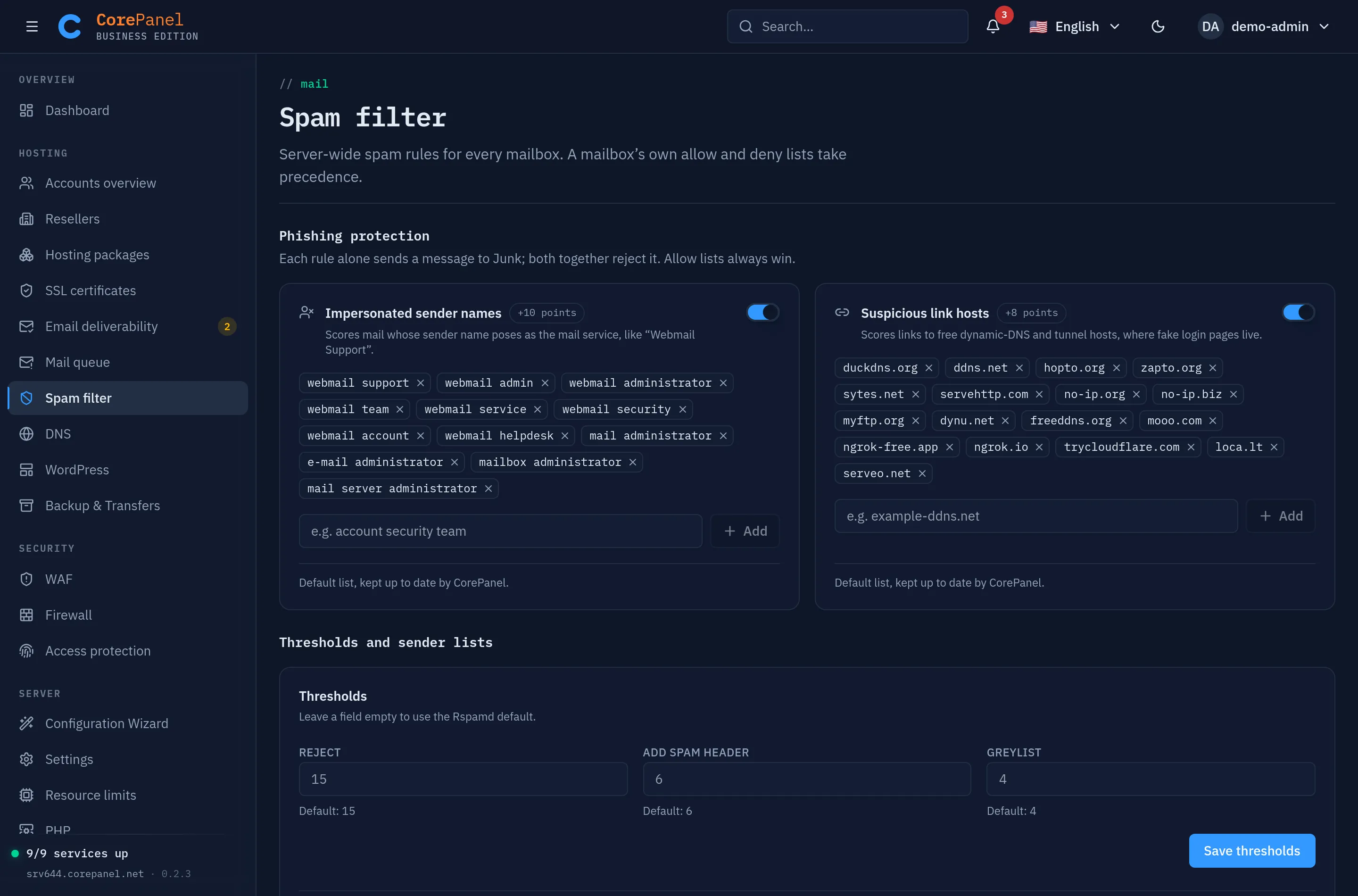
Phishing protection
Section titled “Phishing protection”Credential phishing (“your mailbox is full, log in to keep it”) gets past the usual checks because the sender has done everything right. In a real campaign measured on a CorePanel server, every message came from a domain the attacker owned, with SPF, DKIM and DMARC passing, and scored between −1 and 2: straight to the inbox. What it could not change cheaply was the name it showed and where its link went.
CorePanel ships two rules for that, switched on:
| Rule | Matches | Score |
|---|---|---|
| Impersonated sender names | A From display name that poses as the mail service (Webmail Support, Mail Administrator), whatever address it comes from | +10 |
| Suspicious link hosts | A link to a free dynamic-DNS or tunnel host (duckdns.org, no-ip.org, ngrok-free.app…), where fake login pages live because they cost nothing to make | +8 |
With the default thresholds, each one alone puts a message in Junk (add-header 6), and both together cross the reject threshold of 15 even after a clean SPF/DKIM/DMARC pass takes a point or so off. A replica of the campaign above, which reached the inbox without them, scored over 16 with both and was refused. A sender on an allow list is never touched.
How the lists match:
- A name matches anywhere in the display name, ignoring case and encoding. Spaces,
dots, hyphens and underscores between its words match any of them or none, so
e-mail administratoralso catches “Email Administrator”. Names are plain ASCII letters and digits, at least four of them. - A link host matches the domain and every name under it:
duckdns.orgcatcheswebmail-login.duckdns.org.
Until you edit a list it is the default list, which later versions of CorePanel can improve. Once your entries differ from the defaults it becomes your own list and stays as you left it; Restore defaults hands it back. Switching a rule off or on does not count as editing it.
To see the rules at work, look for their symbols in the Rspamd log:
grep -E 'CP_PHISHING_(DISPLAY_NAME|LINK_DOMAIN)' /var/log/rspamd/rspamd.log | tailThe three thresholds
Section titled “The three thresholds”| Action | Default score | What it does |
|---|---|---|
| Greylist | 4 | Temporarily defers the message; a legitimate sender retries and gets through, most spam bots do not |
| Add header | 6 | Marks the message as spam and files it in the recipient’s Junk folder |
| Reject | 15 | Refuses the message at SMTP time |
Rejecting at SMTP time is the honest option: the sender gets an error and knows the mail did not arrive. That is why the reject threshold is high — a false positive here means losing a real message with no copy anywhere.
Greylisting defers a sender the server has never seen for 5 minutes; its retry after that is accepted, and the sender is remembered for a day. The delay applies once per new sender, not to every message — but it is a real delay, so a domain that sends you time-critical mail (verification codes, order confirmations) is a good candidate for the allow list below.
Choosing thresholds
Section titled “Choosing thresholds”- Lower the reject score (say to 12) only when you are confident about your mail flow, and after watching what a lower score would have caught.
- Lower the add-header score to mark more aggressively; it is a safe knob, since nothing is lost — the message is still delivered.
- Raise the greylist score if legitimate senders complain about delays.
Leaving a threshold empty means “inherit”, so a policy only has to carry the values you actually want to change. On the Spam filter page an empty field inherits Rspamd’s default; on a mailbox it inherits the server-wide threshold, which the mailbox shows as its default.
Where a flagged message lands
Section titled “Where a flagged message lands”A message that reaches the add-header threshold is stamped X-Spam: Yes and delivered to
the recipient’s Junk folder, not the inbox. A message above the reject threshold never
reaches a mailbox at all — it is refused during the SMTP session.
The folder is created and subscribed automatically, so it is there on a mailbox nobody has opened yet, and it is the same folder in webmail and in any IMAP client.
The X-Spam header is safe to filter on yourself: Rspamd strips any X-Spam header a
sender supplies before adding its own, so an incoming message cannot forge one.
Why a message landed where it did
Section titled “Why a message landed where it did”Every message that arrives from the internet carries the verdict in its headers, whatever its score:
X-Spam-Status— the outcome and the score, e.g.No, score=1.50.X-Spamd-Result— the score against the reject threshold, and each rule that fired with its points (DBL_SPAM(6.50),CP_PHISHING_LINK_DOMAIN(8.00)…).Authentication-Results— the SPF, DKIM and DMARC results.
Open the message source (View source in webmail) to read them. Any copy of these headers a sender wrote is removed before delivery — whether the sender is on the internet, a website on this server or another mailbox — so what you read is this server’s verdict. Mail sent from a mailbox or by a website does not carry them. A message forwarded to an outside address keeps the verdict it was given when it arrived.
Moving messages in and out of Junk is also how you teach the filter:
- Drag a message into Junk → it is learned as spam.
- Drag a message out of Junk → it is learned as ham.
- Delete it from Junk (move it to Trash, Deleted Messages or Deleted Items, whichever your mail client uses) → nothing is learned. Throwing spam away is not saying it was legitimate.
It works on the Junk folder the server creates in every mailbox; mail clients that honour the server’s special folders (webmail, Thunderbird, Apple Mail) use it for their spam button. Only moving a message that was delivered counts: uploading a message straight into Junk teaches nothing, so no mailbox can feed the filter content it made up.
What is learned goes into one corpus for the whole server, not one per mailbox. That is deliberate: the classifier ignores its own verdict until it has learned 200 messages of each kind, and a per-mailbox corpus on a hosting server never gets near that — split across the mailboxes of a real server it was single digits each, so the classifier stayed silent for everyone. Shared, the same traffic crosses the threshold and then helps every mailbox, new ones included.
The trade is worth stating plainly: one person marking legitimate mail as spam nudges a classifier everybody shares. It is bounded — 200 messages before it counts for anything, and it is one signal among dozens rather than a verdict — and it is what every shared mail server does, because the alternative measured here was a classifier that did nothing for anyone.
Each hosting account can teach the filter at most 200 messages at once and 200 an hour after that, so no script can flood the shared corpus.
Blocklists need a resolver of your own
Section titled “Blocklists need a resolver of your own”Most of Rspamd’s strongest signals are DNS blocklists — Spamhaus ZEN for sending IPs,
Spamhaus DBL for domains found in the message, dnswl for known-good senders. These
lists refuse queries that arrive through a shared public resolver, which is what a
hosting provider’s default nameservers are. Instead of a verdict they answer
127.255.255.254, meaning “you are querying from a public resolver”.
Rspamd reacts to that badly, and silently: its health probe sees an answer where there
should be none, concludes the list is broken, and stops querying it entirely. The only
trace is a recurring line in /var/log/rspamd/rspamd.log:
rspamd_monitored_dns_cb: DNS reply returned 'no error' for zen.spamhaus.orgwhile 'no records with this name' was expected (likely DNS spoofing or BL internal issues)A server in that state still filters — greylisting, SPF/DKIM/DMARC, content rules and fuzzy hashes all keep working — but it has lost the checks that catch a brand-new phishing domain on its first day. In one measured case a phishing message imitating WeTransfer scored -0.10 and went straight to the inbox; with the blocklists answering, the same message scored 13.40 and was filed in Junk. Its domain was listed in Spamhaus DBL as malware (+7.5) and its sending IP in ZEN (+3.0).
CorePanel installs its own recursive resolver (pdns-recursor, on 127.0.0.1:5301) and
points Rspamd at it, which is why the lists answer normally. That is configured in
/etc/rspamd/local.d/options.inc and applied on install and on every upgrade.
Checking it on your server
Section titled “Checking it on your server”# Spamhaus' own test entry. 127.0.0.x means the list is answering you;# 127.255.255.254 means your resolver is blocked.dig +short @127.0.0.1 -p 5301 2.0.0.127.zen.spamhaus.org
# Any complaint here means at least one list has been switched offgrep rspamd_monitored_dns_cb /var/log/rspamd/rspamd.log | tailIf you run your own resolver elsewhere, or your provider gives you a dedicated one, point
Rspamd at it by editing the nameserver line in /etc/rspamd/local.d/options.inc and
restarting rspamd. Deleting the file makes Rspamd fall back to /etc/resolv.conf.
Three levels
Section titled “Three levels”| Scope | Applies to |
|---|---|
| Server | Every domain hosted here: Email → Spam filter |
| Domain | One domain: corepanel mail spam on the command line |
| Mailbox | One address: the mailbox’s Spam tab |
The most specific scope wins: a mailbox policy overrides its domain’s, which overrides
the server’s. That is what lets one demanding address (abuse@, support@) be more
permissive than the rest of the server without weakening everything.
Allow and deny lists
Section titled “Allow and deny lists”Beyond scores, you can name senders explicitly:
| List | Effect |
|---|---|
| Allow | Mail from this sender is never actioned as spam, whatever it scores |
| Deny | Mail from this sender is always rejected, whatever it scores |
Entries are a sender address or a whole domain, and a sender can appear only once per scope — allow and deny are mutually exclusive there.
A practical order of operations
Section titled “A practical order of operations”When a customer says “we are getting too much spam”:
- Check the blocklists are answering (see above). A server whose resolver Spamhaus refuses has lost its best signal, and no amount of threshold tuning replaces it.
- Look at what is actually arriving and what it scores. If it is scoring 7–12 it is already being filed in Junk, and the complaint is really “I still see it in Junk”.
- Lower the add-header threshold on that domain before touching reject.
- Only then consider a lower reject threshold, and only for that domain.
When the same phishing keeps arriving under one sender name (“IT Helpdesk”, “Account Security”) or links to the same kind of host, add that name or host to the matching phishing rule rather than denying each sender: the addresses rotate, the name does not.
When they say “a message never arrived”:
- Check whether it was rejected (the sender has a bounce with a reason) or marked.
- If it was rejected, add an allow entry for that sender at the narrowest scope that fixes it — mailbox before domain, domain before server.
- If it keeps happening across many senders, the threshold is too aggressive rather than any one sender being wrong.
Outgoing mail
Section titled “Outgoing mail”Antispam settings govern incoming mail. Whether your outgoing mail is accepted elsewhere depends on SPF, DKIM and DMARC — see email authentication — and on the reputation of the server’s IP address.