Deploying from CI/CD
A build pipeline can deploy an application without a person in the loop. A token names one application and authorises one thing: deploying it.
There are two endpoints, and the choice between them is about where the artifact is:
| Upload and deploy | Deploy what is already there | |
|---|---|---|
| The pipeline sends | The .tar.gz itself | An empty POST |
| Credentials in CI | The deploy token | The deploy token and the account’s FTP password |
| Where the token goes | An Authorization header | The URL |
| Artifact size | Bounded by the web server (64 MB by default) | Unbounded |
| Where you get it | The panel or the CLI | The CLI only |
| Good for | Almost every pipeline | Large artifacts, and callers that can only be given a URL |
Start with the first one. Reach for the second when the artifact is too large, or when whatever is calling — a GitHub or GitLab webhook, say — can configure a URL and nothing else.
Enabling it
Section titled “Enabling it”An application is created without a token — a credential nobody asked for is a credential nobody rotates. Issue one when you need it.
In the panel, that is the Deploy webhook card on the application: press Enable and the token is issued, next to the address your pipeline posts to.
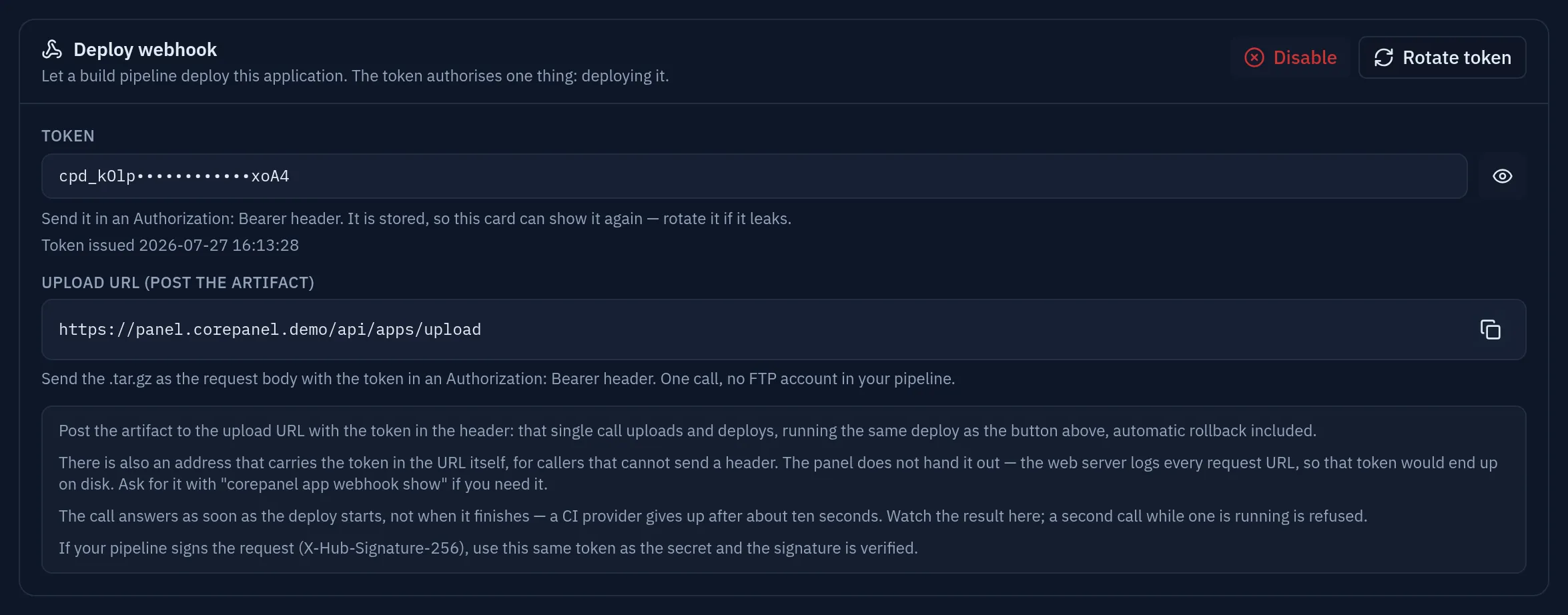
The two values are treated differently on purpose. The token is a credential, so it arrives masked and the copy button appears only once you reveal it — a copy button next to a mask either copies the mask, which is useless, or hands over a secret you believed was hidden. The upload URL carries no token at all, so it is shown in clear and is always copyable.
What the card deliberately does not show is the deploy URL that carries the token in
its path. That endpoint still exists — see Deploy an artifact you uploaded
yourself — but the web server writes every
request URL to its access log, so a panel that offered it would put a live credential on
disk by default. Ask for it explicitly, with corepanel app webhook show, if something in
your pipeline can configure a URL and nothing else.
From then on the card offers Rotate token, which issues a new one and breaks any pipeline still using the old one, and Disable, which clears it and refuses every pipeline call from that moment. Both ask for confirmation; Enable does not, because there is nothing yet to break.
The same, from corepanel:
corepanel app webhook rotate <account-id> apiApplication: api (account example)Webhook: enabledToken issued: 2026-07-27 14:22:10Token: cpd_9f3c…Deploy URL: https://panel.example.com/api/apps/deploy/cpd_9f3c…Upload URL: https://panel.example.com/api/apps/upload
From a pipeline, uploading and deploying in one call: curl -fsS -X POST https://panel.example.com/api/apps/upload \ -H 'Authorization: Bearer cpd_9f3c…' \ --data-binary @api.tar.gz
Or, to deploy an artifact already uploaded to ~/apps/api.tar.gz: curl -fsS -X POST https://panel.example.com/api/apps/deploy/cpd_9f3c…| Command | What it does |
|---|---|
corepanel app webhook show <account-id> api | Prints it again — the token is stored, not shown once |
corepanel app webhook rotate <account-id> api | Issues a new token; the previous one stops working immediately |
corepanel app webhook revoke <account-id> api | Clears it; every pipeline call is refused from then on |
Rotate when you want the pipeline to keep working once you update it. Revoke when you want it to stop now. Both endpoints use the same token, so both stop together.
Upload and deploy in one call
Section titled “Upload and deploy in one call”The artifact is the request body and the deploy runs on the same call:
curl -fsS -X POST https://panel.example.com/api/apps/upload \ -H 'Authorization: Bearer cpd_9f3c…' \ -H 'Content-Type: application/gzip' \ --data-binary @api.tar.gz# GitHub Actionsname: deployon: push: branches: [main]
jobs: deploy: runs-on: ubuntu-latest steps: - uses: actions/checkout@v4 - uses: actions/setup-go@v5 with: { go-version: '1.25' }
- name: Build run: | CGO_ENABLED=0 go build -o server . tar -czf api.tar.gz server templates static
- name: Deploy run: | curl -fsS -X POST https://panel.example.com/api/apps/upload \ -H "Authorization: Bearer ${{ secrets.COREPANEL_DEPLOY_TOKEN }}" \ --data-binary @api.tar.gz# GitLab CIdeploy: stage: deploy only: [main] script: - tar -czf api.tar.gz server templates static - curl -fsS -X POST https://panel.example.com/api/apps/upload -H "Authorization: Bearer $COREPANEL_DEPLOY_TOKEN" --data-binary @api.tar.gzStore the token as a masked secret. It is the whole credential, and it is the only one this form needs: no FTP account in CI.
Where the artifact goes
Section titled “Where the artifact goes”Straight into a spool CorePanel owns, never into the account’s home, and it is deleted as soon as it has been extracted. Uploading a new version does not pile up beside the old one, because there is no old one to pile up beside. What accumulates is releases, which are pruned.
An upload that is refused — a bad signature, an unknown token, a body that is not an archive — is discarded the same way.
The body is bounded by the web server in front, 64 MB by default
(MaxPostSizeMB in CoreHttpd’s configuration, /etc/corehttpd.ini). Over that you get a 413 naming the
alternative. A built Go binary with assets is usually well under it; a container-sized
artifact is not.
Deploy an artifact you uploaded yourself
Section titled “Deploy an artifact you uploaded yourself”The other form deploys whatever is at ~/apps/<name>.tar.gz, which the pipeline puts
there first. Its address is the one with the token in the path, so it comes from
corepanel app webhook show <account-id> api — the panel does not display it:
# GitHub Actions      # FTP over TLS; SFTP with a deploy key works too (see the note below).      - name: Upload the artifact        run: |          curl --ssl-reqd --ftp-create-dirs -T api.tar.gz \               --user "${{ secrets.FTP_USER }}:${{ secrets.FTP_PASSWORD }}" \               ftp://example.com/apps/api.tar.gz
      - name: Deploy        run: curl -fsS -X POST "${{ secrets.COREPANEL_DEPLOY_URL }}"
Store the URL as a masked secret, not in the repository: it is the whole credential.
The upload uses the account’s own FTP credentials, which are a separate secret: the deploy token cannot upload anything, and the FTP account cannot trigger a deploy. Losing one does not give away the other.
Whichever form you use, what runs is the same deploy as the button in the panel, automatic rollback included.
Two properties that decide how you write the pipeline
Section titled “Two properties that decide how you write the pipeline”It answers before the deploy finishes
Section titled “It answers before the deploy finishes”Both endpoints return 202 Accepted as soon as the deploy starts — for the upload,
once the artifact has been received in full. That is not a shortcut: CI providers abandon
a webhook delivery after about ten seconds and then retry it, and a retry mid-deploy would
deploy the same artifact twice.
If your pipeline must gate on the result, have it check the application afterwards —
corepanel app show from a machine with administrator access to the server, or a request
to your own health path once the release should be live. The hosting account cannot do
this itself: corepanel is an administrator tool, and the account has no shell.
One deploy at a time
Section titled “One deploy at a time”A second call while one is running is refused with 409, not queued. Two concurrent
deploys would race over the same release tree and the same current symlink, and the
loser would leave a half-extracted directory behind.
A pipeline that pushes twice in quick succession should treat 409 as “the newer build
will go out on the next push”, or retry after a short wait.
On the upload endpoint the lock is taken after the artifact has arrived, not before,
so a slow upload never blocks anyone. The cost is that a 409 there comes at the end: the
bytes were sent and then discarded. That is the right way round — the alternative is
holding an application’s deploy lock for the length of a transfer that may never finish.
Signatures
Section titled “Signatures”If your pipeline signs the request the way GitHub does, CorePanel verifies it. Use the same token as the secret — one credential to rotate rather than two to keep in agreement:
X-Hub-Signature-256: sha256=<hex HMAC-SHA256 of the body, keyed with the token>- A request with no signature is authenticated by the token alone. That is the normal
case, and it is what a plain
curlsends. - A request with a signature must verify. A caller that signs and gets it wrong is either misconfigured or forging, and falling back to the weaker check is how signature verification becomes decorative.
On the upload endpoint the signature covers the artifact itself, which makes it worth more than it is on the other: it proves the bytes that become the release are the bytes your pipeline built.
SIG=$(openssl dgst -sha256 -hmac "$COREPANEL_DEPLOY_TOKEN" -hex api.tar.gz | awk '{print $2}')curl -fsS -X POST https://panel.example.com/api/apps/upload \ -H "Authorization: Bearer $COREPANEL_DEPLOY_TOKEN" \ -H "X-Hub-Signature-256: sha256=$SIG" \ --data-binary @api.tar.gzStatus codes
Section titled “Status codes”| Code | Meaning | What to do |
|---|---|---|
202 | The deploy started | Read the outcome in the panel or with app show |
400 | The body is not a .tar.gz (upload only) | Check the artifact actually got built and attached |
401 | No token was sent, or a signature does not verify | Check the header, that the signing secret is the deploy token, and that nothing rewrites the body |
404 | The token matches no application | It was rotated, revoked, or truncated when copied |
409 | A deploy is already running | Wait; do not retry immediately |
413 | The body is over the limit | Upload: the artifact is larger than the web server accepts — use the FTP route. Deploy: the payload is over 1 MB and is only used for the signature |
429 | Too many calls | Honour Retry-After; the limit is per token and per source address |
500 | CorePanel could not start the deploy | Check the service logs on the server |
The response body is JSON, so a CI log shows a readable reason on failure.
Security notes
Section titled “Security notes”- The token grants deploying one application. It cannot read logs, change settings, reach other applications, or touch the account in any other way.
- Rotating invalidates the old token immediately, and it invalidates the signature key at the same time.
- The token never appears in CorePanel’s own logs, including on failed attempts. It does appear in the web server’s access log when it travels in the URL, which is the reason to prefer the header form.
- Calls are rate-limited per token and per source address — the two endpoints share one budget — so a leaked token cannot be used to hammer the machine into rebuilding continuously.
- An uploaded artifact is written to a directory CorePanel owns, readable by nobody else, and removed as soon as it has been extracted. It never lands in the account’s home.
- The URL is issued for the panel’s hostname over HTTPS. Do not put the token in a query string, an issue comment, or a build log.