MySQL Databases
CorePanel manages MySQL/MariaDB databases per account: the account owns its databases, its database users, and the limit on how many it may create. A built-in database manager lets you work with the data without installing phpMyAdmin.
Naming: everything is prefixed
Section titled “Naming: everything is prefixed”Database and user names are always prefixed with the account’s system username:
account "example" + suffix "shop" → database example_shopaccount "example" + suffix "app" → user example_appYou type the suffix; CorePanel builds the full name. This is what keeps two accounts from colliding on a shared MySQL server, and it means a name you see in a config file tells you which account owns it.
Suffixes may contain letters, digits and underscores. The full name is limited by MySQL: 64 characters for a database, 32 for a user — the prefix counts.
Creating a database
Section titled “Creating a database”From Databases (pick the account) or the account workspace’s Databases section:
- Create database — enter the suffix.
- Create user — enter a suffix, a password, the host and the privileges.
A database with no user is not reachable by an application; a user is created against a database and granted privileges on it.
Users and hosts
Section titled “Users and hosts”A MySQL user is identified by name plus host. The host defaults to localhost, which
is what an application running on this same server needs. The same suffix can exist for
different hosts, but not twice for the same one.
Privileges are chosen when the user is created and can be changed afterwards, along with the password.
Limits
Section titled “Limits”Database creation is capped by the account’s MySQL databases limit (0 = unlimited).
When the limit is reached, creation is refused until a database is deleted or the limit
raised.
The database manager
Section titled “The database manager”Opening a database from the list gives you a full manager with five views:
| View | What it does |
|---|---|
| Overview | Size, table count, engine and collation, at a glance |
| Browse | Paginated table data, sortable, with row add / edit / delete |
| Structure | Columns, types, keys, indexes and CREATE TABLE; create and alter tables |
| SQL | Run a statement against the database |
| Activity | Live process list, with the ability to kill a query |
Editing rows requires a primary key on the table — without one there is no safe way to address a single row, so the manager offers reading only.
The SQL console is deliberately narrow
Section titled “The SQL console is deliberately narrow”Statements are parsed and classified before they run, and anything outside the allowed shapes is refused rather than passed through:
| Allowed | Refused |
|---|---|
SELECT, SHOW, DESCRIBE, EXPLAIN SELECT | Anything else — including WITH (CTEs) |
INSERT, UPDATE, DELETE, REPLACE | SELECT … INTO, INTO OUTFILE, INTO DUMPFILE |
CREATE, ALTER, DROP, TRUNCATE, RENAME on tables | CREATE/ALTER/DROP USER or ROLE |
CREATE/ALTER/DROP DATABASE or SCHEMA | |
The same statements written CREATE OR REPLACE … | |
| One statement per run | Multiple statements in one run; executable version comments (/*! … */) |
Statements are also capped at 8 KB. Write statements are recorded in the audit log; reads are not.
Importing and exporting a dump
Section titled “Importing and exporting a dump”Export and Import sit in the manager’s header, next to the database name. They are the way a database moves in or out without a shell.
Export asks first. The button opens a dialog that says what the file will contain and what producing it costs; the dump starts when you confirm, not when you press the button. That is on purpose: a dump reads every row of the database through the MySQL instance every site on the server shares, and Export sits on a screen people open to look around. A click made to find out what a button does should not be able to start it.
Once confirmed, it produces a mysqldump of that one database and downloads it as
<database>-<date>.sql.gz. It is taken with --single-transaction, so the site keeps
serving while it runs, and it carries table definitions, data, routines, triggers and
events — but no CREATE DATABASE. The file is built on the spot, so on a large database
the dialog waits for minutes rather than seconds; the download then starts on its own.
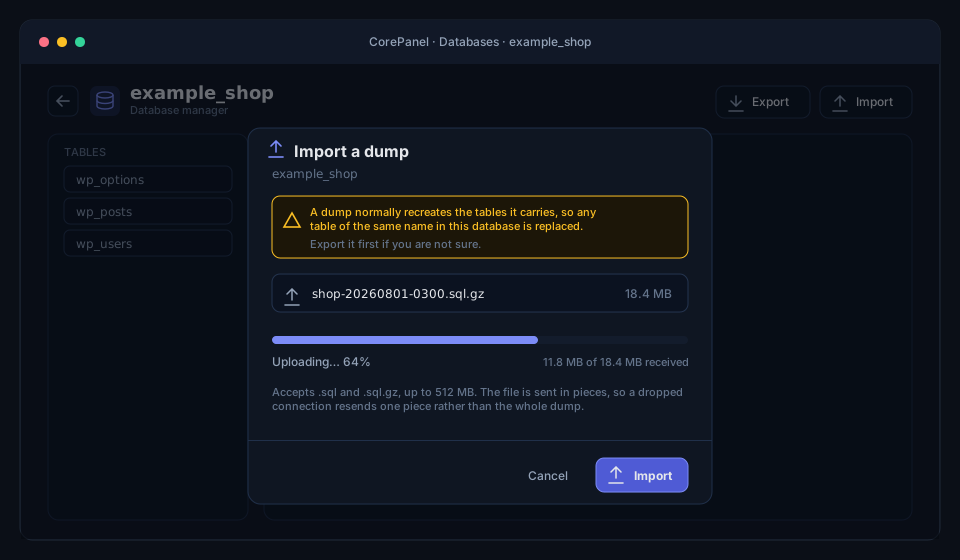
Import takes a .sql or a .sql.gz and loads it into the database you are looking at.
The file is uploaded in pieces, so it is not bound by the web server’s POST limit and a
dropped connection costs one piece rather than the whole transfer; the ceiling is 512 MB
per dump. Whether the file is compressed is detected from its contents, not from its name.
The database is never created by an import — it has to exist first, and you pick it from
the panel. That is not a limitation of the uploader: the dump is loaded through a
throwaway MySQL user granted privileges on that one schema and nothing else, so a dump
carrying CREATE DATABASE, a GRANT, or a write into another schema meets an engine that
refuses it. LOAD_FILE and INTO OUTFILE get nothing for the same reason. It is the same
boundary a migrated account’s dump is loaded through, and it applies to an administrator’s
import exactly as it does to a customer’s.
One export runs per account at a time, and a handful across the server, because a dump reads every row of a database through the MySQL instance every account shares.
Activity
Section titled “Activity”The Activity view shows what MySQL is doing right now and lets you kill a runaway query — the first thing to look at when a site becomes slow and you suspect the database rather than PHP.
The manager in the client panel
Section titled “The manager in the client panel”On Pro and Business, the account owner reaches this same manager over their own databases from the client panel — Overview, Browse, Structure, the SQL console and import/export, with reads and writes. Activity is the exception and stays administrator-only: the process list belongs to the whole MySQL instance, so it shows other accounts’ statements while they run, credentials included.
What confines a customer is MySQL, not a filter on their SQL. Each account gets a
panel-owned MySQL user holding privileges on exactly the databases its rows say it owns,
created the first time the manager is opened — there is nothing to provision when you
upgrade a server. Their statements run as that user, so a schema they do not own is refused
by the engine however the statement is written, and information_schema shows them only
their own. Dropping a database revokes that privilege at the same time, which matters
because you are free to create the same database name again for a different account.
That connection also carries a statement timeout and a row ceiling. Privileges cannot stop an unindexed join over a large table, and that costs every account on the box, so the bound is a property of the connection rather than an option in the console.
Connecting from an application
Section titled “Connecting from an application”Standard MySQL connection settings:
| Setting | Value |
|---|---|
| Host | localhost |
| Database | <user>_<suffix>, e.g. example_shop |
| Username | <user>_<suffix>, e.g. example_app |
| Password | The one you set |
For WordPress, installing through the WordPress Manager creates the database, the user and the credentials for you.
Deleting
Section titled “Deleting”Deleting a database drops it from MySQL along with its users, and frees the account’s counter. Deleting an account drops all of its databases and users from the MySQL server, not just CorePanel’s records of them.