Account Backups
A backup is one .tar file per account, and it is enough to rebuild that account on an
empty server: same uid/gid, same home, same limits. Backups are taken and restored in
Backup & Transfers.
The Backup & Transfers section
Section titled “The Backup & Transfers section”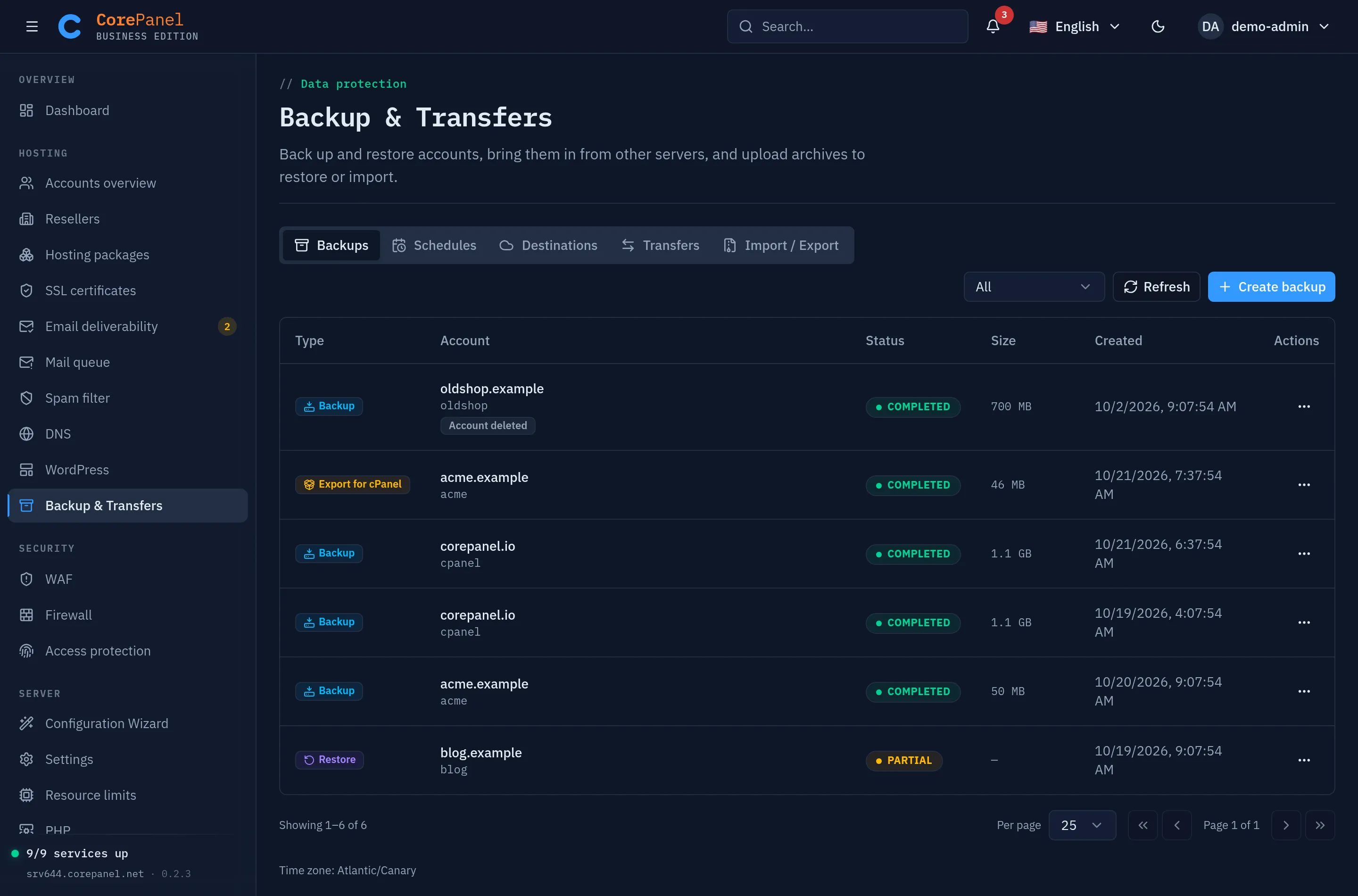
| Tab | What it is for | Covered in |
|---|---|---|
| Backups | Every backup and restore job: create one, restore one, browse one and put part of it back | Taking backups, Restoring, Partial restore |
| Schedules | Recurring backups and how many to keep | Scheduled backups |
| Destinations | Where archives are copied off the server (Pro and Business) | Remote destinations |
| Transfers | Bringing accounts over live from another server — from cPanel/WHM with root, or one cPanel account with its own login | Transferring accounts |
| Import / Export | Uploading an archive from your computer to restore or import it, and exporting an account for cPanel | Uploading an archive, Exporting for cPanel |
The Backups tab is the one the other pages keep coming back to. Every job is a row there, whatever started it — you, a schedule, a customer from their own panel — and its type says what it did: Backup, Restore, Partial restore, or Export for cPanel. Its status is running, completed, partial (it finished, and the report says what it could not do) or failed. The menu at the end of the row is where everything else starts:
| Menu item | What it does |
|---|---|
| View report | The per-resource report: what was captured or restored, what was skipped, and why |
| Download archive | The .tar to your computer — to keep it elsewhere, or to upload it on another server |
| Browse and restore part of it | Opens the backup browser |
| Restore from this backup | Rebuilds the account whole |
| Delete | Removes the archive here and at its destination — see Deleting a backup |
What is inside an archive
Section titled “What is inside an archive”| Resource | Captured |
|---|---|
| Home directory | Every file the account owns, with ownership and permissions |
| MySQL | Each database, dumped, plus its users and their grants |
| Domains | Primary, aliases and addon domains, with their document roots, serving modes, canonical host, web optimizations and PHP version, when the site has one of its own |
| Subdomains | With their document roots, serving modes, their own web optimizations and PHP version |
| Mailboxes | Accounts and their mail, with each mailbox’s filters and autoresponder |
| Mail routing | Every forwarder, the domain catch-all and the whole-domain redirect, with the scripts they pipe to, and whether the account’s mail pipes are on |
| FTP accounts | |
| Cron jobs | Every job with its schedule, command, time zone, resource limits and whether it was enabled |
| DNS records | The records the account added to its zones. The records CorePanel manages itself — apex, www, mail, SPF, DKIM, DMARC — are regenerated by the server that restores the archive, not copied |
| Uploaded certificates | Each commercial certificate with its chain and private key. Certificates the server issued itself are not archived: they are issued again |
| WAF settings | Each site’s own rule overrides and exceptions. The server-wide layer belongs to the server, not the account |
| Applications | Each application’s settings, its environment variables, its data volume and the release it was running |
| The account itself | uid/gid, home path, PHP version, package reference and every limit |
A manifest.json indexes all of it, and an index of the home directory — every path with
its size, date and permissions — sits next to it. Both are the first members of the
archive, so an archive’s content can be listed from its first few kilobytes, without
reading the home and without downloading a remote archive whole. That is what makes the
backup browser instant on an archive of any size.
Capturing something is not the same as every server putting it back: a restore onto an edition without paid optimizations or uploaded certificates leaves those out and says so. What a restore leaves out has the list.
Where archives live
Section titled “Where archives live”Backups are written to /var/lib/corepanel/backups/<user>/ on the server itself,
unencrypted, and copied to a destination when one is
configured. Uploaded archives are kept in /var/lib/corepanel/backups/uploads/. Two
consequences worth planning around:
- Get a copy off the server. A backup on the same disk as the account does not survive
the failure it is there to protect against. A destination is the built-in answer; a
rsyncorrclonecron job is the manual one. - Treat archives as sensitive, wherever they land. An archive contains the account’s files, its databases, its mail, the password hashes of its mailboxes, FTP logins and database users — including the cPanel-compatible (sha512-crypt) copy of each mailbox and FTP password, as a cPanel backup carries its own — and the private keys of its uploaded certificates. On a destination that means a private bucket and credentials scoped to it — a bucket that is readable by the world publishes all of that.
Archives are not deleted when the account they describe is deleted: a backup has to outlive what it describes, so that it can bring it back. They stay in the list marked Account deleted, and the Deleted accounts filter shows only them. No retention rule reaches them any more, so they stay until you delete them.
Backups vs restore points
Section titled “Backups vs restore points”| Account backup | WordPress restore point | |
|---|---|---|
| Scope | The whole account | One WordPress instance |
| Contents | Files, databases, domains, mail, FTP | That instance’s document root and database |
| History | Governed by retention | Three per instance |
| Survives account deletion | Yes | No |
| Purpose | Disaster recovery, migration | An undo button for an update |
Use restore points around risky updates. Use backups for everything else.