Remote Destinations
By default an archive stays on the same disk as the server it protects — which is exactly the failure a backup exists to survive. A destination is where CorePanel copies the finished archive: S3-compatible object storage, or any SSH server over SFTP. Once one exists, taking a backup by hand or on a schedule can push to it, and restoring can read straight from it.
Remote destinations require CorePanel Pro or Business. Listing, disabling and deleting a destination — and restoring an archive back from one — work on every edition, so a lapsed licence never leaves you unable to reach your own backups.
Adding a destination
Section titled “Adding a destination”Backup & Transfers → Destinations → Add destination, then choose the driver:
| Driver | Works with |
|---|---|
| S3-compatible | AWS S3, MinIO, Cloudflare R2, Backblaze B2, Wasabi, and Google Cloud Storage through its S3 endpoint |
| SFTP | Any SSH server with a directory you can write to |
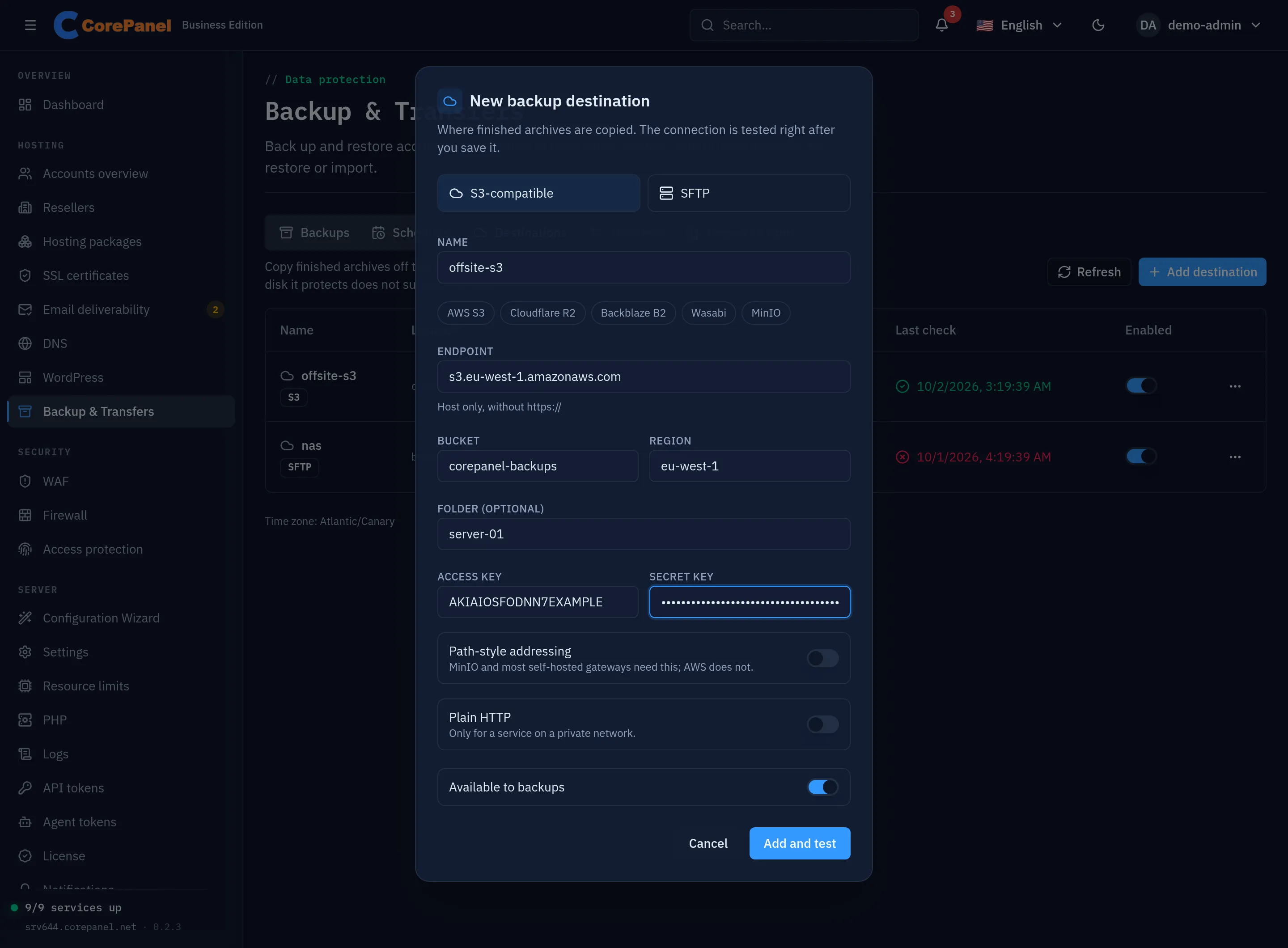
For S3 the form asks for the endpoint, bucket, region and an optional folder inside the bucket — useful when several servers share one bucket — plus an access key and secret key. The provider buttons above the endpoint fill in its usual shape. For SFTP it asks for the host, port, username, a password or a private key, and the remote directory.
Three settings are worth understanding:
- Path-style addressing (S3) puts the bucket in the URL path instead of the hostname. MinIO and most self-hosted gateways need it; AWS does not. Getting it wrong is the usual cause of a destination that connects but cannot find the bucket.
- Plain HTTP (S3) talks to the endpoint without TLS. It exists for a storage service on a private network; over the internet it would send your keys and your archives in the clear.
- The host key (SFTP) is pinned on the first successful connection: CorePanel adopts
the key it sees then and verifies every later connection against it. From the CLI,
--host-keypins one you supply instead.
Available to backups decides whether the destination is offered when a backup or a schedule is created. Turning it off keeps the destination and the archives stored there — they can still be listed and restored — but stops new archives going to it: a schedule that still points at it keeps its local archive and reports the push as not done.
Always test a destination
Section titled “Always test a destination”Add and test saves the destination and tests it in the same step; Test connection in its menu runs the test again at any time. The test uploads a small probe object, lists it and deletes it again. That is deliberately more than a login check: a destination can accept a connection and still reject writes, and you do not want to discover that on the night you need the backup.
The result is stored, so the Last check column shows the last known state of every destination — green when it accepted the test upload, red when it did not.
Using a destination
Section titled “Using a destination”Once a destination exists, Create backup and every schedule can point at it in Copy to. A schedule’s retention then prunes the remote copies too, not just the local ones, and deleting a backup removes its remote copy along with the local one.
A destination is also the simplest way to move an account: add the same one on the other server, and its archives are there to restore.
Editing a destination
Section titled “Editing a destination”Edit changes a destination’s settings in place — a corrected bucket, a new folder, or rotated credentials. Leave the credential fields empty and the stored ones are kept, so fixing a typo in the endpoint never costs you the keys. The driver itself cannot change: S3 and SFTP are different destinations, not two settings of one.
Editing rather than replacing matters more than it looks. Backup jobs remember which destination they were pushed to by id, so deleting a destination and creating an identical one leaves every archive already stored there orphaned: retention can no longer find it, and those files stay in the bucket — billed — until someone removes them by hand. Rotating S3 keys is an edit, not a re-creation.