SSH and SFTP Access
A hosting account can log in to the server over SFTP: the same port as your own SSH,
jailed to the account’s home, with its own password or with keys managed in the panel. It
is how a customer’s FileZilla, a sftp script or a CI job that deploys over SSH reaches
their files without an FTP password.
What it deliberately does not give yet is a shell. An account at the SFTP level can move files and nothing else: it cannot run a command, open a terminal or tunnel to another port. A jailed shell, and a terminal in the panel, are the next steps of this work and are not available today.
Available on every edition.
Access levels
Section titled “Access levels”Every account sits at one level. It decides what sshd lets that account do, whatever it has in its own home:
| Level | What the account can do |
|---|---|
| Off | Nothing. sshd refuses the account outright, so a key left in its own ~/.ssh does not open a session either |
| SFTP only | File transfer, jailed to the home. No shell, no command, no port forwarding. The default for a new account |
| Legacy shell | An account that already had a shell before CorePanel managed SSH. It is left exactly as it was — see below. Never chosen by hand |
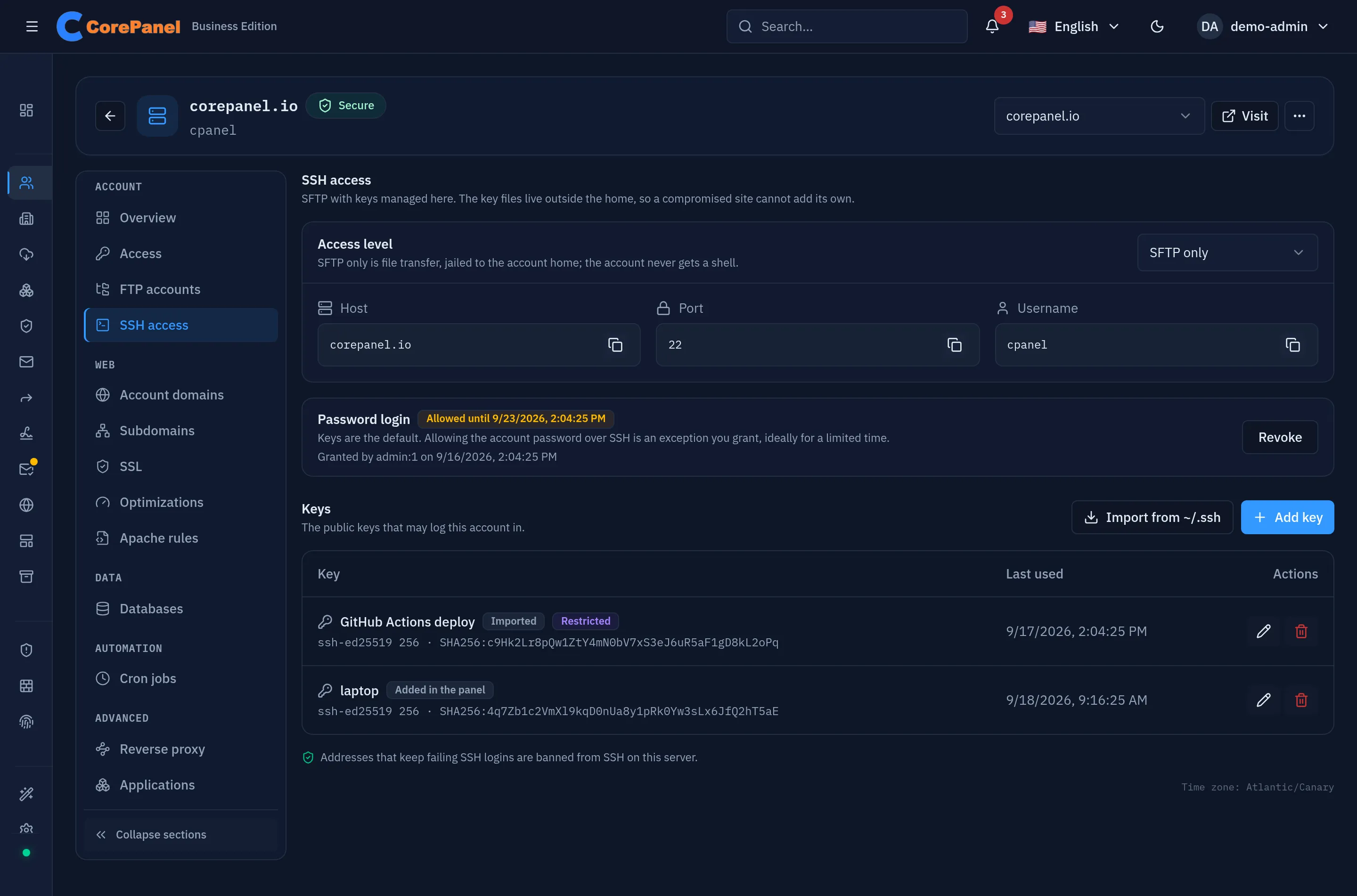
You change it in the account workspace under SSH access → Access level, or with
corepanel account ssh set <account> --level off|sftp. A reseller can set it on its own
accounts, up to the ceiling of the account’s hosting package (SFTP). The account owner
cannot change their own level.
Moving an account to Off also ends any password grant it had and closes its open SSH sessions. A suspended account keeps its level, but its key file is emptied, no password is accepted and its open sessions are closed for as long as the suspension lasts; unsuspending gives keys and password back. A Legacy shell account, whose keys CorePanel does not hold, is denied SSH outright instead, and gets its shell back when the suspension is lifted.
What SFTP only can and cannot do
Section titled “What SFTP only can and cannot do”The level runs sshd’s built-in SFTP server (internal-sftp), which executes nothing. That
is what makes it safe to give every account, and it is also what decides which tools work:
| Works | Does not work |
|---|---|
sftp on the command line | rsync -e ssh — it has to start rsync on the server |
| FileZilla, WinSCP, Cyberduck, Transmit (protocol SFTP) | ssh user@host — there is no shell to log in to |
scp from OpenSSH 9.0 or newer, and from RHEL 9 or later, which speak SFTP by default | scp -O, and scp from older clients (RHEL 8, OpenSSH before 9.0): they use the old protocol, which runs a command on the server (8.7 and 8.8 can use scp -s) |
lftp, rclone (SFTP backend), sshfs | VS Code Remote-SSH, git over SSH, composer or wp-cli on the server |
| VS Code extensions that upload over SFTP | ssh -L / -R / -D tunnels |
A client that asks for a command gets This service allows sftp connections only. and the
connection closes — that sentence is the level working, not a fault.
The jail. The session is locked into the account’s home, which it sees at its real path
(/home/<user>), so a path in a config file or a cron job means the same thing over SFTP.
Nothing outside the home is visible: not /etc, not other accounts, not the server’s
software. Files created over SFTP are private to the account (umask 0077), like the rest
of its home.
For whole-directory deploys, the replacement for rsync is a mirror over SFTP:
# Upload ./dist into the site, deleting what is no longer therelftp -u example, -e "set sftp:connect-program 'ssh -a -x -i ~/.ssh/id_ed25519'; \ mirror -R --delete ./dist /home/example/public_html; quit" sftp://example.comKeys are how an account logs in by default. Each account has its own list, in the account
workspace under SSH access → Keys, in the customer’s own client panel
under SSH & SFTP, and on the command line with corepanel account ssh keys.
- Add key takes one public key as it appears in
id_ed25519.pubor on anauthorized_keysline. Options in front of it are kept as written and the key is tagged Restricted:from="203.0.113.0/24",restrictand theno-…options narrow what it can do, as sshd documents.command=has no effect at SFTP only — the level already forces the SFTP server, whatever the key asks for — andenvironment=is ignored. You can give a key a name and an expiry date. - Refused: DSA keys, RSA keys under 2048 bits, and certificates. Ed25519 is the one to use; ECDSA and RSA of 2048 bits or more are accepted.
- Last used is filled from sshd’s own log, so a key nobody has used in a year is easy to spot and remove.
- Removing a key refuses the next login with it. Sessions already open are not closed.
- Expired keys are refused from the moment they expire, by the authentication broker that answers sshd for each login. If the broker is down, sshd falls back to the key file, which drops an expired key when it is next rewritten — at the latest at the daily reconcile.
To make a key for a customer who has none:
ssh-keygen -t ed25519 -C "laptop" # writes ~/.ssh/id_ed25519 and id_ed25519.pubcat ~/.ssh/id_ed25519.pub # this line is what goes into Add keyOnly the .pub half ever leaves the customer’s machine.
Why the keys do not live in the home
Section titled “Why the keys do not live in the home”CorePanel keeps each account’s keys in a root-owned file outside the home
(/etc/ssh/corepanel/authorized_keys/<user>), written from the panel’s database, and sshd
is told to read that file instead of ~/.ssh/authorized_keys for managed accounts.
The reason is the site. The account owns its home, and so does anything that compromises
its PHP. A backdoor that appends a key to ~/.ssh/authorized_keys would survive every
password change and every key you removed in the panel. With the file outside the home,
the panel is the authority: the keys listed there are the keys that log in, and no
file in the home changes that.
Import from ~/.ssh
Section titled “Import from ~/.ssh”Import from ~/.ssh reads the account’s own authorized_keys and authorized_keys2
and adds what it finds to the panel: options kept, keys it refuses listed with the reason,
keys already present recognised by fingerprint and skipped. The file is read as the
account, a symlink pointing out of the home is not followed, and nothing is written to it.
It is how keys a customer set up by hand come under management, and how an account adopted
from another server gets its keys back. When a server is first upgraded to a version of
CorePanel that manages SSH, every home is imported once, automatically, so no key that
worked the day before stops working. After that, a key that appears in ~/.ssh is the
customer’s file — or a compromised site’s — and is only adopted when someone presses the
button, or runs corepanel account ssh keys import.
Password login
Section titled “Password login”A new account can use its own password over SFTP from the moment it is created. The switch is in Add account — Allow file transfer with the account password — and its starting position comes from the account’s hosting package. It is on by default, with no expiry.
That is deliberate, and it is narrower than it sounds. The account is given an FTP password the same minute, so withholding the SFTP one does not withhold a credential — it pushes the customer onto plaintext FTP, extra data ports and no jail. The SFTP password opens file transfer inside the jail, on the same port as SSH, with the brute-force guard counting every failure against the address.
A password never opens a console. That is the line: file transfer with a password, shell with a key. Moving an account to a shell level withdraws the grant, and the panel says so when it does.
For an account that has none — one created with the switch off, one whose grant expired, or
one whose package withholds it — you grant it per account: SSH access → Password login →
Allow password login, or corepanel account ssh password allow <account> --for 7d.
- The password is the account password — the one the customer signs in to the panel with, changed from the account’s Access section. It is not the FTP password, which is separate once the account exists. There is no second SSH password to rotate.
- The dialog offers 7 days by default. No expiry is a choice you make on purpose, and the panel warns about it. When a grant expires it stops working at once.
- It is refused while SSH brute-force protection is off: automatic blocking, its SSH
source and the SSH guard must all be on.
The panel says so before you try. The same condition applies to the grant made at
creation: with protection off, a new account comes out keys-only whatever its package
says, and the log records why. The guard’s page, or
corepanel auth ssh-guard status, shows whether the guard is enforcing, andcorepanel firewall autoblockshows automatic blocking and its SSH source. corepanel-auth must also be up and following sshd’s log: while it is not, a grant is refused too. Turning protection off afterwards does not revoke grants already made, and they keep working with nothing counting failures against them — revoke them first. - Who can grant it: you, and a reseller over its own accounts only if its settings have May allow SSH password login switched on. That covers the grant made at creation too: an account a reseller without the privilege creates comes out keys-only, even from a package whose switch is on. Switching the privilege off revokes every grant the reseller made, including those. The customer can see the grant in their client panel but can never make one.
- Revoke takes effect at the next login. Sessions already open are not closed.
Addresses that keep guessing are banned from SSH by the guard, and an address the authentication broker is already refusing mail and FTP to is refused the account’s SSH password too. Every grant, revocation and expiry is logged with who made it.
What the customer sees
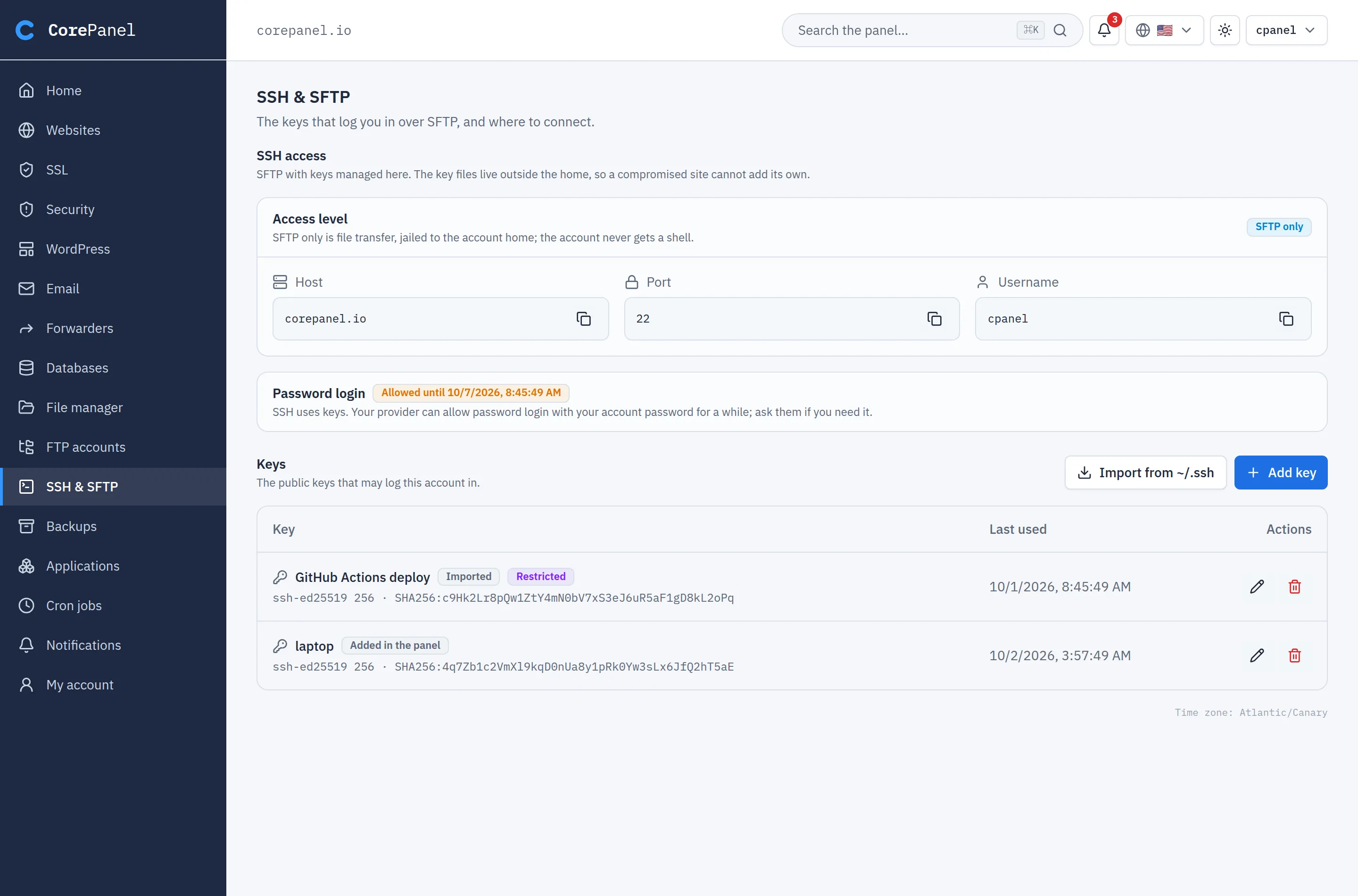
Section titled “What the customer sees”In the client panel, SSH & SFTP shows the customer where to connect — host, port and username, each with a copy button — whether password login is allowed for them and until when, and their keys. They can add, rename, remove and import their own keys. They cannot change the level or allow a password: those stay yours.
A connection needs nothing else:
sftp -i ~/.ssh/id_ed25519 example@example.comIn FileZilla: protocol SFTP, the host and port from that page, logon type Key file (or Normal, if you allowed a password), and the account’s username.
Legacy shell accounts
Section titled “Legacy shell accounts”An account that had a real shell — bash, or a cPanel jailshell — before CorePanel
managed SSH is put at Legacy shell instead of being moved to SFTP. Moving it would cut
a shell its owner may be using right now, with no warning. So it is left exactly as it
was: its shell, its own ~/.ssh/authorized_keys, and sshd’s global rules.
The panel shows such an account with the note This account had a shell before SSH access
was managed; corepanel account ssh status says the same. Legacy can be left but never
chosen again.
Accounts that arrived from cPanel
Section titled “Accounts that arrived from cPanel”- Imported accounts are enrolled from the shell they had:
cPanel’s
jailshellandnoshellbecome SFTP only (noshellrefuses a shell but serves SFTP on cPanel);nologinand/bin/falsebecome Off, because those accounts could not log in there at all; a suspended account is judged by the shell it had before cPanel suspended it, and gets that access back when the suspension is lifted; an unjailedbashstarts at its package’s level, since the import creates the account here without a shell. The keys in their~/.sshare imported. - On a server transformed in place,
cPanel keeps running SSH until the cutover, and CorePanel takes over then — with each
account’s shell, keys and password setting read again at that moment. The accounts that
had
bashend at Legacy shell, and password login is kept for the accounts cPanel’s sshd allowed it for.
What CorePanel changes in sshd
Section titled “What CorePanel changes in sshd”One port — the one you already use. Administrators and hosting accounts are separated by group membership, not by listening on a second port, so there is no new firewall rule and nothing new to reach.
- CorePanel writes one file,
/etc/ssh/sshd_config.d/60-corepanel.conf, and regenerates it whole on every change. Do not edit it: the next change overwrites it. Your own settings belong insshd_configor in another file of that directory. - The file only has
Matchblocks for CorePanel’s groups (cp-ssh,cp-sftp,cp-nossh) and for accounts with a password grant. root and your own users are never matched, so how you log in does not change. - On RHEL 8 a
sshd_configmay not readsshd_config.d/at all. CorePanel checks sshd’s effective configuration, not the file’s text, and when the directory is not read it adds theIncludeline at the top ofsshd_config, keeping a.corepanel.bakcopy. - Every write goes through a gate: the new file is checked with
sshd -t, then sshd’s effective settings for root are compared with what they were before, and only then is sshd reloaded — never restarted, so open sessions survive. A change that would alter how root logs in is rolled back and reported instead. - Hosting accounts’ passwords and keys are checked through CorePanel’s authentication
broker (a PAM line and sshd’s
AuthorizedKeysCommand), which is what makes an expiry, a revocation or a suspension take effect at the next login. root never goes through the broker. If the broker is down, accounts fall back to/etc/shadowand their root-owned key file, and still log in. - Accounts are jailed under
/var/lib/corepanel-jails/<user>: a root-owned directory with a bind mount of the home, declared as a systemd.mountunit so it survives a reboot.
CorePanel re-applies all of this when it starts and once a day, and on demand with
corepanel account ssh reconcile, which exits non-zero when anything was left unapplied.
When an account cannot log in
Section titled “When an account cannot log in”Start with what CorePanel thinks:
corepanel account ssh status <account>It prints the level, whether the account is suspended, how many keys it has, and the password grant — including when one is stored but not in force, and why. On a server still being migrated from cPanel it says In force: NOT YET. Then ask sshd what it will actually do for that account from a given address:
sshd -T -C user=example,host=client.example,addr=203.0.113.7 \ | grep -Ei 'passwordauthentication|forcecommand|chrootdirectory|authorizedkeys|denyusers'| What you see | Why |
|---|---|
This service allows sftp connections only. | The client asked for a shell or a command (ssh, rsync, old scp). Use an SFTP client |
Permission denied (publickey) with a key that is listed | The client offered a different key. ssh -v shows which ones it tried; point it at the right one with -i |
Permission denied for a password | No grant in force for that account — expired, revoked, or the account is suspended |
| The connection is dropped before any prompt | The address is banned by the SSH guard; release it from Access protection → Blocked addresses |
| Nobody but root can log in | sshd_config has a global AllowUsers or AllowGroups that does not include the accounts. sshd applies it before anything CorePanel writes |
| A revoked or expired password still works | The change is stored but sshd’s file could not be rewritten yet: corepanel account ssh reconcile finishes it and says why it failed. With UsePAM no in sshd_config the broker is skipped entirely, so nothing refuses it in the meantime — keep UsePAM yes, the RHEL default |
sshd’s own log is the last word: journalctl -u sshd -n 50 names the account, the address
and the reason for every refusal.