Web Optimizations
CorePanel can speed up a site at the web-server level, with no plugin, no build step and no change to the site’s code. The switches are per site, so you can enable one for a site and leave the rest alone.
You will find them in the account workspace’s Optimizations section, with a site selector at the top. Every site of the account is listed there and each carries its own settings:
- the primary domain,
- each addon domain — an independent site with its own document root,
- each subdomain (
blog.example.com) — likewise a site of its own, usually running its own application, - each alias (parked) domain, which serves a copy of another domain’s site.
Nothing is inherited between them. Turning the page cache on for example.com does not
touch blog.example.com, and vice versa — tune each site for what it actually serves.
What is available
Section titled “What is available”| Optimization | What it does | Editions |
|---|---|---|
| WebP | Serves images as WebP to browsers that accept it, keeping the original for those that do not | All, including Personal |
| Early Hints | Sends a 103 Early Hints response with the page’s key assets so the browser can start fetching them while the server is still building the page | All, including Personal |
| Minify JS | Strips whitespace and comments from JavaScript responses | Speed Optimizer — Pro and above |
| Minify CSS | Same for stylesheets | Speed Optimizer — Pro and above |
| Dynamic page cache | Serves a whole page from cache so a repeat visitor never waits for PHP | Speed Optimizer — Pro and above |
WebP and Early Hints are baseline features: they are part of every edition, including the free Personal edition, and are not something you upgrade for.
Three states, not two
Section titled “Three states, not two”WebP, Early Hints and the two minify switches have three states, and the difference matters (the page cache works differently — see its own section):
| State | Meaning |
|---|---|
| Default | No per-site setting stored — the server’s default applies |
| On | Forced on for this site, whatever the server default is |
| Off | Forced off for this site, whatever the server default is |
Leaving a switch on Default is not the same as turning it off: it means “follow the server”. Set it explicitly only when this site must differ.
Modern browsers advertise WebP support; older ones do not. With this on, an image request from a browser that accepts WebP is answered with a WebP version, while everything else keeps receiving the original file. The files in your document root are untouched.
This is usually the single largest win on an image-heavy site, and it requires nothing from the application.
How much it saves is decided by what was uploaded, not by the server, and the range is wide enough to be worth knowing before you measure:
| The page | Weight, WebP off | WebP on | Time to load |
|---|---|---|---|
| Photographs at sensible sizes | 754 KB | 699 KB | unchanged (1.78 s → 1.79 s) |
| Six 2–3.5 MB PNGs displayed 480 px wide | 14.3 MB | 75 KB | 4.9 s → 1.0 s |
Both rows are the same site on the same server, measured the same day. Flat graphics — screenshots, logos, charts, exports — are what PNG handles worst and WebP handles best: a 3.47 MB PNG in that second page came down to 11 KB. Photographs that were already exported sensibly give up far less, because there was less to give.
Early Hints
Section titled “Early Hints”A normal page load is serial: the browser asks for the HTML, waits while the server (and PHP, and the database) build it, and only then discovers which CSS and JS it needs.
103 Early Hints breaks that wait. CorePanel learns which assets a page pulls in and, on
subsequent requests, sends them as hints before the real response — so the browser
fetches the stylesheet while PHP is still working.
Minification (Pro and above)
Section titled “Minification (Pro and above)”Minify JS and Minify CSS shrink those responses on the way out. They are part of the Speed Optimizer feature set of the Pro edition, alongside dynamic caching.
Minification is generally safe, but it is a transformation of what your application returns. If a site depends on the exact bytes of its scripts — an integrity hash, an inline source map — verify after enabling.
Dynamic page cache (Pro and above)
Section titled “Dynamic page cache (Pro and above)”Every other optimization on this page makes a page cheaper to produce. This one skips producing it. On a cache hit the web server answers the request itself: PHP is never started, WordPress never boots, no plugin runs and the database is never queried. The page goes out through the same short path a static file takes — which is why this is the largest speed-up available to a WordPress site, and the one that holds up when traffic arrives all at once.
What normally makes a page cache a gamble is freshness: cache too long and visitors read yesterday’s site, cache too briefly and you are back to building every page. CorePanel does not trade one against the other, because the application itself drives the cache.
WordPress declares what is shareable, page by page
Section titled “WordPress declares what is shareable, page by page”A companion plugin runs inside WordPress and, on every response, tells the server three things: whether this page may be shared with other visitors, for how long, and which URLs have just gone stale. Nothing is cached that was not explicitly declared shareable — there are no URL patterns to guess and no exclusion list for you to maintain.
The plugin declines to share a page when the visitor is logged in, when a cart holds anything, when the response sets a cookie of its own, and in a handful of similar cases. Where it can, it solves the problem instead of declining: a page whose form carries a one-time security token stays cacheable, but its lifetime is capped a minute short of the token’s own — so the cached copy always hands out a token that still verifies, rather than a form that silently fails to submit on the second day.
The plugin is installed and kept up to date automatically, in the WordPress sites of that
site only: switching example.com on leaves a WordPress under blog.example.com alone.
There is nothing to configure, and it should not be edited — it is a managed file and the
panel overwrites it.
It expires when you publish, not when a timer runs out
Section titled “It expires when you publish, not when a timer runs out”Pages are stored with a lifetime of up to a year. That is only safe because freshness comes from invalidation rather than expiry, and WordPress is the one signalling it:
- Publishing, editing, unpublishing or deleting a post drops its permalink, the front page, its term archives, its post type archive, the feed and the sitemaps.
- A new, edited, approved or deleted comment drops the page it lives on.
- Changes that touch the whole site — switching theme, saving the Customizer, activating or deactivating a plugin, editing a menu, changing the permalink structure — drop everything.
- Updating WordPress, a plugin or a theme drops everything too, wherever the update comes from: the panel’s WordPress section, wp-admin, or WordPress’s own automatic update. Rolling a site back to a restore point does the same.
The invalidation travels on the very response that made the change, including the admin
POST that is never itself cacheable, and covers both the www and non-www form of the
site. Publish, reload, and the new page is already there.
Updates made from the panel have no such response to travel on — they run as commands, not as page loads — so the panel empties that site’s cache itself once the update succeeds.
Updating WordPress itself is the one case where the signal cannot ride the update’s own page: by the time the upgrade finishes, that page has already started printing. It is not lost — it is carried by the next screen you open in wp-admin, which is normally the very next click. An automatic update run from cron has no page at all, so the site fetches one of its own to carry it, and the cache is emptied within the same run.
What decides the hit rate
Section titled “What decides the hit rate”- Tracking parameters do not fragment the cache.
/post,/post?fbclid=…and/post?utm_source=…are one entry, with the remaining query sorted so the order a link was written in does not matter. A campaign or a newsletter therefore lands on a cached page instead of building a fresh copy per visitor — and a later purge of/postfinds that entry. - A page under load is built once. When several visitors ask for the same uncached page at the same time, one request goes to PHP and the rest wait for its result. Traffic spikes do not turn into a pile-up of identical renders.
- Conditional requests never touch the stored body. A browser revalidating with
If-None-Matchgets its304straight from the cache metadata.
Cookies that mean “this visitor is different”
Section titled “Cookies that mean “this visitor is different””Some cookies make a page personal, and a personal page must never be shared. CorePanel already knows the ones that matter on a normal WordPress: the login session, the comment author fields, the WooCommerce cart and session, and the cookies the Aelia Currency Switcher sets. A request carrying any of them skips the cache entirely, and its response is never stored. You do not configure that, and you cannot turn it off.
What CorePanel cannot know is the cookie your plugin invented. A country switcher, a per-visitor price list, a members-only banner, a B2B catalogue — anything that reads a cookie in PHP and renders a different page because of it. The symptom is unmistakable when it happens: a visitor sees something that belongs to another visitor. Prices in the wrong currency, a greeting with somebody else’s name, the members’ block on an anonymous page.
Add the cookie’s name to the site and the problem stops immediately:
corepanel domain optimizations set shop.example.com --state-cookies "my_currency,my_shop_*"Names are comma-separated, a trailing * matches a prefix, and at most 32 fit. They are
added to the ones CorePanel already knows — nothing you type here can switch those off.
Two things worth knowing:
- Both services must be up to date. The names are written to the site by
corepanel-sys. If you upgradedcorepanel-coreon its own, the command refuses with “corepanel-sys is older than corepanel-core” instead of accepting a list it cannot apply — a cookie the panel lists but the server never received would be worse than no cookie at all. Upgradecorepanel-sysand set them again. - The list survives everything else. Unlike the other flags, omitting
--state-cookieskeeps what the site already has, so changing the WebP setting later does not quietly delete it. Clear it deliberately with--state-cookies "". - Every request carrying that cookie now costs full PHP. That is the point — those visitors were getting a wrong page and now get a correct one — but if the cookie is set for everyone on arrival, the site effectively stops being cached. If the hit rate collapses after adding a name, that is what happened, and the fix belongs in the plugin (set the cookie only when the visitor actually chooses something).
- Restoring an old backup clears it. An archive made before this setting existed does not carry the names, and a restore sets the site to what the archive says. The restore report warns you and lists what it removed, so add them back afterwards.
What it measures out at
Section titled “What it measures out at”Numbers from one run on a deliberately modest server — 2 vCPU, 3.5 GB RAM, AlmaLinux 8
— serving a WordPress 7.0 site with 400 posts, 2,488 comments and a 500 MB media library
(the wp-test medium fixture, PHP 8.4 with
OPcache on, MariaDB 10.11). Each figure is the median of 40 requests per page.
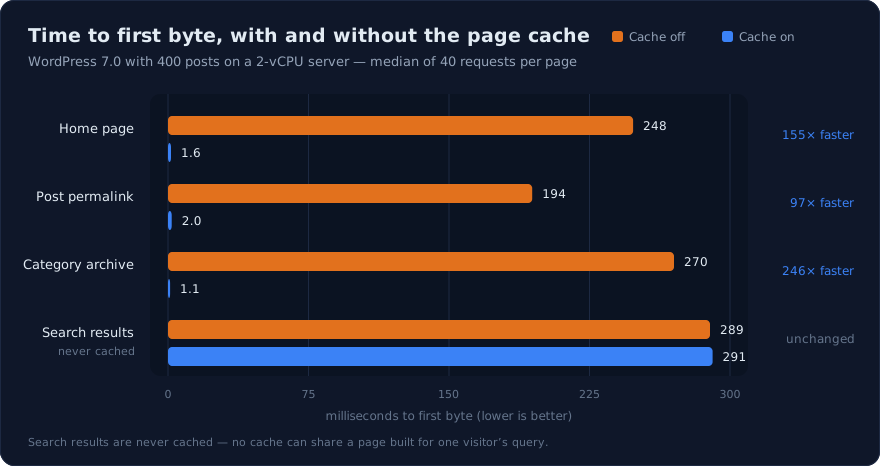
| Page | Time to first byte, cache off | Cache on |
|---|---|---|
| Home page | 248 ms | 1.6 ms |
| Post permalink | 194 ms | 2.0 ms |
| Category archive | 270 ms | 1.1 ms |
| Search results (never cached) | 289 ms | 291 ms |
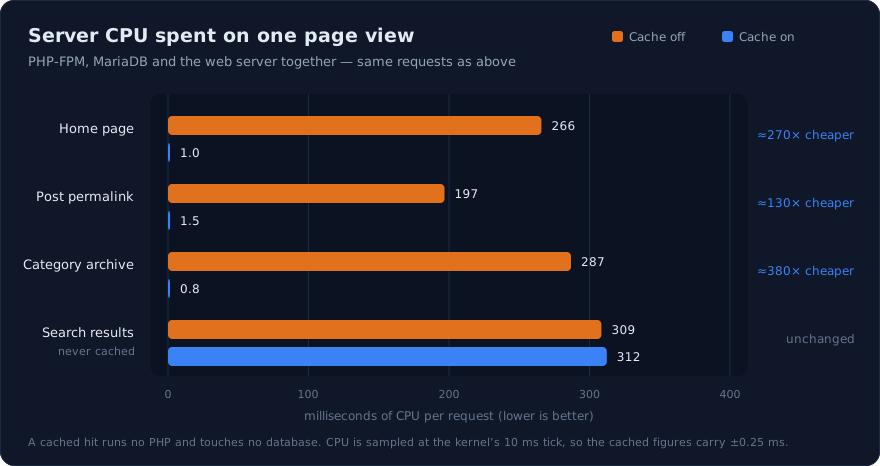
The second chart is the one that decides how much traffic a server takes, because it is what the machine actually spends: on a hit there is no PHP process, no database query and no plugin code, so a page view costs about a millisecond of CPU instead of a quarter of a second.
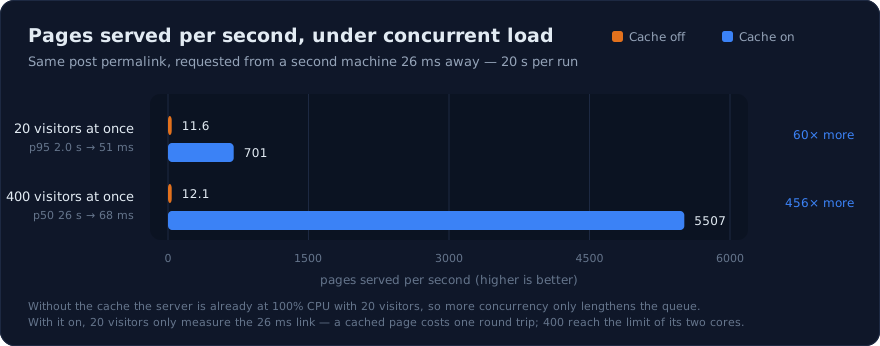
That is what turns into capacity. Requested from a second machine 26 ms away, the same post permalink:
| Concurrent visitors | Cache off | Cache on |
|---|---|---|
| 20 | 11.6 pages/s · p95 2.0 s | 701 pages/s · p95 51 ms |
| 400 | 12.1 pages/s · p50 26 s | 5,507 pages/s · p95 124 ms |
Two honest caveats. Without the cache the server is already at 100% CPU with 20 visitors, so the extra concurrency buys nothing but a longer queue — that is why the two rows agree. And with the cache on, 20 concurrent visitors do not measure the server at all: a cached page costs one round trip, so 701 pages/s is just 20 requests divided by the 26.7 ms the link itself takes. Only at 400 concurrent visitors does the box run out of cores.
Measured on corehttpd 0.7.8. Earlier builds served cached responses with
Connection: close, which cost a TCP — and over TLS a full — handshake per cached page;
the figures above are 2.8× (20 visitors) and 1.6× (400) what the same machine did before
that fix. If you are still on 0.7.7 or older, update before benchmarking.
A note if you benchmark this yourself: have the load generator request gzip and not decompress it. Our first run reported 1,512 pages/s because the client was spending its own cores on 164 MB/s of gunzip — the same server, measured without that, serves 5,507.
Your own site will land somewhere else — the ratio follows how heavy your PHP is and how much of your traffic is cacheable, which is exactly what Evaluate below is for.
The same measurement on a page builder
Section titled “The same measurement on a page builder”A second run on the same server, with the wp-test
agency fixture — Elementor and seven more plugins, 30 builder pages carrying 2,399
widgets — moves every figure in the same direction, further:
| Cache off | Cache on | |
|---|---|---|
| Home page, time to first byte | 511 ms | 0.9 ms |
| Home page, CPU per view | 516 ms | 0.7 ms |
| 20 concurrent visitors | 4.4 pages/s · p50 4.2 s | 679 pages/s · p50 27 ms |
| 400 concurrent visitors | 251 pages in 20 s, 231 requests timed out | 78,946 pages in 20 s, none refused |
A builder page costs more to produce than an ordinary post — half a second rather than a quarter — so the ratio is larger, and the ceiling without the cache is lower: four pages a second, which a modest campaign exhausts. On the cached side the two fixtures agree, because a hit is a hit whatever built it. Full method and charts in the write-up.
Evaluate before you serve
Section titled “Evaluate before you serve”The page cache has three modes, not an on/off switch:
| Mode | What happens |
|---|---|
| Off | No page caching. |
| Evaluate | The cache decides and stores exactly as it would in production, and serves none of it. Visitors get the same site they got yesterday. |
| On | Pages are served from cache. |
Evaluate exists because how much of a site is cacheable cannot be guessed from the outside. A news site and a membership site with identical traffic land in completely different places, and the difference is not visible until you measure it. Leave a site in Evaluate for a few days, then switch it on.
Leaving Evaluate is clean: everything stored while evaluating is discarded, so nothing built under rules you were still testing is ever served. The only cost is that those pages are generated once more.
The evaluation report
Section titled “The evaluation report”While a site is in Evaluate, the Optimizations section shows what the cache is finding:
- How much of the cacheable traffic would be served from cache. This is the number that says whether the cache is worth switching on.
- How much of all traffic could never be cached, as a separate figure. The two are kept apart on purpose: folding them together would produce one number that answers neither question. A shop where every visitor carries a cart is not a site with a bad cache — it is a site the cache cannot help.
- Why requests were not cacheable, by reason.
state-cookiemeans visitors are logged in or carrying a cart;no-contractmeans the companion plugin is not answering, which on a WordPress site usually means it is not installed there;set-cookiemeans the page issues a cookie of its own. - Which
Varyheader blocked, when that is the reason. This is the difference between a finding and a dead end: a language or encoding header can be handled with a cache dimension, while one that varies per visitor (Cookie) cannot be handled at all.
Emptying the cache by hand
Section titled “Emptying the cache by hand”WordPress refreshes its own cached pages as content changes, so day to day there is nothing to do. What it cannot signal is a change it never saw:
- a theme or a template edited over SFTP or in a file manager,
- a database restored underneath the site,
- a page that was cached while something was already wrong.
For those, Empty cache in the Optimizations section drops every stored page for the selected site. The button appears only while the cache is On — under Evaluate nothing is being served, and switching that mode off already discards what it stored.
corepanel cache purge example.com # the whole sitecorepanel cache purge blog.example.com / /feed # just those pagescorepanel cache purge example.com "/2026/*" # everything under a prefixTwo things are worth knowing:
- Every hostname of the site is emptied, not just the one you named. A page is stored
once per hostname a visitor arrived through, so
example.comandwww.example.comhold separate copies. The panel and the CLI both report the hostnames they reached — if one you expected is missing, it is a separate site with its own cache. - Emptying the cache is never blocked, even on a server whose licence has lapsed. The cache is a Pro feature, but pages cached while it was licensed are still on disk, and being unable to clear a wrong page is not an acceptable way to be reminded of a renewal.
Clearing the cache costs the next visitor to each page one normal, uncached page load. There is no other side effect.
What to expect
Section titled “What to expect”- A logged-in visitor is never served a cached page. Your customers editing their site see exactly what they would have seen without the cache.
- The cache does not shorten how long your content is wrong. It shortens how long each page takes. When you publish, the affected URLs are dropped immediately.
- A store or a membership site will see a smaller win than a blog, because far more of its traffic is personal to each visitor. That is the cache working correctly, not failing.
Browser cache: how long a visitor keeps a file
Section titled “Browser cache: how long a visitor keeps a file”Everything above is about what the server sends. This is about what the visitor’s browser keeps, so it does not ask again — and it needs no setting, because CorePanel decides it per file type.
| Files | Kept for |
|---|---|
Anything requested with ?ver= | 1 year, immutable |
Fonts — woff2, woff, ttf, otf, eot | 1 year |
| Images, audio and video | 30 days |
| CSS, JavaScript, PDF | 7 days |
| HTML | 1 hour |
The scale comes from one question: when you replace this file in place, under the same name, how long does a visitor keep seeing the old one? Nobody can clear a browser cache — not you, not us, not support — so each row is a promise that cannot be taken back early.
That is why the rows are not all a year, which is what most speed tools ask for. A typeface is never edited in place, so it costs nothing. A stylesheet is edited often and a stale one is a visibly broken page, so it gets a week. And HTML stays at an hour because a stale page is the failure a visitor actually notices — pages are handled by the page cache instead, on the server, where publishing an edit can genuinely clear it.
If your site versions its assets, you already have the year. WordPress does this out
of the box (style.css?ver=6.4), and so does every modern build tool. Any URL carrying
?ver= is served with a year and immutable, which tells the browser not even to
revalidate: the URL changes when the file does, so there is nothing to go stale.
Changed a file and still see the old one? Add or bump a ?ver= on it — that is the
mechanism, and it works immediately for every visitor, including the ones already holding
a copy. Renaming the file does the same.
An .htaccess asking for a different policy is not applied; see the compatibility
report for why.
A sensible order to enable things
Section titled “A sensible order to enable things”- WebP — biggest win, lowest risk, free.
- Early Hints — helps every dynamic page, free.
- Minify CSS, then Minify JS — check the site after each.
- Dynamic page cache — in Evaluate first, then on. It is last because it is the one that changes what a visitor receives, and the first three are already in place to compare against.
Measure before and after on a real page rather than trusting a single synthetic score; the Web Traffic graphs show what your server is actually serving.