API Tokens
An API token is a credential a program holds. It lets a WHMCS install, a provisioning script or a monitoring probe call CorePanel’s JSON-RPC API without a browser and without anybody’s password.
Until tokens existed the API authenticated exactly one thing — an administrator’s session cookie — so every automation story ended at the same wall. A token is the way past it.
Issuing tokens requires CorePanel Pro or Business. Listing and revoking them work on every edition.
Where the tokens live
Section titled “Where the tokens live”Server → API tokens lists every token this organisation has, revoked ones included.
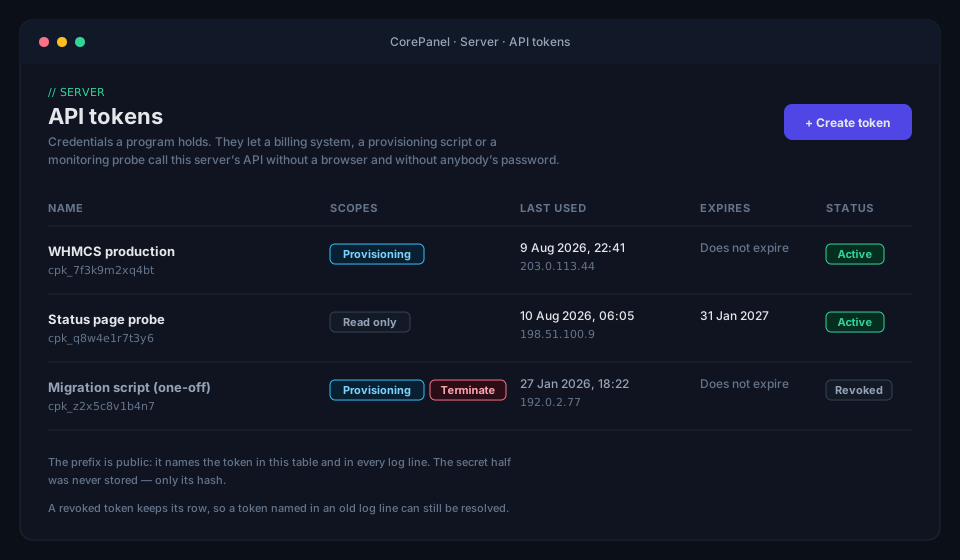
The page is available on every edition, and only super-administrators reach it.
Creating a token
Section titled “Creating a token”From the panel, Create token asks for three things: a name, the scopes, and an optional expiry. Scopes are fixed for the life of the token, so this dialog is the only moment you get to choose them.
The credential appears once, immediately after:
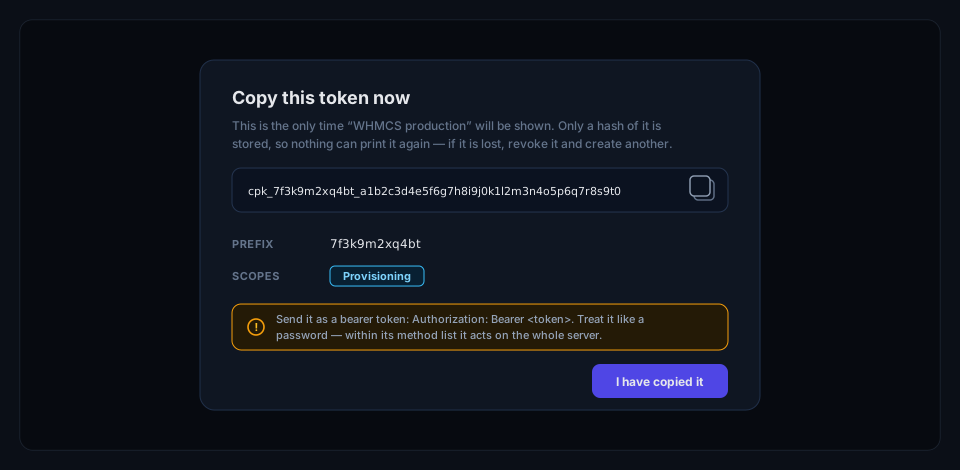
That dialog closes on the button and on nothing else — no click outside, no Escape. It is the only appearance of the credential in its readable form, and the only remedy for losing it is revoking the token and creating another.
From the command line:
corepanel api-token create "WHMCS production" --scope provisioningToken "WHMCS production" created.
cpk_7f3k9m2xq4bt_a1b2c3d4e5f6g7h8i9j0k1l2m3n4o5p6q7r8s9t0u1v2
This is the only time it will be shown. Copy it now.
id: 1 prefix: 7f3k9m2xq4bt scopes: provisioning expires: neverThe part before the last underscore (cpk_7f3k9m2xq4bt) is the prefix. It is public:
it identifies the token in the panel, in the CLI and in log lines, and it is safe to
quote in a support conversation. The rest is the secret.
Using a token
Section titled “Using a token”Send it as a bearer token to the panel’s JSON-RPC endpoint:
curl https://panel.example.com/api/rpc \ -H "Authorization: Bearer cpk_7f3k9m2xq4bt_a1b2c3d4…" \ -H "Content-Type: application/json" \ -d '{"jsonrpc":"2.0","id":1,"method":"cp.ListAccounts","params":{}}'A request that carries both a bearer token and a session cookie is treated as the token’s — which matters if you are testing an integration from a browser tab where you are also signed in. The request does what it says it does, bounded by the token’s scopes rather than by your own session.
Scopes
Section titled “Scopes”Every token carries one or more scopes, chosen when it is created and fixed for its lifetime. To change them, create a new token and revoke the old one.
| Scope | What it allows |
|---|---|
readonly | List and read. Safe for monitoring. |
provisioning | Create accounts, suspend and unsuspend them, change packages and passwords. Implies readonly. |
terminate | Delete accounts. |
terminate is separate on purpose, and it is worth using that way: a hosting provider can let
dunning run unattended with a provisioning token while cancellations stay behind a
human, by simply not granting the scope that destroys data.
What a token can reach
Section titled “What a token can reach”A token reaches a fixed list of methods and nothing else. The list is not “everything an administrator can do minus the dangerous parts” — it is an explicit set, and anything absent is refused whatever scopes the token holds.
| Method | Scope required |
|---|---|
cp.getCorePanelDetails | readonly |
cp.GetCoreCapabilities | readonly |
cp.ListAccounts | readonly |
cp.GetAccount | readonly |
cp.ListAccountDomains | readonly |
cp.ListPackages | readonly |
cp.CreateAccount | provisioning |
cp.UpdateAccount | provisioning |
cp.UpdateAccountPassword | provisioning |
cp.SuspendAccount | provisioning |
cp.UnsuspendAccount | provisioning |
cp.CreateAccountSession | provisioning |
cp.DeleteAccount | terminate |
The host firewall, the WAF, the MySQL console, backups, application environment variables and token management itself are unreachable by any token. A token cannot create another token, which is what stops a leaked credential from minting itself a wider one.
Signing a customer in from your billing system
Section titled “Signing a customer in from your billing system”cp.CreateAccountSession is the one method that does not read or write an account — it
produces a link that signs the customer in. It is what a “Log in to your hosting”
button in a billing area calls: your system asks for a link, then redirects the browser
to it, and the customer arrives in their panel having typed nothing.
{"jsonrpc":"2.0","id":1,"method":"cp.CreateAccountSession", "params":{"user":"acmecorp","client_ip":"203.0.113.44"}}user is the account — its username, any domain it owns, or its id. client_ip is
optional: give it the address of the browser you are about to redirect and the link will
only work from there. It must be an IP address — anything else is refused rather than
ignored, so a link you asked to be bound is never quietly minted unbound. The answer
carries the URL to send them to:
{"url":"https://panel.example.com/login?ott=…","token":"…", "user":"acmecorp","account_id":42,"expires_at":"2026-08-10T18:04:00Z"}Three properties are worth knowing, because they decide how you use it:
- It lasts sixty seconds. It has to survive a redirect and nothing else. Ask for the link at the moment the customer clicks, never in advance.
- It works exactly once. The server destroys it the first time it is presented, so
the copy left in a browser history or a
Refererheader opens nothing. The panel also strips it from the address bar before using it. - It is checked again on arrival. An account suspended in the seconds between minting and use cannot get in — the link does not outlive the authorisation behind it.
If the server has no hostname recorded, url comes back empty and you build your own
from token; the path is /login?ott=<token> on the panel’s address.
Who a token belongs to
Section titled “Who a token belongs to”A token belongs to the seller — the hosting organisation — not to the administrator who created it. Removing that administrator does not affect it. This is deliberate: an integration that provisions a hosting provider’s customers has to outlive whoever set it up.
In the audit trail a token names itself rather than a person. An account suspended by a
billing run is recorded as token 7f3k9m2xq4bt (seller #1), never as the administrator
who created the credential — so an operator reading the log can tell an automated action
from a human one.
Expiry and revocation
Section titled “Expiry and revocation”Tokens do not expire unless you say so. That is the right default for a billing integration: the alternative is provisioning that breaks on a date nobody wrote down.
# Expires at the end of 2026-12-31corepanel api-token create "status page" --scope readonly --expires 2026-12-31Revoking takes effect immediately, from the panel (the Revoke action on the row) or from the command line:
corepanel api-token listcorepanel api-token revoke 4The row is kept rather than deleted, so a token named in an old log line can still be resolved to what it was. Revoking a token that is already revoked succeeds — the command means “make sure this cannot be used”.
What happens when a licence lapses
Section titled “What happens when a licence lapses”An expired card, a network partition, a grace window that ran out — a server can drop to Personal while integrations are running against it. CorePanel is deliberate about what that does:
- Existing tokens keep authenticating. A licence that lapses at 3 a.m. does not stop a hosting provider’s provisioning.
- Issuing a new token is refused until the licence is restored.
- Revoking always works, on every edition.
- Individual operations degrade on their own terms. Suspension, for instance,
requires Pro or Business — so a lapsed server keeps answering
cp.ListAccountsand refusescp.SuspendAccountwith a clear reason, rather than failing everything at once.
The effect is that usage reporting and reads keep working while the paid operations stop, with an error an operator can read in their integration’s activity log.
Security notes
Section titled “Security notes”- Treat a token like a password. It is not scoped to one account: within its method list it acts on the whole server.
- Use one token per integration. They are free to create, and revoking one then costs you exactly that integration instead of all of them.
- Grant the narrowest scope that works. A monitoring probe needs
readonly; almost nothing needsterminate. - Rotate by creating first. Create the replacement, move the integration over, then revoke the old token — a token’s scopes cannot be edited in place.
Related
Section titled “Related”- CorePanel CLI — the
corepanel api-tokencommand reference - Suspending an Account — what
cp.SuspendAccountactually does - Licensing — editions and what happens when a licence lapses