How PHP Runs
Every hosting account on a CorePanel server runs PHP in its own PHP-FPM pool, as its own system user. There is no shared web user and no shared interpreter: two accounts on the same server cannot read each other’s files even when both are running the same PHP version, because the process doing the reading is the account.
This page describes that arrangement. For what PHP is allowed to touch once it is running, see PHP Isolation and Limits; for adding ionCube or any other PHP extension, see PHP Extensions and ionCube.
One pool per account
Section titled “One pool per account”When an account is created, CorePanel writes a single pool file:
/etc/opt/remi/php84/php-fpm.d/<account>.confThe pool runs as <account>:<account> and listens on a Unix socket at
/run/php84-php-fpm/<account>.sock. The web server — corehttpd
— connects to that socket and speaks FastCGI to it. It never executes PHP itself.
That distinction is the whole isolation model:
| Runs as | Can read | |
|---|---|---|
| corehttpd (the web server) | corehttpd | Any file, to serve it — but it only ever streams bytes |
| The PHP worker | <account> | Only what that account owns, and only inside open_basedir |
Account files are 0700/0600 — owner only. A PHP script therefore has exactly the
reach of the account that owns it, which is what makes shared hosting on CorePanel safe
by construction rather than by configuration.
The pool is on demand: no PHP process exists for an idle account. The first request starts a worker, and it exits again after 10 seconds of inactivity. A server with 200 mostly-idle accounts is not running 200 PHP masters — it is running one master per PHP version, with workers appearing only where there is traffic.
The PHP version is per account
Section titled “The PHP version is per account”Each account runs one PHP version, chosen when the account is created and changeable afterwards. The versions available are the ones installed on the server — see Adding a PHP version if the one you need is not there.
The version is still per account, not per domain: an account’s aliases, addon domains and subdomains all run in the one pool, and moving the account moves all of them together.
This is also why an operator installing an extension has to think in versions rather than
in accounts: php84-php-soap does nothing for a customer running PHP 8.3 — and an account
moved to 8.4 needs 8.4’s extensions installed before it gets there.
How long each version is supported
Section titled “How long each version is supported”PHP branches go out of support on a schedule, and the panel says where each one stands. Next to every version — in the account creation form, in Edit account → PHP version, and on the dashboard — you will see one of three states:
| Badge | What it means |
|---|---|
| Supported | Active support: bug fixes and security fixes. |
| Security fixes only | The branch is past active support. Security patches only, with an end date. |
| End of life | Unsupported by PHP. No security fixes upstream. |
“End of life” means end of life upstream. Remi — the repository CorePanel installs PHP from — keeps publishing builds of dead branches and backports the occasional patch, but the PHP project does not, and no packager covers that gap in full. PHP 7.4 has been out of support since November 2022 and ships on every CorePanel server, because a migrated account may still need it.
The panel warns, it does not block. An account imported from cPanel may genuinely require 7.4, and you know your customers better than the panel does. What it will not do is let the decision be made without saying so.
Accounts on unsupported PHP
Section titled “Accounts on unsupported PHP”The dashboard carries the figure that matters operationally: how many accounts are running a version that no longer receives security fixes. Each version links straight to the accounts on it, so the number turns into a work list rather than an audit you have to do account by account.
The same card reports a second, louder case: an account pinned to a version that is not installed on this server. That happens when a version is removed while accounts are still on it. Those sites are not running an old PHP — they are not running PHP at all.
The card is not shown when there is nothing to report, and it is not shown to your customers: an account holder cannot change their own PHP version, so the notice would be a worry they cannot act on.
Adding a PHP version
Section titled “Adding a PHP version”The versions on a server are not fixed. Server → PHP versions lists what is installed, how many accounts run each, and what else this server can install. Pick one, confirm, and watch it happen. The screen is super-administrator only: this installs software as root and restarts a service every account on the machine shares, so it is not a reseller’s decision.
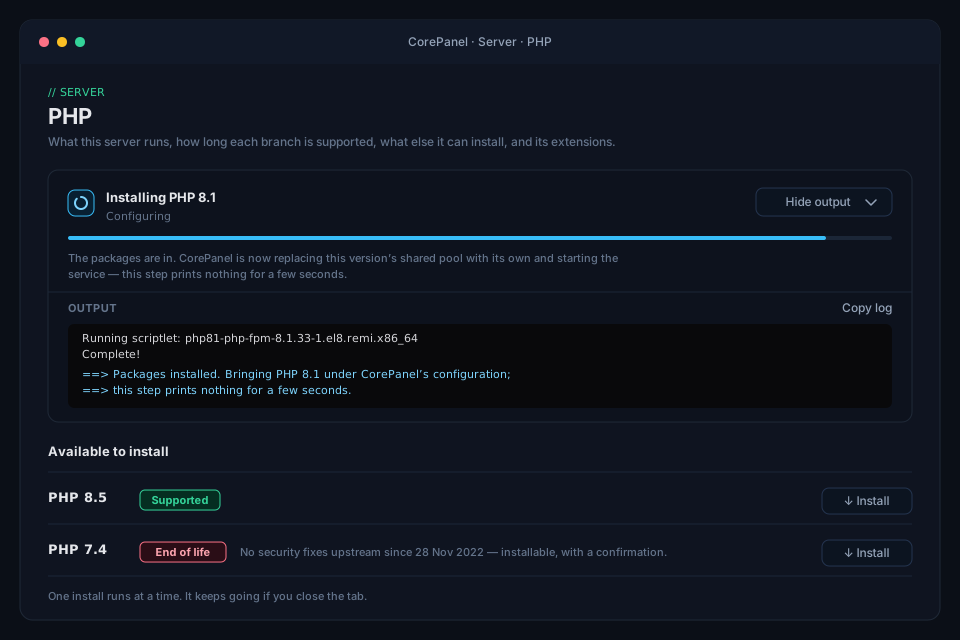
Installing a version does not move anything onto it. Accounts change one at a time, so adding 8.1 for one migrated customer costs the other accounts nothing — you assign it afterwards in Accounts → the account → Edit account → PHP version.
The list of versions on offer is fixed in the server, not read from the repository: it is what CorePanel is prepared to configure and keep configured, which is a narrower question than what a repository happens to carry. Every version on it comes with its support dates, so a branch that is out of support is visible before it is chosen — the only moment that warning is free to act on. An end-of-life version can still be installed, with a confirmation, because 7.4 is what most cPanel migrations arrive on.
What is on offer depends on the operating system, because Remi publishes old branches for some releases and not others:
| Server | Versions CorePanel can install |
|---|---|
| EL8 (AlmaLinux, Rocky, RHEL, CloudLinux 8) | 5.6, 7.0, 7.1, 7.2, 7.3, 7.4, 8.0, 8.1, 8.2, 8.3, 8.4, 8.5 |
| EL9 and EL10 | 7.4, 8.0, 8.1, 8.2, 8.3, 8.4, 8.5 |
The branches before 7.4 are there for one reason: a site migrated off cPanel that still runs on one of them keeps running on it, rather than being moved several major versions up in the same night it changes panel. They are end of life, some of them for years, and the panel badges them that way. Plan to move those sites; the migration is not the moment to do it.
Watching an install
Section titled “Watching an install”An install runs a package transaction and takes minutes, so it runs in the background and the panel follows it:
- The output is the package manager’s own, verbatim. Lines beginning
==>are CorePanel’s; everything else isdnfspeaking for itself. It is collapsed while things are going well and opens by itself if the install fails, because that is the moment it is the only thing that matters. There is a button to copy the whole log for a ticket. - You can close the tab. The install is not tied to your browser: it runs on the server and finishes whether or not anybody is watching. Come back and the version is either there or the reason it is not is in the server log.
- There is a quiet stretch near the end, and the panel says so. Once the packages are down, CorePanel replaces the version’s shared pool with its own and starts the service; on a server with SELinux that step prints nothing for several seconds. It has not hung.
- One at a time. The package database takes a lock, so a second install is refused rather than left to fail halfway — and the refusal names the version already running, including one started from the command line.
An install that fails leaves the error on screen in full. That is deliberate: the point of installing from CorePanel is not having to open an SSH session to find out what went wrong.
From the command line
Section titled “From the command line”The same install, without a browser:
corepanel php versionscorepanel php install 8.1corepanel account update acme --php 8.1corepanel php install waits for the transaction and prints the output when it ends,
rather than streaming it — it is the same install underneath, so it takes the one slot too.
Versions installed outside CorePanel
Section titled “Versions installed outside CorePanel”A PHP installed by hand — dnf install php81-php-fpm and its friends — arrives with the
distribution’s stock www pool, which:
- runs as the shared
apacheuser rather than as an account, - starts idle workers whether or not anything uses them, and
- has neither
open_basedirnordisable_functions— the one PHP on the host outside the isolation model described above.
CorePanel repairs that by itself. It checks on every start and once an hour, and any version still carrying the stock pool is brought under the same per-account pools as every other version. There is nothing to press and nothing to remember; a version installed at an SSH prompt is inside the isolation model within the hour.
On a multi-tenant server this is not treated as a preference. A PHP running as a shared
user without open_basedir is a hole in the boundary between accounts, and it is closed
whether or not anyone asks.
A version still marked Not configured in the panel therefore means something different now: not “installed by hand”, but “CorePanel tried to configure this and could not”. The server log says why. Treat the badge as a fault to investigate, not a to-do.
Which files run as PHP
Section titled “Which files run as PHP”corehttpd sends a file to PHP-FPM based on its final extension:
.php .php5 .php7 .php8 .phtmlAnything else is served as a static file.
The list is wider than just .php for a specific reason. Every cPanel-generated
.htaccess declares its handler like this:
AddHandler application/x-httpd-ea-php81 .php .php8 .phtmlSo on a cPanel server those files are PHP. An account imported from cPanel carries them, and serving one as a static file would publish its source code — database credentials included. CorePanel executes what the origin server executed.
Three details are worth knowing:
- Only the last extension counts.
backup.php.bakis a.bakfile and is served statically, not executed. Apache does the opposite — it assigns a handler from any extension a file carries, and will happily runbackup.php.bak. This is a deliberate divergence, and the safer of the two. .phpsis not executed. On Apache it means “render this file as highlighted source”, so executing it would invert what the extension means.- Matching ignores case, because Apache’s does.
Why the list is not narrower
Section titled “Why the list is not narrower”A site that never had anything but .php gets the wider list too, and that is a real
trade rather than a free win. If an application accepts uploads and filters them by
extension, a filter that blocks .php and overlooks the rest is a well-known mistake —
and on a wider list its consequence is worse.
The default is what it is because the alternative is worse in a way that is already
happening: an imported site whose .phtml files are served as static text publishes its
own source, database credentials included, to anyone who asks for the URL. That is a live
condition on real accounts, not a scenario.
The mitigations that matter are the ordinary ones, and they do not depend on this list: keep the application patched, and do not let untrusted uploads land inside a document root. A per-site override exists in the site configuration, but it is not exposed in the panel today — if you need one, ask support rather than editing the file by hand, because the web server and the account’s pool have to be changed together. If they disagree, PHP answers Access denied instead of serving the page.
PHP on the command line
Section titled “PHP on the command line”There is no global php binary on a CorePanel host, because there is no single PHP
version for the host to have. Instead, /usr/local/bin/php is a small shim (cpphp)
that resolves the invoking account’s version and execs the right Remi binary:
php -v # as an account: that account's versionThat is what makes a cPanel-style cron line work verbatim after a migration:
0 3 * * * /usr/local/bin/php /home/example/public_html/cron.phpThe shim reads a flat, root-written map file rather than asking a daemon, so
cron jobs keep running even when the panel’s services are
down. It also points the CLI at the account’s private ~/tmp, exactly like the pool
does — so a script behaves the same whether the web server or cron invoked it.
To run a specific version explicitly, call it by path:
/opt/remi/php83/root/usr/bin/php -vEach account gets its own pair, outside /home so a full account quota cannot stop
logging:
/var/log/php-fpm/users/<account>/php-access.log/var/log/php-fpm/users/<account>/php-error.logphp-error.log is where a PHP fatal error lands, and it is the first place to look when
a page returns a blank 500. Both are rotated by logrotate.
What CorePanel writes, and what is yours
Section titled “What CorePanel writes, and what is yours”CorePanel owns exactly one file per account per PHP version — the pool config above. It
does not manage php.ini and it does not manage the version’s php.d directory.
That boundary is deliberate: anything you drop into php.d is yours and survives panel
updates. What CorePanel will rewrite is the pool file, including on upgrade — the panel
normalizes the settings it owns in every existing account’s pool when the service starts,
so a hardening change reaches accounts that already exist and not only new ones. Edits
made by hand inside a CorePanel pool file can be overwritten; put them in php.d, or in
a .user.ini for a single
site.