Email Deliverability
Everything under Email → Authentication is about one domain: does example.com publish the right SPF, DKIM and DMARC records. Email deliverability asks the other half of the question, and it is about the whole machine: when this server opens a connection to Gmail or Microsoft 365, does it get accepted?
Those are different failures. A domain can have flawless SPF and still have every message refused, because the address the mail physically left from is on a blocklist, or has no reverse DNS, or the server introduced itself with a name that belongs to the hosting provider rather than to you.
The page lives at Email → Email deliverability and is available on every edition. It is administrator-only: everything on it is server-wide, and none of it is something an individual hosting account could act on.
For mail that is still waiting on the server, and the reason the receiving side gave for it, see Mail queue.
You do not have to remember to look. Whenever a check needs attention, the menu entry carries a badge with how many — amber while something is only going to cost you delivery, red once something already is. With the menu collapsed to its icon rail the badge becomes a dot on the icon, in the same two colours. No badge means every check passed the last time they were run.
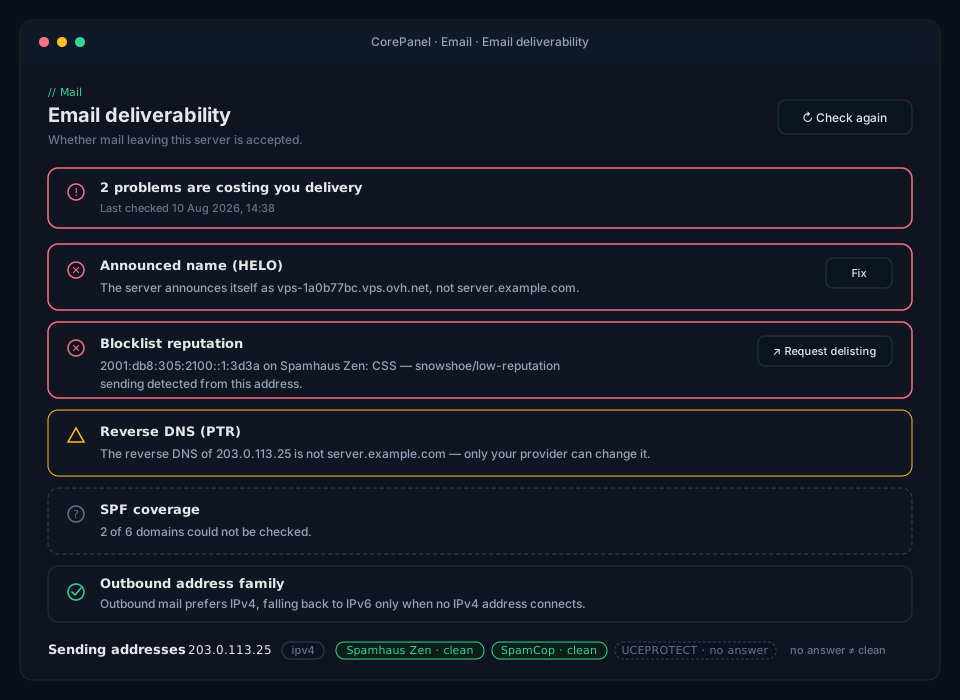
The checks
Section titled “The checks”Each one reports ok, a warning, a failure, or unknown.
Announced name (HELO)
Section titled “Announced name (HELO)”The name your server gives when it starts an SMTP conversation. CorePanel compares it with your panel domain — the one name that, by construction, resolves to this server.
Fresh servers usually fail this. The installer seeds the name from the operating system’s
hostname, which on a VPS image is something like vps-1a0b77bc.vps.ovh.net or
almalinux-2gb-nyc1-01. Receiving servers weigh that name against the reverse DNS of the
sending address and against the domain you are sending for, and a mismatch costs
reputation on every message.
Fix sets it to your panel domain and reloads Postfix.
Reverse DNS (PTR)
Section titled “Reverse DNS (PTR)”The name the sending IP address resolves back to.
- No PTR at all is a failure. Several large providers reject on it before looking at anything else.
- A PTR that does not match your HELO is a warning. It costs reputation rather than the delivery.
CorePanel cannot repair this one, and says so: the PTR of an IP address is set by whoever owns the address — your hosting provider — from their control panel, never from the server itself. Set it to the same name as the HELO.
Blocklist reputation
Section titled “Blocklist reputation”CorePanel queries Spamhaus Zen, SpamCop and UCEPROTECT Level 1 for each address your server sends from, and names the sub-list when it finds one. That matters because the work differs completely:
| Spamhaus sub-list | What it means | Who fixes it |
|---|---|---|
| PBL | The provider declares this address should not send mail directly | Your provider, or relay through a smarthost |
| CSS | Low-reputation or snowshoe sending was seen from this address | You — then request delisting |
| SBL | A spam source is or was operating on this address | You — find and stop it first |
| XBL | The address looks compromised or is running an open proxy | You — it usually means a hacked site or mailbox |
When an address is listed, the check links straight to that list’s delisting form.
”Unknown” is not “clean”
Section titled “”Unknown” is not “clean””This is the one thing worth reading carefully. Blocklists refuse to answer queries that
arrive through a public resolver — Google’s 8.8.8.8, Cloudflare’s 1.1.1.1, Quad9 — and
they refuse once a resolver goes over its daily budget. Spamhaus signals that with an
answer that looks, to careless software, exactly like a listing.
CorePanel reports it as unknown and tells you why. It never renders as a pass, because “we could not check” and “your address is fine” would send you in opposite directions. If you see it, point the server at its own resolver and check again.
Results are cached for an hour for the same reason — a page that queried on every refresh would burn through the budget and end up unable to check anything.
Outbound address family
Section titled “Outbound address family”Which of IPv4 and IPv6 your server tries first — and the setting most likely to be quietly costing you mail.
Postfix’s own default is any, which does not mean “whichever works”. It means picking
at random, per destination, whenever that destination publishes both an A and an AAAA
record. Microsoft 365, Google Workspace and most hosted filters publish both. So on a
default configuration, roughly half of your mail to those recipients leaves over IPv6.
That is a problem because of how providers hand out addresses. Your IPv4 address is yours:
you control its PTR, and your SPF records authorise it. Your IPv6 address comes out of a
block the provider assigns wholesale, often with no reverse DNS, no reputation of its own,
and — unless you published an AAAA record or an ip6: mechanism — not authorised by your
SPF either. It is a coin flip between delivery and a 550.
CorePanel installs with smtp_address_preference = ipv4, so new servers do not have
this problem, and servers installed before this existed pick it up when they update. IPv6
is still used as a fallback when no IPv4 address of a destination accepts a connection, so
nothing becomes unreachable. Use Fix to apply it, or the CLI to go back to any.
SPF, DKIM and DMARC coverage
Section titled “SPF, DKIM and DMARC coverage”A roll-up across every mail-capable domain on the server — how many publish each record — so you can see at a glance whether the gap is one domain or all of them. Per-domain editing stays where it was, under Email Authentication.
The SPF check has one extra rule worth knowing: if outbound mail may still leave over IPv6 and your SPF records do not authorise that address, it warns even when every domain has a valid record. That combination — a perfectly good SPF that does not cover the address the message actually came from — is invisible from the per-domain page.
The DKIM check reports the signer before the records: if Rspamd is not answering, nothing is being signed no matter how many domains publish a key.
From the command line
Section titled “From the command line”corepanel mail deliverability # run the checks (cached for an hour)corepanel mail deliverability --refresh # re-run everything, blocklists includedcorepanel mail deliverability repair-helo # set the HELO to the panel domaincorepanel mail deliverability prefer ipv4 # or: prefer anyThe terminal output uses [ ok ], [warn], [FAIL] and [ ? ]. As on the page,
[ ? ] means the check could not be made — not that it passed.
A worked example
Section titled “A worked example”A message to a Microsoft 365 recipient bounces with:
550 5.7.1 Service unavailable, Client host [2001:41d0:305:2100::1:3d3a]blocked using Spamhaus.Read it in order. The address in brackets is IPv6, so the message left over IPv6 —
meaning the address preference was any and the coin came up tails. That address is on
Spamhaus. The server’s IPv4 address is clean and would have delivered.
Two things to do, in this order:
- Prefer IPv4. This fixes the delivery immediately and permanently. It is the
outbound_preferencecheck. - Request delisting for the IPv6 address, from the link in the reputation check. Note
that Spamhaus lists IPv6 by
/64, so if the neighbourhood is dirty it may come back — which no longer matters once mail does not leave that way.
While you are there, the same page will very likely show a HELO still set to the provider’s generic hostname, and a PTR to match. Fixing both is worth doing: they are what the next receiving server judges you on.