Exporting an Account for cPanel
An account can leave CorePanel as well as arrive. Backup & Transfers → Import / Export →
Export for cPanel writes the account as an archive cPanel restores with its own tool,
/scripts/restorepkg — the same kind of file WHM’s Transfer or Restore a cPanel Account
takes. Export an account… opens the account picker; choose the account, optionally a
destination to copy it to, and Start export. It runs in the
background like a backup, and is listed both in that card and in the Backups tab,
marked Export for cPanel, with View report and Download archive in its menu.
Exporting is for the server’s super-administrator.
From the command line:
corepanel account backup pxdemo --format cpmove --waitOn the cPanel server, as root:
/scripts/restorepkg /home/backup-10.1.2026_14-05-09_pxdemo.tar.gzKeep the file’s name. It is backup-<date>_<user>.tar.gz, the name cPanel gives its own
account backups, and restorepkg takes the username from it: renamed, the account would
be created under whatever the new name says. Read restorepkg’s output rather than its
exit code, which is 0 even when a restore fails.
What travels
Section titled “What travels”| Travels | How it lands on cPanel |
|---|---|
| The home directory, mail included | As it was, under the same home path |
| Domains: primary, addons, aliases and subdomains | With their document roots. An addon becomes an addon on cPanel’s usual internal subdomain; an alias of an addon stays parked on that addon |
| Mailboxes, their mail and quotas | Every mailbox, on the primary domain, addons and aliases; see passwords below |
| Forwarders and catch-alls | As forwarders and the domain’s default address |
| MySQL databases, their users and grants | Users keep their passwords (see below) |
| DNS zones | The zones this server hosts, with their records — a mail provider’s DKIM records included. cPanel puts its own nameservers and SOA, and records that pointed at this server point at the cPanel server |
| Cron jobs | With the address each one mails its output to |
| Uploaded certificates | Installed on the matching site |
| SSH keys, and shell access | Keys in ~/.ssh/authorized_keys when the account has SSH access here; an account with a shell gets /bin/bash |
| Limits and package | The account’s limits; cPanel creates the package from them if it has none by that name (spaces become underscores) |
Passwords
Section titled “Passwords”The account’s password travels. cPanel checks it the same way the operating system does, and every account has its password in that form.
Other logins travel only if their password was set before the account came to CorePanel — typically a mailbox or an FTP login imported from cPanel and not changed since. A password set in CorePanel is stored in a form cPanel cannot check (argon2id), so there is nothing to carry: the mailbox or FTP login is created on cPanel, and nobody can sign in to it until it is given a new password there. A mailbox whose sign-in is disabled here travels the same way, whatever its password: turning sign-in off was a decision, and the old password must not start working again on cPanel.
Database users keep their passwords — MySQL stores them the same way on both — as long as they use MySQL’s standard password scheme. One that does not cannot be created by cPanel’s restore at all; it is left out and must be created again there.
Every login that needs a new password, or has to be created again, is listed in the export’s report.
Suspended accounts
Section titled “Suspended accounts”A suspended account arrives suspended: cPanel’s restore suspends it, so its sites, mail and cron stay off on the new server until it is unsuspended there — where the account’s own password works again.
The report
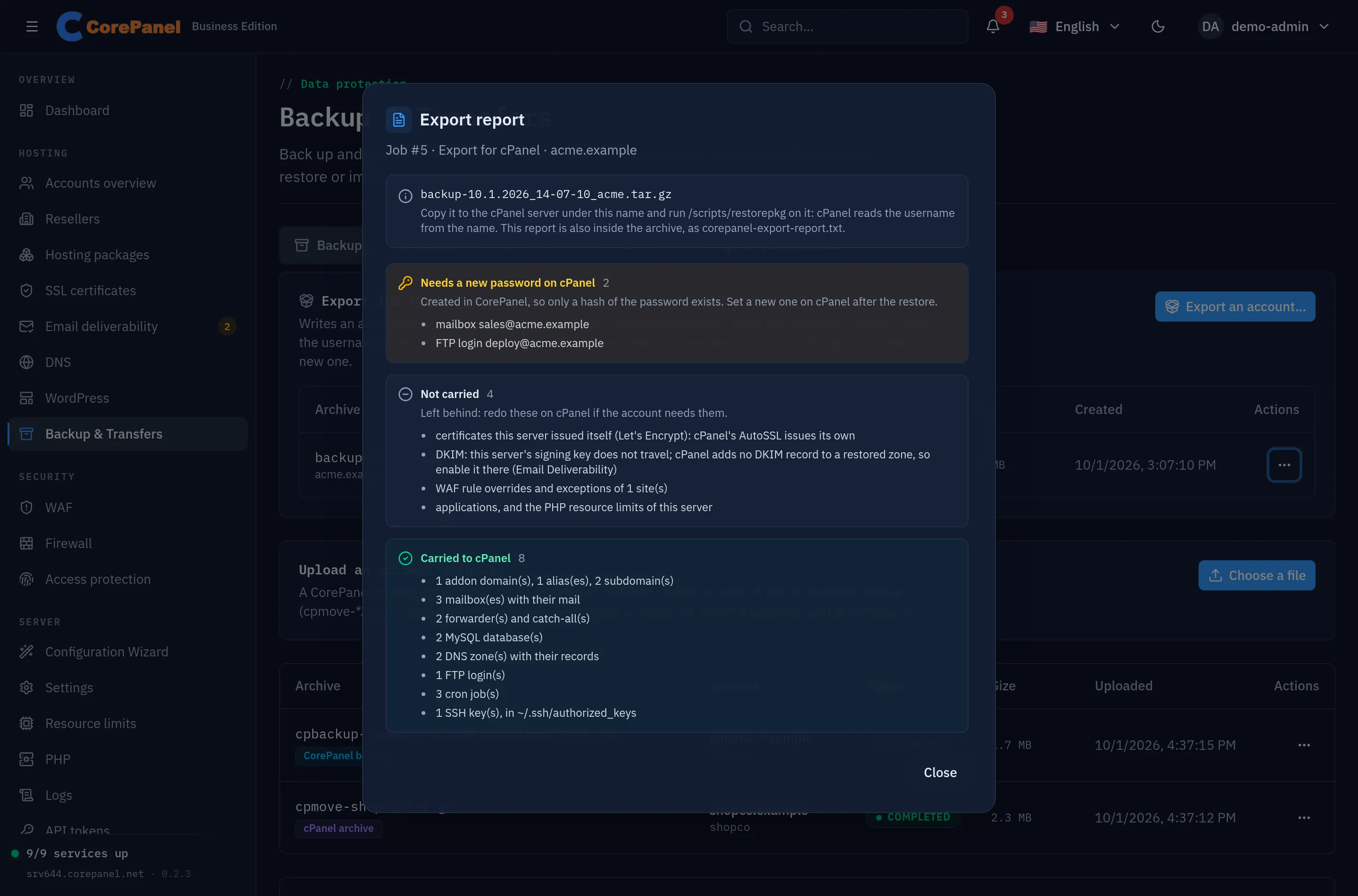
Section titled “The report”Each export carries a report — in the job’s View report and as
corepanel-export-report.txt inside the archive — with what was carried, the logins that
need a new password on cPanel, and everything that did not travel or travelled changed:
- Applications, WAF rule overrides and exceptions, web optimizations, the SSH access level and its address allowlist, and this server’s PHP resource limits: cPanel has nowhere to put them.
- DKIM: this server’s signing key does not travel — its records are left out of the zone, while a mail provider’s (Google Workspace, Microsoft 365…) stay — and cPanel adds no DKIM record to a zone it restores: turn it on in cPanel’s Email Deliverability.
- DNS zones this server does not host, and any record a zone cannot hold.
- Certificates this server issued itself (Let’s Encrypt): cPanel’s AutoSSL issues its own.
- The PHP version is carried as
ea-phpNN; if cPanel does not have that version installed, the sites use its default PHP. - A whole-domain mail redirect, disabled forwarders and FTP logins, and a cron job’s time zone, single-instance setting or resource limits. A disabled cron job travels commented out. The report names cron jobs by their schedule, not their command — commands often carry keys.
- Reseller ownership: the account arrives owned by root on cPanel.
An export is not a backup. It cannot be restored or browsed here, and no schedule’s retention counts it: the three most recent exports of each account are kept, and a fourth removes the oldest — its copy at a destination included. An export can also be deleted from its menu at any time. It never appears in the client panel either — it carries the account’s password hash, and taking an account to another panel is the administrator’s decision.