Webmail
CorePanel ships a webmail client — Roundcube — so a mailbox owner can read and send mail from a browser, without configuring anything. There is nothing to install and nothing to enable: it is part of the server from the moment CorePanel is installed, and every domain gets its own address for it.
There is nothing to create
Section titled “There is nothing to create”Webmail is provisioned with the domain, not separately. When you create a hosting account, add an addon domain or park an alias, CorePanel writes:
- a website for
webmail.<domain>, serving the webmail; - an
Arecord for thewebmailhost in the domain’s DNS zone, when CorePanel manages the DNS; webmail.<domain>into the domain’s certificate request, alongsidewww,mail,ftpandcorepanel— see SSL/TLS Certificates.
This is why webmail is a reserved label: you cannot create a subdomain called
webmail, because the domain already has one. The same goes for the account’s
subdomains.
Gets webmail.<domain> | |
|---|---|
| Primary domain | Yes |
| Addon domain | Yes |
| Alias (parked) domain | Yes — it serves the same webmail |
| Subdomain | No |
All of these addresses are served by one shared Roundcube installation. The hostname decides which certificate is presented and nothing else — it is not a separate copy per domain, and there is no per-domain configuration to maintain.
Signing in
Section titled “Signing in”Send the mailbox owner to https://webmail.<their domain>. They sign in on the
mailbox page with the mailbox address and its password, and
Open my mail takes them into Roundcube already signed in.
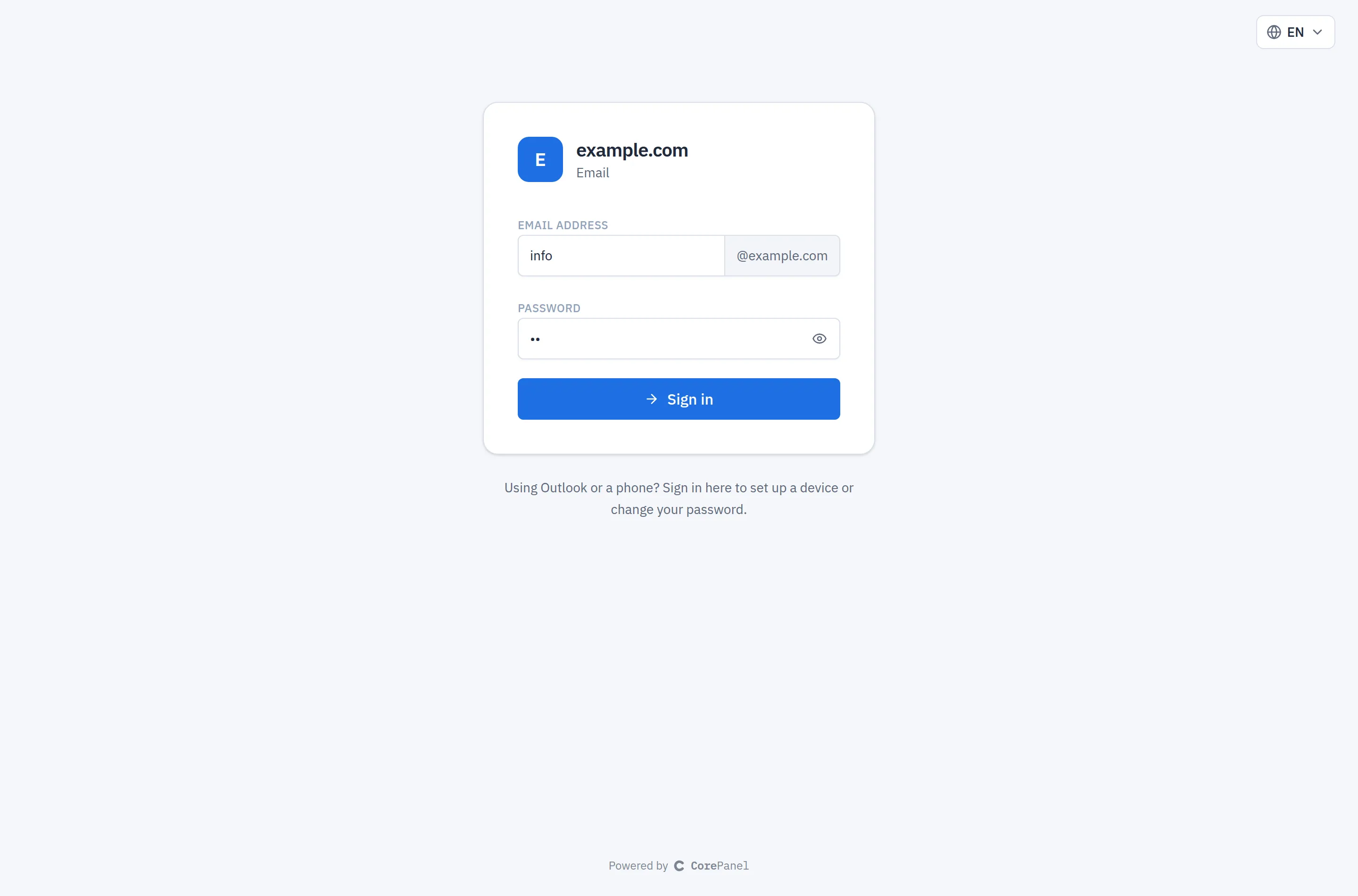
| Address | https://webmail.example.com |
| Username | Just info — the field shows @example.com after it — or the full address. On Roundcube’s own sign-in screen (see Security), only the full address |
| Password | The mailbox password (not the hosting account password) |
The webmail is a service for the people who own the mailboxes, and they do not need a panel login — only the address above.
Roundcube’s own sign-in screen is not shown any more: a visitor without a webmail session is sent to the mailbox page. Signing out of Roundcube signs out of the mailbox page too, so a shared computer is not left signed in to either.
Under the hood Roundcube reads the mail over IMAP from Dovecot on the same server, and sends through Postfix on port 587. Mail read in the webmail is the same mail seen over IMAP on a phone: folders, read state and filters are shared, because they live in the mailbox, not in the client.
The mailbox page
Section titled “The mailbox page”https://webmail.<domain> opens a page for the person who uses a mailbox (its own
address is https://webmail.<domain>/mailbox/). They sign in with the mailbox’s own
address and password, and every sign-in lands on this page — whether they came to read
mail in the browser or to change a setting for Outlook or their phone:
- Open my mail — the page’s main button, already focused, so Enter goes into Roundcube, signed in, without typing the password again.
- Usage — under the address, a bar with how much of the mailbox’s quota is in use (“1.9 GB of 2 GB”), or the size and “no limit” for a mailbox without one.
- Automatic reply — answers each sender once while the person is away: a subject, a message, optional first and last days, and how many days to wait before answering the same sender again (1 to 60, the mail server’s maximum). It is the same autoresponder the panel edits for that mailbox, so a reply set on either side shows on the other. Subject up to 200 characters, message up to 8 KB. The first and last days are the server’s calendar days. Every change made here is written to core’s log with the address.
- Rules and forwarding — sorts incoming mail as it arrives: each rule tests the From,
To, Cc or subject (contains, is exactly, or matches a pattern such as
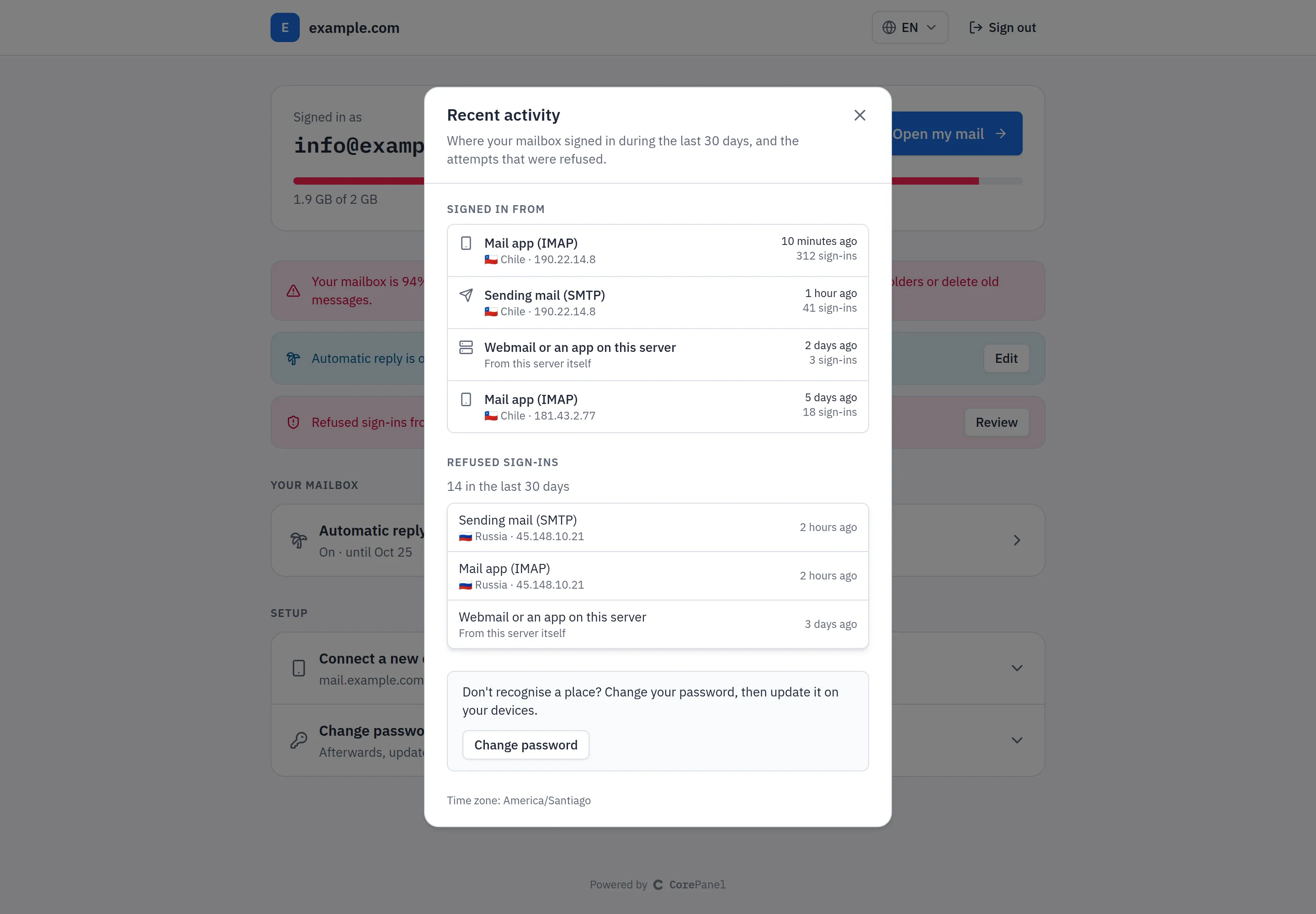
*@example.com) and then moves the message to a folder, forwards it, keeps it in the Inbox too, deletes it, or stops the rules below; they run top to bottom and can be reordered. Above them, a switch forwards a copy of every message to another address, keeping a copy here or not. They are the panel’s filters for that mailbox — one list, edited from either side. A rule the provider set that this page cannot edit, such as one that pipes to a script, is shown by its name only, with a lock, and keeps its place in the list. Mail is forwarded to at most four addresses in all, never to the mailbox itself. If the list changed somewhere else while it was open, saving reloads it instead of overwriting the other change. Every save is written to core’s log with where the mail is forwarded. - Recent activity — where the mailbox signed in during the last 30 days: one line per kind of client (mail app over IMAP or POP3, sending over SMTP) and address, with the country, the last time and how many times, followed by the refused sign-ins. A sign-in from the server itself is shown as “Webmail or an app on this server”: Roundcube signs in from there, and so would a script running on the server, and the address cannot tell them apart. It reads the server’s sign-in record (see Access Protection), limited to this mailbox’s IMAP, POP3 and SMTP sign-ins. That record is trimmed by age and by size, so on a busy mail server it may reach back less than 30 days; the page then says how many days it covers. It is left out on a server that keeps no record.
- Connect a new device — the server name, ports and username to type into Outlook,
Thunderbird or a phone, each with a copy button, plus a profile for iPhone, iPad and Mac
that sets the account up in one tap (the device asks for the password). The server name
is
mail.<domain>when the domain’s certificate covers it, and the server’s own hostname otherwise, so mail clients never warn about the certificate. - Change password — asks for the current password. Once changed, every other place signed in to this page with the old password is signed out; phones and mail clients need the new password too.
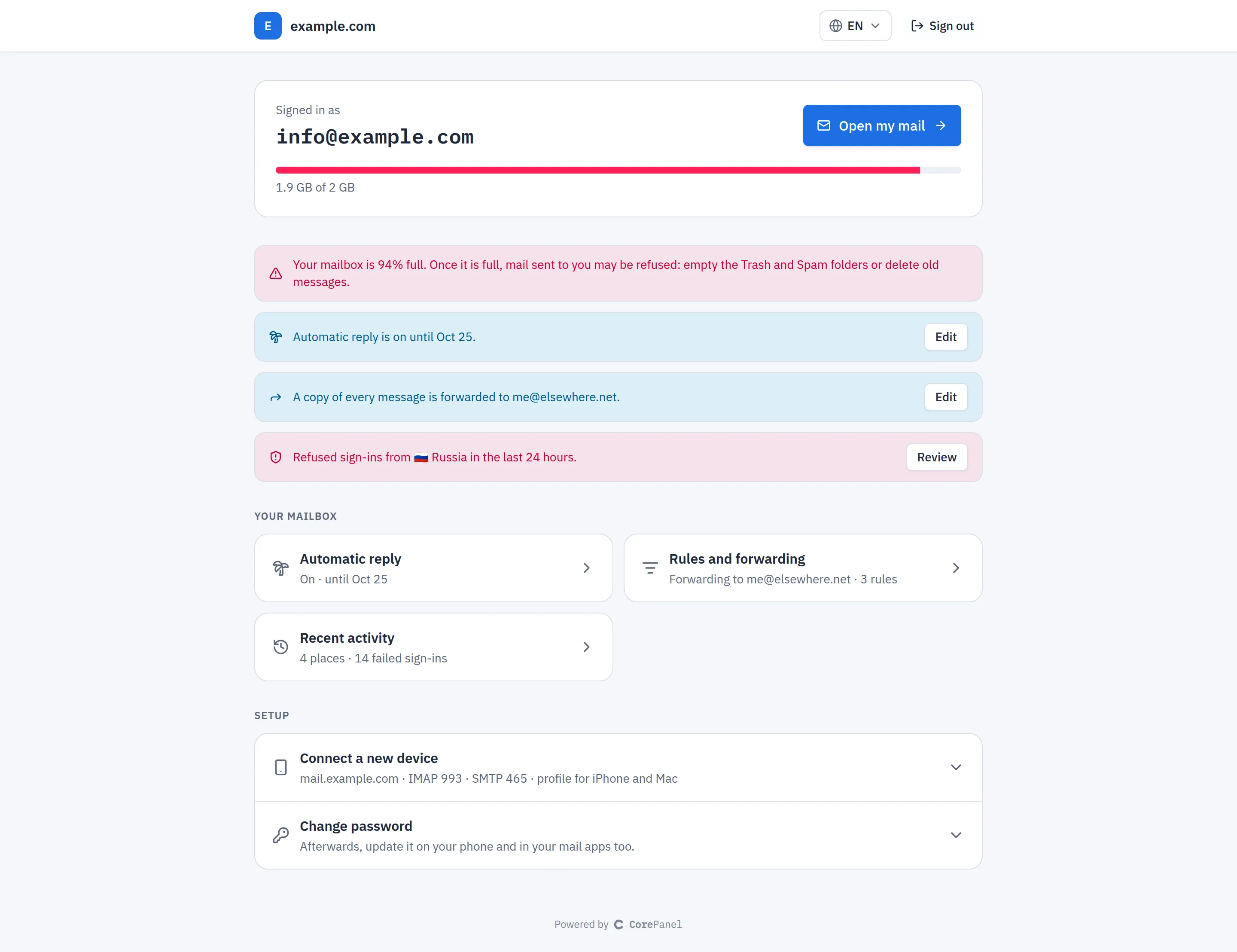
The page adapts to the mailbox rather than to settings anyone has to choose:
- Notices appear only when there is something to say: the mailbox is 90 % full or more, an automatic reply is answering right now (with its last day), or sign-ins were refused in the last 24 hours from a country the mailbox has never signed in from. A copy of every message being forwarded is said on every visit, with the address: a forward someone else set with the password would otherwise copy the mail away unseen. Each opens the view it is about.
- Connect a new device is shown open, at the top, while no mail app or phone has signed in to the mailbox in the span the record covers, and folds itself away once one has. A mailbox read only in the webmail gets a one-line “Want this mail on your phone too?” instead. On a server without a sign-in record — or with a corepanel-auth older than the page, which can hand back only its newest sign-ins — it simply stays folded, and the new-country notice is not shown either.
- A link to
https://webmail.<domain>/mailbox/#autoreply,#rulesor#activityopens that view directly.
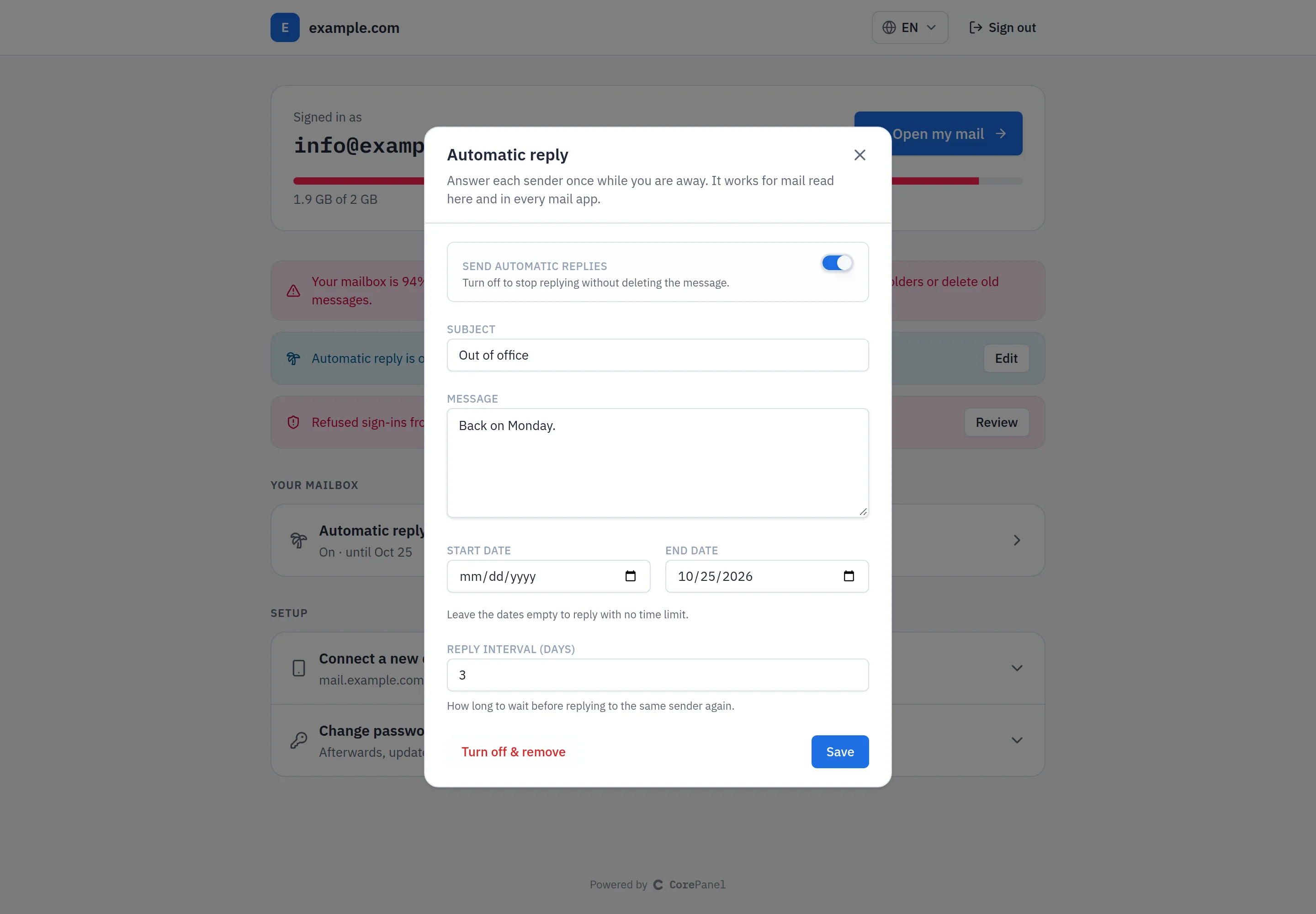
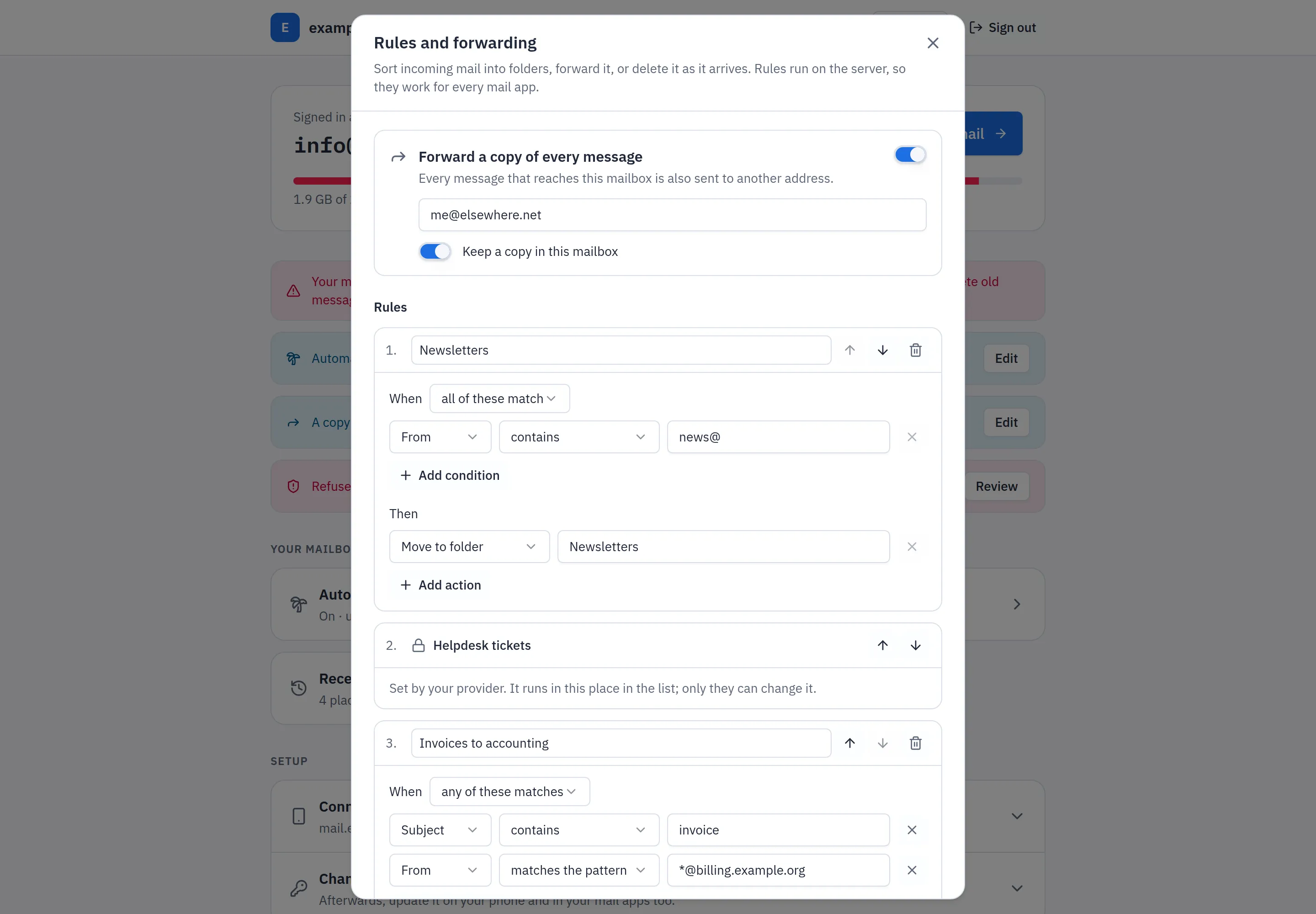
The account’s administrator can lock the rules for every mailbox of the account (see Locking the mailbox page’s rules). The page then shows them read only, with a note that the provider manages them; the rules keep running, and the automatic reply stays the mailbox user’s.
When the administrator has asked for a new password, the page shows only the change-password form — not Open my mail, not the device settings, not the automatic reply or the activity (the server refuses those too) — until one is chosen, and the server refuses to open the webmail for that mailbox until then. Mail apps, and Roundcube’s own sign-in screen, keep working with the old password meanwhile.
The page shows nothing about the hosting account and cannot reach the panel. It differs from Roundcube in two ways:
- Only addresses of that domain sign in on its
webmail.host:info@example.comsigns in atwebmail.example.com, not at another domain’s. On an alias domain’s host, the addresses of the domain it is an alias for sign in, typed with either domain. Typing only the part before the@works. - Five wrong passwords for an address within 15 minutes lock that address out of the page — counted per mailbox, however the address is typed and on whichever of its domains’ hosts — for a minute, then longer if the guessing goes on; the page counts down the wait. Roundcube and mail clients are not affected.
A mailbox the administrator has disabled, or whose sign-in is closed, cannot sign in here either: the page lets in exactly the mailboxes the mail server lets in. A mailbox of a suspended hosting account still signs in and reads its mail, as it does over IMAP, but cannot set an automatic reply or forward mail until the suspension is lifted (it can remove them, and sort its mail into folders).
The automatic reply and the rules can be saved or removed at most 20 times in 10 minutes per mailbox, together; a save the server refuses does not count.
Open my mail does not hand Roundcube the password, which the page does not keep. It hands it a one-off key for that mailbox, which the mail server accepts only from the server itself — where Roundcube runs — so a key that leaks opens nothing from anywhere else. It stops working when the webmail session goes idle for four hours, after twelve hours at most, and as soon as the mailbox password changes.
What the webmail can and cannot do
Section titled “What the webmail can and cannot do”Roundcube covers reading and writing mail: folders, search, an address book, an Archive button, and downloading several messages or attachments at once as a zip. It is deliberately kept to that.
Anything that changes the mailbox itself is done in the panel, not in the webmail:
| Where | |
|---|---|
| Change the mailbox password | The mailbox page, Panel → Email accounts, or the client panel |
| Autoresponder (out of office) | Panel → the mailbox’s workspace |
| Filters (Sieve rules) | Panel → the mailbox’s workspace |
| Quota, enabling and disabling | Panel → Email accounts |
Keeping them in one place is the point: a filter written in the panel applies to mail arriving at the server, so it works the same in the webmail, on a phone and over POP3. See Mailboxes and Forwarders.
Attachment size
Section titled “Attachment size”Roundcube accepts uploads of up to 25 MB per message. The message still has to leave through Postfix, which enforces its own limit (10 MB by default) on the whole encoded message — and attachments grow by roughly a third when encoded for mail. In practice anything much over ~7 MB of actual file is better sent as a link than as an attachment.
Security
Section titled “Security”The webmail is reachable from the whole internet, for every domain on the server. It is configured accordingly, and these defaults are visible to users, so it is worth knowing what they do:
- HTTPS is forced. A plain HTTP request to
webmail.<domain>is answered with a redirect to HTTPS, so no password travels in the clear. The redirect is only issued while that hostname has a currently valid certificate — otherwise users would be bounced to a handshake that cannot complete, which would take the webmail off the air on both ports instead of merely leaving it unencrypted. - A session is bound to the address that created it. A stolen session cookie is useless from anywhere else. The cost is real: a client whose IP address changes mid-session — a phone moving between mobile data and Wi-Fi, some ISP proxies — is signed out and has to sign in again.
- Every sign-in attempt is recorded, successful or failed, with the client’s real
address. Roundcube talks to Dovecot over loopback, so without this record every webmail
attempt would appear in the mail logs as coming from
127.0.0.1. - Only
webmail.*hostnames are answered, so the installation cannot be made to generate links pointing at somebody else’s host. - Open my mail works from the server only. The key it hands Roundcube is accepted by
the mail server only for a login from the server itself. Do not enable Dovecot’s
auth_cache: with it, a key accepted once would be answered from the cache for any address. CorePanel checks: whileauth_cache_sizeis anything but0, Open my mail sends mailbox users to Roundcube’s own sign-in, where they use their password, and the panel log says why.
Mailbox passwords are what stands between an attacker and the mail. Set strong ones — the panel generates them when you create or edit a mailbox — and check a mailbox’s Security section, or Access Protection, when something looks wrong.
A suspended account keeps its webmail: mail is still delivered and still readable, which is what you want while a billing issue is sorted out.
How it is isolated
Section titled “How it is isolated”The webmail is a PHP application exposed to the internet, so it does not run as any hosting account and cannot reach one:
- it runs as its own
roundcubesystem user, which has no shell, in its own PHP-FPM pool, separate from every account’s pool; - its PHP is confined to the Roundcube directory (
open_basedir), with the process-execution functions disabled; - temporary files, including attachments being uploaded, stay in Roundcube’s own
directory rather than the shared
/tmp, where other accounts could read them; - its small SQLite database holds preferences, contacts and caches. Messages are never stored there — they stay in the mailbox, on Dovecot.
One operational consequence: Roundcube requires PHP 8.4, so that version cannot be removed from the server while the webmail is in use. Server maintenance never removes a PHP version for exactly this kind of reason.
Troubleshooting
Section titled “Troubleshooting”| Symptom | Cause |
|---|---|
webmail.<domain> does not resolve | The A record is missing — normal when the domain’s DNS is hosted elsewhere |
| Certificate warning, or no redirect to HTTPS | No valid certificate for that hostname yet. Check the domain’s certificate status; issuance needs the name to resolve to this server |
| ”The address or the password is not correct” with the right password | The mailbox address of that domain (or just the part before the @). The hosting account username will not work, and another domain’s address signs in at that domain’s webmail |
| Signed out every few minutes | The client’s IP address is changing mid-session (mobile networks, some proxies) |
| Cannot change the password from the webmail | By design — it is changed on the mailbox page, in the panel or in the client panel |
| ”Too many attempts” on the mailbox page | Five wrong passwords for that address in 15 minutes. Wait for the time the page shows — a minute at first, up to an hour if the guessing goes on. Mail apps are not affected |
| Large attachment refused on send | The message exceeds the server’s mail size limit, not the upload limit |