WHMCS
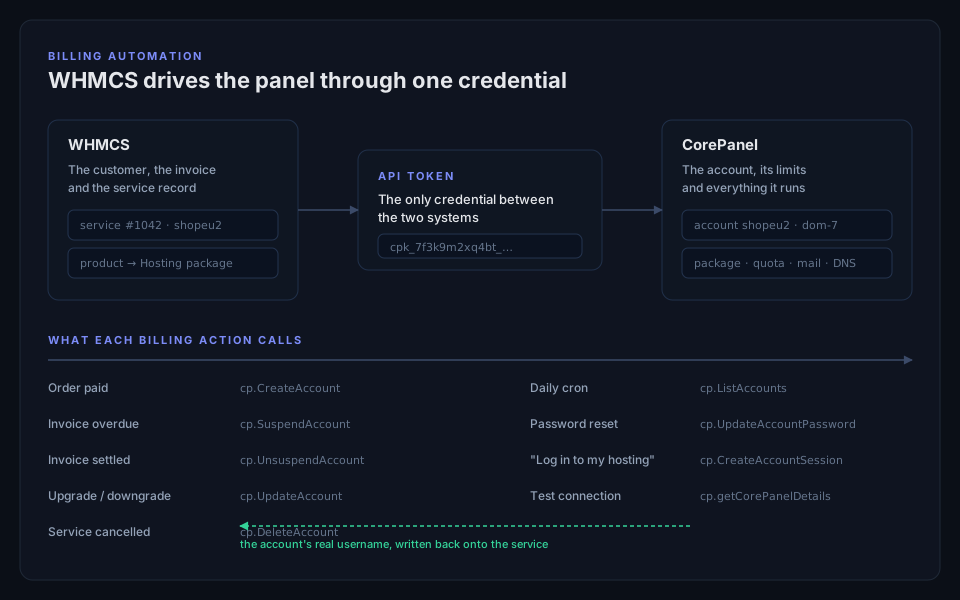
The CorePanel module for WHMCS lets your billing system run hosting accounts on its own: it creates them when an order is paid, suspends them when an invoice is overdue, lifts the suspension when it is settled, moves customers between packages, resets passwords, reports disk and bandwidth usage, and signs customers into their control panel from your client area.
It is a thin client of the panel’s JSON-RPC API — the same API the panel’s own interface speaks — authenticated with an API token. Nothing is decided in the module: what a suspension closes and what a package grants is decided by the panel, so a suspension from WHMCS and a suspension from the panel are the same act.
The module requires CorePanel Pro or Business on the server, and WHMCS 8.0 or newer.
Setting it up
Section titled “Setting it up”1. Issue a token
Section titled “1. Issue a token”In the panel, go to Server → API tokens and create one with the provisioning scope,
plus terminate if you want WHMCS to delete accounts when a service is cancelled.
corepanel api-token create "WHMCS production" --scope provisioning --scope terminateThe credential is shown once. Copy it.
2. Install the module
Section titled “2. Install the module”Download it and unzip it into your WHMCS root, so the module lands in
modules/servers/corepanel/. No other file is touched.
cd /path/to/whmcscurl -fsSLO https://get.corepanel.net/whmcs/whmcs-corepanel-latest.zipunzip whmcs-corepanel-latest.zipA specific version is at https://get.corepanel.net/whmcs/whmcs-corepanel-1.0.0.zip;
latest always points at the current one.
3. Register the server in WHMCS
Section titled “3. Register the server in WHMCS”System Settings → Servers → Add New Server:
| Field | Value |
|---|---|
| Hostname | The panel’s hostname, exactly as its TLS certificate spells it |
| Module | CorePanel |
| Access Hash | The token (cpk_…) |
| Username / Password | Leave empty — a token authenticates on its own |
Then press Test Connection. It reports the panel’s version and refuses if the server’s edition cannot do billing automation, so a licence problem surfaces now rather than on your first overdue invoice.
4. Point a product at it
Section titled “4. Point a product at it”On the product, Module Settings has two fields:
- Hosting package — the name of a package in the panel, from Server → Packages. The package decides every limit the account gets. Left empty, accounts are created with the server defaults.
- PHP version — for example
8.3. Left empty, the highest version installed on the server is used.
Limits live in the panel’s package and nowhere else. A product that repeated them in WHMCS would give you two places for the same number to be wrong.
What each action does
Section titled “What each action does”| In WHMCS | On the server |
|---|---|
| Create | Creates the account with the product’s package and PHP version |
| Suspend | Suspends the account across every plane |
| Unsuspend | Lifts it and restores what it changed |
| Terminate | Deletes the account and its data |
| Change Password | Changes the account’s panel/FTP login. Its FTP users keep their own passwords |
| Change Package | Applies the new package’s limits to the existing account |
| Usage Update | Writes each account’s disk and bandwidth back into WHMCS, once a day |
| ”Log in to the control panel” | Signs the customer in with a single-use link, valid for 60 seconds |
Things worth knowing
Section titled “Things worth knowing”The panel owns the username
Section titled “The panel owns the username”WHMCS generates a username when the order is placed; the module sends it to the panel and then writes the panel’s answer back onto the service. So the two sides always agree about who the customer is, even when the panel had to adjust the name.
Names are normalised to what the panel accepts — lowercase letters and digits, not
starting with a digit, at most 16 characters — so Shop_EU-2 becomes shopeu2. The
restriction is not cosmetic: an underscore would put two accounts into one MySQL
namespace, and a name that is all digits could not be told apart from an account id.
Retrying is safe
Section titled “Retrying is safe”Suspending an account that is already suspended, unsuspending one that is not, and terminating an account that no longer exists all report success: the state the request asked for is the state the server is in, and WHMCS retries failed actions. A refused token or an unreachable server never reports success — a cancellation that never happened must not close the service in your billing system.
TLS is always verified
Section titled “TLS is always verified”There is no option to disable certificate checking. This credential can suspend and delete every account on the server; accepting an unverified certificate would hand that to anything on the network able to answer for the hostname.
A server that still serves a self-signed certificate — a freshly installed or freshly transformed box — has to finish issuing a real one before WHMCS can drive it. Registering the server under the hostname its certificate covers is usually all it takes.
Disk usage means the account’s files
Section titled “Disk usage means the account’s files”The figure reported to WHMCS is what the account’s disk quota is checked against: the files it owns. Its MySQL databases live under the database server’s own user, where no per-account quota can see them, so they are not added in — the number has to mean the same thing as the limit printed next to it.
When the licence lapses
Section titled “When the licence lapses”Nothing about the module is disabled from our side. Each operation is checked by the panel against the server’s own entitlements, so a lapsed licence stops exactly what that edition stops and no more: reading and reporting keep working, and a refused operation comes back with the reason in your WHMCS activity log. See Licensing.
The compatibility layer
Section titled “The compatibility layer”The module above is for a new server entry in WHMCS. That is fine for a new server and wrong for an existing one: adopting it on a box you have been provisioning for years means creating a server entry, re-pointing every product and re-linking hundreds of live services — which nobody does to try a new panel.
So there is a second, entirely separate route. corepanel-whmcompat answers the
WHM API on :2087, the way cPanel’s whostmgrd did, using the hostname, the IP and
the credential your WHMCS already has. After a transform your billing system keeps
talking to the same server in the same way, and there is nothing to reconfigure.
It is a different package from the panel, and you have to ask for it:
dnf install corepanel-whmcompatcorepanel whmcompat enableIt requires CorePanel Pro or Business, like the module above: enable is refused on any
other edition, and says so. Turning it off and reading its state are never refused —
a licence that lapsed must not leave you unable to close a port you opened.
That applies to the WHM API specifically. The same package also fixes your customers’
old :2083 and :2096 bookmarks, and that part is available on every
edition — a Personal server that came from cPanel installs
corepanel-whmcompat for that alone and never enables the API at all.
enable opens the port in the host firewall too, and disable closes it — in the
corepanel zone on a server that adopted the host firewall,
in the distribution’s default zone otherwise. The command prints which one it touched:
Firewall: port 2087/tcp opened in the "public" firewall zoneWorth reading that line, because the two halves fail independently. A daemon listening
on :2087 behind a firewall that drops the traffic passes corepanel whmcompat selftest
— which runs over loopback — and is still unreachable for your WHMCS, so the only symptom
is a server WHMCS reports as down. If the line says nothing was changed, that is because
firewalld is stopped or absent on this server, and nothing is filtering the port anyway.
If you moved the API to another port in whmcompat.ini, open that one yourself: the
switch manages 2087.
The credential keeps working
Section titled “The credential keeps working”Your WHMCS holds either a WHM API token or the old access hash. Import whichever it is, once, and nothing on the WHMCS side changes:
corepanel whmcompat import-credential --user root --kind token < token.txtOnly the digest is stored. The server keeps proof of the credential, never the credential itself — SHA-512, which is exactly what cPanel stores for a WHM API token. A transform can therefore import your existing token straight from the cPanel install without anybody ever learning its value, and the WHMCS that holds the secret keeps authenticating unchanged.
Access hashes still work where they still work: a cPanel with
allow_deprecated_accesshash switched on — which any hosting provider still using one necessarily
has — authenticates the existing file unchanged, and so does this. Import both if you are
not sure which one is in use; they cost nothing side by side.
To see what a server accepts, and to stop accepting one:
corepanel whmcompat credentials # digests, labels, datescorepanel whmcompat revoke-credential --digest a9e70ee8The digest is what names a credential — a label cannot, since several can share one.
Revoking everything a user holds is --all, spelled out on purpose: an empty store
accepts nothing, which is how a server stops answering your billing system altogether.
A reseller’s own WHMCS
Section titled “A reseller’s own WHMCS”On cPanel a reseller can run their own WHMCS against your server, signed in with their own WHM credential, and WHM limits it to the accounts that reseller owns. A transform carries those credentials across with root’s, and the compatibility layer keeps that limit: a reseller’s credential acts as the CorePanel reseller of the same name, which the transform creates, and reaches only that reseller’s accounts.
What the reseller’s WHMCS sees:
listacctsandshowbwlist only their accounts, withownerset to the reseller.createacctcreates the account under the reseller and counts it against their limits. Anowner=naming anybody else,rootincluded, is refused.listpkgslists the reseller’s own plans, and the server’s plans that cPanel named<reseller>_<plan>. They can provision with those and no others.- Suspending, removing, changing a password or signing a customer in works on their own
accounts. Another reseller’s account, or one of yours, answers as if it did not exist,
and
removeaccton it is refused rather than reported as already removed.
Two things are different from cPanel:
- WHM’s per-reseller privileges are not applied. On their own accounts a reseller can
use every call the layer answers, including ones their cPanel ACLs withheld, such as
terminating an account.
myprivssays so honestly (all: 1). - A suspended reseller’s WHMCS is refused on every call, unsuspend included, until you lift the suspension.
A credential whose user is not a reseller on this server is refused on every call, with
the reason in the WHMCS Module Log. A credential also stays with the reseller it was
first used by: if you delete or rename that reseller and another one takes the name,
the old credential is refused instead of reaching the new reseller’s accounts. corepanel whmcompat credentials lists every
credential by user, and corepanel whmcompat revoke-credential removes one.
This needs corepanel-whmcompat and corepanel-core 1.10.4 or later. An older
corepanel-whmcompat serves a reseller’s credential with root’s reach; a new one on an
older core refuses resellers until core is updated. corepanel-whmcompat is not part of
the corepanel package, so check with rpm -q corepanel-whmcompat corepanel-core and
update both with dnf update 'corepanel*'.
What it answers today
Section titled “What it answers today”The compatibility layer is built against a recorded WHMCS session — a full service lifecycle captured from a real WHMCS 8.11 driving a real cPanel, request and response both — rather than against a guess at what WHMCS sends. Every row below has since been run again the other way round: through WHMCS’s own cPanel module, pointed at a CorePanel server.
| WHMCS asks for | Status |
|---|---|
| Test Connection, server version and hostname | Answered |
| The server status panel | Answered |
| The package list on a product | Answered |
| The account list and its disk and bandwidth figures | Answered |
| Create an account | Answered |
| Suspend and unsuspend | Answered |
| Change package | Answered |
| Change password | Answered |
| Terminate | Answered |
| The nightly usage update (disk, bandwidth, overage) | Answered |
| The usage bars in your client area | Answered |
| The “Log in to cPanel” button | Answered, but off until you turn it on — see below |
An action that is not implemented is refused in the shape WHMCS expects, with a reason in your Module Log. It never looks like the server being down.
The login button has its own switch
Section titled “The login button has its own switch”The “Log in to cPanel” link in your client area works over this route, and it is off until you say otherwise:
corepanel whmcompat sso enableOff by default, and off on servers that were already serving :2087 before this switch
existed — enabling the layer months ago was not consent to this.
The reason it is separate is what the capability looks like from the outside. Everything else the layer does is loud: a password change stops the customer’s own password working, a suspension takes their site down, a termination shows up in three places. A minted session is silent — it is the customer’s own session, which is exactly what makes it the right thing for that button. Most billing setups only provision and suspend and never press it.
While it is off, the button reports a reason in your client area that names the command above, so an operator who turned it off by mistake finds out from their own client area rather than from a ticket. Customers can always sign in at the panel with their account username and password, and nothing else on this route is affected.
corepanel whmcompat status prints the switch in both states, on its own line, always —
it is the one thing here that leaves no trace a customer would notice, so it has to be
readable rather than inferable:
WHM API compatibility: enabledPasswordless sign-in: disabledLegacy bookmarks: enabledThe module at the top of this page is not affected by any of this: it reaches the same feature through an API token you issued, over the port the panel already owns, and its login button works whatever this switch says.
Your customers’ bookmarks
Section titled “Your customers’ bookmarks”The rest of the old cPanel port set is a separate problem with a separate switch, and it is the one your customers notice first.
On a cPanel server, :2083 is the URL every customer has saved and :2096 is how they
reach their webmail. The day you transform the server those become a refused connection —
no page, no explanation, no clue where their panel went — for everybody at once.
corepanel whmcompat redirects enable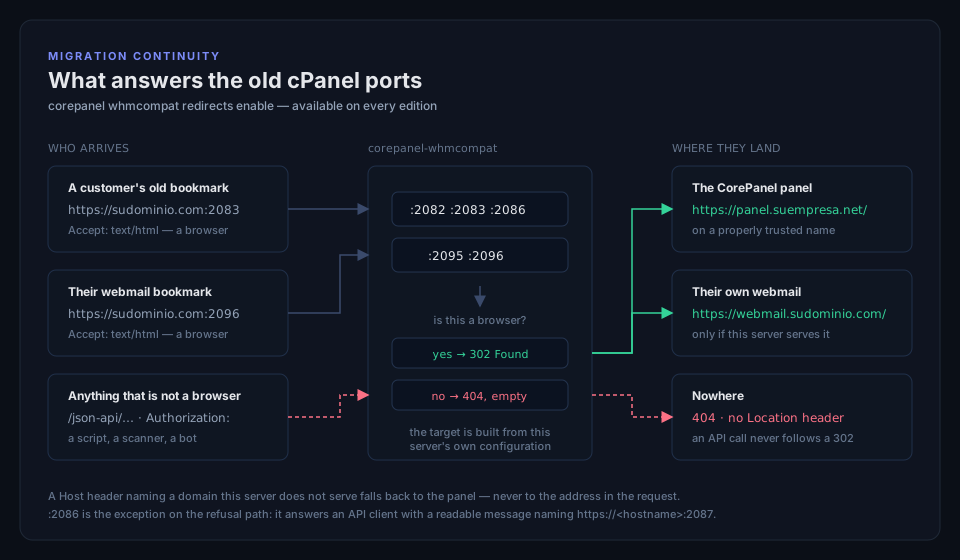
With that on, this server answers those ports and sends the browser where the thing lives now:
| Port | TLS | A browser is sent to |
|---|---|---|
| 2082 | no | the panel |
| 2083 | yes | the panel |
| 2086 | no | the panel |
| 2095 | no | webmail.<domain>, for the domain it asked for |
| 2096 | yes | webmail.<domain>, for the domain it asked for |
This one is available on every edition, unlike the WHM API above. It is not part of “WHMCS integration”: what it serves is a redirect to your own panel, it holds no credential and it reads no parameter. A Personal server that came from a transform has exactly the same broken bookmarks as a paid one, so it gets the same fix.
It is off by default all the same, including on servers already serving :2087 — five
ports on an internet-facing box is a decision you make, not something an upgrade does for
you. The switch opens and closes them in the host firewall along with everything else.
What these ports will not do, because getting this wrong is worse than not doing it:
- They never redirect something that is not a browser. A request on a
/json-api/path, or one carrying anAuthorizationheader, is never given a redirect — an automated call that follows a 302 to a login page reports whatever it finds there as success. On:2086, cPanel’s cleartext WHM API port, an API client gets a readable refusal pointing athttps://<hostname>:2087instead; the other four answer nothing at all, as they did on cPanel. - They never send a browser to an address from the request. The webmail target is
built from the
Hostheader only after the panel confirms this server serves that domain. A request naming somebody else’s domain lands on your panel. Without that check these would be an open redirect on the most-scanned ports on the server. - They never send a permanent redirect. A 301 would be cached in the browsers of people who are not your customers, outliving any later change you make.
corepanel whmcompat status names which of the five are actually bound. Fewer than five
means something else on the server is holding the rest — worth checking on a freshly
transformed box, where a leftover from the old panel is the usual cause.
Where it deliberately differs from cPanel
Section titled “Where it deliberately differs from cPanel”Five places, and they are all in the direction of not lying to you:
- Terminating an account that is already gone reports success. cPanel reports an error. WHMCS retries what fails, so copying cPanel would leave a cancelled service stuck in a retry loop over a termination that had already worked. Suspending an already-suspended account also succeeds — that one matches cPanel.
keepdnsis not honoured. Deleting an account always takes its DNS zones with it. The deletion still goes ahead, because refusing it would leave a customer hosted after they cancelled, and the answer says the zone went too.- A password change moves fewer credentials. On cPanel,
passwdrotates the system, FTP, mail and MySQL passwords together. Here it changes the account’s panel login and its Linux user — so SSH and SFTP — and deliberately leaves FTP users, mailboxes and database users alone: those are separate credentials from the moment they are created. The answer reports exactly what changed rather than cPanel’s four. - A downgrade below current usage is refused, with a reason naming each limit and what the account is actually using. cPanel would apply it. A quota silently set below current usage is how an account ends up unable to write to its own files with nothing to point at.
- Bandwidth counts web traffic, and only the current month. The figure your usage update collects is the bytes CorePanel’s web server served for that account. Mail, FTP and anything an application opens for itself are not in it yet, and neither is the protocol overhead underneath. Expect your numbers to drop after a migration — they are lower than cPanel’s, not different in units. There is also no history: a request for a past month is refused rather than answered with this month’s figures under last month’s label, so run your usage update on its normal schedule and it will never notice.
Check this side before touching WHMCS:
corepanel whmcompat selftestThat drives a real request over loopback — the port, TLS, the credential, the response envelope and the call into the panel, with nothing stubbed. When it passes, press Test Connection in WHMCS: only WHMCS proves WHMCS.
Full command reference: corepanel whmcompat.
What is not supported
Section titled “What is not supported”-
Third-party WHMCS addons. cPanel Extended and similar addons drive hundreds of per-user cPanel API calls. Neither the module nor the compatibility layer implements a per-user cPanel API, and there are no plans to.
-
Creating resellers. WHMCS cannot make one:
setupreseller, the per-reseller ACL list and setting a reseller’s limits are not implemented on either route. Resellers are created in the panel or from the CLI.Provisioning on behalf of an existing reseller does work, on the compatibility layer:
createaccthonours WHM’sowner=, so a product configured for a reseller creates the account under that reseller, and it counts against that reseller’s own ceilings — a full reseller is refused, with the wall named, exactly as the panel’s own button is refused. Anownernaming nobody on this server is refused rather than quietly reassigned to you, and the refusal lists the resellers that do exist. -
The admin’s “Log in to WHM” button. That is a different path from the customer’s: it asks for a session as
root, which is not an account on a CorePanel server, and it is answered as the missing user it is. The customer-facing login button does work — on the module always, and on the compatibility layer once you turn it on.
Troubleshooting
Section titled “Troubleshooting”Every call the module makes is recorded in Utilities → Logs → Module Log in WHMCS, with the request, the answer and the reason for any refusal. The panel’s own wording is passed through unchanged, so an error there says what the panel would have said.
That log is off by default — the page has an Enable Debug Logging button. Turn it on before reproducing a problem, and off again afterwards: it records every module on the system, not only this one.
| What you see | What it means |
|---|---|
CorePanel rejected the API token | The Access Hash is wrong, or the token was revoked in the panel |
requires the "provisioning" scope | The token was created without the scope this action needs. Scopes are fixed for a token’s life — create a new one |
The panel's TLS certificate could not be verified | The server is registered under a name the certificate does not cover, or the panel has not issued one yet |
No CorePanel account matches username "…" | The account was renamed or removed in the panel; the service in WHMCS points at a name the server does not have |
No hosting package named "…" exists | The product’s Hosting package does not match a package in the panel. The message lists the ones that do exist |
licence does not cover the operation | The server’s edition does not include this action. See Licensing |