Restoring a Backup
A full restore rebuilds an account from its archive: system user (with its original uid/gid and home path), files, databases and users, domains, subdomains, mailboxes, mail routing, FTP accounts, SSH access, cron jobs, DNS records, uploaded certificates and WAF settings. It is for an account that is gone — deleted, lost with a disk, or being moved here from another server. When the account is still there and only part of it is broken, a partial restore puts back just that part instead.
Starting a restore
Section titled “Starting a restore”In Backup & Transfers → Backups, open a backup’s menu and choose Restore from this backup. An archive uploaded from your computer has the same item in its row on the Import / Export tab.
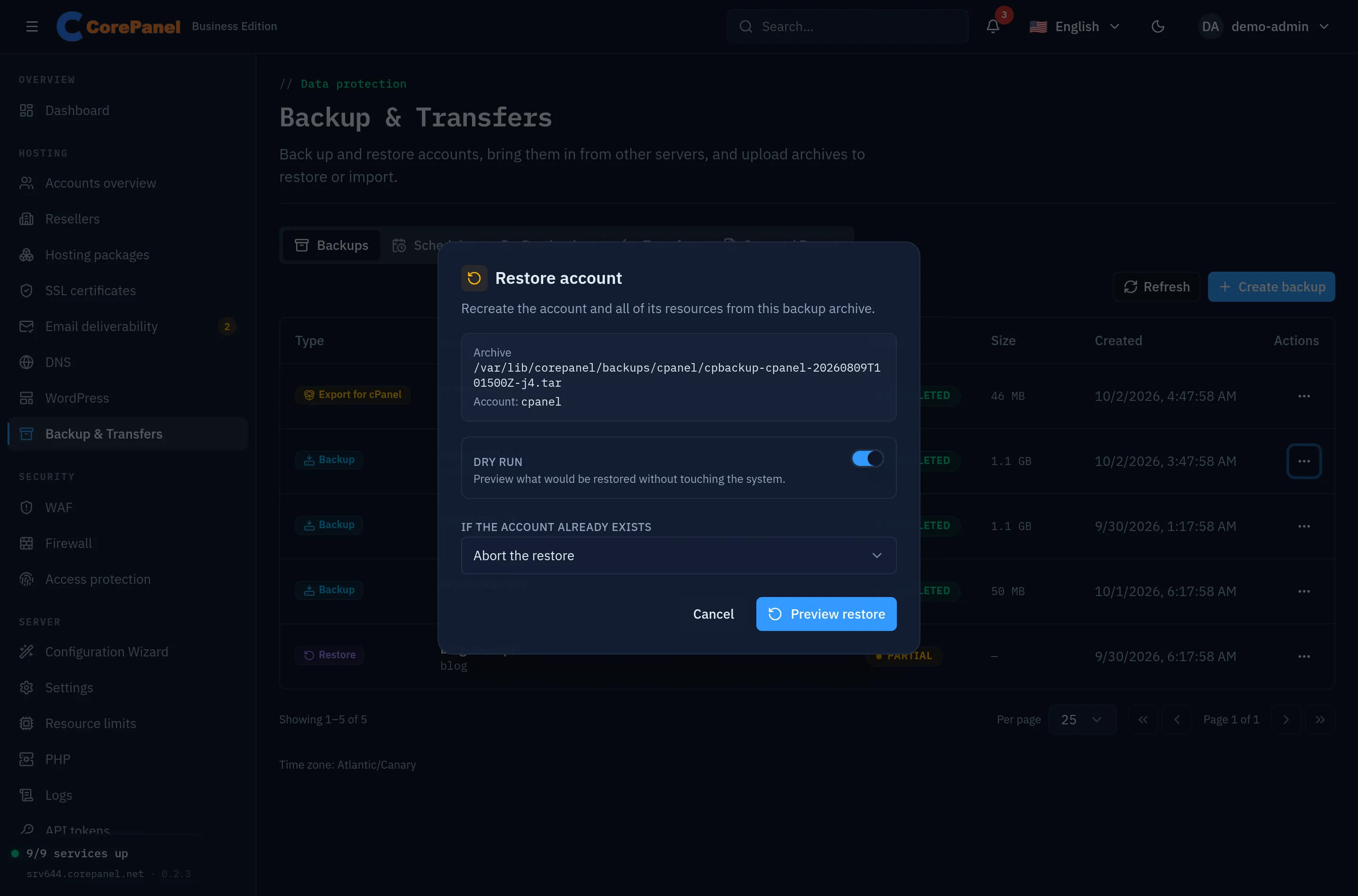
Two options shape the run:
| Option | Effect |
|---|---|
| Dry run | On by default. Reports everything the restore would do, and every conflict it would hit, without writing anything. The button reads Preview restore while it is on and Restore now once you turn it off |
| If the account already exists | Abort the restore (default) stops at the first collision; Skip restores everything that does not collide and reports the rest |
Always dry-run a restore onto a server that already hosts things. A domain name is unique across the whole server, so an existing domain is the most common collision.
The home directory is unpacked straight into the account from the archive: it is never extracted to a temporary copy first. Restoring a 200 GB account needs room for the account and the archive, not for the account twice.
From the CLI, from a path on this server or straight from a destination:
corepanel account restore <archive> --dry-run --waitcorepanel account restore --dest <destination> --remote-key <key> --waitAn archive at a destination is downloaded to a private staging directory, restored, and the download removed; the copy at the destination is left alone.
What a restore leaves out
Section titled “What a restore leaves out”Paid optimizations are not applied on an edition that does not include them. Restoring an account that used minification or the page cache onto a Personal server brings back everything else and reports what it left out — the free optimizations still come back exactly as they were. The same happens to the page cache of an alias domain, which cannot be cached at all. Uploaded certificates and per-site WAF rule overrides follow the same rule on an edition that does not include them: the site keeps the certificate the server issues itself and the server-wide WAF rules, and the report names each one.
Everything else that changes on the way in is described per resource below.
WordPress after a restore
Section titled “WordPress after a restore”A restore ends by scanning the rebuilt account for WordPress installations, so its sites are back in WordPress — not just back on disk — when the job finishes. The archive carries the sites’ files and databases but no catalog of its own, which is why the scan runs rather than being restored from the archive.
The report’s wordpress line says how many installations were cataloged. If it reads
skipped, the scan could not run: the sites themselves are unaffected and
corepanel wp scan <account> lists them.
Mail routing after a restore
Section titled “Mail routing after a restore”Forwarders, the catch-all and the whole-domain redirect are recreated after the mailboxes, in the order they were originally created. Both halves of that matter: a forwarder that keeps a copy in its own mailbox needs that mailbox to be back first, and a forwarder is checked against the ones already present, so replaying the sequence that built the routing is what rebuilds it.
A route that cannot be recreated is reported and skipped, never fatal — the restore has already brought back the account by then. There are two realistic reasons: its domain did not restore (the domain step says why), or a forwarder that delivers into its own mailbox found that mailbox suspended, which is the one state the panel does not let you create either.
Archives taken before CorePanel captured mail routing carry none, and restore without it.
Passwords after a restore
Section titled “Passwords after a restore”The account’s password — for the panel and for FTP — is preserved when the archive carries a recoverable hash, so the customer’s credentials keep working. When it does not, the account is restored with a random password and the report says a reset is required.
A mailbox or FTP login that was closed when the backup ran comes back closed. Its password is restored with it, so reopening the login later gives the owner back the one they already had — but the restore never reopens it for you, because a login somebody disabled is not something to hand back by surprise on the day of an incident. Backups taken before CorePanel recorded this restore every login active, as they always did.
MySQL users are recreated with their original credentials where the hash can be recovered. A user whose password cannot be recovered is skipped and reported rather than recreated with a random password — recreating it would silently break the application that connects with it.
SSH access after a restore
Section titled “SSH access after a restore”An archive records what the account could reach over SSH and SFTP: its access level, its authorised keys, its address allowlist and whether password login was allowed. A restore puts all of it back, so the customer connects the same way after a rebuild as before it.
The archive decides, not the hosting package. This is the part worth knowing: an account whose password login you revoked comes back revoked, and an account you had set to Off comes back off — even if its package would grant both to a new account. A restore recreates a decision somebody made; it does not re-provision a plan.
Two things change on the way back in, and the restore report says so for each account:
- A Legacy shell account comes back at its package’s level instead. Legacy marks a shell that predated SSH management on the server the account came from, and the restored account’s login shell is the one this server just created for it.
- A key this server would refuse today — a DSA key, an undersized RSA one — is refused on the way back in rather than trusted because an archive carried it. The report counts them.
A password grant is only restored while SSH brute-force protection is on, exactly as a grant you make by hand requires, and a grant that had already expired is not revived. Archives taken before CorePanel captured SSH access carry none of this; restoring one enrols the account from its hosting package, as it always did, and the report says that is what happened.
Cron jobs, DNS, certificates and WAF after a restore
Section titled “Cron jobs, DNS, certificates and WAF after a restore”These four come back after the domains, because each of them hangs off a site the restore has just recreated. Each goes through the same checks as an edit made in the panel, so an archive cannot bring in anything you could not have set by hand:
- Cron jobs are recreated with their schedule, time zone and limits, and a job that was disabled comes back disabled. The per-account limit of 100 jobs applies.
- DNS records the account added are merged into the new zones. An address that pointed at the server the archive came from is rewritten to this server’s address; one that pointed anywhere else is kept as it was.
- Uploaded certificates are validated again before they are installed. One that has expired since the backup was taken is reported and left out — the site is served with the certificate the server issues itself.
- WAF settings are re-applied per site. An exception this server refuses — one that excludes a protocol-integrity rule, which is always enforced — is dropped on its own and named in the report; the site’s other exceptions still come back.
All four only touch sites that belong to the restored account. A domain whose creation was skipped because it already existed on this server belongs to somebody else, and the restore leaves its records, certificate and WAF settings alone.
Archives taken before CorePanel captured these carry none of them, and restore without them, as they always did.
When part of a restore fails
Section titled “When part of a restore fails”View report in the job’s menu lists every resource with what happened to it. A failure in one resource does not abort the whole run: it downgrades the job to partial and is recorded in the report. You get an account that mostly came back plus an explicit list of what did not, instead of an all-or-nothing failure.
Restoring a deleted account
Section titled “Restoring a deleted account”Backup archives are not deleted when an account is deleted. That is the point of a backup: it must outlive what it describes. Restoring a deleted account is the ordinary restore flow, with no collisions to worry about.