Notifications
Every part of CorePanel reports what it does through one pipeline: certificate renewals, backups, imports, disk usage, services, WordPress installs. Before this existed those outcomes ended in a log file, which is another way of saying nobody saw them until something had already broken.
Notifications are available in every edition. This is operational hygiene, not a paid feature.
Where they show up
Section titled “Where they show up”The bell in the top bar carries the unread count and the ten most recent unread entries. Notifications in the sidebar is the full list, with filters and the delivery state of each entry.
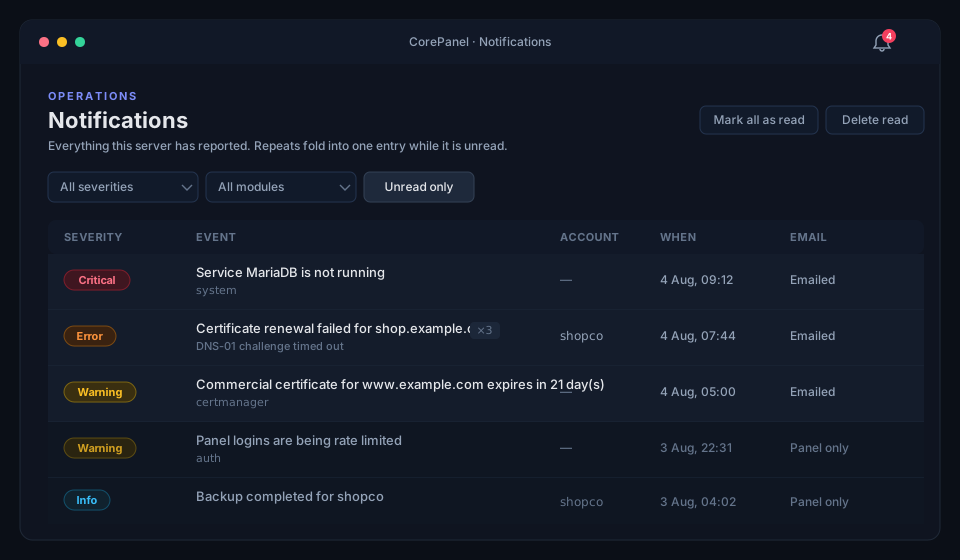
Each entry has:
| Severity | Critical, Error, Warning or Info — this is what decides how it is delivered |
| Event | What happened, plus the module it came from |
| Account | The hosting account affected, when the event is about one |
| When | The first time it happened |
| Whether it was emailed, and if not, why |
A ×N beside an event means the same thing happened N times and was folded into one
entry. Folding only happens while the entry is unread: once you have seen it, the next
occurrence is news again and gets its own row. That is what keeps a service flapping every
five minutes from producing three hundred rows overnight, without hiding the fact that it
flapped again after you looked.
Severity decides the delivery
Section titled “Severity decides the delivery”| Severity | In the panel | By email |
|---|---|---|
| Critical | ✓ | Immediately — within about a minute |
| Error | ✓ | In the next digest |
| Warning | ✓ | In the next digest |
| Info | ✓ | Never to an operator; panel only |
The last row is the deliberate asymmetry. “A backup completed” is worth having in the panel and is not worth an email to the person who runs the server — but it is exactly the mail a hosting customer wants about their own account, and that is how it is treated when the recipient is an account owner.
Who gets told
Section titled “Who gets told”An event is routed by what it is, not by which part of CorePanel produced it. Three audiences, each getting its own copy with its own read state and its own email:
| Audience | Who | Where the mail goes |
|---|---|---|
| Administrator | Whoever runs this server | The server’s administrator email |
| Reseller | The reseller that owns the affected account | The reseller’s contact email |
| Account owner | The hosting customer | The account’s owner email |
Reading an alert as the administrator does not mark it read for the customer — they have not seen it.
On Pro and Business, the account owner’s copy is not only emailed: the customer reads it in their own panel, under Notifications, and chooses there whether it is emailed to them at all — see the client panel. What they get is their own audience and nothing else; the administrator’s copy of the same event, and every event about the server itself, stays yours.
Two consequences worth knowing:
- A server-wide event reaches the administrator alone. A failed renewal on a customer’s domain concerns its owner; the same failure on the server’s own hostname certificate concerns nobody but you, and it carries no account, so that is where it stops.
- On a server with no resellers there is no reseller copy. The primary vendor’s operator is the administrator, who already has one.
Settings
Section titled “Settings”Notifications → Notification email, visible to super-administrators because these are server-wide. A hosting customer has a card of their own with the first two of these settings and neither of the last three: the digest interval and the From address belong to the server, and sending a test is an operator’s diagnostic.
- Send notification email — off keeps everything in the panel and mails none of it.
- Minimum severity — the floor that reaches your mailbox. Warning by default.
- Digest interval — hourly or daily. How often the non-critical events are bundled into a single message, grouped by module.
- Send from — the address the messages come from. Empty means
corepanel@<your server hostname>. - Send test notification — one email now, ignoring the severity policy and the rate limit. Use it before you need it.
The rate limit
Section titled “The rate limit”A recipient receives at most ten emails per hour. It counts emails, not events: a digest carrying forty entries is one email. When the cap is reached, the remaining alerts fold into that recipient’s next digest, which says how many were folded in. A runaway producer can neither flood your mailbox nor a customer’s, and one noisy account cannot consume another’s budget.
Making the email actually arrive
Section titled “Making the email actually arrive”This is the part that is not a CorePanel setting, and it decides whether the feature works for you.
A fresh VPS is a poor sender. corepanel@<hostname> with no SPF record, no DKIM
signature and no matching reverse DNS is exactly the profile Gmail and Outlook drop
silently. Your own alerts landing in your spam folder is survivable; a customer’s “your
WordPress is ready” landing in theirs makes your hosting look broken.
Three ways out, in the order most people take them:
-
Publish the records for your hostname. If the hostname’s DNS zone is on this server, CorePanel signs with DKIM and publishes SPF for you. If it is at a registrar elsewhere — the common case — add them there:
Record Name Value SPF (TXT) <hostname>v=spf1 a mx ~allPTR (at your provider) must resolve to <hostname>The PTR is set in your VPS provider’s control panel, not in DNS you host. A mismatched or missing one is the single most common reason this mail is discarded.
-
Send from a domain you already send from. Set Send from to an address on a domain with working SPF/DKIM, and the messages inherit its reputation.
-
Relay through a provider. Configure a
relayhostin Postfix (SES, Postmark, Mailgun, your own MX). This is a Postfix change, outside CorePanel, and it is the only option that gives you delivery reports.
When the mailbox is inside the account that broke
Section titled “When the mailbox is inside the account that broke”Account is out of disk space sent to an address hosted on this same server, inside that
same account, cannot be delivered — the delivery fails precisely because the alert is
true. CorePanel detects this, leaves the entry in the panel marked
“Not emailed — the mailbox is inside the affected account”, and adds a note to the
administrator’s copy. It never redirects a customer’s mail to the administrator: that
would put one customer’s operational detail in somebody else’s mailbox.
Reading the Email column
Section titled “Reading the Email column”| Shown | Meaning |
|---|---|
| Emailed | Handed to the local mail server |
| Queued | Not decided yet; the next pass (once a minute) will |
| Panel only | Below the recipient’s minimum severity — by design |
| Not emailed — no address on file | The recipient has no email address |
| Not emailed — email is turned off | The recipient disabled notification email |
| Not emailed — the mailbox is inside the affected account | See above |
| Folded into the next digest | The hourly cap was reached |
| The mail server refused it | Postfix rejected the submission — check its log |
What triggers a notification
Section titled “What triggers a notification”| Event | Severity | Who hears |
|---|---|---|
| Certificate renewal failed | Error | Administrator, reseller, owner |
| Commercial certificate expiring (30, 14, 7, 3, 1 days) | Warning | Administrator, reseller, owner |
| Backup failed | Error | Administrator, reseller |
| Backup completed | Info | Administrator, owner |
| Restore failed | Error | Administrator, reseller, owner |
| Import completed / failed | Info / Error | Administrator / Administrator, reseller — never the account owner |
| Disk nearly full (server) | Critical | Administrator |
| Service stopped running | Critical | Administrator |
| Application stopped answering | Error | Administrator, owner |
| Panel logins rate limited | Warning | Administrator |
| The WAF was turned off | Warning | Administrator |
| Repeated failed mail logins from one address | Warning | Administrator |
| WordPress installed | Info | Owner |
| WordPress install failed | Error | Administrator, reseller, owner |
| Account nearing / over its disk limit | Warning / Critical | Reseller, owner / all three |
| Account created | Info | Reseller, owner |
There is deliberately no expiry warning for automatic certificates. One about to expire either renews itself — making the warning noise — or fails to, and then “renewal failed” has already said so with the reason attached. Two alerts for the same fact train you to ignore both. Expiry warnings exist only for certificates a human has to go and buy.
The commercial one reaches the owner because, since customers install their own certificates, the customer is usually the only person who can buy the renewal. It fires on a ladder — 30, 14, 7, 3 and 1 days, then on expiry — rather than every day the certificate is inside the window, which would be thirty mails for one errand. Its wording distinguishes the two outcomes: a host with an automatic certificate underneath changes issuer, a host without one loses HTTPS. The second case is the only event in this table that keeps repeating daily until somebody acts, because it is the only one where the site is actually down.
Retention
Section titled “Retention”| Kept for | |
|---|---|
| Read notifications | 90 days |
| Unread notifications | 180 days |
| Per recipient | The 2 000 most recent |
The cap is per recipient, not per server: one busy account cannot evict every other customer’s history.
From the CLI
Section titled “From the CLI”The CLI is root-local and may therefore read every audience — which is what answers “did my customer actually get that mail?”.
# What has the server been trying to tell me?corepanel notifications list --unread
# Only the things that are actually on firecorepanel notifications list --severity critical
# Did this customer get their mail?corepanel notifications list --account john
# Prove email works before something breakscorepanel notifications testcorepanel notifications test --account john
# Clear the badgecorepanel notifications ack --all
See the CLI reference for every flag.