Files, databases and cron
These sections give the customer direct hands on their account’s content: the files in their home, the people and keys allowed to reach them, their MySQL databases and the jobs that run on a schedule. Most of them are the same screen you use, with nothing removed — anything they do there they could already do as the account’s own system user.
File manager
Section titled “File manager”Their home folder in the browser: a Places entry per site, previews, search, uploads and
downloads, an editor that checks PHP and .htaccess on save, permissions and the trash.
See File Manager.
FTP accounts
Section titled “FTP accounts”What the customer does. Adds FTP logins confined to one directory of their home — for a designer, say — changes passwords and deletes them. That is the safer alternative to sharing the account password.
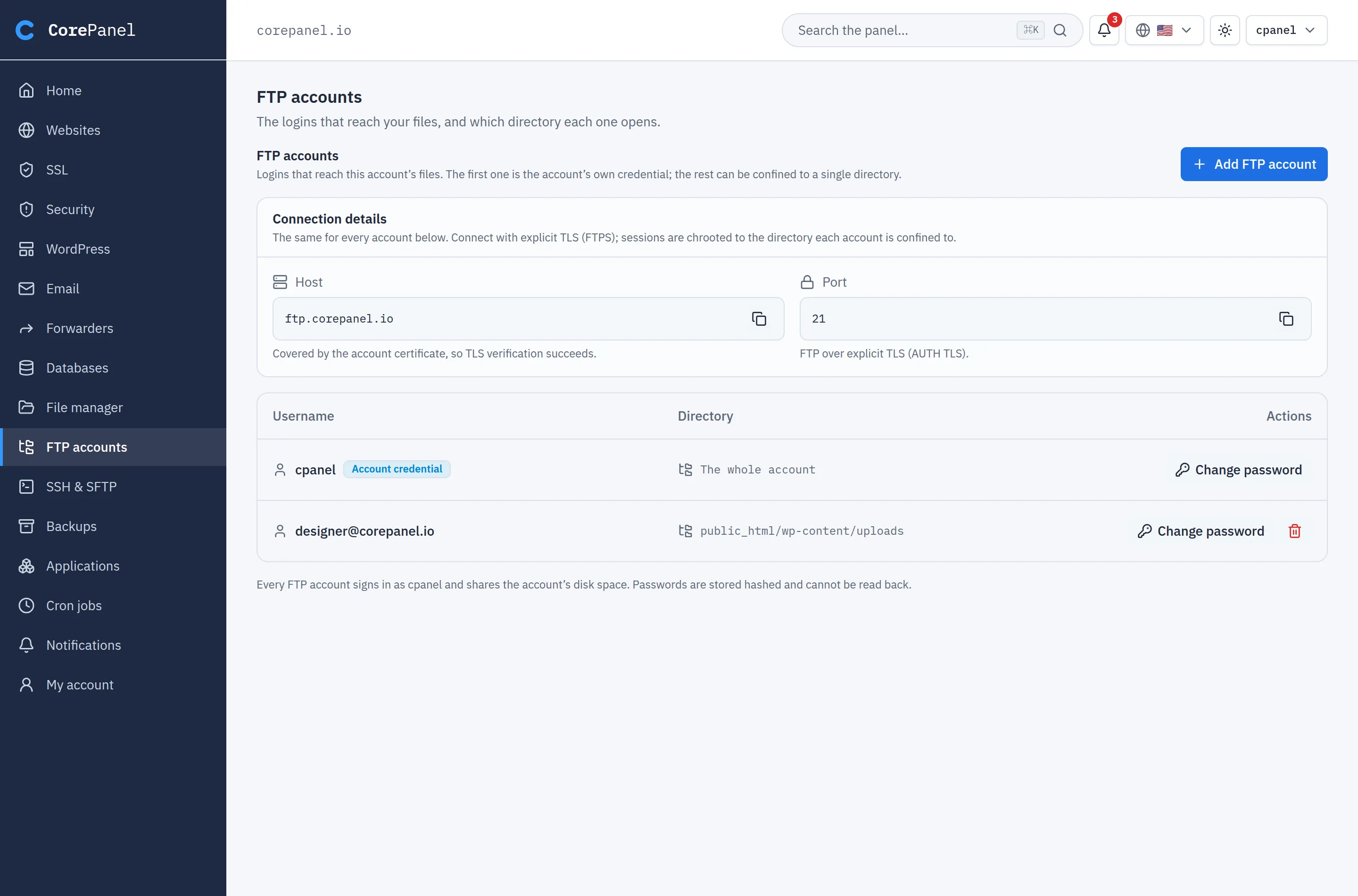
The limits, the same for you and them:
- the account credential (the login named after the system user) cannot be deleted;
- a new login is named
user@domain, with the domain checked against the account’s own; - the directory is confined to their home by the server, symlinks included.
SSH & SFTP
Section titled “SSH & SFTP”The customer manages their own keys — add, rename, remove, import from ~/.ssh — and
copies the host, port and username for their SFTP client.
The access level and password login stay with you and are shown read-only. Keys added while access is Off start working when you turn it on. See SSH access.
Databases
Section titled “Databases”What the customer does. Creates and deletes MySQL databases and users, changes passwords and privileges. Names are prefixed with the account’s username, so they never collide with a neighbour’s.
Clicking a database opens the same table manager you use: browse and edit rows, change the
structure, an SQL console, and
import and export. Import is
usually the first thing a migrating customer uses — they arrive holding a .sql file.
How it stays safe. Their console runs as a per-account MySQL user that only has privileges on their own databases, so MySQL itself refuses anything that names another schema. Queries carry a timeout and a row ceiling.
The limits:
- a dump is capped at 512 MB — moving a whole account belongs in backups;
- a MySQL user created here connects only from the server itself; remote access is yours to open;
- the Activity tab (the instance-wide process list) is yours only.
Cron jobs
Section titled “Cron jobs”The same screen you see in the account workspace: add, edit, enable, disable, delete and run a job now. Jobs run as the account’s system user, under the same per-account ceiling for both of you. See Cron Jobs.