SSL/TLS Certificates
CorePanel issues and renews SSL/TLS certificates automatically, with no manual
ACME client to run. Understanding how it issues them explains an important
operational detail: some hostnames (like mail.example.com) are secured
differently from the website, and a domain whose DNS lives on an external
provider (Cloudflare, Route 53, etc.) needs specific handling for its mail
certificate.
This page is for server administrators. It covers the issuance model, the
delegation requirement, why web and mail behave differently, and the concrete
setups that produce a valid certificate on mail.<domain>.
Issuance model: DNS-01 wildcard
Section titled “Issuance model: DNS-01 wildcard”CorePanel’s certificate manager (part of corepanel-sys) obtains certificates
from an ACME CA (Let’s Encrypt by default) using the DNS-01 challenge only.
It never uses HTTP-01.
For each domain it requests a single wildcard certificate covering the wildcard plus the apex:
*.example.comexample.comThat one certificate covers every direct hostname of the domain —
www, mail, webmail, ftp, and so on — from a single issuance. There is no
separate certificate per service hostname.
| Property | Value |
|---|---|
| Challenge type | DNS-01 (only) |
| CA | Let’s Encrypt (ACME endpoint is configurable) |
| Coverage | *.example.com + example.com |
| DNS provider | Local PowerDNS (via its HTTP API) |
| Store path | /var/lib/cp-sys/ssl/certs/<domain>/{fullchain,privkey}.pem |
| Renewal | Automatic (background worker; renews before expiry) |
The delegation requirement
Section titled “The delegation requirement”Because issuance is DNS-01 through the server’s own PowerDNS, CorePanel can only complete the challenge when it is authoritative for the domain — that is, when the domain’s nameservers are delegated to this server.
Before every DNS-01 order, the certificate manager runs an authority pre-check:
it resolves the domain’s NS records through public resolvers (Cloudflare,
Google, Quad9) and confirms they point back to this server’s configured public
IP addresses.
Subdomains inherit the delegation of the zone that holds them. api.example.com
almost never carries NS records of its own — it lives inside its parent’s zone —
so the check reads the zone name from the SOA the resolver returns and verifies
the nameservers of that zone. A subdomain of a zone delegated here counts as
delegated; a subdomain of a zone that lives elsewhere does not. The walk stops
before a bare TLD, so an unregistered domain is never mistaken for a delegated one.
When a domain is not delegated to the server, CorePanel does not fire a
failing ACME order (that would burn the CA’s failed-validation rate limit).
Instead it parks the domain and re-checks delegation every 30 minutes,
waiting indefinitely without consuming the retry budget. The moment you point
the domain’s NS at the server, the certificate is issued on the next check.
The IPs used for this check are the server’s own public IPs. They are configured
automatically during initial setup — corepanel system init detects the main
public IP (plus any additional IPs) and records them in the certificate manager.
If the server’s public IP later changes, re-run initial setup so the delegation
check compares against the correct addresses: a nameserver that resolves to an IP
not in this list is treated as not pointing here.
When the certificate is obtained
Section titled “When the certificate is obtained”CorePanel uses two independent issuance paths with different triggers. Knowing which one fires — and when — explains why a freshly added site is already on HTTPS while its mail hostname may not be.
The wildcard (DNS-01) — issued proactively when the domain is added
Section titled “The wildcard (DNS-01) — issued proactively when the domain is added”The certificate manager does not wait for a visit. The moment a domain is provisioned (account creation, or adding a domain to an account) it queues an issuance attempt in the background:
- Delegated → it publishes the
_acme-challengeTXT record in the server’s PowerDNS, waits for it to propagate, and obtains the*.example.com+ apex wildcard — typically within seconds to a couple of minutes of adding the domain, with no traffic required. As soon as it lands, every hostname (www,mail,webmail,ftp) is covered and Dovecot’s per-domain SNI block is generated. - Not delegated → no ACME order is fired. The domain is parked and re-checked
every 30 minutes; issuance happens automatically on the first re-check after
you point the domain’s
NSat the server.
There is no visit-triggered issuance for the wildcard and no manual “issue now” step: once the domain is delegated to the server, the next 30-minute delegation re-check obtains the certificate on its own.
While a domain is in that parked state the panel’s SSL view shows it as having no certificates yet — an empty list, not an error. That is the honest reading: nothing has been issued, and nothing is wrong that waiting or delegating will not fix. The same is true for the few minutes between adding a delegated domain and the first issuance landing.
The web certificate (TLS-ALPN-01) — issued on the first HTTPS request
Section titled “The web certificate (TLS-ALPN-01) — issued on the first HTTPS request”Independently, CoreHttpd obtains the website’s certificate on demand, at the first HTTPS (port 443) handshake for a hostname it serves:
- A browser opens the first
https://connection to the host. - CoreHttpd asks the CA for a certificate and answers the CA’s
acme-tls/1validation probe inside that same handshake (TLS-ALPN-01). - The original handshake then completes with the just-issued certificate — the first HTTPS hit is what triggers issuance.
That first handshake blocks for up to ~30 s while issuing. If it takes longer, the connection falls back to the default certificate and issuance continues in the background, so a retry a few seconds later succeeds. Issuance is gated to hostnames CoreHttpd actually serves (a site must exist) — the abuse guard against ACME orders for arbitrary names.
This path:
- fires on the first HTTPS request only — a plain HTTP (port 80) visit does not trigger it;
- covers the web hostname that was hit, nothing else — it never produces a
certificate for
mail.*or an FTP hostname; - needs port 443 for the host to terminate on this server (an external proxy in front breaks it — see the caution in the next section).
How the two paths combine
Section titled “How the two paths combine”For a delegated domain the wildcard usually issues before anyone visits, so the site serves its real certificate from the first hit and mail is covered by the same wildcard. For a non-delegated domain the wildcard never issues, so the website is carried entirely by the on-demand path (first HTTPS visit) while mail and FTP have no automatic certificate — the gap the next sections address.
certmanager (DNS-01) has preference: when it later issues a wildcard, that certificate takes over and owns renewal. Renewals are automatic on both paths — certmanager renews before expiry on its schedule, and CoreHttpd proactively renews its cached web certificates in the background (re-armed on startup, so a certificate issued in a previous run is renewed on schedule rather than only when traffic next arrives).
Two layers: the website vs. everything else
Section titled “Two layers: the website vs. everything else”The delegation gate matters differently for the website than for mail/FTP, because the website has an on-demand fallback and mail does not.
Website (ports 80/443)
Section titled “Website (ports 80/443)”The origin web server, CoreHttpd, obtains the website’s certificate
on demand using TLS-ALPN-01 on port 443. TLS-ALPN-01 is solved inside the
TLS handshake itself — it needs no DNS record — so the website gets a valid
certificate even when the domain is not delegated to the server, as long as
the A record points at the server.
Mail, FTP and other service hostnames
Section titled “Mail, FTP and other service hostnames”Mail (Postfix/Dovecot), FTP and other service daemons do not have an on-demand challenge. They can only present a certificate that already exists in the store — which means a DNS-01-issued certificate. There is no TLS-ALPN-01 fallback on the mail or FTP ports.
Both Dovecot and Postfix select their certificate by SNI, from the same set of names:
- For each domain that has a certificate in
/var/lib/cp-sys/ssl/certs/, the names that certificate is valid for are published — alocal_nameblock in/etc/dovecot/conf.d/99-corepanel-ssl.conffor Dovecot, an entry in thetls_server_sni_mapstable at/etc/postfix/corepanel_sni.mapfor Postfix. A*.example.comwildcard is expanded intomail.,webmail.,imap.,smtp.,pop.andpop3., because neither daemon matches wildcards in an SNI table. - Connections with no matching SNI fall back to the default host
certificate — the server’s own hostname certificate at
/var/lib/corehttpd/hostcert/, obtained by CoreHttpd and kept on that path bycorepanel-sys. That certificate is self-signed until the server’s hostname itself obtains an ACME certificate, or until one of the domain certificates on disk is found to cover the hostname; it is replaced within seconds of either.
The practical consequence: mail.example.com presents a valid certificate
only when a certificate for example.com exists in the store — i.e. only after
DNS-01 has succeeded, i.e. only when the domain is delegated to the server. If
it is not, the mail daemons fall back to the server’s host certificate, whose
name does not match mail.example.com.
Seeing the host certificate: SSL certificates → Automatic
Section titled “Seeing the host certificate: SSL certificates → Automatic”Because it belongs to no domain, the host certificate is not in the per-domain table — that table is built from certmanager’s DNS-01 store, and the host certificate comes from CoreHttpd’s own on-demand store. It has its own card at the top of SSL certificates → Automatic, above the domain selector:
- Trusted — a real certificate from a public CA. Nothing to do.
- Self-signed — CoreHttpd’s bootstrap certificate. It is written so the mail services have something rather than falling back to the distribution’s default, and it is replaced automatically once the panel’s own hostname has been served over HTTPS and its certificate issued. Every mail client connecting to this server sees a warning until then, whatever the individual domains’ certificates say.
- Expired, Missing, Unreadable — the file on
/var/lib/corehttpd/hostcert/fullchain.pemneeds looking at.
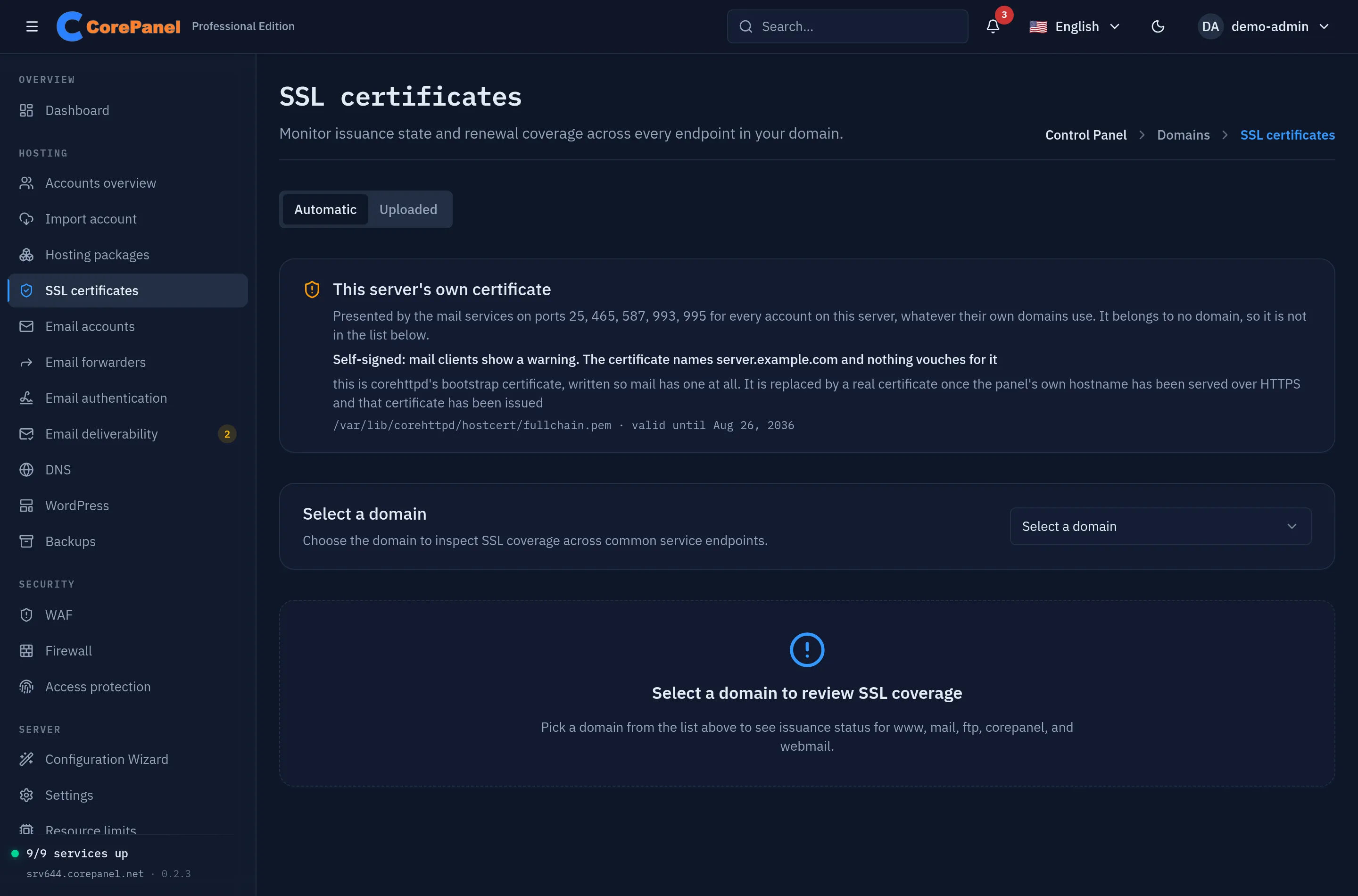
The card names the ports the certificate is served on (25, 465, 587, 993, 995) and the path it lives on, because the answer to “why is my mail untrusted” is usually one file.
If the card says self-signed on a server whose panel loads over HTTPS
without a browser warning, the promotion has not happened: visit the panel over
https:// under its own hostname, which is what triggers issuance, and the
certificate is picked up within five minutes.
Worked example: external DNS (Cloudflare) with only A + MX
Section titled “Worked example: external DNS (Cloudflare) with only A + MX”This is the common case: a customer keeps their DNS at Cloudflare and simply
adds an A record and an MX record pointing at the CorePanel server. Here is
exactly what happens:
| Endpoint | Result | Why |
|---|---|---|
example.com / www (web) | ✅ Valid certificate | CoreHttpd issues it on demand via TLS-ALPN-01 on port 443 (requires DNS-only, not proxied) |
mail.example.com (IMAP/POP3/SMTP) | ⚠️ Certificate name mismatch | No DNS-01 cert in the store (domain not delegated), so mail falls back to the server host certificate |
ftp.example.com (FTPS) | ⚠️ Certificate name mismatch | Same reason as mail |
So a Cloudflare domain with only A + MX works for the website but produces
an untrusted / name-mismatch warning in mail clients that connect to
mail.example.com. The website is fine; the mail hostname is the one that needs
attention.
Recommended setups
Section titled “Recommended setups”Choose one of the following to get a valid certificate on the mail (and FTP) hostname:
1. Delegate the domain’s DNS to CorePanel (full automation)
Section titled “1. Delegate the domain’s DNS to CorePanel (full automation)”Point the domain’s NS records at the server. Once the delegation is visible in
public DNS, the next 30-minute delegation check issues the wildcard, the
per-domain Dovecot local_name block is generated, and mail.example.com
presents a valid certificate automatically. This is the intended,
zero-maintenance path.
2. Keep external DNS, but use the server’s canonical hostname for mail
Section titled “2. Keep external DNS, but use the server’s canonical hostname for mail”If the customer must keep DNS at Cloudflare (or another external provider),
configure mail clients to use the server’s own hostname (for example
mail.yourhosting.tld) as the incoming/outgoing server, instead of
mail.customerdomain.tld. The server hostname always has a matching, valid
certificate (the host certificate), so clients connect without warnings. This is
the standard “one mail hostname for all accounts” model and needs no per-domain
delegation.
3. Migration preserves an existing certificate
Section titled “3. Migration preserves an existing certificate”When you migrate an account from cPanel, a still-valid certificate found in the
archive is imported verbatim (sys.ImportCertificate) and tracked for renewal,
so the site keeps serving TLS through the cutover without a re-issue.
Using your own certificate (commercial SSL)
Section titled “Using your own certificate (commercial SSL)”Everything above is about the certificate CorePanel issues and renews for free. Sometimes that is not the certificate you have to serve: an organisation buys an OV or EV certificate for the identity information it carries, a corporate policy names a specific CA, or a customer arrives with a certificate they have already paid for.
For those cases, upload the certificate from the panel or with
corepanel ssl upload. Installing one is available on Pro and Business;
inspecting and removing certificates works on every edition, so a lapsed licence
never traps you with a certificate you cannot take off.
Where it lives in the panel
Section titled “Where it lives in the panel”Uploaded certificates are reachable from three places:
- Accounts → the account → SSL. Under the per-domain status table, listing the certificates installed on the hosts that account owns — its domains, aliases, addons and subdomains. This is the everyday route: a customer sends you their certificate and you are already in their workspace. Super-administrators only: installing a certificate hands the server a private key and decides what every visitor of that site sees, so an administrator without the super flag does not see this block.
- The customer’s own panel → SSL. The same section, seen by the account holder. They install their own certificates on their own domains without going through you — see below.
- SSL certificates → the Uploaded tab. Every uploaded certificate on the
server, including hosts that belong to no account — the panel’s own hostname,
mail,webmail. Those are only reachable here, and so is this tab: it describes every tenant on the machine, so it is super-administrators only.
Either way the button is Install certificate. From the account it starts on that account’s primary domain, and you can change it to any of its addon domains or subdomains; from a row’s Replace, the host is fixed to that certificate’s.
Letting customers install their own
Section titled “Letting customers install their own”The person who bought the certificate is usually the customer, and they are the one who will have to buy the next one. So the client panel offers the same Install certificate button, on their own domains only, and it is on by default.
That default is the opposite of the one customer-started backups get, and the difference is what the two settings cost. A backup writes an archive to this server’s disk, outside anybody’s quota, so you have to agree to the space first. Installing a certificate spends nothing: it is a file the customer already paid a CA for, on a name they already own, validated on the way in exactly as yours is. Shipping it off would mean every OV certificate on the box arrives as a support ticket instead.
Turn it off in Server → Settings → Client panel if you would rather handle certificates yourself. What that switch does and does not do:
- It stops installing. It does not stop reading or removing — a customer who already installed a certificate must always be able to take it off, or flipping the switch would leave them holding one they can neither renew nor remove.
- It never applies to you. It is your switch, not a rule about the server.
- It cannot reach beyond the account. A customer may only name a host their own
account owns, and one hostname is excluded even from the account that owns the
zone under it: the panel’s own hostname. That name carries the server’s
identity — the
HELOPostfix announces, the certificate the panel itself is reached on — so whoever holds its certificate decides how the server presents itself to every other account. It stays yours.
How it behaves
Section titled “How it behaves”Four rules cover the whole feature, and the second is the one worth remembering:
- Your certificate wins. It is stored separately from the automatic one and is served ahead of it for that host, from the next connection on. No restart, no reload.
- A renewal never overwrites it. Nothing automatic writes to the store your certificate lives in, so there is no setting to protect and no race to lose. Meanwhile the automatic certificate underneath keeps renewing itself, which is what makes the next point work.
- Expiry degrades — as long as there is something to degrade to. A bought certificate does not renew itself. If yours lapses, the web server falls back at the next handshake to the automatic certificate, which has been renewing itself underneath all along, and the site keeps serving valid TLS under a different issuer. That safety net needs an automatic certificate to exist. See the warning below.
- Removing it is instant and safe. Deleting your certificate returns the host to the automatic one immediately. It is the way back if an installed certificate turns out to be wrong.
Getting one: the CSR
Section titled “Getting one: the CSR”Your certificate authority will ask for a CSR (certificate signing request). CorePanel does not generate it, and that is deliberate: the private key would then have to exist on the server before the certificate did, and the one property worth paying for — that the key has never been anywhere you did not put it — would be gone.
Generate the pair on any machine with openssl. The install dialog shows this
command already filled in with the hostname you typed:
openssl req -new -newkey rsa:2048 -nodes \ -keyout example.com.key -out example.com.csr \ -subj "/CN=example.com"Send the .csr to your CA and keep the .key: without it, the certificate
they issue cannot be installed anywhere. When the certificate comes back, install
it together with that key.
The step before the CSR is not CorePanel’s either, and it is worth saying plainly: your CA has to validate that you control the domain, usually by asking you to publish a DNS record or serve a file. If CorePanel manages the domain’s DNS, add the record in DNS; if the domain uses external DNS, add it wherever its zone actually lives. The file method works as soon as the domain resolves to this server.
Installing one
Section titled “Installing one”You need the certificate and its private key; whether you also need the CA bundle depends on your issuer. Some CAs append the intermediate to the certificate file, others mail it separately.
In the panel, Install certificate takes the host and those files — pasted as PEM or picked from disk — and validates everything before writing. From a shell it is one command:
corepanel ssl upload example.com \ --cert /root/example.com.crt \ --key /root/example.com.key \ --chain /root/example.com.ca-bundleApplying a renewal is the same command with the new files — it replaces the certificate in place.
The certificate is checked before anything is written, so a rejected upload leaves the site exactly as it was:
| Refused when | Why it matters |
|---|---|
| The chain does not reach a trusted CA | The classic one. Without the intermediate, the site works in the browser you test with — it cached the issuer from another site — and fails on Android and curl |
| The key does not match the certificate | Would take TLS down on the next handshake |
| The certificate does not cover the host | Name mismatch in every browser |
| It is expired, or not yet valid | Cannot secure anything |
| It is self-signed | A trust error for every visitor |
Watching expiry
Section titled “Watching expiry”The panel flags a certificate inside its 30-day window, the server logs a daily warning, and a notification goes out at 30, 14, 7, 3 and 1 days and again when it expires — five reminders rather than one a day for a month.
The notification reaches the administrator, the reseller and the account that owns the host, which is the point: since customers install their own certificates, the customer is usually the only person who can buy the renewal. Its wording follows the same distinction as the caution above — one message says the site will change issuer, the other says it will lose HTTPS — so nobody has to work out which case they are in.
The one case that keeps reminding you daily is an expired certificate with no automatic certificate underneath it: the site has no valid TLS at that point, and that stays true until somebody acts.
From a monitoring script, the exit status is enough:
corepanel ssl list >/dev/null || echo "a certificate needs attention"What it does not cover
Section titled “What it does not cover”This is for web hosts — HTTPS, and nothing else. Mail (mail.<domain>) and
FTPS keep using the automatic wildcard described earlier in this page. Installing
a web certificate does not change what Dovecot, Postfix or pure-ftpd present, on
purpose: a certificate covering example.com alone would break STARTTLS on
mail.example.com.
It is worth telling a customer this before they buy. Somebody who buys an OV certificate to stop a mail client warning will still see the warning, and the install dialog says so at the moment they are about to paste the key in.
A backup does carry the uploaded certificate: the account’s archive includes every hand-installed certificate that has not expired, and restoring the account installs it again. An expired one is left out, since it could not be installed anyway.
Operations & troubleshooting
Section titled “Operations & troubleshooting”Inspect what is actually being served
Section titled “Inspect what is actually being served”The panel surfaces per-domain certificate status through the certificate manager
(internally, the sys.GetDomainSSLStatus / sys.GetDomainSSLCertificates
JSON-RPC methods on corepanel-sys). From a shell you can inspect the live
certificates directly, which is the most reliable check:
# Web: which certificate the site presents on 443openssl s_client -connect example.com:443 -servername example.com </dev/null 2>/dev/null \  | openssl x509 -noout -subject -dates
# Mail: which certificate IMAPS presents for the mail hostnameopenssl s_client -connect mail.example.com:993 -servername mail.example.com </dev/null 2>/dev/null \  | openssl x509 -noout -subject -dates
If the mail hostname reports a subject that is the server’s hostname rather
than example.com, the domain has no per-domain certificate in the store — the
delegation gate. Confirm it:
# The domain's nameservers as seen by the public hierarchydig +short NS example.com
# Where those nameservers resolve — must match the server's public IPsdig +short A ns1.example.com
# Is there a per-domain certificate on disk at all?ls -l /var/lib/cp-sys/ssl/certs/example.com/
A domain shows a corepanel certificate and a “no website” page
Section titled “A domain shows a corepanel certificate and a “no website” page”The domain’s DNS points at this server, but the web server has no site for it.
It has no certificate for a name it does not serve, so HTTPS presents its
fallback certificate (CN=corepanel, self-signed), and after the browser
warning the visitor gets a 404 page saying There is no website for this
domain on this server. Plain HTTP shows the same page.
Nothing is wrong with SSL or Let’s Encrypt. Check which case it is:
# Prints 1 when the web server has no site for the namecurl -s -H 'Host: example.com' http://127.0.0.1/ | grep -c 'no website for this domain'-
The domain is not in the panel (never added, or its account or addon domain was removed): add it on this server, which issues its certificate on the first HTTPS request, or point its DNS at the server that does host it.
-
The domain is in the panel: its site file did not load. The reason is in the web server’s log:
Terminal window grep 'sitestore:' /var/log/corehttpd/error.log | tail
Mail client shows the wrong or untrusted certificate for mail.<domain>
Section titled “Mail client shows the wrong or untrusted certificate for mail.<domain>”This is expected when the domain is not delegated to the server (see the Worked example above); apply one of the recommended setups.
Check reading and sending separately. They are served by different daemons from different configuration, so one can be right while the other is wrong — and the symptom a user reports (“it won’t take my password”) is the same either way:
# Reading (Dovecot, IMAPS)openssl s_client -connect mail.example.com:993 -servername mail.example.com \  </dev/null 2>/dev/null | openssl x509 -noout -subject
# Sending (Postfix, submission)openssl s_client -starttls smtp -connect mail.example.com:587 -servername mail.example.com \  </dev/null 2>/dev/null | openssl x509 -noout -subject
To confirm what each daemon is configured to serve:
# Dovecot: per-domain local_name blocks + the default (host) certificatecat /etc/dovecot/conf.d/99-corepanel-ssl.conf
# Postfix: the SNI table, and that it is actually referenced from main.cfcat /etc/postfix/corepanel_sni.mappostconf -h tls_server_sni_maps
Both files are generated from one scan of the certificate store, so they should
always list the same names; if they do not, systemctl restart corepanel-sys
regenerates both. An empty tls_server_sni_maps on a server with certificates
means Postfix is older than 3.4 — check postconf mail_version and the
corepanel-sys journal for the warning.
When a certificate is issued, CorePanel regenerates both files and reloads
Postfix and Dovecot automatically (internally, via sys.ReloadMailTLS), so a
valid mail.<domain> certificate is picked up without manual steps. To force the
running daemons to re-read their configuration yourself:
systemctl reload dovecot postfix