PHP Isolation and Limits
How PHP Runs covers who executes PHP — the account’s own system user, in its own pool. This page covers what that process is allowed to do once it is running, and what a site owner can change.
Everything here is written into the account’s pool file by CorePanel, and re-applied to
existing accounts when corepanel-sys starts. You do not configure it per account; you
inherit it.
Where PHP can read and write
Section titled “Where PHP can read and write”open_basedir confines every file operation to the account’s own trees:
| Path | What it is |
|---|---|
~/public_html | The primary domain’s document root, shared with its aliases |
~/domains | One directory per addon domain and subdomain |
~/tmp | The account’s private temporary directory (below) |
Everything else in the home directory is outside PHP’s reach — ~/mail,
~/backups, ~/.ssh — and so is the rest of the filesystem. A script that tries dies
with open_basedir restriction in effect, which is the message to look for when a plugin
that works elsewhere fails here.
The private temporary directory
Section titled “The private temporary directory”/tmp is shared by every account on the server. CorePanel does not let PHP use it.
Instead each account gets ~/tmp — mode 0700, owned by the account — and all four
settings that decide where PHP puts temporary files point at it:
| Setting | Covers |
|---|---|
sys_temp_dir | sys_get_temp_dir(), tempnam(), tmpfile() |
upload_tmp_dir | Multipart file uploads in flight |
session.save_path | Session files |
open_basedir | Excludes /tmp entirely, so nothing can reach it |
The fourth is what makes the other three complete. Setting only upload_tmp_dir and
session.save_path — the usual advice — leaves sys_get_temp_dir() pointing at the
shared /tmp, and that path is used by Composer, PHPMailer, image libraries and a long
tail of plugins. On a shared server that means one account reading another’s leftovers,
and, worse, a script include()-ing a file another account planted there.
The command-line shim applies the same setting, so a cron job and a web request agree about where temporary files live.
Disabled functions
Section titled “Disabled functions”The pool disables the functions that exist to run other programs:
exec passthru shell_exec system proc_open popen show_sourceWell-behaved web software does not need any of them, and the list is what stops a compromised site from turning a PHP bug into a shell.
Process limits
Section titled “Process limits”| Setting | Value | What it means |
|---|---|---|
pm | ondemand | No worker exists until a request arrives |
pm.max_children | 8 | At most 8 concurrent PHP requests for this account |
pm.process_idle_timeout | 10s | An idle worker exits |
pm.max_requests | 500 | A worker is recycled after 500 requests, capping any leak |
rlimit_files | 4096 | Descriptor ceiling per worker |
pm.max_children is the one that shows up in practice. It is a per-account ceiling, so a
site being hammered queues its own requests instead of taking the server down with it —
but it also means a genuinely busy site can hit 8 concurrent PHP requests and start
queuing. If a site is slow and its php-error.log is quiet, this is worth checking
before anything else.
rlimit_files exists because workers inherit the master’s descriptor limit, which
CorePanel raises to 65536. Without a cap, one account’s descriptor leak would starve
every other account sharing that PHP version’s master.
Per-request limits
Section titled “Per-request limits”Each individual request also has ceilings, so one bad script cannot hold resources forever. Unlike everything else on this page, these are yours to change — in the panel under Resource limits → Per request, or from the command line:
corepanel php limits # what is in effectcorepanel php limits set --memory-limit 512 # only what you name changes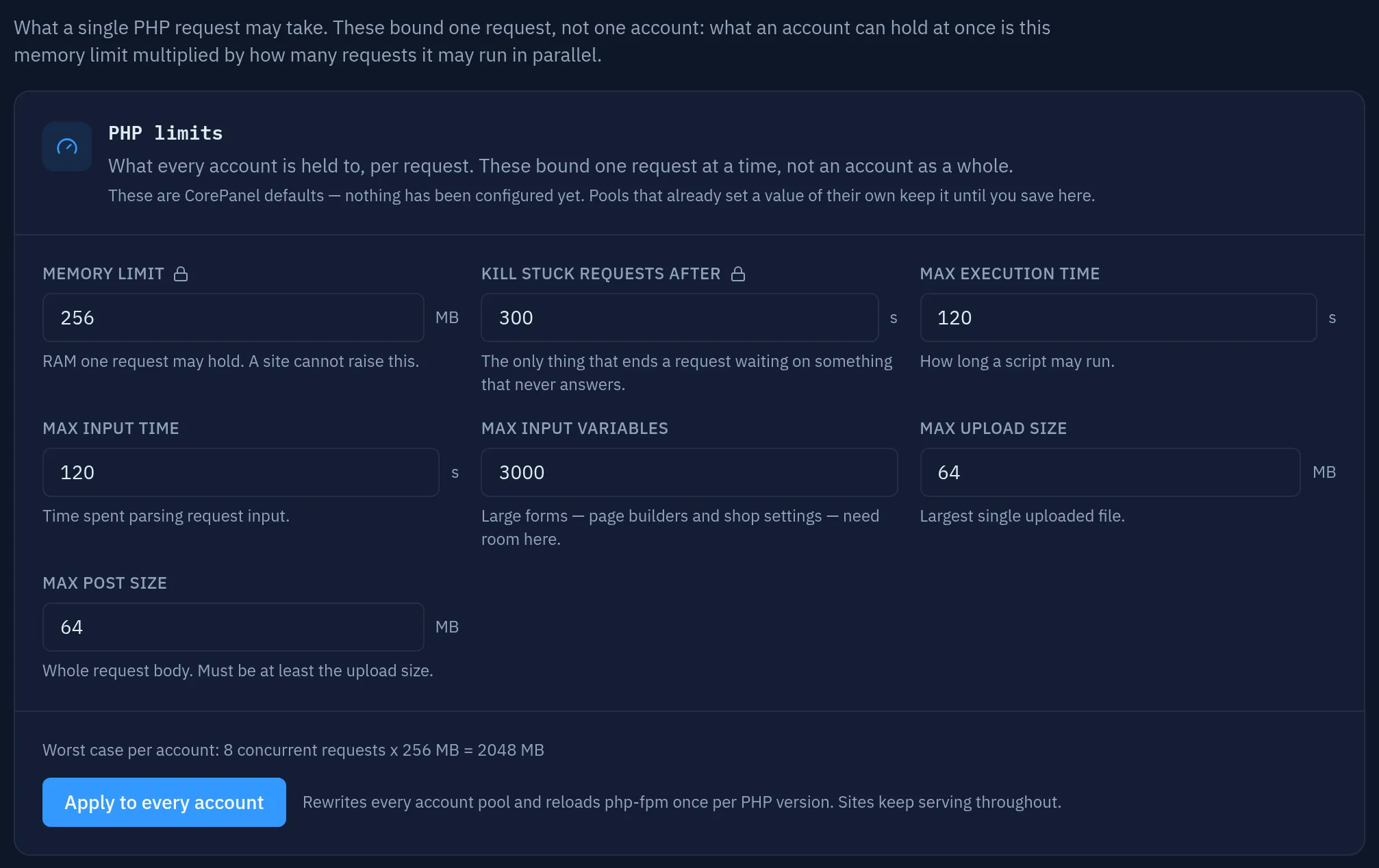
| Setting | Default | Can the site change it? |
|---|---|---|
memory_limit | 256M | No — pinned |
request_terminate_timeout | 300s | No — pinned |
max_execution_time | 120 | Yes, with a .user.ini |
max_input_time | 120 | Yes |
max_input_vars | 3000 | Yes |
upload_max_filesize | 64M | Yes |
post_max_size | 64M | Yes |
The padlock marks the two a site cannot raise for itself. The line above the button is
the one to read before typing a bigger number: these are per request, so what the
server has to survive is pm.max_children of them at once.
They are server-wide, and only a super-administrator can see or change them: a reseller setting them would be reaching into every other reseller’s accounts.
Two combinations are refused, because each produces a server that is quietly wrong rather than one that reports an error:
- The kill timeout must stay above
max_execution_time. Below it, php-fpm ends the worker before PHP can write anything, and every runaway script becomes a 502 with an empty error log. post_max_sizemust be at leastupload_max_filesize. PHP checks the POST size first, so a larger upload limit could never be reached.
request_terminate_timeout is the important one, and it is worth understanding why it
exists next to max_execution_time. On Linux, max_execution_time does not advance
while PHP is waiting on the system — a request blocked on an API that never answers,
or a database query that never returns, can sit there forever without ever tripping it,
holding one of the account’s 8 workers the whole time. Eight of those and the site
returns nothing but errors. request_terminate_timeout is what ends them.
It is deliberately set well above max_execution_time so that PHP is normally what stops
a runaway script — PHP writes a Maximum execution time exceeded line to the error log,
which tells you what happened, whereas php-fpm can only kill the worker and leave you
with a 502 and no explanation.
The server-wide ceiling
Section titled “The server-wide ceiling”The limits above bound one request. They do not bound the sum of them, and the sum is what takes a server down: enough accounts busy at the same time, and PHP alone can use every byte of RAM on the machine — at which point the kernel’s OOM killer starts choosing victims, and it does not know that MariaDB and Dovecot matter more than a worker.
So all of PHP runs inside one systemd slice, corepanel-php.slice, with a ceiling of its
own. Every installed PHP version’s master (php81-php-fpm, php83-php-fpm, …) is placed
in it, which is the point: a limit written once per version would multiply by however
many versions happen to be installed.
| Limit | How it is sized | On a 4 GB / 4-core server |
|---|---|---|
MemoryMax | Everything except a reserve of 1 GB, or 25% of RAM, whichever is larger | 3072M |
MemoryHigh | 80% of MemoryMax — the kernel reclaims here, before it kills | 2457M |
CPUQuota | Every core but half of one | 350% |
TasksMax | Flat backstop against a fork bomb coming out of PHP | 8192 |
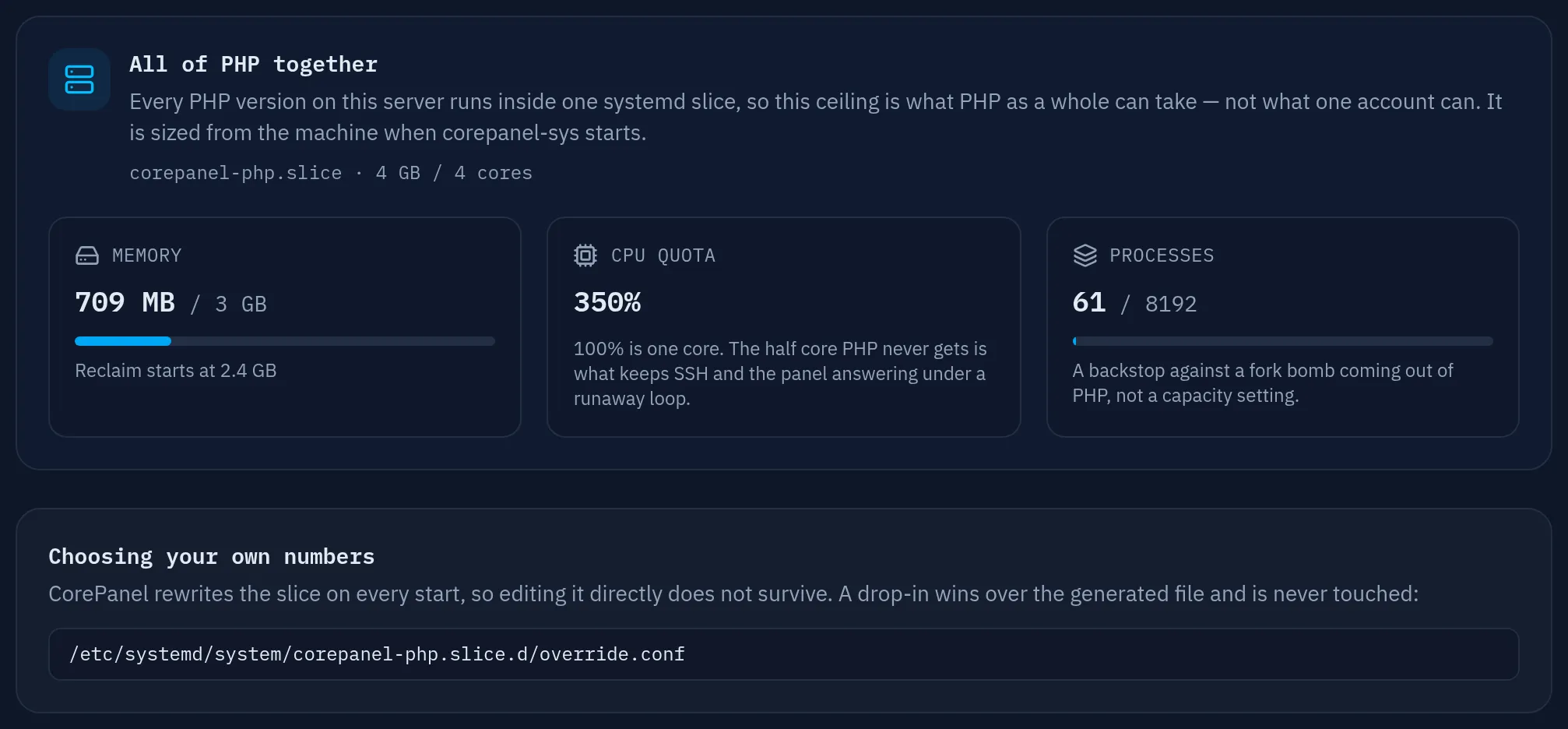
The reserve is what the rest of the machine keeps: sshd, the panel, MariaDB, Postfix and Dovecot. It has an absolute floor of 1 GB because a percentage alone would leave a small VPS without enough room to log in and fix things.
The CPU quota is half a core the server never gives PHP, and it buys exactly one thing: under a runaway loop, that half core is the difference between the panel is slow and I cannot ssh in to see why.
Masters also run with OOMPolicy=continue, so if the kernel does kill a PHP worker for
memory, systemd lets the master carry on. The default is to stop the service — which
would turn one runaway request into every site on that PHP version going down at once.
Seeing what it is doing:
systemctl show corepanel-php.slice -p MemoryMax -p CPUQuotaPerSecUSecsystemd-cgtop corepanel.slice # live memory and CPU for all of PHPOn EL8 the kernel runs cgroups v1, where MemoryHigh does not exist; the hard MemoryMax
still applies, so those servers get the stop without the gentler slowdown first.
Limiting one account
Section titled “Limiting one account”The two ceilings above bound a request and the machine. Neither divides the machine between accounts: one busy site can fill the whole PHP budget on its own, and the others get whatever is left.
Resource limits → Per account is where that is decided. The number is
how many PHP requests one account may run at the same time. Past it, the account’s
next request is answered 508 Resource Limit Is Reached — the same status code
CloudLinux uses, so existing monitoring and support articles apply unchanged — while
every other account on the server is untouched.
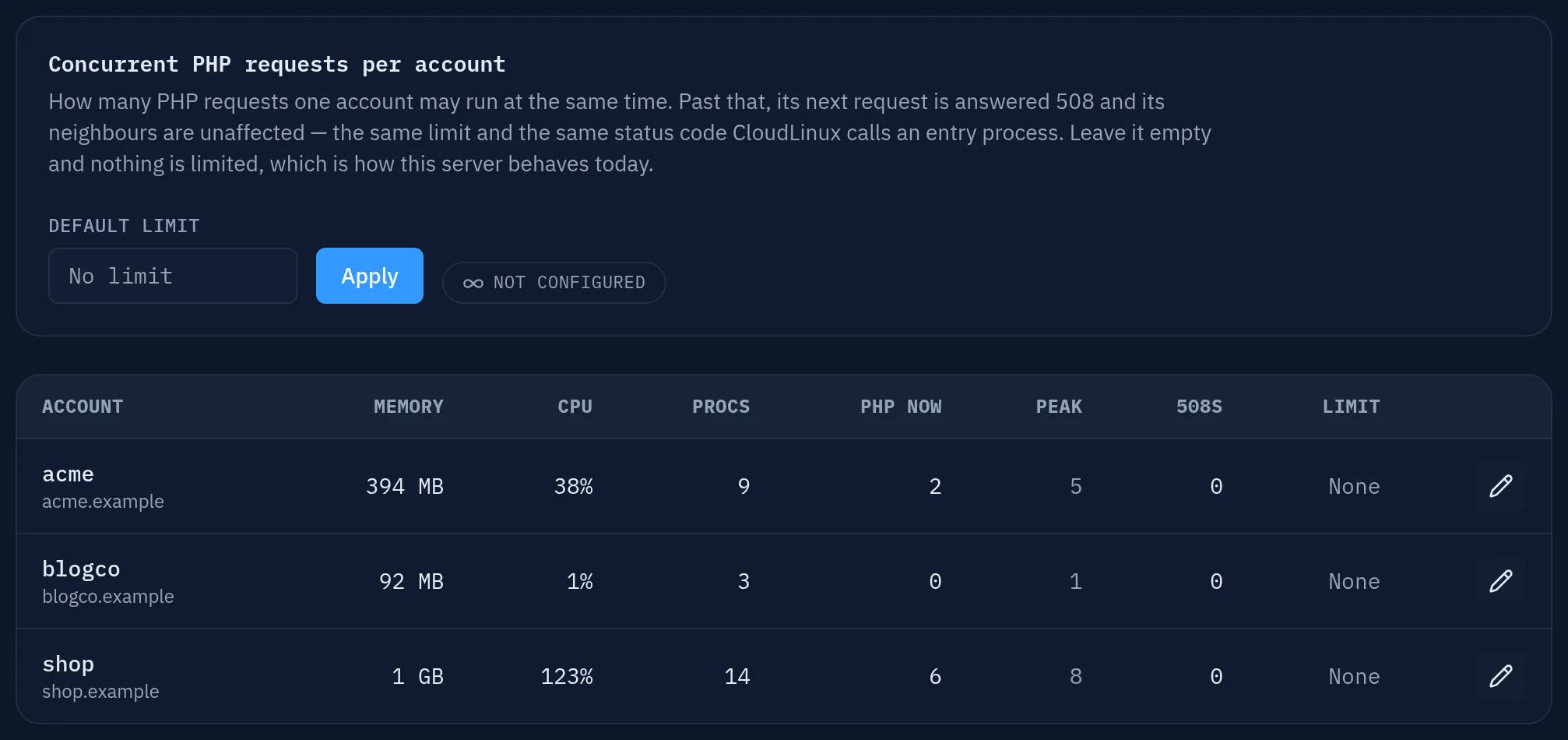
That is what makes the per-request memory limit into a per-account bound:
RAM an account's PHP can hold ≤ concurrent requests × memory_limitWith the shipping defaults, an account limited to 4 requests can hold at most 4 × 256 MB = 1 GB, enforced at the door instead of by a cgroup.
Two values mean different things and the panel keeps them apart:
| Value | On the server | On one account |
|---|---|---|
| (empty) | No limit at all, nothing is written | Follow the server default |
0 | Unlimited, on the record | Exempt this account from a server that limits the others |
The same page lists what each account is actually using — memory, CPU, processes,
requests in flight, the peak, and how many were refused. Memory and CPU are read from
/proc and cover everything the account runs (PHP workers, its cron jobs, an SSH
session), not only PHP.
Lowering a limit never kills what is already running: those requests finish, and the new ceiling applies to what arrives next.
From the command line, the same thing is corepanel resources.
What an account can change
Section titled “What an account can change”Everything above is written into the pool with php_admin_value, which a site cannot
override. What is left — five of the seven per-request limits, and most of the everyday
PHP settings — a site owner sets for themselves with a .user.ini file in the
document root, which PHP-FPM reads natively:
; ~/public_html/.user.iniupload_max_filesize = 128Mpost_max_size = 128Mmax_execution_time = 300max_input_vars = 5000That is the supported route, and it has enough detail of its own to deserve a page:
where the file goes for each kind of domain, which directives it can and cannot set, and
why an edit takes five minutes to appear. See
Changing PHP Settings with .user.ini.
Two things worth knowing here, because they are the ones people discover the hard way:
memory_limitis not on the list. A.user.inicannot raise it, because it is what bounds how much memory the account’s PHP can hold. A script that needs more stops with Allowed memory size exhausted, and raising it is the server operator’s call — server-wide, under Resource limits → Per request, not per site.- It is not
.htaccess.php_valuelines in an.htaccessare a mod_php feature; PHP-FPM does not read them, here or on any other FPM host.
An operator with root can, of course, change anything. For the seven per-request limits,
do it in the panel or with corepanel php limits set: that is where they live, it reaches
every account in one step, and it survives the pool rewrite. For anything else CorePanel
does not expose, use a .ini in the PHP version’s php.d directory rather than editing a
pool by hand — CorePanel rewrites the settings it owns on service start, so a hand edit
there can be normalized away, while php.d is yours and is never touched.