Resellers
A reseller is an organisation that sells hosting on your server. It has its own administrators, who sign into the same panel you do — narrowed to the accounts that organisation owns, with everything about the machine taken out.
It is the answer to the question a growing provider eventually asks: how do I let an agency, a partner or a franchise sell space here without giving them my server?
The model, in one picture
Section titled “The model, in one picture”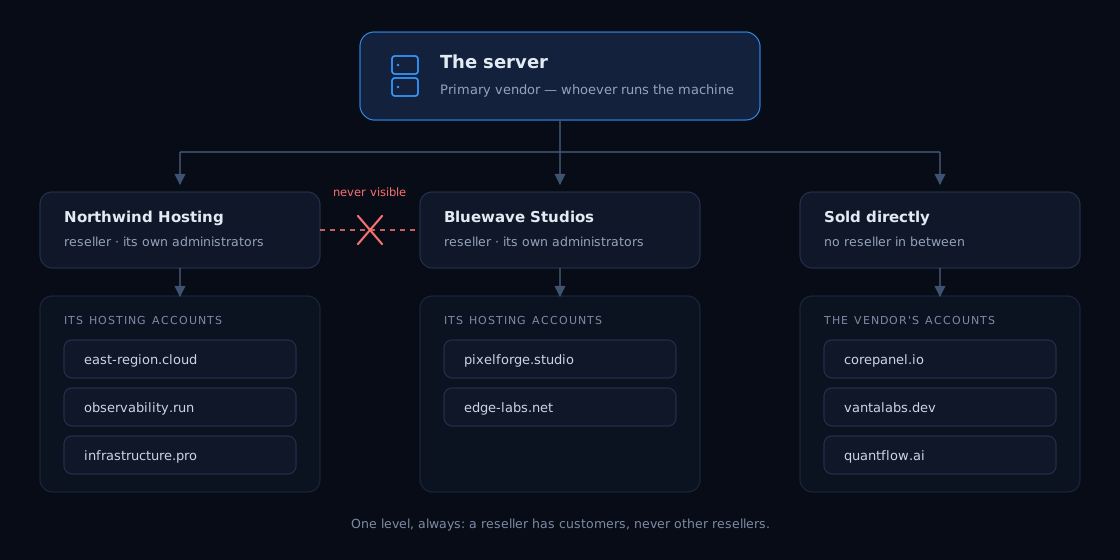
Three things this diagram is saying, and each of them is a rule:
- Every hosting account has exactly one owner. Either a reseller, or the organisation that runs the server — what the panel calls the primary vendor, and what every account belongs to on a server with no resellers at all.
- One level, always. A reseller has customers, never other resellers. There are no sub-resellers and none are planned; a reseller who wants to resell wants their own server.
- A reseller never sees the neighbour. Not their accounts, not their domains, not their mailboxes, and not the fact that they exist. This is enforced by the server on every request, not by hiding things in the panel — the same code path answers a request from the panel, from the command line and from the API.
Creating one
Section titled “Creating one”Resellers, next to Accounts in the panel, is where they live. It is visible to super-administrators on Business, and to nobody else.
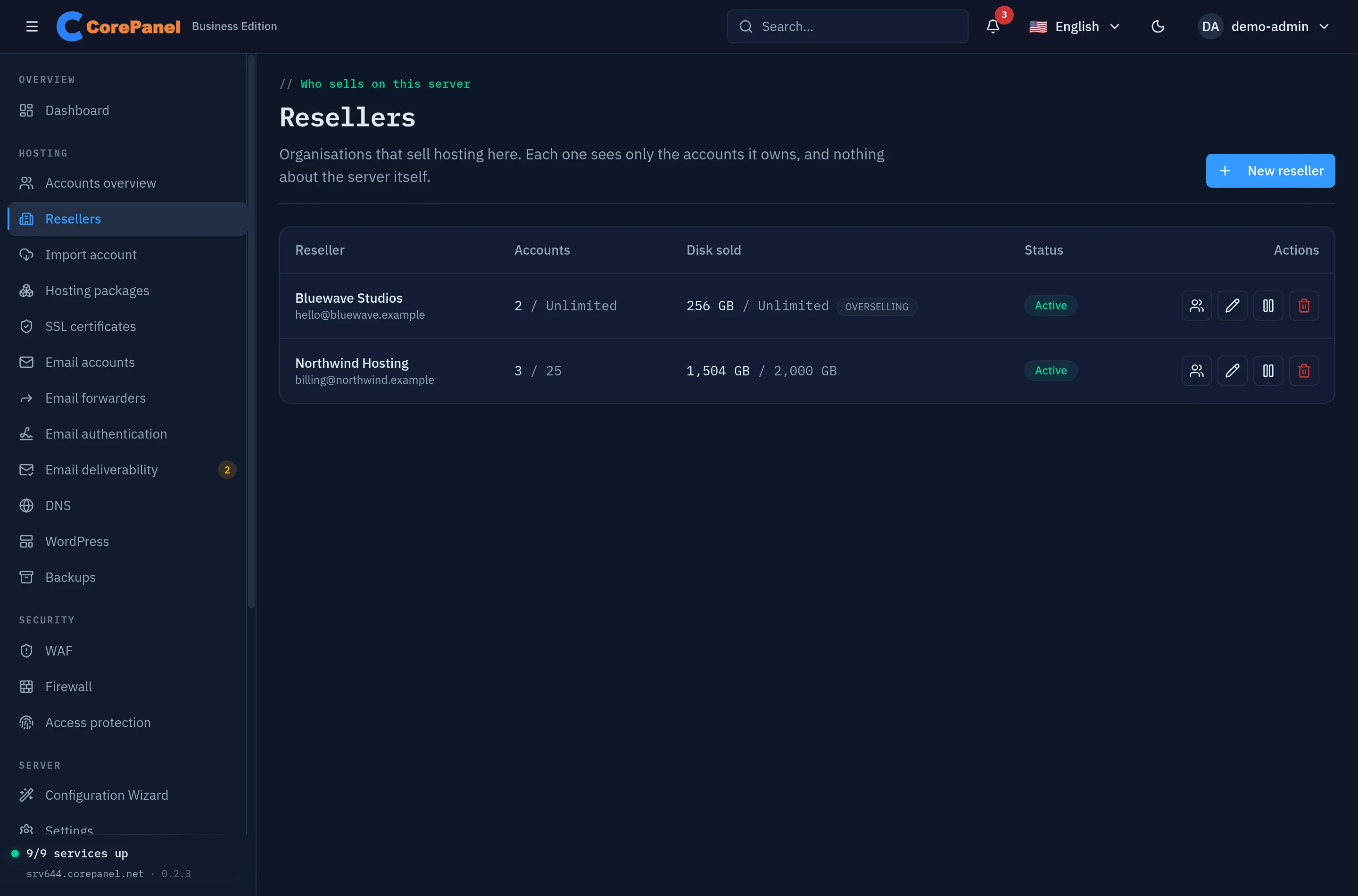
New reseller asks for four things:
| Field | What it does |
|---|---|
| Name | How you refer to them, and what their own administrators see on their panel. Must be unique, compared without regard to case. |
| Contact address | Where this reseller is notified about their own customers’ events. |
| Accounts | How many hosting accounts they may own in total. 0 means no limit. |
| Disk | How much disk they may sell in total, in MB. 0 means no limit. |
A reseller with no administrator can do nothing at all — the row exists and nobody can sign in as it. Use the administrators button on the row to create the first one: username, email and an initial password they are required to replace the first time they sign in.
The same operations exist on the command line:
corepanel seller listcorepanel seller create "Northwind Hosting" --email billing@northwind.example \ --max-accounts 25 --max-quota 2048000corepanel admin create northwind --seller "Northwind Hosting" --email ops@northwind.exampleSee the CLI reference for the full set.
The ceilings, and what they refuse
Section titled “The ceilings, and what they refuse”The two limits are totals across everything the reseller owns, and they refuse rather than decorate: creating an account past either one is rejected, with a message naming the wall it hit.
What is counted is what was assigned, never what is being used. A reseller with a 2,000 GB ceiling who has sold four 500 GB accounts is full, whether those customers have uploaded anything or not — because that is what they sold, and the alternative is a limit that moves on its own and suspends provisioning at three in the morning because somebody’s mailbox grew.
Two consequences worth knowing before you set a number:
- A reseller with a disk ceiling cannot be given an account with no quota. An unlimited account adds nothing to the total, so a single one would exempt them from the ceiling for ever without ever exceeding it. Accounts that are already unlimited — every reseller imported from cPanel arrives with some — are counted separately and shown beside the total; they do not block anything, because that is a state the import created and not one the reseller chose.
- The ceiling is the reseller’s, not the caller’s. You creating an account for a full reseller is refused exactly as they would be. A limit the operator can step over by hand is a limit that stops applying the moment billing automation runs as you.
Allow overselling lifts the disk ceiling only — it is cPanel’s
enable_overselling_diskspace under a clearer name, and the account limit was never
part of it there either.
What a reseller’s panel looks like
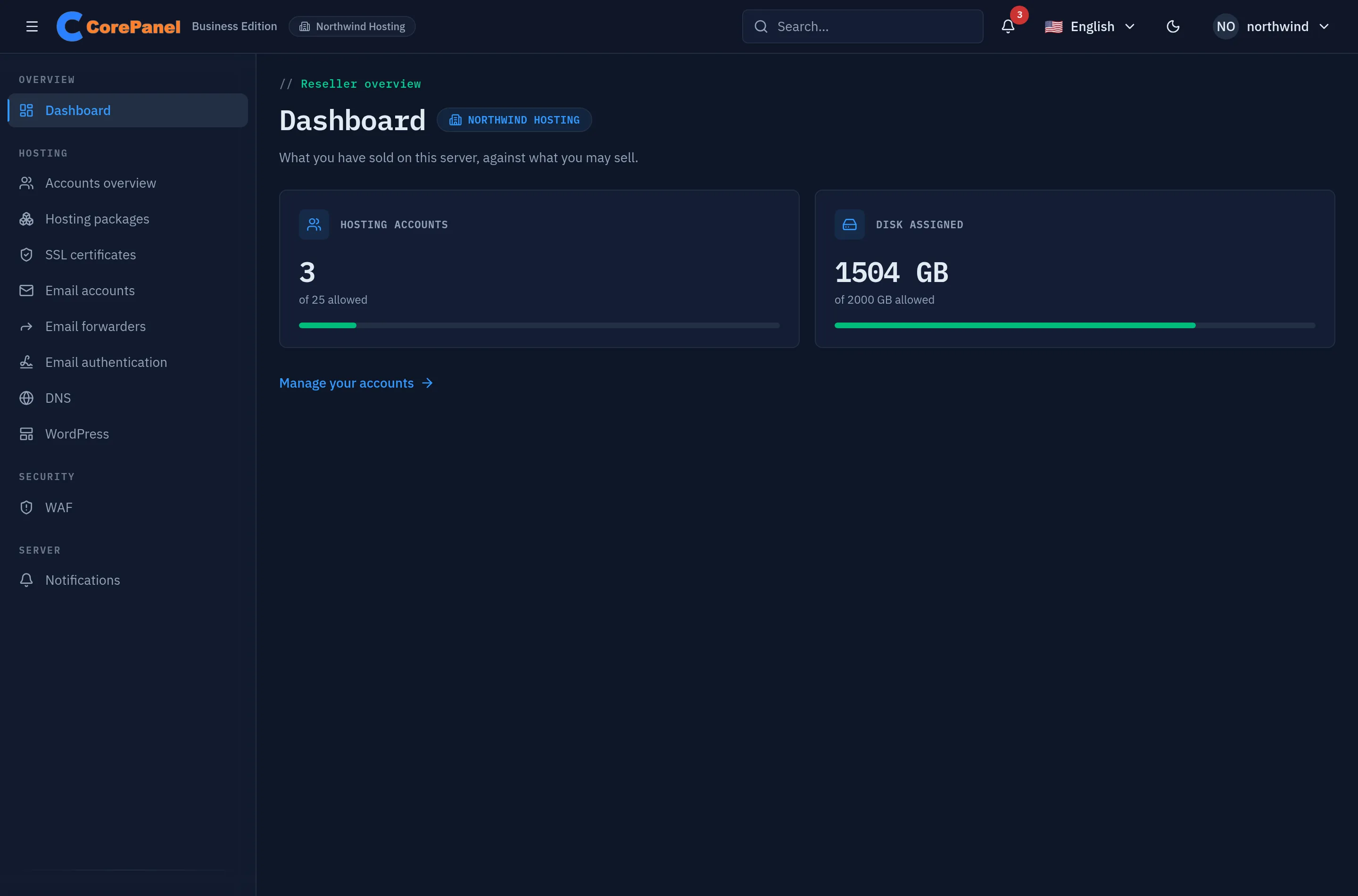
Section titled “What a reseller’s panel looks like”The same panel, recut. Their administrators get the accounts they own and the things that live inside them; everything whose subject is the machine is gone.
| They keep | They do not get |
|---|---|
| Accounts, and everything inside one — domains, subdomains, mailboxes, databases, FTP, cron, backups of an account | The server dashboard: disk, load, memory, service health, web traffic |
| Suspending and reinstating their own customers, and turning a customer’s panel login on or off | Suspending anything they do not own, and every restore: recreating an account is the server owner’s |
| DNS records for their own domains | Server settings, the setup wizard, the account importer |
| SSL certificates for their own domains | The host firewall, access protection, the server logs |
| WordPress installations on their own accounts | The WAF’s own rules and its event log — its whole monitoring half |
| WAF exceptions and trusted IPs per domain | API tokens, agent tokens, the licence, PHP versions |
| Hosting packages: their own, plus yours | Anything at all about another reseller |
| Notifications about their own customers | Support requests to CorePanel about this server |
Suspension is theirs to use. A reseller whose customer has not paid suspends that customer exactly as you would, with the same effect on every plane and the same reason field — recorded for whoever reads the audit trail, and naming the reseller’s administrator rather than you. What they cannot do is suspend anything outside their own organisation, or reinstate an account somebody else suspended.
Their dashboard is a different screen rather than yours with the tiles removed: every number on the operator’s dashboard is the machine’s, so what replaces them is the only aggregate a reseller has — what they have sold, against what they may sell.
Seeing who owns what
Section titled “Seeing who owns what”Once the first reseller exists, Accounts gains a Reseller column and a filter beside the search box. The column names the reseller that owns each account, or says Direct for the accounts you sell yourself; the filter narrows the list to one reseller, or to the accounts sold directly.
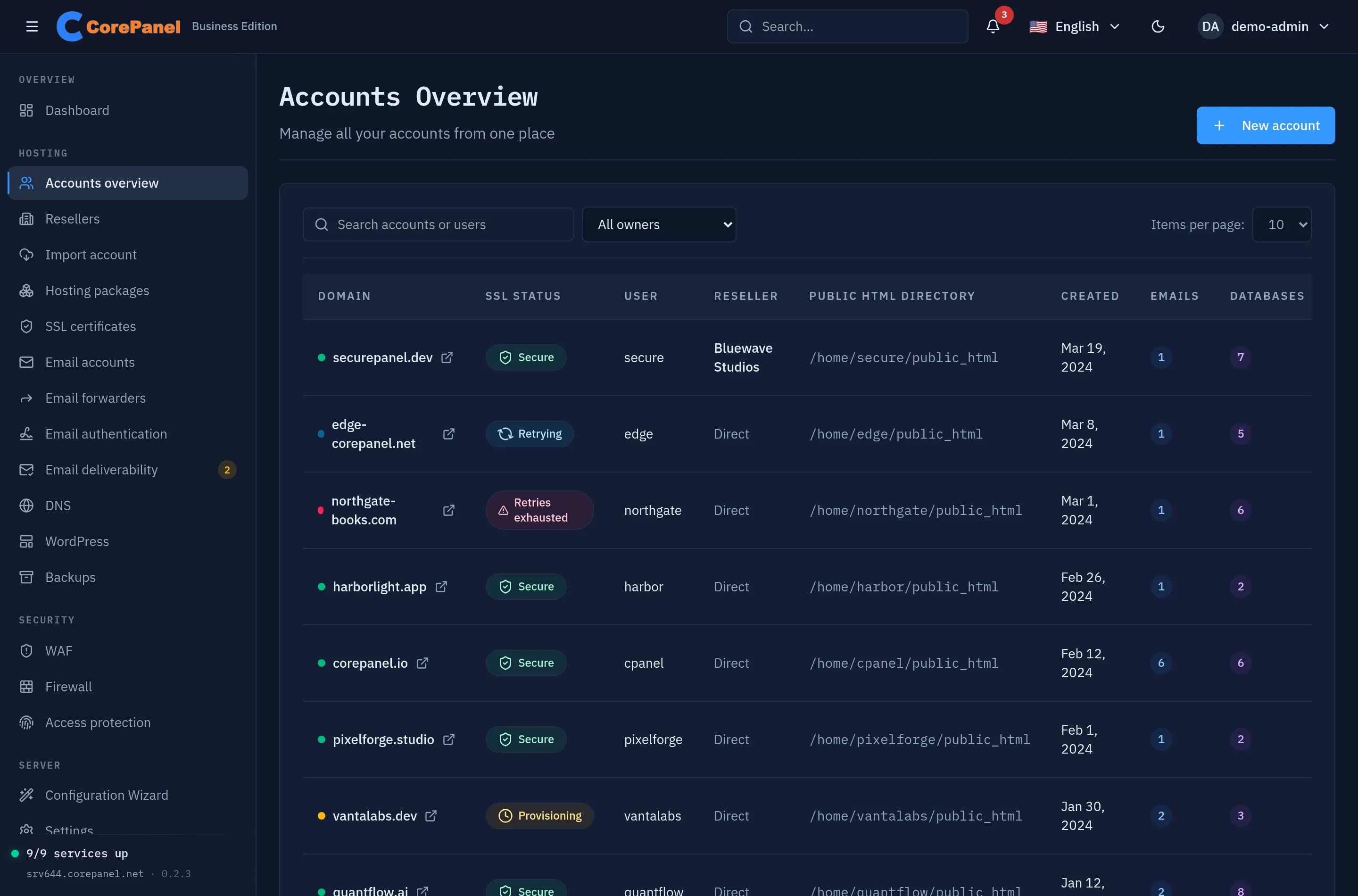
Both are for the server’s own administrators. A reseller’s administrators only ever see their own accounts, so there is nothing for them to tell apart — and asking the server for a neighbour’s accounts answers an empty list, not an error. A server with no resellers shows neither.
The filter lives in the address — /accounts?seller=12 — so a filtered list can be
bookmarked or sent to a colleague.
Moving an account between owners
Section titled “Moving an account between owners”Ownership is the only thing that changes. No service restarts, no site is interrupted, the account keeps its own limits, and its past notifications stay with the reseller that owned it when they happened.
In Accounts, the transfer button on the row (two opposing arrows) asks for the new owner: any reseller, or This server (sold directly) to take the account back. A suspended reseller is listed but cannot be picked — an organisation that is not trading cannot take on customers. The same operation on the command line:
corepanel account transfer east-region.cloud --to "Northwind Hosting"The destination’s totals go up exactly as if the account had been created there, so a transfer into a full reseller is refused. The account’s hosting package reference is cleared, because a package belongs to a seller: the limits it already has stay untouched, but it is no longer described by a plan the new owner does not have. The dialog warns you before you confirm when the account is on a package.
An account that is down because its reseller is suspended cannot be moved until you reactivate it: moving it would hand the new owner a customer they have no way to bring back. Reactivate that one account from the list, then transfer it.
Suspending a reseller
Section titled “Suspending a reseller”Suspending a reseller stops the organisation trading: every hosting account it owns goes down with it, and its administrators can no longer sign in.
Their customers see exactly what a suspended account’s customer always sees — the same suspension page, the same rejection on mail. The reason you type is yours: it is recorded on the reseller row and shown to you, never to the reseller and never to the people whose sites just stopped.
Lifting it brings back exactly the accounts that suspension took down. An account somebody had suspended on its own merits before — for abuse, for non-payment to the reseller — stays down, which is the whole reason the panel records which ones it was responsible for.
Deleting one
Section titled “Deleting one”Deleting a reseller never cascades. Cancelling a contract is not a reason to delete somebody’s customers’ hosting, so the deletion is refused while the reseller still owns anything, and the message names what is holding it: transfer their accounts to another owner (or to yourself) first, then remove the reseller.
Removing a reseller’s administrator removes a login, and nothing else — the hosting accounts belong to the organisation, not to the person who created them.
What is not here yet
Section titled “What is not here yet”- A reseller cannot issue API tokens, so they cannot point their own WHMCS at this
server. Provisioning through WHMCS is the server owner’s, and an
account created through it can be given an owner with
owner=— see that page. - The WAF’s monitoring half is server-wide, so a reseller sees no events for their own customers’ sites yet, only the per-domain exceptions and trusted IPs.
- Support access: a reseller cannot log in as one of their own customers. That button belongs to the server owner today.