Server Maintenance and Updates
The mechanism that keeps a CorePanel server current is the one already on the box:
dnf updateThat is not a simplification for the docs — it is the design. Everything CorePanel needs to correct on a running server travels in its packages, so the moment you update them the host converges. There is no update daemon and no agent phoning home; a systemd timer runs that same command against CorePanel’s own packages every night, and you can turn it off with one line — see The nightly update.
This page says exactly what an update covers, so you know what it will and will not do before you run one, or before the timer does.
What an update converges
Section titled “What an update converges”| Area | What arrives with the packages |
|---|---|
| PHP stack | The base set of PHP versions and extensions, declared by the corepanel-php package. Versions and extensions added later from the panel are updated by the same dnf update, but they are not part of this set — see PHP Extensions |
| SELinux policy | The corepanel_app_t, corepanel_cron_t and corepanel_phpfpm modules, shipped compiled and reloaded on every upgrade |
| PHP-FPM pools | The inert placeholder pool that replaces the stock Remi www pool, plus the SELinux booleans and labels PHP needs to serve from /home |
| Runtime directories | The tmpfiles.d entries that recreate /run/php-fpm on every boot |
The important consequence is for servers that have been running a while. Earlier CorePanel releases configured some of this from the installer, which runs once when the server is built and never again — so a correction made later reached only newly built servers. That is no longer true of anything in the table above.
What an update will never do
Section titled “What an update will never do”These are guarantees, not current behaviour that might change:
- It never removes a PHP version. Accounts run on a version they were given (and can be moved to another one), and the webmail runs on PHP 8.4. Versions are only ever added.
- It never rewrites configuration you edited.
main.cf,dovecot.conf, your firewall rules and your DNS zones are yours. CorePanel only rewrites files it owns and marks as its own. - It never touches a PHP version CorePanel does not ship. If you install a Remi PHP of
your own, its pool and its service are left exactly as you set them. CorePanel manages
only the versions listed by
rpm -q --requires corepanel-php. - It never reboots, never prompts and never asks for a password. Anything needing a decision — enabling disk quotas, for instance — stays a deliberate action you take.
- It never restarts a service that did not need it. PHP-FPM runs every account’s pool in one process per version, so a needless restart would drop live requests. A version is restarted only when its own configuration actually changed.
The nightly update
Section titled “The nightly update”CorePanel updates itself at 02:00, and it is on from the moment you install it. The
corepanel-update.timer unit runs corepanel updates run, which is an ordinary
dnf update of CorePanel’s own packages — the same command as above, at an hour nobody
is watching.
The timer fires at 02:00 in the server’s own timezone plus a random delay of up to three hours, so a fleet does not update in the same minute. A server that was powered off at 02:00 runs it after it boots instead of waiting a day.
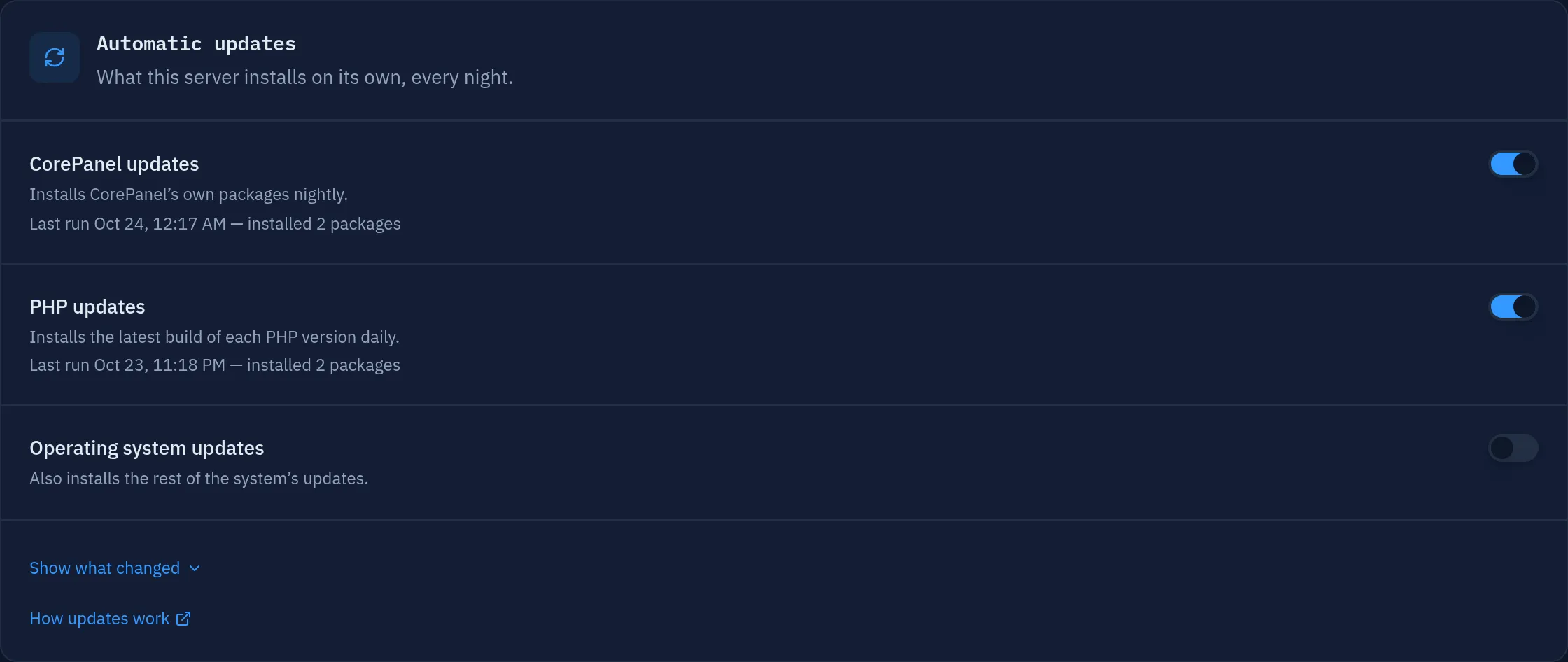
What it touches, and what it deliberately does not
Section titled “What it touches, and what it deliberately does not”It updates only packages whose names begin with corepanel or corehttpd. PHP has
its own daily run, described in The daily PHP update. MariaDB and
the rest of the operating system are left exactly where they are.
That is a deliberate line, not an oversight. MariaDB has an upgrade plan of its own, and neither it nor the rest of the system should change as a side effect of wanting the panel patched. If you do want the whole system updated overnight, that is a separate switch: see Updating the rest of the system.
Before the transaction it copies the panel’s database aside, keeping the last three
copies in /var/lib/corepanel/db/pre-update. If another package manager is running, it
waits up to 15 minutes for it. It stands down without doing anything if a cPanel
transformation is in progress, or if the other package manager is still running after
the wait.
Turning it off
Section titled “Turning it off”systemd is the switch, and there is no second copy of the answer anywhere:
systemctl disable --now corepanel-update.timerThat decision survives upgrades — the package will not turn it back on. The Settings
page in the panel shows the same switch, reading systemctl rather than a stored copy,
so the command line and the panel can never disagree.
Changing the hour
Section titled “Changing the hour”Override the unit rather than editing it, so an upgrade does not overwrite your change:
systemctl edit corepanel-update.timer[Timer]OnCalendar=OnCalendar=*-*-* 05:00:00The empty OnCalendar= is required: without it systemd adds your time to the shipped
one and the update runs twice.
When it fails
Section titled “When it fails”The unit’s OnFailure hands the failure to corepanel-failure-report, which reads the
administrator’s address straight out of the panel’s database and gives the message to
sendmail. It depends on nothing of CorePanel’s that could itself be the broken thing,
and it is throttled to one message an hour.
There is no retry. A transaction that failed at 03:00 fails again at 03:05, and a retry loop on a package manager is how one bad night becomes a hundred emails. The next attempt is tomorrow, and you have been told.
To see what the last run did:
systemctl status corepanel-update.servicejournalctl -u corepanel-update.servicecat /var/lib/corepanel/last-update.jsonThe panel’s Settings page shows the same last run, including which packages moved.
The daily PHP update
Section titled “The daily PHP update”CorePanel installs the latest build of every PHP version on the server once a day, and
it is on by default. corepanel-php-update.timer runs corepanel updates php at 01:00
plus a random delay of up to an hour, before the CorePanel update starts.
It only updates within a branch: 8.3 gets the newest 8.3 and stays 8.3. It never installs
a version you do not have, and no site changes version. It updates only Remi’s phpNN-*
packages that are already installed. The distribution’s own php packages are not touched.
When a branch moves, its PHP-FPM master restarts, so in-flight requests for the sites on that version are cut once. Afterwards the run checks every master that was serving. One still running the replaced binary is restarted, so the fix is live as soon as the run ends.
A failed update does not leave the server in a failed state. If dnf cannot update (a mirror is down, a dependency does not resolve), the installed packages are left as they were and the run still exits cleanly. It is recorded as failed in the panel, and the next day’s run tries again. You are emailed only if a PHP-FPM master that was serving before is still down after the run restarted it, because that means sites are down.
If another package manager is running, it waits up to 15 minutes. It does nothing while a
cPanel transformation is in progress. To pin one PHP build, add an exclude= for it in
/etc/dnf/dnf.conf. The run respects it and records that it left PHP as it was.
Turn it off from Settings or with:
systemctl disable --now corepanel-php-update.timerLike the CorePanel timer, that decision survives upgrades. To see what the last run did:
journalctl -u corepanel-php-update.servicecat /var/lib/corepanel/last-php-update.jsonUpdating the rest of the system
Section titled “Updating the rest of the system”CorePanel does not ship its own operating-system updater; RHEL already has one, and
writing a worse copy of it would move the responsibility for every package on the box to
us. The switch in Settings installs dnf-automatic, sets apply_updates in its
configuration and enables its timer. By hand:
dnf install dnf-automaticsed -i 's/^apply_updates = no/apply_updates = yes/' /etc/dnf/automatic.confsystemctl enable --now dnf-automatic.timerKnow what you are asking for. This one does update MariaDB, and PHP too, across
every repository you have enabled. If you want the security updates without it, exclude
them where that setting belongs — in /etc/dnf/automatic.conf:
[base]exclude = php* mariadb*The three timers do not overlap on a normal night (PHP 01:00–02:00, CorePanel
02:00–05:00, dnf-automatic 06:00–07:00). After a server that was off at night boots,
all three fire together; whichever gets the rpmdb first runs, and the other two wait
for it.
An open panel picks the new version up on its own
Section titled “An open panel picks the new version up on its own”Updating corepanel-ui replaces the panel’s files, which means the build any open
browser tab is running has just been deleted from under it. Until now, the first page
that tab tried to open after the update failed to load and only a hard refresh brought
it back.
That is handled now. A tab that was left open across an update notices that its build is
gone, reloads itself once, and lands on the new panel — no Ctrl+R, no lost session.
You may see “The panel was updated. Reloading…” for an instant while it happens.
The reload happens at most once. If a page still fails after it, the cause is not a stale build, and the panel says so with a recovery screen instead of reloading in a loop.
The PHP stack is its own package
Section titled “The PHP stack is its own package”The PHP versions live in a package called corepanel-php. You can see exactly what it
pulls in:
rpm -q --requires corepanel-phpThat is the base set — what a server starts with. A version added afterwards with
corepanel php install, and any extension added from PHP → Extensions, is a package of
its own that this list does not mention. It is still kept current by dnf update like
everything else; it simply does not hang off corepanel-php.
CorePanel recommends this package rather than requiring it. That is deliberate: the PHP packages come from the Remi repository, and if Remi has not yet published a newly added version for your EL release, that must not stop the panel itself from updating. The trade-off is visible rather than silent — you see a package transaction fail, instead of a PHP version quietly arriving unconfigured.
The webmail is the one exception: corepanel-roundcube requires PHP 8.4 outright, because
it will not run without it.
Extensions outside that set — the ionCube Loader, for instance, which encoded software like WHMCS needs — are installed separately and are not touched by updates. See PHP Extensions and ionCube.
Repairing a host by hand
Section titled “Repairing a host by hand”There is no special repair command to learn. Because all of this lives in package scriptlets, reinstalling the package re-runs them:
# Re-apply the PHP stack configuration: pools, SELinux booleans and labelsdnf reinstall corepanel-php
# Re-load the SELinux policy modules and relabel the application treesdnf reinstall corepanel corepanel-sys
Both are safe to run on a live server. They re-apply what is already correct without touching it, and restart only what genuinely changed.
To see what a package’s scriptlet did, read the transaction output, or afterwards:
dnf history # find the transactiondnf history info <id>Checking the SELinux policy is loaded
Section titled “Checking the SELinux policy is loaded”CorePanel confines account applications, account cron jobs and PHP-FPM’s access to MariaDB with its own SELinux modules. A missing module is silent — nothing fails, the confinement simply is not there — so it is worth knowing how to check:
semodule -l | grep corepanelYou should see corepanel_app, corepanel_cron and corepanel_phpfpm. If one is
missing, dnf reinstall corepanel corepanel-sys loads it.
When a service fails or the server runs out of memory
Section titled “When a service fails or the server runs out of memory”Every CorePanel service is already restarted by systemd when it fails. Two things it does not do on its own, and now does:
It no longer gives up in five seconds. Restart=on-failure with systemd’s defaults
allows five restarts in ten seconds, and with a one-second delay that budget is spent
almost immediately — a service that needed a few more moments than something it depends on
was left dead for good. The panel’s services now retry ten times over five minutes.
Somebody is told. When systemd does stop retrying, OnFailure= runs a reporter that
emails the panel’s administrator: which service, what systemd says happened, how many times
it restarted on its own, and the last 100 journal lines. It is a separate unit on purpose —
the process that died cannot report its own death, and the panel’s notification system
lives inside corepanel-core, which is one of the services being watched. The reporter
reads the address straight out of the database and hands the message to sendmail, so it
still works when core is the thing that is down. At most one mail per service per hour.
If the mail says systemd has given up, the service will not come back without:
systemctl reset-failed corepanel-core && systemctl start corepanel-coreWho the kernel kills first
Section titled “Who the kernel kills first”This machine runs other people’s PHP, and the Linux OOM killer picks its victim by how
much memory a process is using — so, left alone, it takes the biggest one. On a real
server that was corehttpd, scoring higher than anything else on the box: the first thing
the kernel would have taken is the single process serving every site.
The panel’s services now carry an OOMScoreAdjust, which does not prevent an OOM but
decides the order. A hosting server should lose one site before it loses the panel you
would fix it from:
| Service | Adjust | Why |
|---|---|---|
corepanel-sys | -900 | The root daemon. Without it nothing can be repaired at all |
corepanel-core | -800 | The data, and the hub that raises notifications |
corepanel-api | -700 | No panel without it, but cheap and quick to restart |
corehttpd | -600 | Losing it takes every site on the server down at once |
corepanel-auth | -100 | Least protected, deliberately — see below |
corepanel-auth is the one service where being killed is the right outcome. It grows
steadily while it runs, so protecting it like the others would turn that into the whole
server being taken apart around it, site by site. Killed, it restarts in a second and
comes back at its startup footprint.
OOMScoreAdjust is applied when a process starts, so a server picks this up when the
service restarts — which the package upgrade does for you. It is also the only lever of
its kind available on all of RHEL 8, 9 and 10: OOMPolicy needs systemd 243 and
MemoryMin needs cgroup v2, and RHEL 8 has neither.
Upgrading the whole server
Section titled “Upgrading the whole server”CorePanel does not restrict dnf update, and there is nothing to stop first. Standard
practice applies: update at a quiet hour, and expect PHP-FPM to restart for any version
whose configuration changed in that release. To have that happen on a schedule rather
than by hand, see Updating the rest of the system.