.htaccess Support
A site arriving from cPanel brings its rules with it. WordPress writes a permalink
block, Wordfence writes nine Deny from all files, PrestaShop writes a front
controller, and a directory somebody password-protected years ago is protected by an
.htaccess nobody has looked at since.
CorePanel’s web server reads those files. You do not have to rewrite them, and nothing has to be turned on: it is the default for every site.
What is applied
Section titled “What is applied”| Directive | Status |
|---|---|
RewriteEngine, RewriteRule, RewriteCond, RewriteBase | Applied |
Order / Allow / Deny | Applied |
Require all granted, Require all denied, Require ip, Require valid-user, Require user | Applied |
<Files>, <FilesMatch>, <IfModule> | Applied |
AuthType Basic, AuthName, AuthUserFile | Applied |
Redirect, RedirectMatch, RedirectPermanent, RedirectTemp | Applied |
AddEncoding, and the AddType that goes with it | Applied — see Caching plugins |
ExpiresActive, ExpiresByType, ExpiresDefault | Applied to static files — see Browser caching |
Options -Indexes, FileETag, IndexOptions, AddType, AddOutputFilterByType | No effect needed — see below |
AddHandler, SetHandler, Action | Not applied — the server decides, see below |
Header, ErrorDocument, DirectoryIndex, SetEnv, php_value, php_flag | Not applied — see below |
Anything not applied is reported, never ignored quietly. Every line gets one of four answers — applied, no effect here, not supported, or an error — with its file and line number, so a difference in behaviour after a migration has an explanation instead of being a mystery.
There is deliberately no “coming soon”. CorePanel is not trying to be a second Apache: it serves old sites its own way, and a directive it does not implement is a decision rather than a queue position. A report that promises work nobody intends to do is a report nobody reads — including on the two or three lines that genuinely need somebody to look.
The report, per site
Section titled “The report, per site”Every account has an Apache rules section that reads the .htaccess files under a
site’s document root and shows what happened to each line.
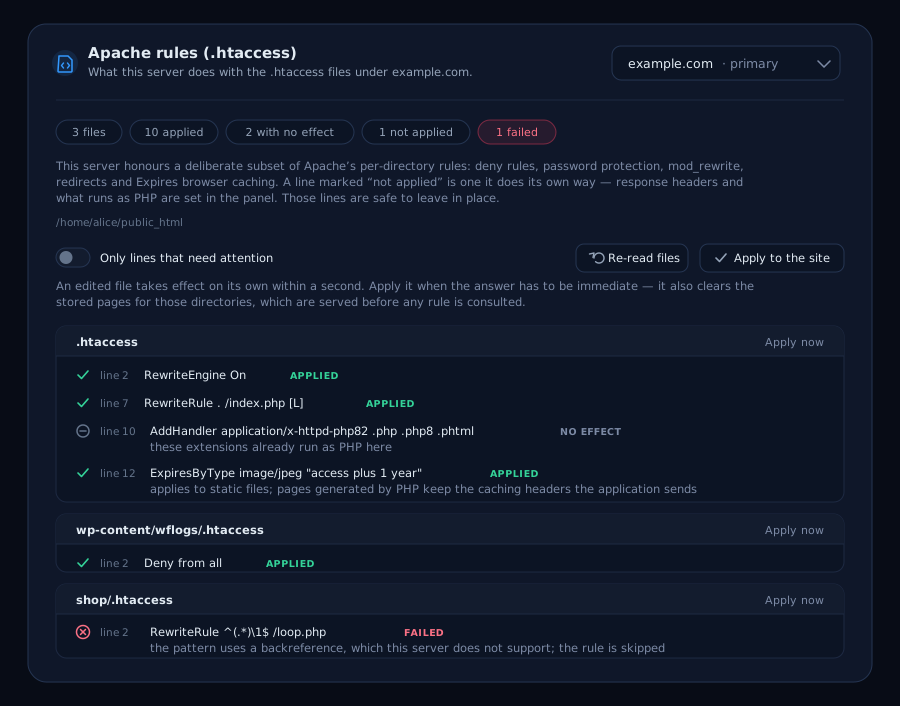
Four answers, and no fifth:
| Meaning | |
|---|---|
| Applied | The rule is in force. |
| No effect | It asks for what already happens here — every cPanel file carries a handler line naming the extensions that already run as PHP. |
| Not applied | Out of scope by design, with the reason on the line. |
| Failed | It could not be compiled, and that line is skipped. Worth looking at: a deny rule that failed is a deny rule not being enforced. |
Read it top-down and stop at the ones that are not green. In practice a migrated WordPress site produces a page of applied rewrite rules, a couple of lines that do nothing, and — occasionally — one that needs a decision. The filter at the top hides the applied lines when there are hundreds of them.
The report reads the files as they are on disk, which is what would apply. The running server picks a changed file up on its own within a second, so the two differ only briefly; Apply now on a file, or Apply to the whole site, closes that gap when the answer has to be immediate. The same report is available from the command line:
corepanel htaccess report example.comcorepanel htaccess report example.com --problemsA site whose .htaccess support has been switched off
still gets a full report, with a note saying so — “these rules are fine and this site is
not reading them” is exactly the answer somebody needs at that point, and an empty page
would send them hunting for a mistake in the file.
Password-protected directories
Section titled “Password-protected directories”cPanel’s Directory Privacy keeps working. The .htpasswd file comes across untouched
and its passwords still work — the $apr1$ hashes htpasswd writes are verified
directly, so nobody has to reset anything.
Two limits worth knowing:
- Only
AuthType Basic. Digest authentication is refused, and the directory stays closed rather than opening. - DES-crypt and plaintext passwords are refused. Both are from the 1990s and both are
broken; an account using one is named in the report and cannot sign in until its
password is reset. Bcrypt,
$apr1$and{SHA}all work.
A password file that cannot be read leaves the directory protected and nobody able to sign in. That is deliberate: the alternative — opening a directory because we could not read the list of who may enter it — is the one failure that cannot be undone.
Changing the password file is enough. Add a user, change a password or take somebody
out of the file and the next request sees it, at most a second later — the same as for
the .htaccess itself, and without touching it. Restoring a password file that was
missing works the same way: the directory starts letting people in again on its own.
Which files run as PHP is decided by the server
Section titled “Which files run as PHP is decided by the server”Files ending in .php, .php5, .php7, .php8 and .phtml run as PHP, on every
domain. That list is the only thing that decides, and an .htaccess cannot add to it.
That is a deliberate difference from Apache, and it closes a well-worn attack. On Apache, this in an uploads directory:
AddHandler application/x-httpd-php .gifmakes every .gif there run as PHP. Pair it with an upload form that only checks the
file’s magic bytes — a GIF89a header followed by code passes that check — and “somebody
can upload an image” becomes “somebody runs code as your account”. It is one of the most
common ways a plugin vulnerability turns into a compromised site. Here the line simply
does nothing, wherever it came from.
In practice:
- The cPanel handler line changes nothing. Every cPanel-generated
.htaccesscarriesAddHandler application/x-httpd-ea-phpNN .php .php8 .phtml, and those already run as PHP. The report marks it as having no effect and there is nothing to do. - A line naming any other extension is reported, with the extension named — not as an
error, but as a difference you can see. Files with that extension are served as they
are, which for a PHP file means publishing its source: if the site genuinely ran PHP
on one, rename those files to
.php. And if you did not put the line there, it is worth finding out who did.
Browser caching (Expires)
Section titled “Browser caching (Expires)”ExpiresActive, ExpiresByType and ExpiresDefault are honoured, so a site that arrives
with the block W3 Total Cache, WP Rocket or a speed guide wrote keeps the browser
lifetimes it had. They work as on Apache:
- Nothing applies until
ExpiresActive On, and a subdirectory can turn itOff. - Rules merge from the document root down; a subdirectory overrides its parents type by
type and inherits the rest. Rules inside
<Files>or<FilesMatch>cover only those files and win over the directory’s. - An
ExpiresByTypefor the exact type beats one for the whole family (image/*), and either beatsExpiresDefault. The type compared is the one the site’s ownAddTypelines give the extension, which is what Apache sent — W3 Total Cache names fontsapplication/font-woff2, and they match. The extension is read regardless of case, so a camera’sDSC0001.JPGis animage/jpeglikephoto.jpg. - Both syntaxes are read —
A2592000and"access plus 1 month"— counting from the visit (access,now) or from the file’s last change (modification).
Three differences, each deliberate:
- Only static files. Apache also stamps these rules on the pages PHP generates, so the
ExpiresDefault "access plus 1 year"many guides recommend pins every page of a site in its visitors’ browsers whenever the application sends no headers of its own. Here a page generated by PHP carries what the application sends; the report says so on each line. - A URL whose query string starts with
?ver=is always a year,immutable, whatever the rule says — the URL changes when the file does. - A year at most. A longer lifetime is shortened to one.
A rule here wins over the browser cache settings
of the site and of the server; categories the rules do not cover follow those settings.
The site’s Optimizations shows, under each browser cache category, which of these
lines decide it and in which folders — see when the site’s .htaccess decides
instead.
Header set Cache-Control is not applied — see below.
What “not applied” means for headers
Section titled “What “not applied” means for headers”The rest of these directives are dropped on purpose rather than being on a list to implement.
php_value and php_flag. These only ever worked under mod_php, which no modern
server runs — under PHP-FPM they were already inert on the source server, so nothing
changes. PHP settings belong in the account’s PHP configuration or a .user.ini.
Header, DirectoryIndex and ErrorDocument. These are not applied, and the panel
has no setting for them yet: a site gets the server’s default headers, its default index files
and the server’s error pages. They are left out of the .htaccess on purpose — a
Content-Security-Policy compiled out of a file written years ago breaks a site silently
the day its assets move.
Directives that need nothing
Section titled “Directives that need nothing”Options -Indexes asks the server not to list the contents of a directory that has no
index file. CorePanel never lists one, so the directive is already satisfied. The same
goes for the IndexOptions / AddIcon family, for FileETag, and for the compression
filters: they configure Apache machinery whose job CorePanel does itself.
Options +Indexes — asking for a listing — is the one that is reported rather than
applied. Directory listings are not generated at all, so a directory that relied on one
will need an index file.
Changes apply within a second
Section titled “Changes apply within a second”However the file was changed — uploaded over FTP, edited over SSH, or rewritten by a plugin — the new rules are in force on the next request, at most a second later. There is nothing to reload and no cache to clear. The same holds for a directory’s password file, wherever in the account it lives.
Rules are compiled the first time a request touches the directory they live in, so a
site with no .htaccess costs nothing, and one with fifty pays only for the directories
people actually visit.
When you need the answer now rather than within a second — a deny rule you have just fixed, a customer on the phone — Apply to the whole site in the Apache rules section says so, and so does the command behind it:
corepanel htaccess reload example.comIt drops the site’s compiled rules and the pages stored for them in one step, and reports
which document root it addressed. Naming directories after the hostname narrows it to
those (corepanel htaccess reload example.com wp-content).
Rules and the page cache
Section titled “Rules and the page cache”If the site has the page cache enabled, one detail is worth
knowing, because it is the only place where an .htaccess rule and a CorePanel feature
can disagree.
A cached page is served straight from the cache. Nothing else runs — not the rewrite rules, not the deny rules. So when you protect a directory, the pages stored from before you protected it have to go, and CorePanel drops them: the first request that reaches the site rather than the cache picks up the new rules and empties that directory’s cached pages along with them.
That first request is usually immediate on a live site — any URL under the directory that
is not itself cached will do, and static files count. If you want to be certain a
protection took effect on a busy cached site, run corepanel htaccess reload <hostname>
after saving the file: it drops the compiled rules and the stored pages together, which
is the ordering that matters here.
One case CorePanel cannot cover. A rule that refuses a particular address —
Deny from 203.0.113.10 — is not applied to a page served from the cache, because the
stored page is filed under its URL and carries no visitor address. A visitor from an
allowed address stores the page; the blocked address is then handed the stored copy.
This does not affect the two common cases:
Deny from all— nobody is ever served the page, so nothing is ever stored to replay.- Password-protected directories — a request carrying credentials is never cached, by design.
If a rule has to hold against a specific address and the site uses the page cache, turn the page cache off for that site, or block the address at the firewall instead, where it is enforced before anything is served. The compatibility report flags the rule so you are not left to discover it.
Caching plugins keep working
Section titled “Caching plugins keep working”A WordPress arriving from another server usually brings a caching plugin, and the way
those plugins are fast is written in the .htaccess: rewrite rules that send a visitor
straight to a page the plugin rendered earlier and stored on disk, so PHP never runs.
CorePanel applies those rules, so the plugin keeps doing its job from the first request
after the migration — nothing to reconfigure, nothing to turn back on.
That includes the compressed copies. W3 Total Cache stores its pages as .html_gzip,
WP Super Cache as .html.gz, and both declare what they are in the same file:
<IfModule mod_mime.c> AddType text/html .html_gzip AddEncoding gzip .html_gzip</IfModule>Those two lines are what let CorePanel hand the stored bytes to the browser untouched —
the encoding says the file is already compressed, the type is the only thing that says it
is a page. Both have to be there. If the AddType is missing, the file is served as a
download rather than a page, so CorePanel does not serve it at all: the rewrite is
dropped and the page is generated normally. Slower on that request, and never a broken
one. The same happens for a visitor whose browser does not accept the encoding, and for
encodings other than gzip and Brotli.
You will probably want to turn the plugin’s page cache off anyway. CorePanel’s own page cache serves the same pages from memory rather than from disk, and it is the faster of the two by a wide margin. Turn off the page cache feature inside the plugin rather than deleting the plugin: W3 Total Cache and its peers also do object caching, minification and CDN integration, and those are worth keeping — the object cache in particular is what WooCommerce leans on in the cart and the admin, which is exactly where a page cache cannot help.
The safe order is: enable CorePanel’s page cache, confirm the site is right, then turn off the plugin’s. Running both is not dangerous, just wasteful — two copies of the same page on the same server, and the one on disk is the slower.
What this costs, and why other servers refuse it
Section titled “What this costs, and why other servers refuse it”.htaccess has a reputation for being slow, and the reputation is earned. It is worth
knowing exactly what the cost is, because it is the reason nginx and Caddy will not
implement it at all and the reason a panel that promises “full compatibility” is usually
not telling you the whole story.
What it costs in principle. Per-directory configuration means the server cannot know
what the rules are until it knows which directory the request lands in. Apache therefore
walks the directory chain on every single request — a /shop/product/42 request looks
for an .htaccess in the document root, in shop/, and in shop/product/ — reads every
file it finds, and re-evaluates it. Nothing is remembered between requests. That is the
price of the feature, and it is why the Apache documentation itself recommends turning
.htaccess off and moving the rules into the server configuration.
What CorePanel actually pays. The rules of a directory are parsed and compiled once, the first time a request touches it, and then kept. What a request pays after that:
A site with no .htaccess | Nothing at all — no lookups, no memory |
| A request to a directory whose rules are compiled | 0,61 µs |
| The same, when the rules are revalidated | 7,6 µs, at most once per second per directory |
| Memory, 200 sites | around 10 MB total |
For scale: the PrestaShop page those rules run in front of takes 50 to 200 milliseconds to generate. The rules are four to five orders of magnitude below the page they gate.
How we get there. Three things, and each one is what makes the next affordable:
- Compiled once per directory, not parsed per request. A real PrestaShop has 8.037 directories and about ten of them are ever touched. Only those ten are ever compiled.
- Checked for changes at most once a second. Between checks the compiled rules are used as they are. This is the one deliberate difference from Apache, and it is what the “changes apply within a second” section describes from the other side: an edit is live on the next request, at most a second later, instead of costing every request a trip to the disk.
- Patterns are shared across every site on the server. WordPress, Wordfence and W3 Total Cache write the same rules on every site they are installed on — a W3 Total Cache file alone is 252 patterns — so those are compiled once for the whole machine and shared, not once per site. On our test corpus, ten sites running the same applications cost 480 KB of compiled rules instead of 5,3 MB: 11 times less.
The .htaccess rules also never touch a page served from the page
cache, which answers before any of this runs — with the one
consequence covered in Rules and the page cache above.
Two rules with surprising outcomes
Section titled “Two rules with surprising outcomes”A syntax error does not take the site down. Apache answers 500 for the whole directory when it cannot parse the file. CorePanel serves the site without those rules and records the error — with one consequence worth stating plainly: a file that will not parse is a file whose deny rules are not in force. Fix it as soon as the report shows it.
A rule that cannot be evaluated denies. Deny from badbot.example needs a reverse
DNS lookup for every request, which is a per-request name resolution we will not do.
Rather than skip the line, the directory it appears in is closed and the line is
reported. Skipping it would publish exactly what somebody wrote it to protect.
A RewriteRule whose RewriteCond did not compile is dropped with it, and both
lines are reported. The usual cause is a lookahead or a backreference — the
RewriteCond %{HTTP_HOST} ^(?!www\.)(.+)$ that half the “force www” recipes on the
internet are written with. The condition is what makes such a rule safe: keeping the
rule without it would redirect www.example.com to itself, which is an endless
redirect loop for the whole site. Rewrite the condition without the lookahead
(RewriteCond %{HTTP_HOST} !^www\. does the same job) and both lines go green.
Proxied paths are outside its reach
Section titled “Proxied paths are outside its reach”An .htaccess governs what is served out of the document root. A path handled by a
reverse proxy route — including one published by an
application — is not served from there at all: it is another
service mounted on a sub-path, with its own files and its own rules. So the site’s
.htaccess is not consulted for it. Apache draws the same line: a URL claimed by
ProxyPass never becomes a path on disk, so no .htaccess is read for it either.
This is what lets an application live under a WordPress site. WordPress ends its
permalink block with RewriteRule . /index.php [L], and the only thing holding it back
is “the request names no existing file” — which a proxied path never does. Without this
rule, every request to an application mounted at /app would be rewritten into
WordPress and come back as its 404.
Two consequences worth stating:
- A deny rule or a password on that path does nothing. Protect a proxied service
inside the service itself, not with an
.htaccessin the docroot beside it. - Everything else on the site is unaffected. The front controller still catches permalinks, and every deny rule still refuses; only the paths the route table proxies away skip the file.
Turning it off for one site
Section titled “Turning it off for one site”There is no server-wide switch, and that is a decision rather than an omission: the only
thing switching it off would change is that deny rules stop being enforced, publishing
vendor/, config/ and wp-content/wflogs on every imported site.
A single site can opt out when its rules have deliberately been replaced by CorePanel’s own routing — for instance a reverse proxy route that has taken over the paths the old front controller used to handle. Leaving the file in place alongside the new routing applies two front controllers to the same request. Contact support if you need this; it is not something a site needs by accident.