Migrate cPanel accounts to CorePanel over SSH, straight from the WHM server
With root on the cPanel server, CorePanel lists its accounts, packages the ones you pick, copies them across and imports them, one after another, with passwords, mail, databases and DNS. No archive to carry, nothing changed on the source.
When you run the cPanel server yourself, the quickest way to move accounts off it is to let
CorePanel fetch them. You give it the server’s address and root’s password; it lists every
account, you tick the ones to move, and it does the rest on its own, one account at a
time: pkgacct on the source, the copy, the import, the report. You can close the browser
while it works.
The source server is only read. Its accounts keep serving until you move their DNS, so you can migrate a few sites a night and leave the rest where they are.
The examples move the account shop, with the domain example.org: WordPress on PHP 8.1
with its database shop_wp, and the mailbox info@example.org. The cPanel server is
cpanel.example.net (198.51.100.5). The CorePanel server comes from
Install CorePanel and host your first website:
203.0.113.10, with ns1.example.com and ns2.example.com as its nameservers.
Let CorePanel log in to the cPanel server
CorePanel connects to the cPanel server over SSH as root, with a password. Many
cPanel servers only accept keys for root, and that is the better setting, so open password
login for root to the CorePanel server’s address only, for the time the migration takes.
On the cPanel server, add this at the end of /etc/ssh/sshd_config:
cat >> /etc/ssh/sshd_config <<'EOF'
# CorePanel migration — remove when doneMatch Address 203.0.113.10    PasswordAuthentication yes    PermitRootLogin yesEOFsshd -tsystemctl reload sshd
It has to go at the end: everything after a Match line belongs to it. sshd -t checks the
file before the reload. If the server also runs cPHulk or CSF, allow 203.0.113.10 there
too, so a mistyped password does not get the CorePanel server blocked.
The password is used for the connection only: CorePanel does not store it.
Connect and pick the accounts
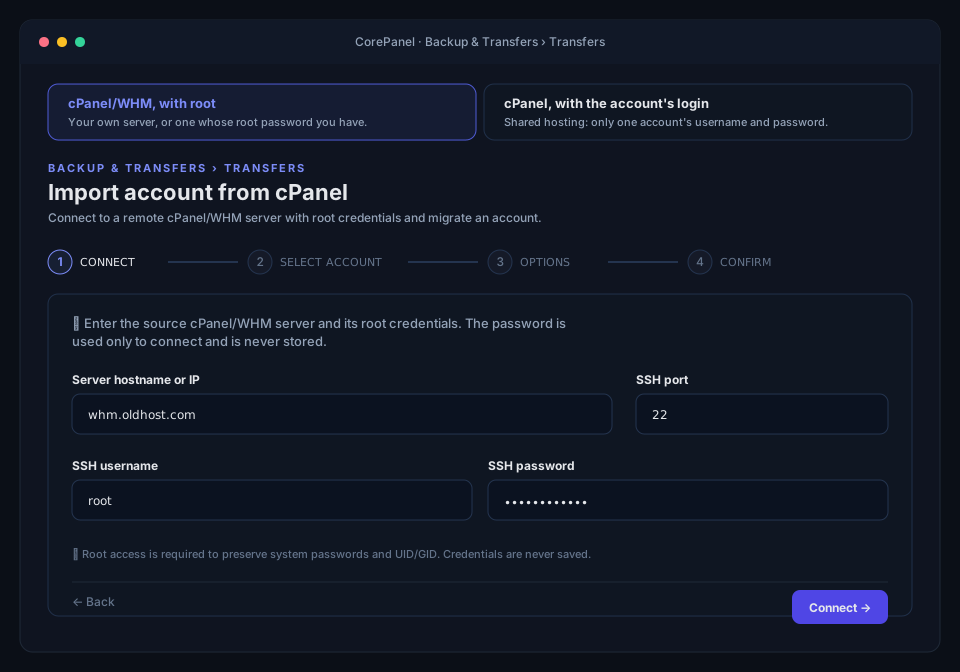
In CorePanel, open Backup & Transfers → Transfers. Enter the cPanel server’s host name or
IP address, the SSH port (22), root and its password:
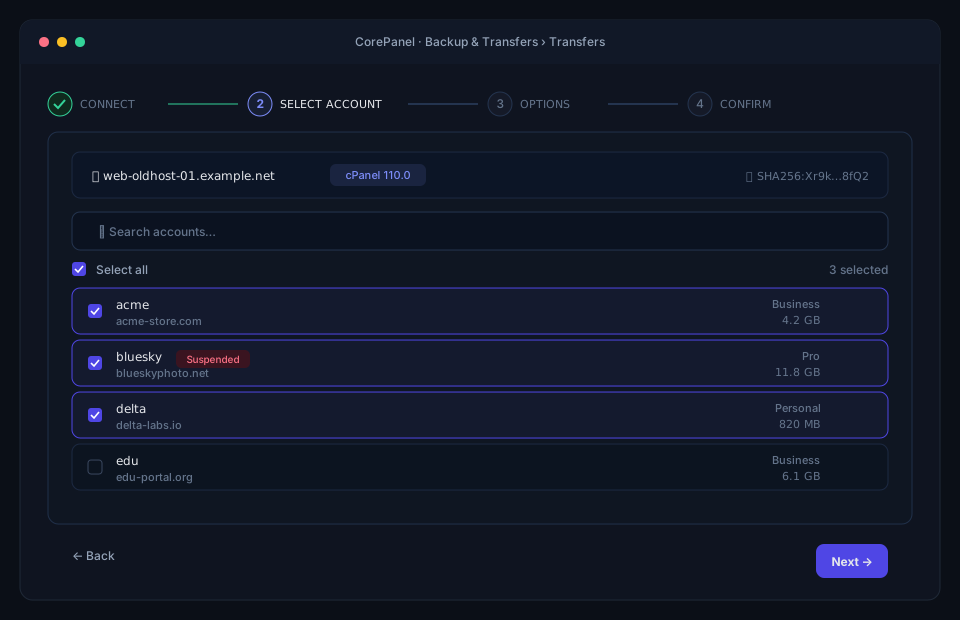
CorePanel lists every account on the server, with its domain, plan and disk usage, and shows the server’s SSH host-key fingerprint. Compare the fingerprint with the server’s own before going on. On the cPanel server, this prints it:
ssh-keygen -lf /etc/ssh/ssh_host_ed25519_key.pubTick shop. To move several accounts, tick them all, or filter the list and use
Select all; suspended accounts are marked, and come over suspended.
Choose the options
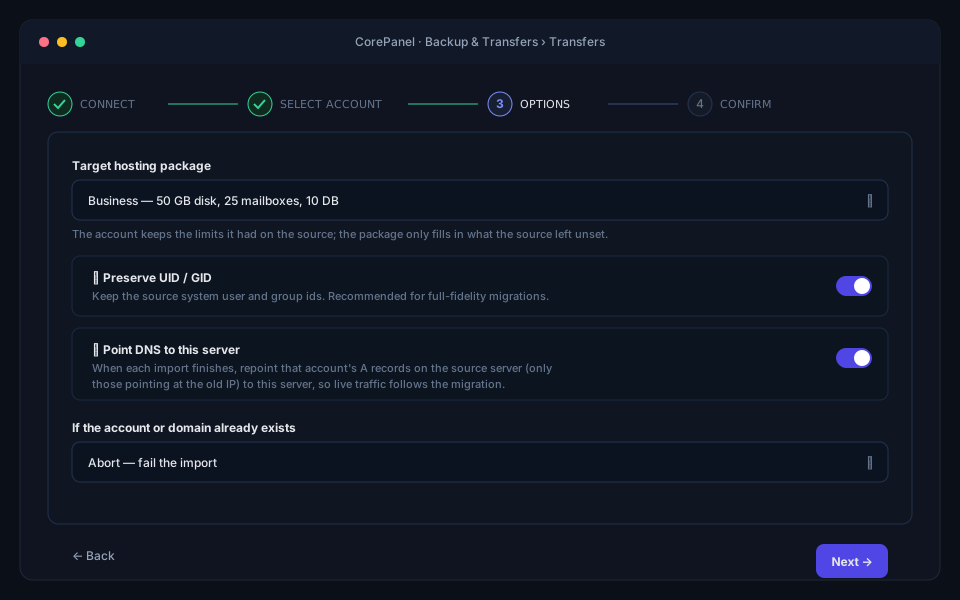
- Target hosting package. Leave it empty and each account goes to the CorePanel package with the same name as its cPanel plan, if there is one. Either way the account keeps the limits cPanel recorded for it.
- Preserve UID / GID. Switch it on. The files keep their numeric owners, which matters for anything that recorded them.
- Point DNS to this server. When an account finishes, CorePanel logs in to the cPanel
server again and changes, in its DNS zones, the
Arecords that pointed at the old IP to this server’s. That moves visitors over within minutes when the cPanel server is still the domain’s nameserver and you are not ready to change nameservers. In this tutorial the domain moves to CorePanel’s own nameservers, so leave it off. - If the account or domain already exists. Keep Abort: nothing is overwritten.
Review the summary and click Start.
Watch it work
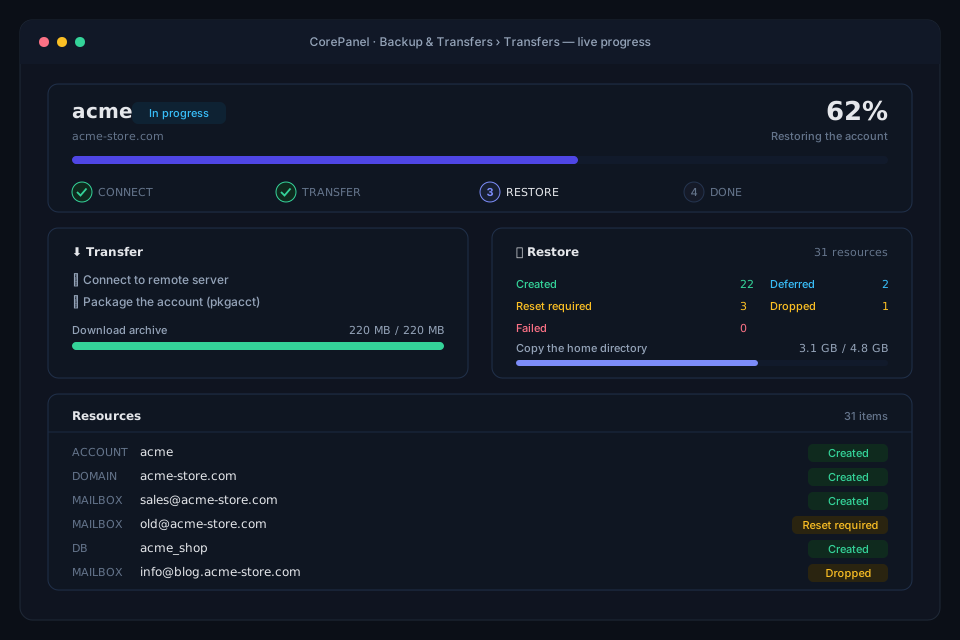
For each account, CorePanel runs pkgacct on the cPanel server, copies the archive across,
creates the account and restores into it, and writes a report. Accounts go one at a time, so
the cPanel server never packages two at once. The job runs on the CorePanel server: close
the page and pick it up later from Recent imports. A 100 MB account takes under a
minute.
When it is done, the account is here:
corepanel account listcorepanel wp list shopcorepanel mail list example.org| 2 | example.org | shop | 1 | 1/∞ | 1/∞ | 0/∞ | | active |ID STATUS VERSION SITE URL PATH1 ok 7.1.2 https://example.org /home/shop/public_htmlinfo@example.org active quota=1024 MBThe report says what came over, resource by resource:
- the account, its password and its FTP logins, with their passwords;
- the site, at the same path as on cPanel,
/home/shop/public_html; - the database
shop_wp, with its user and that user’s password, sowp-config.phpworks unchanged; - the mailbox, with its messages and its password;
- the DNS zone, with its custom records, and every record that pointed at
198.51.100.5rewritten to203.0.113.10; - the WordPress site, now in the WordPress list.
It also has two warnings. The site ran PHP 8.1 and runs on 8.4 here, the newest version of
the same major release, because 8.1 is not installed on this server. And cPanel’s
default plan has no package of that name here, so the account is not attached to one.
Test before the DNS moves
Visitors still reach the cPanel server. Ask the new one directly:
curl -sk --resolve example.org:443:127.0.0.1 https://example.org/ | grep -o '<title>[^<]*</title>'curl -sk --resolve mail.example.org:993:127.0.0.1 --url 'imaps://mail.example.org/INBOX' --user 'info@example.org:Info-Shop-2026!' -X 'STATUS INBOX (MESSAGES)'<title>Example Shop</title>* STATUS INBOX (MESSAGES 1)The page came from the imported database on PHP 8.4, and the mailbox opened with its cPanel
password. -k skips the certificate check: the free certificate is only issued once the
domain points here. To browse the site, add 203.0.113.10 example.org www.example.org to
the hosts file of your own computer and remove it when you are done.
Switch the DNS
At the registrar, change the nameservers of example.org to ns1.example.com and
ns2.example.com. The zone on CorePanel is already complete.
dig +short NS example.orgns1.example.com.ns2.example.com.CorePanel checks every 30 minutes whether a domain waiting for its certificate has been
delegated, then orders a wildcard for example.org and *.example.org:
timeout 2400 bash -c 'until echo | openssl s_client -connect example.org:443 -servername example.org 2>/dev/null | openssl x509 -noout -ext subjectAltName 2>/dev/null | grep -q "\*.example.org"; do sleep 10; done'curl -fsS -o /dev/null -w '%{http_code}\n' https://example.org/200Mail sent while senders still had the old answer cached lands on the cPanel server. Keep the account there for a few days, then move any late messages across from a mail app connected to both mailboxes.
Close the door you opened
When the last account you are moving has landed, remove the Match block from
/etc/ssh/sshd_config on the cPanel server, then sshd -t and systemctl reload sshd.
Root is back to keys only. A week after the switch, remove the migrated accounts from
cPanel with /scripts/removeacct <user>.
What you have now
| On cPanel | On CorePanel | |
|---|---|---|
| Site | public_html, PHP 8.1 | Same path, PHP 8.4, under WordPress |
| Database | shop_wp | shop_wp, same user and password |
info@example.org | Same mailbox, same password, its messages | |
| DNS | Zone on the cPanel server | Zone on CorePanel, records kept, IPs rewritten |
| Source server | Serving, untouched | — |
The other accounts are still on cPanel, waiting for the next batch. When the last one is gone, or if you would rather convert the whole server at once, in place and with a way back, see Transform. No root on a cPanel server, only an account’s login? Move a website off shared cPanel hosting.