Self-hosting email in 2026: the mail server was never the hard part
Port 25, reverse DNS, the announced name and the IPv4/IPv6 coin flip decide whether your mail is accepted — not Postfix. What to check, and in what order.

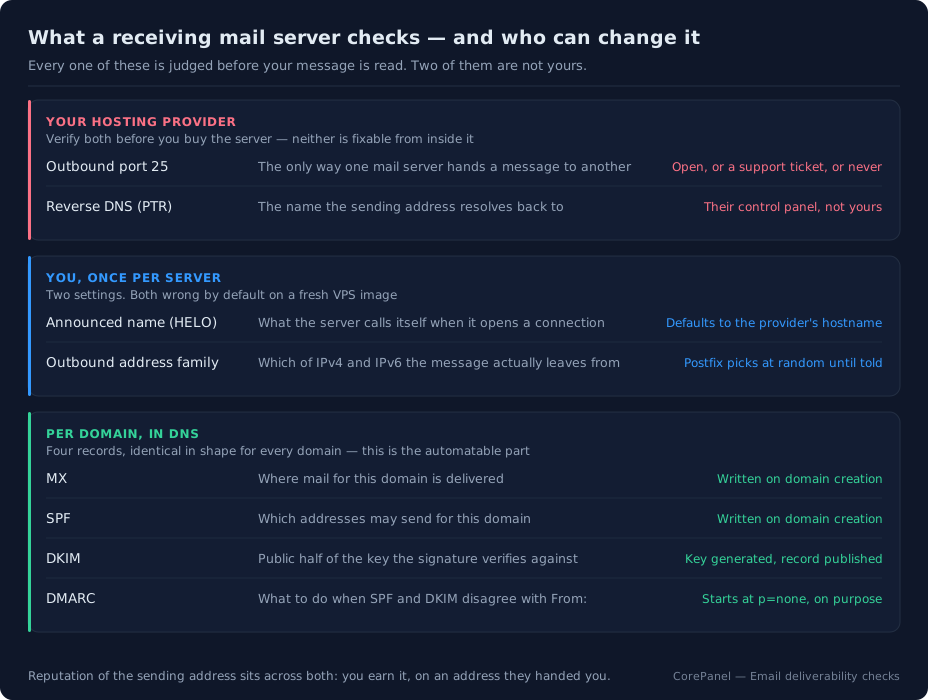
In short: running your own mail server still works, and the software has not been the difficult part for years. Postfix, Dovecot and Rspamd are mature, free and boring. What decides whether Gmail and Microsoft 365 accept your message is the identity of the IP address it left from — whether port 25 is even open outbound, whether that address has reverse DNS, what name your server announced, and which of your two addresses the message actually used. That last one is a coin flip on a default Postfix install, and it is the failure we hit on our own server. Below: the three questions to answer before you install anything, the DNS a working domain needs, and where a panel genuinely removes work — plus the parts nobody can automate for you.
Every couple of years the internet agrees again that self-hosted email is dead. The canonical version is Carlos Fenollosa’s 2022 post, After self-hosting my email for twenty-three years I have thrown in the towel, and its argument is not a technical complaint. It is that email stopped being a distributed network: a handful of companies decide what arrives, and you cannot appeal.
Your hosting provider says the same thing, more bluntly. DigitalOcean’s own documentation recommends against running your own mail server — “difficult to secure and maintain, frequently get flagged as spam” — and blocks the ports so you can’t, by default, since June 2022.
Here is the part that gets lost. Receiving mail has never been easier. Sending to each other has never been easier. The hard problem is narrow and specific: getting a message accepted by the four or five large receivers everyone actually corresponds with. And that problem is almost never about your mail server. It is about the address your mail leaves from, and about six or seven facts a receiver can check in milliseconds before it has read a single byte of your message.
Those facts are checkable. Most of them are yours to fix. Two of them are not, and knowing which two before you spend a weekend on this is the whole point of this post.
Three questions to answer before you install anything
Not “which distribution”, not “Docker or packages”. These three, in this order, because a wrong answer to any of them means you should stop.
1. Can this machine open a connection on port 25?
Not receive on 25 — that is nearly always allowed. Open an outbound connection on 25, which is the only way one mail server hands a message to another. There is no alternative port for server-to-server delivery; 465 and 587 are for your clients talking to your server.
Providers block it because fresh VPS instances are the cheapest spam cannon in existence, and the policy varies enormously:
| Provider | Outbound 25 | How to get it |
|---|---|---|
| Hetzner, OVH and most traditional hosts | Usually open | Sometimes a short account-age wait |
| DigitalOcean, Vultr, Linode | Blocked by default | Support ticket, explaining the use case; not guaranteed |
| Oracle Cloud | Blocked on tenancies created after 23 June 2021 | Service limit increase request |
| AWS EC2, Google Cloud | Blocked, and effectively permanent | GCP does not lift it at all; AWS wants a use-case review |
| Azure | Blocked except on enterprise agreements | Subscription-type dependent |
Test it from the machine itself before anything else:
# any of the three; you want a 220 greeting, not a hangnc -zv gmail-smtp-in.l.google.com 25A timeout here is the end of the road for that machine. Not a configuration problem — a policy one, and no amount of Postfix tuning changes it.
2. Can you set the reverse DNS of the IP address?
The PTR record — the name the sending address resolves back to — is set by whoever owns the address, which means your provider, from their control panel. Never from the server. Some providers expose it as a field next to the instance; some make you ask; some, on shared or dynamic addressing, will not do it at all.
No PTR is not a scoring penalty. Several large receivers reject on it before looking at anything else. If you cannot set it, you do not have a mail server, you have an outbox.
3. Does the address have a past?
Addresses are recycled. The one you were just assigned may have spent last year sending for somebody else, and blocklists remember. Check it before you build anything on top of it — Spamhaus, SpamCop and UCEPROTECT all have public lookup forms, and a listing on a fresh address is the cheapest possible reason to destroy the instance and take another one.
Answer those three and the rest of this is ordinary sysadmin work. Fail one and no software on earth will save the setup.
What a working domain needs is mostly DNS
The mail server itself is four packages and a handful of config files. What receivers actually read is DNS, and it is the same four records for every domain you host:
| Record | What it says | Who checks it |
|---|---|---|
MX | Where mail for this domain goes | Anyone sending to you |
SPF | Which addresses may send for this domain | Everyone you send to |
DKIM | The public key your signature verifies against | Everyone you send to |
DMARC | What to do when SPF and DKIM disagree with the From: header | Everyone you send to |
None of that is difficult. What makes it tedious is that it is per domain, it must be right the first time (a broken SPF is worse than no SPF), and the DKIM half requires generating a key pair, storing the private half where the signer can read it, and publishing the public half as a TXT record with matching selector names on both sides.
This is the first place a panel earns its keep. When a domain is created, CorePanel writes the whole set into the zone in one transaction:
example.com. IN MX 10 mail.example.com.example.com. IN TXT "v=spf1 a mx ~all"cp1._domainkey.example.com. IN TXT "v=DKIM1; k=rsa; p=MIIBIjANBgkqh…"_dmarc.example.com. IN TXT "v=DMARC1; p=none; sp=none; adkim=r; aspf=r"The DKIM key is a 2048-bit RSA pair generated at the same moment, with the private half
handed to Rspamd, which signs from then on. Rotation is a button: the selector
increments (cp1 → cp2), the new record is published, and the old key stays valid for
a seven-day grace period so messages already in flight still verify — after which a
daily job removes the key file and the record together.
The DMARC policy starts at p=none deliberately. p=none means “tell me, don’t
reject”: it turns on the reporting without giving any receiver a reason to bin mail
while you are still finding out which of your systems send as this domain. Tightening
it to quarantine and then reject is a decision, and decisions belong to the person
who knows what else sends from that address.
TLS is the other piece that quietly matters, and it is now table stakes rather than a differentiator: Postfix and Dovecot both present the host certificate CoreHttpd maintains, self-signed the moment the panel has a domain so nothing is ever unencrypted, and swapped for the real certificate automatically once it is issued. Dovecot serves per-domain certificates over SNI on top of that.
The failure you cannot see in your DNS records
Now the interesting one, because it is the failure that makes people give up. It is invisible from every per-domain page, every DNS checker and every “test my SPF” site, and it took down mail from our own server.
A message from info@corepanel.net to a Microsoft 365 recipient bounced with:
550 5.7.1 Service unavailable, Client host [2001:41d0:305:2100::1:3d3a]blocked using Spamhaus.SPF: correct. DKIM: signing and verifying. DMARC: published. PTR: set. And the message was refused anyway, because of the part in brackets: it left over IPv6, from an address in a block the provider hands out wholesale, with no reputation of its own — and that block was on Spamhaus CSS. The IPv4 address, the one whose PTR we had set and whose reputation we had built, was clean and would have delivered.
The cause is a Postfix default that reads like the safe option and is not.
smtp_address_preference ships as any, and any does not mean “whichever works”. It
means choose at random, per destination, whenever that destination publishes both an A
and an AAAA record. Microsoft 365 publishes both. So does Google Workspace, and so do
most hosted filters. On a default install, roughly half your mail to the receivers that
matter most leaves over the address you have done none of the work on.
It is a coin flip between delivery and a 550, and it looks like intermittent
flakiness, which is the worst way for a problem to present itself.
# what is this server actually going to do?postconf -h smtp_address_preferenceCorePanel now installs with smtp_address_preference = ipv4, and re-seeds it on every
boot — but only when main.cf does not name the setting at all, so an operator who
deliberately chose any keeps it. IPv6 remains the fallback when no IPv4 address of a
destination will accept a connection, so nothing becomes unreachable. It is one line of
configuration, and on most VPS providers it is the single highest-value line in the
whole setup.
”Unknown” is not “clean”
One more trap, and this one is about the tools rather than the mail.
When you check your address against a blocklist, there are three possible answers,
not two. Spamhaus and the others refuse to answer queries that arrive through a public
resolver — Google’s 8.8.8.8, Cloudflare’s 1.1.1.1, Quad9 — and they refuse once a
resolver goes over its daily budget. Spamhaus signals the refusal with an answer in
127.255.255.0/24, which to careless parsing looks exactly like a listing, and to
slightly-less-careless parsing looks like a pass.
It means neither. It means nobody checked. Any tool that renders that as a green tick is telling you the most damaging possible lie: your mail is bouncing and your dashboard says everything is fine.
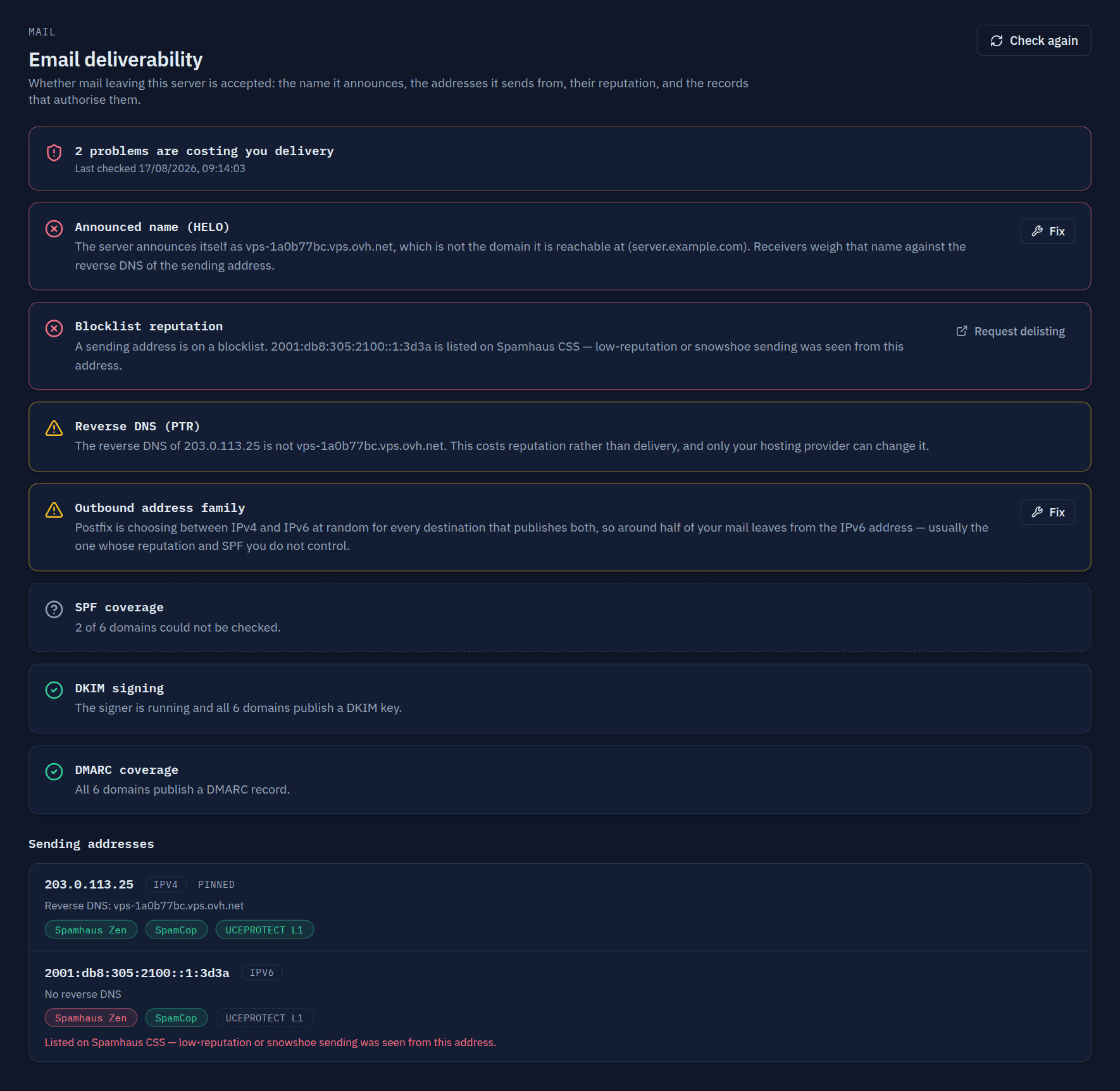
That page is why the whole thing is worth a panel at all. Seven checks — the announced name, reverse DNS, blocklist reputation, the address family, and SPF/DKIM/DMARC coverage across every domain on the server — run in one place, worst-first, with a Fix button on exactly the two that a machine can fix by itself. It is free on every edition, including Personal, because charging for a diagnosis would be a strange way to run a hosting product. From a terminal it is the same thing:
corepanel mail deliverability # cached for an hourcorepanel mail deliverability --refresh # re-run everything, blocklists includedcorepanel mail deliverability repair-helo # announce the panel domain insteadcorepanel mail deliverability prefer ipv4 # the coin-flip fixThe reverse DNS check deliberately has no Fix button. Only your provider can set a PTR, and a button implying otherwise would send you down a dead end while your mail kept bouncing.
Docker was never the hard part either
If you have looked at this before, you have met mailcow and Mail-in-a-Box. They are good, they are clear about what they do, and if you want one mail server on a Debian box, they will get you there.
What they are is a mail appliance. Where CorePanel differs is not the mail stack — underneath it is the same Postfix, the same Dovecot, the same Rspamd everybody sensible uses — but everything wrapped around it:
- The DNS is authoritative and local. The zone with the MX, SPF, DKIM and DMARC in it is the one this server serves, so a new domain is correct the moment it exists. No copying TXT records into somebody else’s dashboard and getting the selector wrong.
- The websites and the mail are the same account. One tenant, one home directory, one quota, one set of credentials, isolated from the next tenant at the filesystem and at the PHP pool — the isolation model is the same one the web side uses.
- Every credential check on the box lands in one audit trail. IMAP, POP3, SMTP submission and FTP all go through one broker, which records the address, the outcome and the reason as data rather than a log line — and delays repeated failures instead of banning the office NAT everyone shares.
- Webmail is already there, at
webmail.<domain>, with its certificate.
This is a hosting stack, not an appliance, and it costs what a hosting stack costs. It runs on RHEL 8, 9 and 10, AlmaLinux and Rocky — not Debian or Ubuntu. And a full install idles around 1.2 GB of userspace memory (measured as PSS+swap of every process on an AlmaLinux 8 box with one account), of which Rspamd alone is about 400 MB across its five processes. On a 2 GB VPS that is real. On the 4 GB one you would want for mail plus a couple of sites, it is not.
If you want one mailbox on one domain and nothing else, an appliance is a better fit. If you want mail for the domains you are already hosting, without a second machine, a second DNS story and a second set of certificates, that is the case this is built for — and on Personal it is free for up to twenty websites, with the complete mail stack in the free edition, because a hosting stack without mail is not a hosting stack.
What nobody can automate for you
Three things, and they are the three that actually take time:
The PTR. Provider’s field, provider’s rules. Set it to the same name your server announces.
Reputation. A brand-new address has none, and volume from nowhere looks exactly like a spam run. Start small, send real mail to people who expect it, and let it build. There is no shortcut and no product that sells you one.
The judgement call about bulk. If you are sending newsletters or transactional mail at volume, that traffic belongs on a relay with a dedicated reputation team, not on the box that also serves your websites. Self-hosting the mail your business corresponds with is a different activity from running a sending platform, and conflating them is how people end up concluding that self-hosting doesn’t work.
The checklist
nc -zv gmail-smtp-in.l.google.com 25from the server. Timeout means stop.- Confirm you can set the PTR for the address, in the provider’s panel, today.
- Look the address up on Spamhaus before you build on it.
- MX, SPF, DKIM, DMARC — all four, per domain.
p=noneto begin with. postconf -h smtp_address_preference. If it is empty orany, fix it.- Check the HELO name. A VPS image announces itself as the provider’s hostname until you change it.
- Never read “unknown” as “clean”.
The oligopoly argument is right about one thing: you do not get to appeal a receiver’s decision. But the decision is made on facts you can see, and six of the seven are yours to set. That is not a network that has closed. That is a network with an entrance exam — and the exam is short, written down, and the same for everybody.
Related
- Email deliverability — the seven checks, what each one means, and the worked example of an IPv6 bounce
- Mail System — the full stack: Postfix, Dovecot, Rspamd, the authentication broker, DKIM rotation and TLS
- CSF is gone. Here’s how to run a server firewall in 2026 — who blocks the brute force against those mailboxes now
- True user isolation, explained — what separates one account’s mail and files from the next