CSF is gone. Here's how to run a server firewall in 2026
ConfigServer shut down on 31 August 2025. Which half firewalld already replaces, the three mistakes that lock you out, and who does lfd's job now.

In short: ConfigServer closed on 31 August 2025 and CSF — the firewall most of the hosting industry ran on — stopped having a vendor. It was really two tools in one package, and they need different answers. The packet filter is replaced by firewalld on nftables, which is already installed and running on every RHEL 8, 9 and 10 box you own. lfd’s job — counting failed logins and blocking the source — has no successor in the base OS, and assuming otherwise is how people end up with less protection than they had. CorePanel answers it from a different direction: not by tailing logs, but from inside the service that checks the password. Below: what to run, the three mistakes that lock you out of your own server, and exactly which doors are covered.
On 31 August 2025, Way to the Web Ltd — the company behind ConfigServer Security & Firewall — shut down all operations with about a month’s notice, after twenty years. On the way out they released CSF v15.00 under the GPLv3, and cPanel has since forked it to keep critical security and stability fixes coming for its own users.
So nothing broke that night, and nothing will break tomorrow. That is exactly why this is worth thinking about now rather than during an incident: a firewall that still works is the most comfortable place to stop paying attention.
The part nobody says out loud: CSF was two products
Almost every “CSF alternative” list gets this wrong, because it treats CSF as one thing and looks for one replacement. It wasn’t one thing.
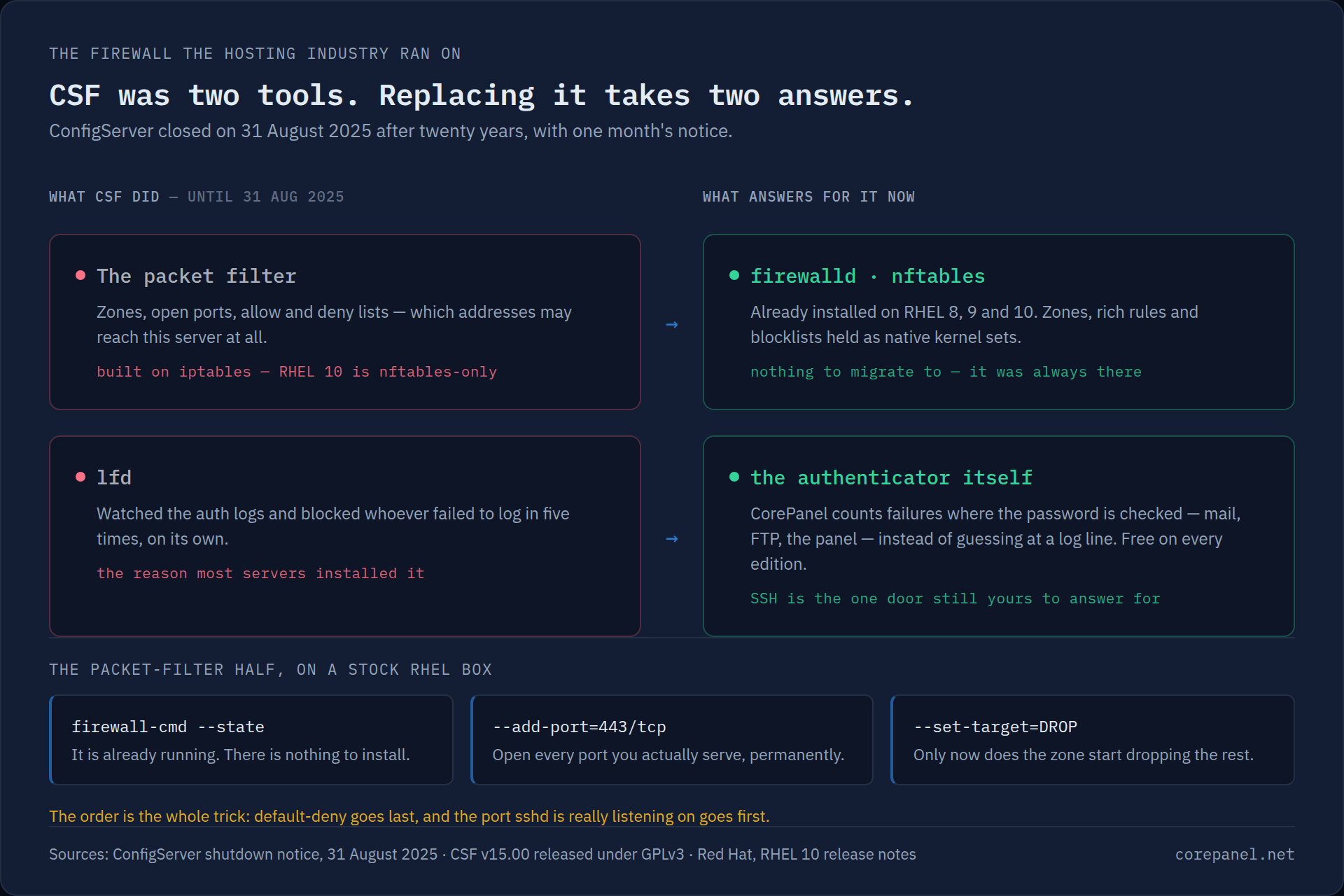
The packet filter decided which addresses could reach which ports. Zones, open ports, allow lists, deny lists — the boring, essential half.
lfd, the Login Failure Daemon, was the other half, and if you are honest it is the one you actually installed CSF for. It tailed the auth logs, counted failures, and blocked whoever tried five bad SSH passwords, all by itself, with no configuration from you.
Replacing CSF means answering for both. They are not the same kind of software, and no single tool inherited the pair.
Half one: the packet filter you already have
Here is the good news, and it is genuinely good: on RHEL 8, RHEL 9, RHEL 10, AlmaLinux and Rocky, firewalld is already installed and already running. There is nothing to migrate to. It ships with the distribution, it is maintained by Red Hat, and it sits on nftables, the kernel subsystem that iptables was replaced by — which matters, because RHEL 9 deprecated the iptables backend and RHEL 10 no longer ships it at all. CSF’s architecture was on the wrong side of that line.
firewall-cmd --state # it is very probably already "running"firewall-cmd --list-all # and this is what it is currently letting throughThe concept you need is a zone: a named set of rules with a default policy. Public
zones on RHEL default to rejecting what they were not told to accept, but the zone your
interface is assigned to may be more permissive than you think — read --list-all before
believing anything.
Turning a server into default-deny is three moves, and the order of them is the entire game:
# 1. open everything you actually serve — permanently, not just at runtimefirewall-cmd --permanent --add-port=22/tcp     # the port sshd IS on. See below.firewall-cmd --permanent --add-port=80/tcpfirewall-cmd --permanent --add-port=443/tcpfirewall-cmd --permanent --add-port=443/udp    # HTTP/3, forgotten every single time
# 2. only now, make the policy deny-by-defaultfirewall-cmd --permanent --zone=public --set-target=DROP
# 3. and only now, apply itfirewall-cmd --reload
Blocking a single abusive address, the thing lfd used to do for you, is a rich rule:
firewall-cmd --permanent --add-rich-rule='rule family=ipv4 source address=203.0.113.7 drop'firewall-cmd --reloadThat is the whole packet-filter half. It is unglamorous and it is enough.
The three mistakes that lock you out of your own server
A firewall is the only piece of infrastructure whose failure mode is losing the machine you would use to fix it. These three account for nearly all of it.
1. You opened port 22, and sshd is not on port 22
This is the one that actually ends sessions. People move SSH to 2222 or 2022 and forget,
or they check /etc/ssh/sshd_config — which on modern RHEL resolves Include /etc/ssh/sshd_config.d/*.conf and may not hold the answer at all. Then they set the zone
to DROP and watch their own terminal die.
Ask the running daemon, not a file:
ss -lntp | grep sshdWhatever port that prints is the port that goes in the allow list. Nothing else counts.
2. You set default-deny first and opened the ports afterwards
The two commands are separated by seconds, and those seconds are enough. Between
--set-target=DROP --reload and the first --add-port, your SSH session is on the wrong
side of a wall you just built. Build the openings, then close the wall — always in that
order.
3. You trusted a timeout that the firewall cannot read back
This one is subtle and cost us real debugging time. firewalld can hold entries that expire by themselves, which sounds perfect for temporary blocks. In practice, on both RHEL 8 and RHEL 10, such an entry cannot be read back or removed through the API once written — it is effectively write-only, and on EL8 the timeout is ignored outright.
So a “24-hour block” placed that way can be a permanent block you cannot see, cannot list, and cannot lift. If you want expiring blocks, something outside the firewall has to own the deadline and remove the entry itself. Anything else is a trap with a delay fuse.
And regardless of all three: know the way out before you need it. Your provider’s serial or VNC console is the answer, and the time to find out whether it works is now, not while locked out.
Half two: the auto-blocker, and why log tailing was always the wrong end
Here is where most migration guides quietly change the subject.
Nothing in the base OS replaces lfd. fail2ban is the closest free equivalent — it tails logs, matches failure patterns and calls firewalld to ban the source. It works, and it is a reasonable answer if you are willing to own its configuration: a different tool, a different config language, and nothing set up for you.
But notice what both lfd and fail2ban are actually doing. They read a log line written by a service that already knew the answer, parse an address back out of prose, and hope the regex still matches after the next upstream release. That indirection is where the whole category’s false positives come from — and a false positive here is not a missed detection, it is a customer’s office cut off from mail, FTP, SSH, the panel and every website on the box, all at once, for hours.
Note also that most brute force in a hosting environment is not SSH any more. It is IMAP and SMTP, and it is WordPress logins and XML-RPC over HTTPS on port 443 — a port your firewall must leave open, carrying traffic a packet filter cannot see at all. The web half belongs to a web application firewall, one layer up. The mail half belongs to whatever checks the mailbox password, and that is the part CorePanel took.
Where CorePanel fits, and where it doesn’t
CorePanel manages firewalld directly — no agent, no second firewall competing with the
first. It builds a dedicated corepanel zone with a default-deny policy, seeds it with the
ports of the stack actually installed on the machine, and holds the blocklist and the
bastion allowlist as native nftables sets.
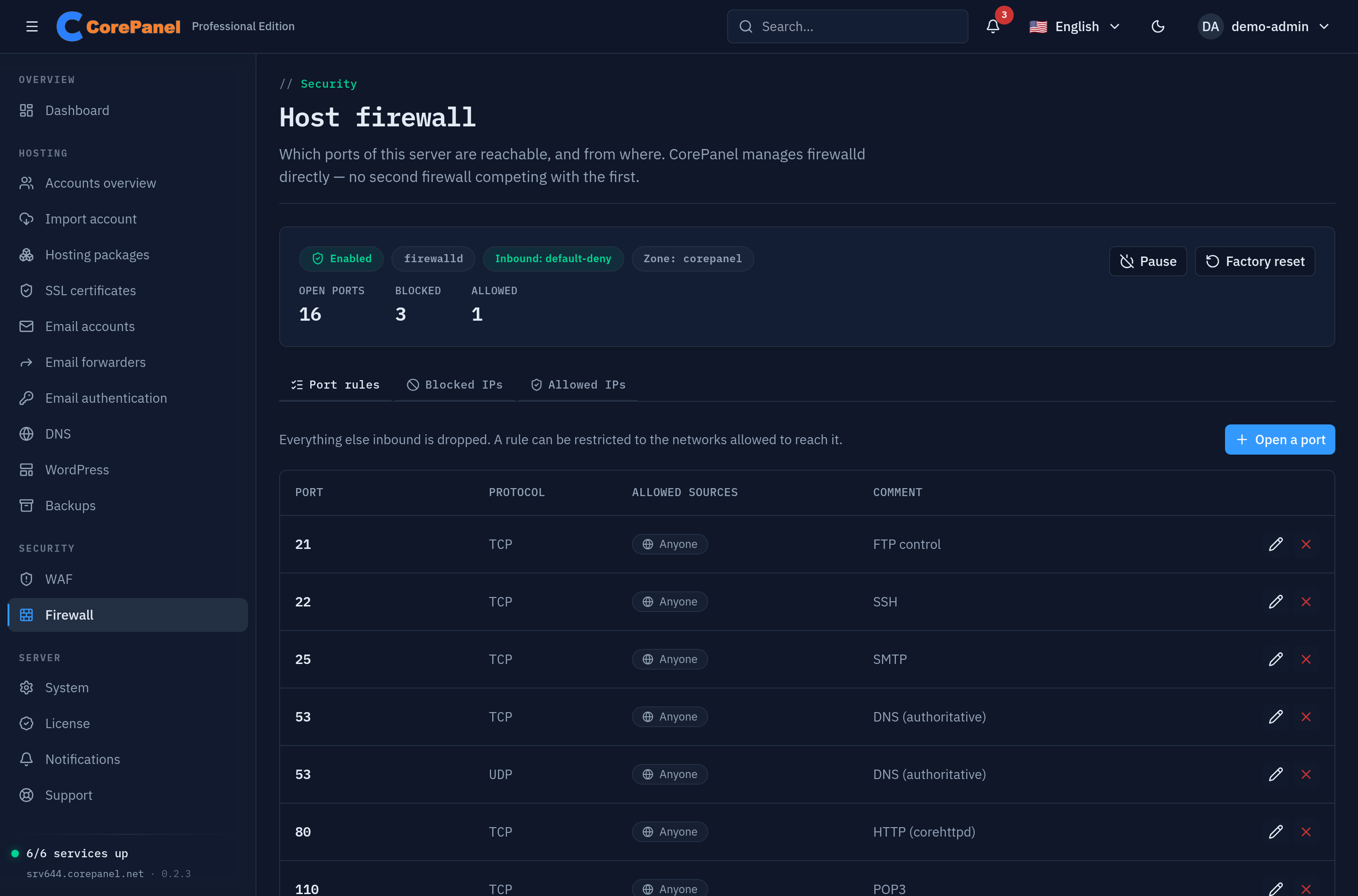
The three mistakes above are why it behaves the way it does:
- The SSH port is read from the running sshd, never guessed from a config file.
- Adoption applies the seed first and makes the zone default last, so traffic only starts being dropped once every rule is already in place. The whole port list is shown to you before anything changes.
- Expiring blocks are timed by CorePanel, not by firewalld, precisely because of the write-only-entry problem — which also means a block survives a reboot and still expires on schedule.
- Closing port 22 or 443 is refused unless you force it, because those are the two whose loss ends the access you would need to undo the mistake.
And corepanel firewall disable is never gated by your licence — a default-deny
firewall that outlived its subscription and could no longer be switched off would be a
hostage situation, not an upgrade prompt. It stops firewalld, keeps every rule in permanent
configuration, and asks no questions.
lfd’s job, done from inside the authenticator
CorePanel checks every mail and FTP credential on the server in one place: its own authentication broker, which Dovecot and Pure-FTPd call instead of holding passwords themselves. That process sees the username, the source address, the protocol and the outcome — as data, not as a log line — for IMAP, POP3, SMTP submission and FTP alike. There is nothing to parse and no pattern to keep in step with an upstream release.
So it counts. An address that is guessing gets its rejections delayed — two seconds each, which no human notices. Successful logins are never delayed, which is what makes this safe on an office NAT where one phone holds a stale password and fifty people are working. (Credit where it is due: Dovecot already delays repeated mail failures by up to fifteen seconds on its own, so on IMAP and SMTP this is a small addition to a large existing one. FTP had nothing, and there it is the whole of it.) All of it is free on every edition, Personal included, and all of it is visible in Security → Login activity with the CLI to match:
corepanel auth stats # the window's aggregates, and what the detector did about themcorepanel auth attackers # worst source addresses, with the accounts each one triedReporting an address to the firewall is a much higher bar, and the difference is the point. lfd banned on five failures. CorePanel requires all of the following, and every one of them exists to protect somebody real:
- No successful login from that address in the last seven days. One person collecting their mail proves a human being is behind it — on carrier-grade NAT, possibly thousands of them. That outweighs any amount of failure counting, and it is why an attacker sharing an exit with a paying customer is left to the tarpit instead of taking the customer down with them.
- At least three different accounts. One mailbox failing forever is a stale password on a device, and that is the authenticator’s problem permanently. Many mailboxes from one address is a dictionary run, which is a different question.
- Enough volume for the shape it has. Ten guesses against mailboxes that do not exist on this server — the thing no legitimate client ever asks for twice, and which a bot reaches in twenty seconds — or sixty against mailboxes that do. The second bar is deliberately wide: an attacker with a leaked address list and an office whose mailboxes all hold the wrong password produce identical rows, and getting that one wrong costs a customer their FTP, SSH and websites on top of the mail they had already lost. A third bar exists because the first two are measured over five minutes and real attacks are not: twenty guesses against five or more non-existent mailboxes over a day, at any speed. More on why below.
- A globally routable address. Never the container network, never the provider’s LAN, never carrier NAT, never the server’s own addresses, never anything on the bastion allowlist.
- The audit trail agreeing. Before anything is sent to the firewall the case is re-derived from the recorded events — the same rows you can read in the panel. The counters propose; the evidence decides.
Nobody attacks at five failures a minute any more
That third bar is worth dwelling on, because it is the one that made us re-read our own design. Here is six days of a live CorePanel mail server: 1,873 rejected logins, every single one aimed at a mailbox that was never created there, from 38 addresses — and not one of those addresses ever exceeded three failures in any five-minute window. Eight of them were a coordinated /24 pacing themselves at roughly one attempt per window each.
lfd’s five-failures-in-five-minutes would have caught none of that. Neither would ours, as originally built, and that is the point: rate limits have been standard for fifteen years, so the people still doing this for a living moved below them years ago. A burst counter measures how fast somebody guesses. What actually identifies an attacker is what they ask for — mailboxes that do not exist, over and over — and that signal does not decay with time.
So CorePanel asks the audit trail a slower question every five minutes, over a 24-hour window. On that server it catches 34 of the 38. It runs on exactly the same safety rules: an address a customer signed in from is still untouchable, however many non-existent mailboxes somebody behind it asks for.
Only that last step is a paid feature: automatic blocking runs on Pro and Business, where it also inherits the escalation ladder (30 minutes, doubling per repeat, capped at seven days) and the expiry CorePanel times itself. Detection, the delays, the attacker list and the per-mailbox history are free everywhere — the protection is not the upsell, the automation is.
The gap that remains: SSH is not covered yet. The panel’s own login guard and the WAF cover the panel and HTTP, mail and FTP are covered by the above, and SSH remains yours — key-only authentication, a non-standard port, or fail2ban for that one service. It is on the roadmap as a journald watcher in the privileged daemon, and until it lands this post is not going to pretend otherwise.
Update, 18 September 2026: SSH is covered from CorePanel’s next release, on every edition. The authentication broker reads sshd’s log for every user, root included, and the SSH guard bans an address that keeps failing from the SSH port alone — its websites, its mail and the panel stay open, so it cannot lock you out of the page you would release yourself from. See Access Protection.
Firewall management is a Pro and Business feature. On Personal the section stays in the sidebar and shows what Pro unlocks — with two exceptions that are ungated on every edition: reading the status, and turning the firewall off.
Update, 17 September 2026: both paragraphs above are out of date. The firewall and automatic blocking are now free on every edition, Personal included — adopting firewalld, the blocklist and allowlist, and the escalating ban. Only opening, closing and restricting ports stays on Pro and Business. See Host Firewall.
The checklist
ss -lntp | grep sshd— find the port SSH is really on.- Confirm your provider’s console works, before you need it.
- Open every port you serve, permanently. Do not forget 443/udp.
- Then set the zone target to DROP and reload.
- Decide who is doing lfd’s job — per door. Mail and FTP, the panel, HTTP and SSH are four different answers, and “CSF used to” is not one of them.
- Never trust a firewall timeout you cannot list back.
The packet-filter half was always solved; CSF’s shutdown just makes it visible. The half worth your attention is the other one — and it is worth doing from inside the service that knows the answer, not from the log line it wrote afterwards.
Related
- Login Activity — who is trying to sign in, and what the detector did about it
- Host Firewall — the full CorePanel firewall documentation
- Web Application Firewall — the layer that sees what port 443 carries
- True user isolation, explained — what actually separates one account from the next, one layer below the network