Why trust a new control panel? What every CorePanel release has to survive
Unit tests, a hostile review, ~980 acceptance checks on fresh AlmaLinux 8, 9 and 10 servers, a CI gate and immutable versions: what every release goes through.

In short: before a CorePanel release reaches your server, it passes more than 4,500 unit tests, a review whose only job is to break it, and an acceptance suite of about 980 checks that installs CorePanel from scratch on three fresh servers — AlmaLinux 8, 9 and 10, SELinux enforcing — and checks what actually happened on the operating system. Then the release tag runs the tests again in CI, builds only what changed, and publishes it under a version number that can never be overwritten. The discipline is the one the Linux kernel is known for, at the scale of one product.
CorePanel is new, and a new control panel is a fair thing to be careful with. It runs as root on the machine that holds your customers’ sites, mail and databases. “Trust us” is not an answer to that, and neither is “we’ve been around for twenty years” — age says nothing about how the next update was tested.
What does answer it is process: what a change has to survive before it is allowed anywhere near a server. The Linux kernel is the best-known example. Nobody trusts a new kernel because Linus wrote the first one in 1991; they trust it because every release goes through review, testing on real hardware and weeks of release candidates. That is the model we follow, and this post walks through it.
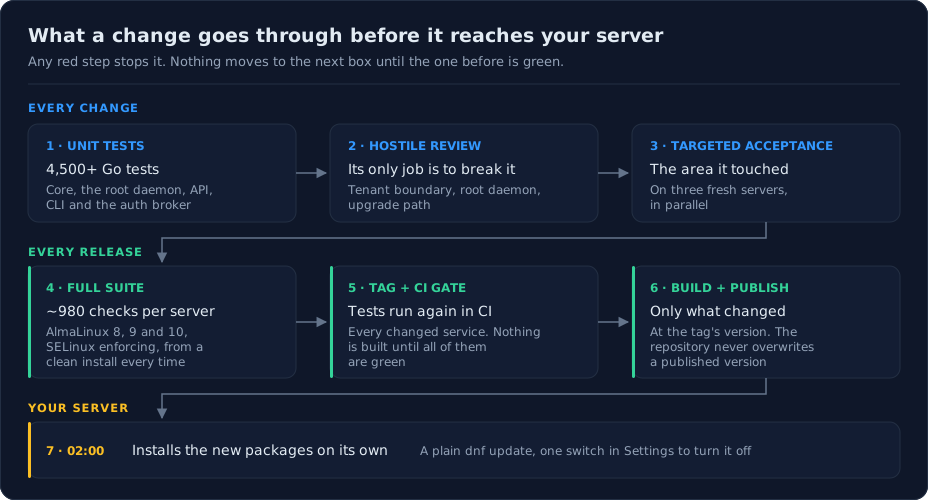
Every change: tested, attacked, then run for real
Work on CorePanel lands in small slices — one capability or one fix at a time — and each slice clears three gates before the next one starts.
Unit tests. The Go services that make up CorePanel — the core, the root daemon that touches the operating system, the API, the CLI and the authentication broker for mail and FTP — carry more than 4,500 unit tests between them. They are the fast layer: seconds to run, and they catch logic errors before anything is installed anywhere.
A hostile review. Rereading your own code finds what you expected to find. So every slice gets a separate review pass whose brief is not “does this look right?” but “break it”, along the three lines where a hosting panel actually fails:
- The tenant boundary. Can one hosting customer read, change or delete something belonging to another? Can a reseller reach an account that isn’t theirs?
- The root daemon. Does any input from a customer reach a privileged operation without being checked — a path, a name, a symbolic link?
- The upgrade path. What happens to a server that already has data when this change arrives on it?
A finding has to come with a concrete scenario, and a confirmed one is fixed before the slice moves on.
Targeted acceptance. Finally the slice’s own acceptance tests, and their neighbours, run on three freshly installed servers. Not a mock, not a container pretending to be a server: a real machine, installed by the same installer you use.
The acceptance suite: ask the operating system, not the API
Most of what makes a hosting panel trustworthy cannot be proven by a unit test. A panel that says “mailbox created” while the mail server cannot deliver to it is a broken panel with a green dashboard.
So every acceptance test works the same way: it drives the panel’s API exactly as
the panel does, then checks the real effect on the operating system. Creating a
mailbox is not done when the call returns ok — it is done when a message sent through
SMTP arrives and can be read back over IMAP. A restored backup is not done when the job
says “finished” — it is done when the site answers with the restored content, the
database has the rows, and the mailbox has the mail. A suspended account is checked by
trying to log in to it.
Today the suite holds 349 tests in 135 files, and with their sub-cases that comes to about 980 checks per server. They cover accounts, domains and DNS, web serving and PHP, mail and spam filtering, databases, FTP and SSH, backups and restores, cPanel imports, WordPress, applications, the firewall, the WAF, licensing, the reseller and client panels, API tokens and logs.
More than a third of those checks are about one thing: that nobody can step outside their own account. One test walks every method a hosting customer can call and proves each refuses another customer’s resources. Another walks 140 server-wide methods and proves every one of them refuses a reseller. These are the tests that answer the question behind most of the year’s cPanel vulnerabilities — what can your own customer do to your server?
Four rules decide what a green run is worth:
- Every run starts from a clean install. The servers are created for the run and destroyed after it, so nothing left over from a previous run can make a test pass.
- SELinux is enforcing, or the run refuses to start. Cloud images often ship in permissive mode, where the tests of process confinement would quietly have nothing to check. The suite reads the mode after installing and stops if it is not enforcing.
- Three operating systems, in parallel. AlmaLinux 8, 9 and 10 each get their own server, so a difference between releases of RHEL shows up as a red target, not as a customer’s bug report.
- A red run always points at CorePanel. No test leans on a shared test machine or another server that might be down that day. The few that need the internet — a site’s PHP fetching an external page, for instance — first check that the server itself has a connection, so an outage is reported as an outage instead of being blamed on the panel. When a target goes red, there is exactly one place to look.
Same commands, different results
“RHEL-compatible” sounds like one target. It is three. AlmaLinux 8, 9 and 10 ship different generations of systemd, OpenSSL, SELinux policy and the kernel underneath, and the same command can work on one, fail on another, or — worst of all — appear to work everywhere and quietly do something different on one of them.
A real case the suite caught: CorePanel gives PHP a CPU and memory budget, so that a runaway site cannot take the whole server down with it, by moving the PHP service into a dedicated control group. On AlmaLinux 9 and 10 that is one step and both limits apply. On AlmaLinux 8, which still uses the older cgroup v1 hierarchy, the same reload moved the running service halfway: the CPU limit took effect, the memory limit did not — and systemd reported the new group as if everything had moved. Nothing errored and nothing looked wrong in the panel. Only a test that read the live process’s control groups on an AlmaLinux 8 server showed that PHP could still use all of the server’s memory. CorePanel now restarts the service when it moves it, which moves it completely, and the test reads the limit the kernel is actually enforcing on all three.
Sometimes the difference runs the other way, and the older system is the one telling
the truth. CorePanel’s web server keeps the server’s own TLS certificate, and the mail
server reads it to offer encrypted connections (STARTTLS). That read permission came
from a default access rule on the certificate’s directory, which new files inherit.
On a fresh AlmaLinux 8 server, mail answered 454 TLS not available — the systemd on
AlmaLinux 8 does not apply that kind of rule, so the mail server could not read the
certificate. On 9 and 10 everything worked.
The easy conclusion would have been “an AlmaLinux 8 quirk”. The real one was more useful: the permission had never belonged to the certificate files at all. Every certificate renewal writes a new file, and whatever permission the old one carried goes with it. On 9 and 10 the directory rule quietly handed it back each time; on 8 nothing did. The web server now sets the permission on each certificate file as it writes it, on every version, and the test that checks it strips the directory rule first, so it cannot pass on 9 and 10 by luck again. Without a server for each version, mail on AlmaLinux 8 would have lost encryption, and the fragile design behind it would have stayed hidden on the other two.
That is the difference between “we support RHEL 8, 9 and 10” on a feature page and the same sentence backed by a red target that has to turn green on each of them.
Everything under SELinux, enforcing
SELinux is a second lock built into the Linux kernel on RHEL and its rebuilds. Ordinary
Unix permissions ask who you are; SELinux also asks what you are. Every process and
every file carries a label — the PHP processes that run a website’s code are
httpd_t, the website’s files are httpd_user_content_t, the mail spool is something
else again — and a policy loaded
into the kernel lists exactly which labels may do what to which. Anything not on the
list is refused, even to root. So if an attacker takes over the web server through a
vulnerable plugin, they hold a PHP process that can read websites and very little else: not
the mail, not the databases’ files, not the SSH keys.
The same strictness that stops an attacker also stops perfectly legitimate things the policy did not expect. The everyday example on a hosting server: by default, RHEL’s policy does not let the web server’s PHP open outbound network connections. That is a sound default for a box serving static pages, and it breaks half of what a real website does — WordPress checking for plugin updates, a WooCommerce store talking to its payment gateway, a contact form sending through an external SMTP service. The site does not say “SELinux”; it says “could not connect”, and the owner opens a ticket.
That is why, for hosting panels, SELinux has mostly been the first thing switched off — “disable SELinux” has been the standard troubleshooting step for over a decade. The alternative is more work: know every legitimate thing a hosted site needs, grant exactly that and nothing else, and prove it keeps working. CorePanel does the work. It runs enforcing, every service in its own confined domain, with the permissions a hosting server needs — outbound connections for PHP among them — set on purpose, and a test that has a real site’s PHP fetch an external HTTPS page proves that one on every run. That is a promise you can only keep by testing it.
The reason is that SELinux failures rarely look like SELinux. A denied operation is often not logged at all — the policy marks many of them “don’t audit” to keep the logs quiet — so the symptom is a page that 404s or 502s and an audit log with nothing in it. No unit test sees that; a request to a real site on a real enforcing server does. Three cases the suite caught:
- Every site answered
502 Bad Gateway. The web server was meant to run in its own SELinux domain, but a few hardening options in its systemd unit silently prevented the switch, so it ran in a generic one that is not allowed to talk to PHP. Nothing in the logs; static files and PHP both failed. With SELinux off, everything worked — which is exactly why a suite that ran permissive would never have seen it. - The web server crashed in a loop at startup. A new disk cache mapped its files into memory, and the policy granted the web server permission to read and write those files but not to map them. Fine in permissive; fatal in enforcing.
- Every PHP page returned “File not found”. PHP-FPM needs two policy switches to read websites in users’ home directories. On a fresh install they were off, so PHP saw no files at all, and the error looked like a broken document root rather than a security policy.
Each of those is now fixed in what CorePanel ships — its own SELinux policy module, or the package that installs PHP — and each has a test that makes the real request (serve a static file, run a PHP script, start the cache) on a server that is enforcing. That is also why the run refuses to start in permissive mode: in permissive, all three of these tests would have passed.
This is what the acceptance work buys. Every service confined, every legitimate thing a hosting server needs granted on purpose, and a suite that makes those requests for real on every supported system, so a gap in the policy turns up on a throwaway test server instead of in production. It is how CorePanel keeps the protection most panels switch off, without asking you to choose between a secure server and a working one.
Every release: the whole suite, then a gate
A slice runs the tests for its area. A release runs all of them, on all three servers, including the slow ones the everyday run skips — the ones that wait out the mail server’s own brute-force penalty, the login tarpit and the firewall’s timers in real time, because those are exactly the things nothing faster can prove.
Then the release is cut, and from that point no step is done by hand:
- A tag is the version. A release is published on GitHub; its tag becomes the version number of every package built from it.
- CI runs the tests again. Every service that changed since the previous release is tested from a clean checkout. Nothing is built until all of them are green — so a change spanning two services can never ship in only one of them.
- Only what changed is built, and it is published to a package repository that refuses to overwrite a version that already exists. A package that reaches it can be superseded, never silently replaced, so a version number means the same build on every server that has it.
The upgrade path has a test of its own, too: it installs the published release, fills it with real accounts, files, databases and credentials, upgrades it in place to the new build, and checks that every one of them survived.
Your server: one quiet update at 02:00
A CorePanel server installs new CorePanel packages on its own at 02:00 local time. It
is an ordinary dnf update — nothing to learn, nothing hidden — and one switch in
Settings turns it off if you’d rather update by hand. The panel shows when the
last run happened and what it installed; the details are in the
maintenance documentation.
That is the reason all of the above exists. An update that installs itself at night, with nobody watching, has to have been proven before it left.
The kernel comparison
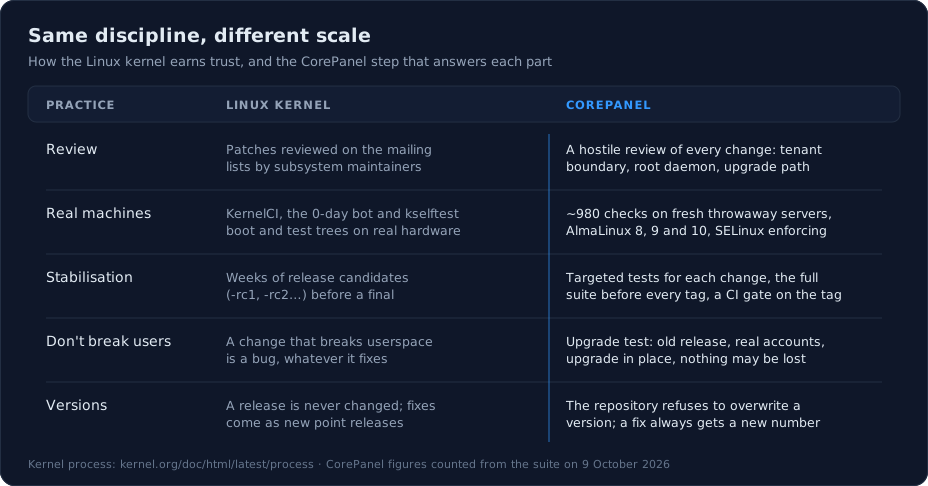
The comparison is about discipline, not size. The kernel has thousands of contributors, a two-week merge window and a fleet of test farms; CorePanel is one product with one suite. What carries over is the shape of it: every change is reviewed by someone trying to find what’s wrong with it, it is tested on real machines before it ships, a release never breaks what was already working, and a published version never changes under you. The kernel’s version of the third rule is famous — we don’t break userspace. Ours is the same rule with a hosting panel’s vocabulary: an update does not break your customers’ sites, mail or data.
The best way to judge it is the way you’d judge a kernel: run it. Install CorePanel on a spare AlmaLinux, Rocky or RHEL 8, 9 or 10 VPS — the getting started guide takes a few minutes — and let the 02:00 updates arrive. Every one of them went through everything above first.