cPanel alternatives in 2026: prices, platforms, and where each one fails
Plesk, DirectAdmin, CloudPanel, CyberPanel, HestiaCP and CorePanel compared on price, platform, mail, DNS and multi-tenancy — including where each one is the wrong answer.
In short: there is no single best cPanel replacement — there are four or five good ones, and which is right depends on your operating system, whether you need mail and DNS on the box, and whether you resell hosting. This post gives you the checked prices, the platform each panel actually runs on, and the cases where CorePanel is not the answer.
Two things happened over the last year that pushed a lot of operators to start looking. First, the bills: cPanel’s 2026 list price starts at $29.99/month for a single account, and Plesk revised its pricing structure effective 1 January 2026. Second, the trust: cPanel’s own CVE-2026-41940, an authentication bypass affecting every version released since 2013, was exploited in the wild from February 2026 and only patched on 28 April.
So the question is worth asking properly. Here is the landscape as of 17 August 2026, with every number linked to the vendor’s own page so you can check it the day you read this. CorePanel’s own two paid editions went on sale on 10 August, which changes one of the answers below — it is marked where it does.
The comparison
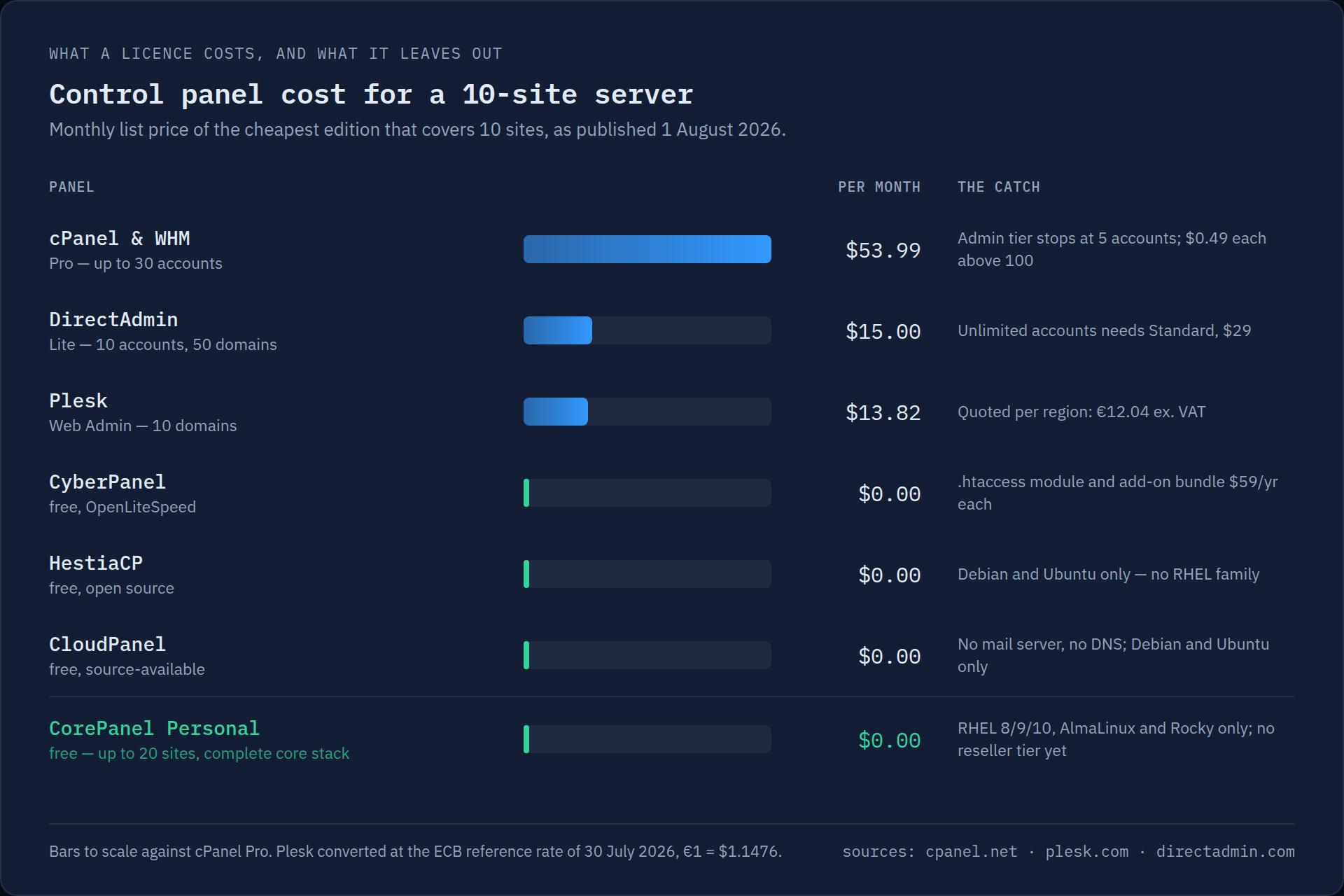
The chart above is the licence bill for a ten-site server. It is also the least interesting column, because three of these panels cost nothing and still aren’t interchangeable. Here is the rest of it:
| Panel | Price (list) | OS | DNS | Multi-tenant | License | |
|---|---|---|---|---|---|---|
| cPanel & WHM | $29.99–$69.99/mo, +$0.49 per account over 100 | RHEL-family, Ubuntu | Yes | Yes | Yes | Proprietary |
| Plesk | ~€12–€31/mo by edition | RHEL-family, Debian/Ubuntu, Windows | Yes | Yes | Yes | Proprietary |
| DirectAdmin | $5 / $15 / $29 per month | RHEL-family, Debian/Ubuntu, FreeBSD | Yes | Yes | Yes | Proprietary |
| CloudPanel | Free | Debian 12, Ubuntu 24.04 | No | No | No | Source-available |
| CyberPanel | Free with OpenLiteSpeed; add-ons $59/yr | RHEL-family, Ubuntu | Yes | Yes | Yes | GPL + paid add-ons |
| HestiaCP | Free | Debian/Ubuntu only | Yes | Yes | Limited | GPL |
| CorePanel | Free (20 sites) / $14.90 / $24.99 per server, any number of accounts | RHEL 8/9/10, AlmaLinux, Rocky | Yes | Yes | Yes (Pro and Business) | Proprietary, free tier |
Two columns in that table decide most of the choice, and they are not the price one.
The OS column is the first filter
If your servers are AlmaLinux, Rocky or RHEL — which they are, if you came from cPanel — then HestiaCP and CloudPanel are already out. HestiaCP runs on Debian and Ubuntu only. CloudPanel’s requirements list Debian 12 and Ubuntu 24.04. Both are good panels; neither will install on the machine you are holding.
That leaves Plesk, DirectAdmin, CyberPanel and CorePanel as drop-in candidates on an RHEL-family box. If you are willing to rebuild the server on Debian, the list opens back up — but rebuilding is not a migration, it is a rebuild, and you will still have to move the mailboxes by hand.
The mail column is the second
CloudPanel doesn’t include a mail server, and it’s a deliberate design decision, not an omission — its documentation says plainly that “E-Mail is very complex and shouldn’t be handled by the server that runs your Applications”, and points you at Google Workspace, Zoho or a separate Mailcow box.
That is a perfectly defensible position for an agency running twelve Laravel apps. It
is a non-starter if you are hosting forty small businesses whose info@ address has
eight years of mail in it and who will not pay $6/user/month to Google. Know which of
those two you are before you shortlist anything.
Panel by panel
Plesk is the closest thing to a like-for-like cPanel replacement, and the only serious option if any of your customers run Windows or ASP.NET. It has the deepest extension ecosystem of anything here. It is also the one alternative that costs roughly what you were already paying, and it raised prices at the start of 2026 like everyone else. Moving from cPanel to Plesk solves a vendor problem, not a cost one.
DirectAdmin has the widest platform coverage of anything here — RHEL-family, Debian, Ubuntu and FreeBSD — and the most mature reseller model outside cPanel, which is the thing to weigh if your customers resell to their customers. Twenty years of hosting companies have run on it. It is less polished than cPanel and the interface shows its age in places, and its unlimited tier is the one price on this table that a per-server licence now undercuts rather than matches.
CyberPanel is free, RHEL-capable, and includes mail, DNS and backups. Its pitch is OpenLiteSpeed and LSCache, which is a genuine performance advantage for WordPress. Weigh it against its history: CVE-2024-51378 was a CVSS 10.0 unauthenticated RCE, and the PSAUX ransomware campaign that followed in October 2024 hit roughly 22,000 exposed instances — of which about 400 were still online afterwards. The fix shipped within thirty minutes of disclosure, which says something good about the maintainers, but an unauthenticated RCE in the panel is the whole server.
CloudPanel is the best of these for a developer running applications rather than hosting customers: fast, clean, NGINX-first, good Node and Python support. No mail, no DNS, no multi-tenancy, Debian/Ubuntu only, and source-available rather than open source — you can use it free but not fork and resell it.
HestiaCP is the community favourite for a reason: genuinely open source (GPL), complete stack, no license anywhere. Debian and Ubuntu only.
CorePanel is the newest thing on this list and the only one whose stack is its own rather than an interface over other people’s daemons — the web server, the WAF, the page cache and the authentication broker are ours, which is why features like real Early Hints (HTTP 103) and automatic WebP exist here and not in the others.
Personal is free forever, capped at 20 sites, with the complete core stack: CoreHttpd
with HTTP/3, multi-PHP 7.4–8.4 with a dedicated FPM pool per account, MariaDB, Postfix +
Dovecot, PowerDNS, Let’s Encrypt, local backups and the full WAF — every rule set,
not a starter tier — on RHEL 8/9/10, AlmaLinux and Rocky. Every account is a real system user with a 0700
home under SELinux enforcing, so one compromised site can’t read its
neighbours.
Pro ($14.90) is the one that matters if you host other people, up to 50 sites: every account gets its own panel login, you can sign in as a customer to fix something, resellers can sell on your server without seeing it, and both halves of the WHMCS integration ship — a native provisioning module and a WHM-compatible API layer, so existing WHMCS automation written against cPanel keeps working — plus the speed optimizer and commercial SSL. Business ($24.99) is the same with no site cap and priority support. All three are per server, not per account.
Where CorePanel is the wrong choice
Worth being direct about, since the whole point of this post is that the answer depends on you:
- You run Debian or Ubuntu. CorePanel is RHEL-family only, on purpose. HestiaCP or CloudPanel are your list.
- Your resellers resell. Pro and Business have resellers: organisations that sell hosting on your server with their own administrators, narrowed to the accounts they own. It is one level, on purpose — a reseller has customers, never resellers of its own. If your model is a tree of resellers under resellers, that is DirectAdmin or cPanel.
- Your customers need a shell. Accounts get SFTP, jailed to their home with keys managed in the panel — SSH and SFTP Access — and the panel’s file manager uploads, downloads, organises, edits, extracts and sets permissions on every file of an account. But there is no shell yet: git, composer and wp-cli run from cron or a deploy, not from a terminal. Anyone arriving from cPanel with SSH habits notices.
- You need Windows hosting. Plesk, and only Plesk.
- You need LiteSpeed specifically — because your customers depend on LSCache and you don’t want to retrain them. CyberPanel.
- You want a panel with a ten-year track record. CorePanel doesn’t have one. The engine inside its WAF and web server does — six years in front of cPanel servers, protecting more than 800,000 domains — but the panel around it is new, and if track record is your deciding factor you should weight it accordingly.
The part that actually decides it: the exit
Everything above is a feature table, and feature tables are not why people stay on an
expensive panel. They stay because the migration is the scary part — 40 mailboxes with
years of mail, WordPress installs with absolute paths in wp-config.php, and a
customer who will notice immediately if their password stops working.
Of the panels here, most expect you to move accounts yourself. CorePanel connects to your existing WHM over SSH, lists every account, and recreates the ones you pick natively: files at their original paths, mailboxes with their full Maildir, forwarders and filters translated to Sieve, MySQL databases with data, cron jobs, SSL and the DNS zone with A records repointed while MX, SPF, DKIM and CAA are left alone. The original password hashes are imported verbatim wherever the scheme can still be verified, so nobody gets a reset email because you changed vendors.
If you’d rather not hand a panel your root credentials, the CLI takes a staged
cpmove archive and prints the entire plan first, without touching the system:
corepanel account import /var/lib/corepanel/import/cpmove-acme.tar.gz --dry-runIt is a one-shot import, not a sync; it reads cPanel only, not Plesk or DirectAdmin; and the cPanel reseller tree doesn’t come across. The full list of what it can and can’t reproduce is in the cPanel import documentation.
Every panel is attack surface
One last thing that belongs in any comparison of these and is missing from most of them. The control panel is the most privileged software on the machine, and in the last two years the two largest incidents in this category were panel vulnerabilities, not application ones: CyberPanel’s unauthenticated RCE in October 2024, and cPanel’s authentication bypass exploited quietly from February 2026 across an install base Shodan puts at roughly 1.5 million internet-exposed instances.
Whichever panel you pick, judge it on how it behaves when this happens to it: does it listen on a port the whole internet can reach, does one compromised site reach the others, and how fast did the vendor ship a fix the last time. Those questions matter more than the row count in a feature table.
Trying one is cheaper than reading about one
Point a spare VPS at whichever two you shortlisted and import a single real account into each. For CorePanel that’s one command on AlmaLinux, Rocky or RHEL 8/9/10, and the source server doesn’t change until you move DNS:
curl -fsSL https://get.corepanel.net/install.sh | bashcorepanel system initIf the license is what pushed you into this search, the arithmetic is in Your cPanel license costs more than your server. The full feature matrix, edition by edition, is on the pricing page.
And whichever you try, ask each one how an account gets back out. CorePanel fits into the
hosting ecosystem instead of walling itself off from it: it imports and exports accounts in
the cPanel format, so your backups are never trapped in a format only we can read — any
account exports as an archive cPanel restores with its own
restorepkg, on every edition. A trial you can walk away from is the only kind worth
running.