# Your cPanel license costs more than your server
> cPanel's 2026 list price starts at $29.99 a month for a single account. What that buys, what it doesn't, and how to move a whole server to a free panel.
Source: https://www.corepanel.net/blog/your-cpanel-license-costs-more-than-your-server
Author: CorePanel Team
Published: 2026-07-30
Tags: migration, cpanel, personal
From the CorePanel blog — https://www.corepanel.net/blog
---
> **In short:** cPanel's published 2026 price is $29.99/month for one account and
> $69.99/month for a hundred. CorePanel Personal is free forever, ships the complete
> core hosting stack, and imports cPanel accounts — files, mail with its messages,
> databases, DNS, cron and SSL — while preserving the original passwords.
Look at what you pay for the box, then look at what you pay for the software that
draws boxes around it. On most servers running a control panel today, the second
number is the bigger one.
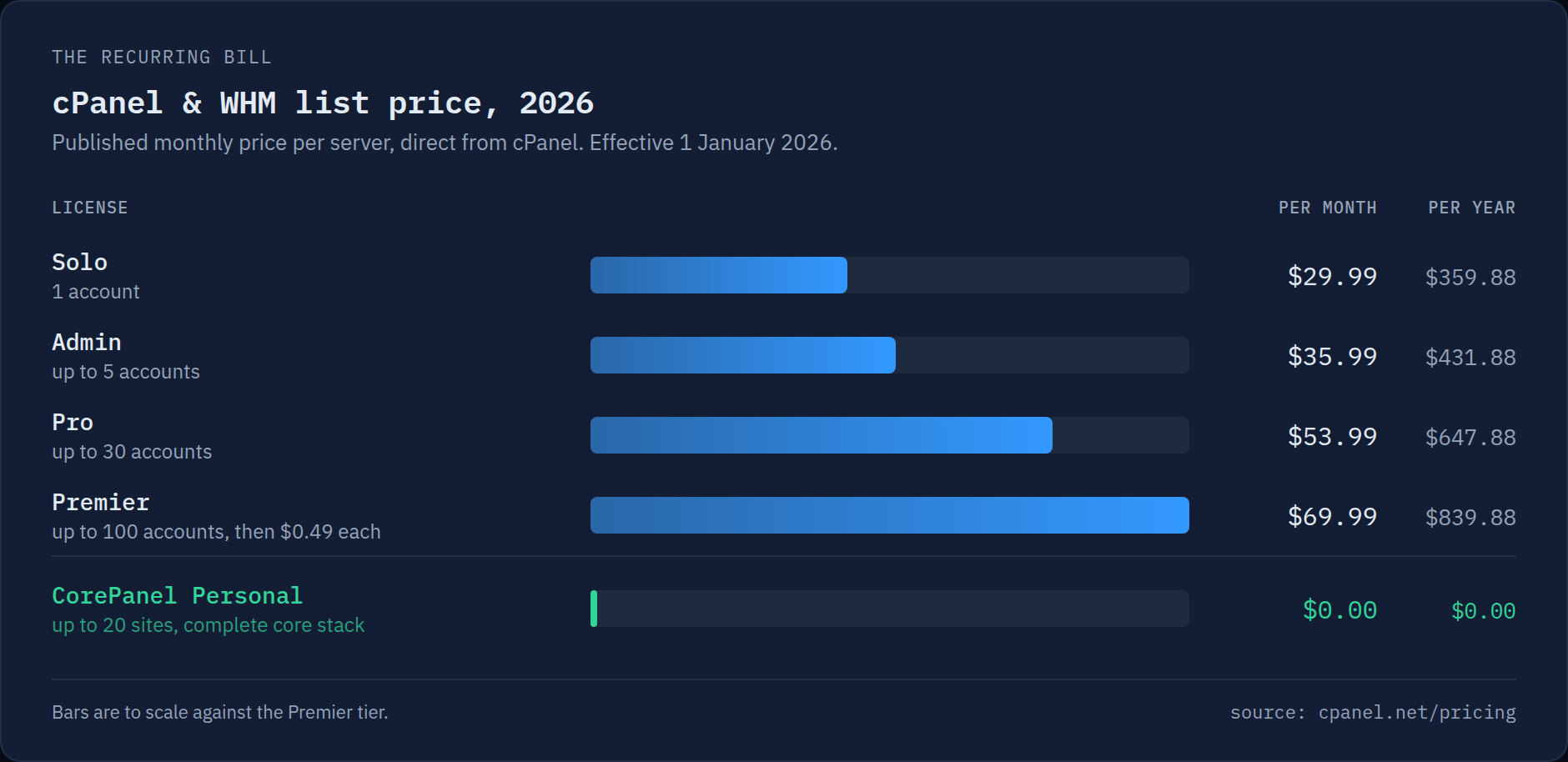
Here is cPanel's own published price list, effective 1 January 2026:
cPanel & WHM list prices as published at cpanel.net/pricing. Resellers on bulk NOC agreements pay less — they are also the ones paying per account past 100.
A single-site VPS with 4 vCPU and 8 GB of RAM runs somewhere between $15 and $30 a
month at most providers. The Solo license alone — one account, one site — is $29.99.
The panel has quietly become the most expensive component in the stack.
## The number isn't the problem. The direction is.
Prices going up is normal. What makes this one land differently is that it has gone
up **every year since 2019**, when cPanel moved from a flat license to per-account
pricing, and the increases don't track anything you can point at on your invoice. From
2025 to 2026 alone, Solo went up $3 a month and Pro went up $7 — a ~15% jump on a
product whose feature set, from the operator's chair, looked much the same in December
as it did in January.
The structural part is worse than the annual part. Per-account pricing means the
license grows with your business at exactly the moment your margins are thinnest: your
101st account costs $0.49/month before you've provisioned a single byte for it. You
are not buying a tool anymore. You are renting a percentage.
And on a commercial server the licence is rarely the only line. Add per-account
resource limits, commercial ModSecurity rules, a security suite, a caching layer and
off-server backups — five more vendors, five more invoices — and the stack reaches
**$173.94 a month at list prices**. That sum is a
[live calculator](https://www.corepanel.net/for-hosting-providers#invoice) on the page for hosting providers:
every figure in it is editable, so put the numbers from your own invoices in and see
what the real total is.
## What you're actually paying for
Strip away the branding and a control panel is a coordination layer. It creates a
system user, writes a vhost, issues a certificate, provisions a mailbox, hands you a
database, and keeps DNS honest. That's real work — but it's *bounded* work, and it
isn't where hosting costs money. The disk, the RAM and the bandwidth are.
That's the whole reasoning behind **CorePanel Personal**: the coordination layer is
free, forever, and complete. Not a trial, not a crippled tier that hides SSL behind an
upgrade:
- **CoreHttpd with HTTP/3**, multi-PHP 7.4–8.4 with a dedicated FPM pool per account
- **MariaDB 10.11 LTS**, **Postfix + Dovecot** mail with SPF and DKIM, **PowerDNS**
- **Free SSL** via Let's Encrypt, issued and renewed automatically
- **True user isolation** — `0700` directories, `0600` files, a separate system user
per account, SELinux enforcing. One compromised site does not reach its neighbours.
- **Fast by default** — on-the-fly WebP conversion and real Early Hints (HTTP 103),
on out of the box
- **The full WAF**, every rule family blocking — not a starter set with the rest
behind an upgrade
Paid editions exist, and they add *layers* — the dynamic page cache, managed firewall,
commercial SSL, and the multi-tenant panel for people reselling hosting. They do not
add the basics back, and security is not one of the layers: the WAF that protects the
server is the same on all three.
## The exit is the part nobody builds
Free is easy to announce. The reason people stay on an expensive panel isn't the
license — it's the 40 mailboxes with eight years of mail in them, the WordPress
installs with absolute paths baked into `wp-config.php`, and the customer who will
absolutely notice if their password stops working on a Tuesday.
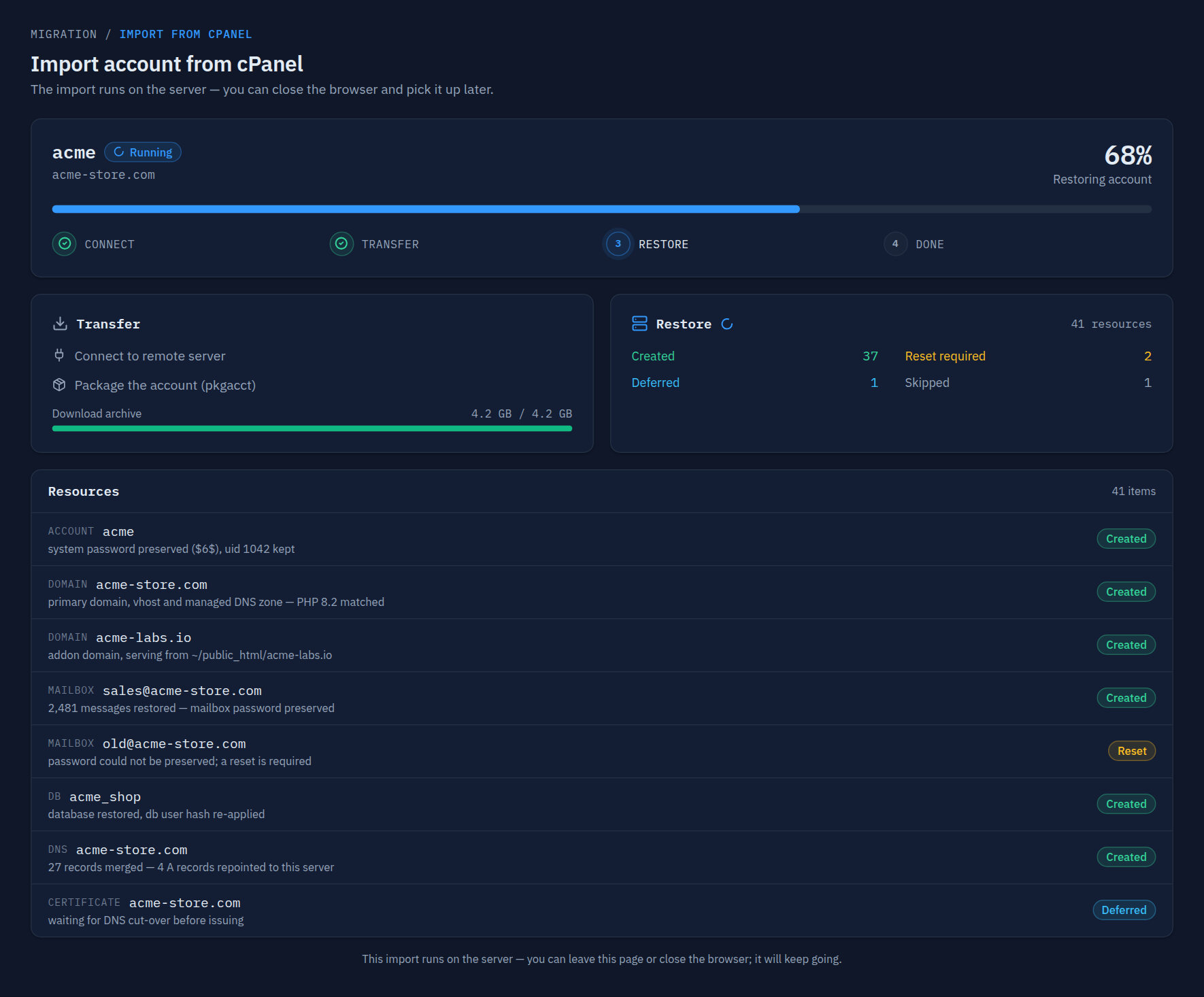
So the migration is the product. CorePanel connects to your existing WHM over SSH,
lists every account on it, and recreates the ones you pick — natively, not in a
compatibility shim:
An import in flight. It runs on the server, so you can close the browser and pick it up later — and every resource is reported individually, including the ones that needed a compromise.
What comes across: the system account, primary and addon domains, aliases and
subdomains, mailboxes **with their full Maildir**, forwarders, autoresponders and
filters (translated to Sieve), FTP accounts, MySQL databases with their data, cron
jobs, SSL certificates, and the DNS zone — with A records that pointed at the old
server rewritten to the new one, while MX, SPF, DKIM and CAA are left exactly as they
were.
Two details matter more than the list:
**Passwords survive.** The original hashes are imported verbatim whenever the scheme
can still be verified — SHA-512, SHA-256, MD5, bcrypt, yescrypt for system and mailbox
logins; `mysql_native_password` and `caching_sha2_password` re-applied at the MySQL
layer, so application configs keep working untouched. Nobody gets a "please reset your
password" email because you changed vendors. When a hash genuinely can't be preserved,
the login still exists and the account is listed under *Password resets required* in
the report — never silently broken.
**Sites keep their paths.** The importer doesn't relocate anything into CorePanel's own
layout. If a site served from `~/public_html/blog` on cPanel, it serves from
`~/public_html/blog` here. Absolute paths live inside `wp-config.php`, compiled caches,
`.htaccess` includes and the cron jobs restored alongside them; moving the tree would
break all of them quietly. CorePanel extends the SELinux context and the PHP pool's
`open_basedir` to cover the imported path instead.
If you'd rather not hand a panel your root credentials, the CLI takes a staged
`cpmove` archive and does the same thing — with a `--dry-run` that prints the entire
plan, conflicts and credential compatibility included, without touching the system:
```bash
corepanel account import /var/lib/corepanel/import/cpmove-acme.tar.gz --dry-run
```
## What it doesn't do
Worth saying plainly, because finding out later is expensive:
- It's a **one-shot import**, not a two-way sync — you cut over once.
- **cPanel only.** Plesk and DirectAdmin aren't supported.
- The cPanel **reseller tree** doesn't come across; you map accounts to CorePanel
sellers and packages yourself.
- A document root that lived **outside** the account's home (`/var/www/...`) has nowhere
to land — the domain, DNS and mail identity are still created, and the report flags
it so you can move the content and repoint it.
- **Personal covers 20 sites.** If you're running a hundred accounts commercially, the
edition you want is [Business](https://www.corepanel.net/for-hosting-providers) — same import, plus the
per-account panel logins and the WHMCS integration.
Anything the importer can't reproduce ends up in the job report as a warning or a
per-resource status. A run with any forced reset, dropped or failed resource reports
`partial`, not `completed`. We would rather show you a yellow you can act on than a
green that isn't true.
## Try it on one server
Point a spare VPS at it — AlmaLinux, Rocky or RHEL 8, 9 or 10 — and import a single
account first. It's the cheapest possible test: one command, and the source server
doesn't change until you tell DNS to move.
```bash
curl -fsSL https://get.corepanel.net/install.sh | bash
corepanel system init
```
The full migration procedure, including the DNS cut-over and how to read the import
report, is in the [cPanel import documentation](https://www.corepanel.net/docs/cpanel-import). The rest of what
Personal includes is on the [pricing page](https://www.corepanel.net/pricing) — the whole matrix, edition by
edition.
Your server should be the expensive part.