# WebP without a plugin: what it saves, and why on-the-fly conversion is a trap
> WebP cuts image weight 50–87% on real files. Why most WordPress sites still don't serve it, why converting per request can't work, and how CoreHttpd fixes it.
Source: https://www.corepanel.net/blog/webp-without-a-plugin
Author: CorePanel Team
Published: 2026-08-03
Tags: performance, wordpress, webp
From the CorePanel blog — https://www.corepanel.net/blog
---
> **In short:** WebP makes the same image 50–87% smaller with no visible quality loss.
> Almost nobody serves it, because doing it properly means converting thousands of
> files, storing a second copy of each, and picking the right one per browser — which
> is why the job usually ends up as a plugin, a queue, and a support ticket.
> Converting per request instead is roughly **10,000× more CPU than serving a file**,
> so that door is closed too. CoreHttpd converts each image once, in the background,
> and serves it on the same URL. It is on by default, including on the free
> [Personal edition](https://www.corepanel.net/pricing).
## What WebP actually is
WebP is an image format Google published in 2010. It compresses photographs better
than JPEG and flat graphics better than PNG, using the same trick modern video codecs
use: predicting each block of pixels from its neighbours and only storing the
difference. Every current browser reads it — Chrome, Firefox and Edge for over a
decade, Safari since 2020.
That's the whole story. It's not a new standard you have to adopt, not a build step,
not something your visitors need to install. It's a smaller file that looks the same.
## What it actually saves
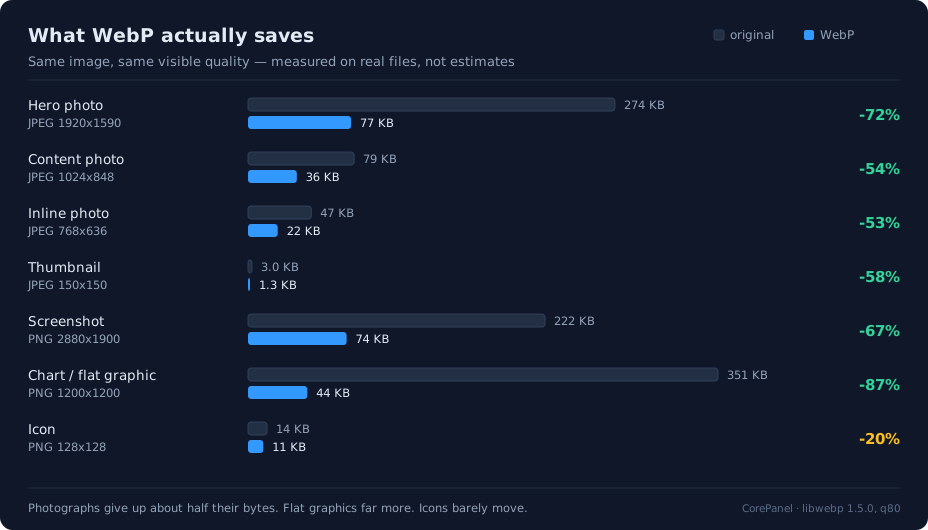
Estimates are cheap, so here are measurements. Every file below is a real image put
through the exact converter CoreHttpd runs in production — photographs at quality 80,
flat PNGs lossy above 30 KB and lossless below it:
Measured, not estimated — the same converter that runs in production, on real files.
Take a normal blog post — one 1920-px hero, six 300-px inline photos, twelve 150-px
thumbnails in the sidebar and related posts. Using the measurements above, that page
ships **362 KB** of images as JPEG and **117 KB** as WebP. Two thirds of the page's weight, gone, without touching a single line of the
theme.
On a phone on a mobile connection, that is the difference between a hero image that
appears immediately and one the visitor watches load. It is also the single easiest
Largest Contentful Paint win most sites have available: on a typical content page the
LCP element *is* the hero image, and Core Web Vitals are part of how Google evaluates
page experience.
## So why isn't your site serving it?
Because "convert your images to WebP" is one sentence describing five jobs:
**You have thousands of images, not one.** WordPress doesn't store your upload — it
stores five or six resized copies of it, and your theme adds its own. A modest site
with 400 uploads is 2,000+ files to convert, and the conversion has to happen
somewhere, on someone's CPU.
**Every new upload restarts the problem.** It's not a migration, it's a permanent
obligation. Something has to convert every image anybody uploads, forever.
**Then you have to serve the right one.** A WebP file nobody requests helps nobody.
Either the server negotiates it per request, or something has to rewrite your HTML into
`` elements with fallbacks — which is where image plugins collide with caching
plugins, page builders, lazy-loaders and CDNs. This is the part that generates the
support tickets.
**Storage doubles.** Every original keeps living next to its variant.
**And it goes stale.** Crop the photo, re-upload it, and the old variant is still there
and still being served. Cache-clearing becomes part of your editorial workflow.
None of this is hard, exactly. It's just five things that have to keep working
together, and the usual answer is a plugin with a settings page, a bulk-conversion
queue you have to babysit, and — increasingly — a subscription that ships your images
to somebody else's cloud to do the work.
## "Just convert on the fly"
The obvious idea is to skip all of it: convert the image when the browser asks for it.
No queue, no backlog, no storage. It doesn't survive contact with arithmetic.
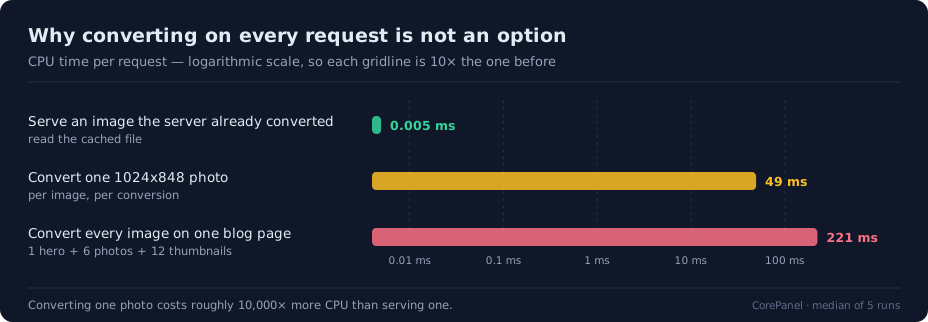
CPU cost per request, log scale. Converting a photo costs about 10,000× what serving one does.
Converting one ordinary 1024×848 content photo costs **49 ms of CPU**. Serving a file
that already exists costs **0.005 ms**. That is not a 20% overhead you can absorb —
it's four orders of magnitude, and it scales with pixels: roughly 50–60 ms per
megapixel, so a 3-megapixel hero is 172 ms and a large screenshot is 241 ms.
Add up one page — hero, six photos, twelve thumbnails — and converting on demand is
**221 ms of pure CPU per visitor** — for many sites the same order of magnitude as
generating the entire HTML page in PHP, and paid again by every single visitor. On a 2-vCPU VPS running
PHP-FPM, MariaDB and mail, a handful of concurrent visitors turns the image pipeline
into the slowest thing on the server. Your site doesn't get faster; it gets a new
bottleneck with a queue in front of it.
This is why the plugin ecosystem converts in bulk instead. The work is real. It just
has to happen exactly once per image.
## How CoreHttpd handles it
[CoreHttpd](https://www.corepanel.net/docs/web/optimizations) is CorePanel's web server — the thing actually answering
requests for your sites. It treats WebP as a serving concern rather than a content
concern, which removes the whole problem from your side of the fence:
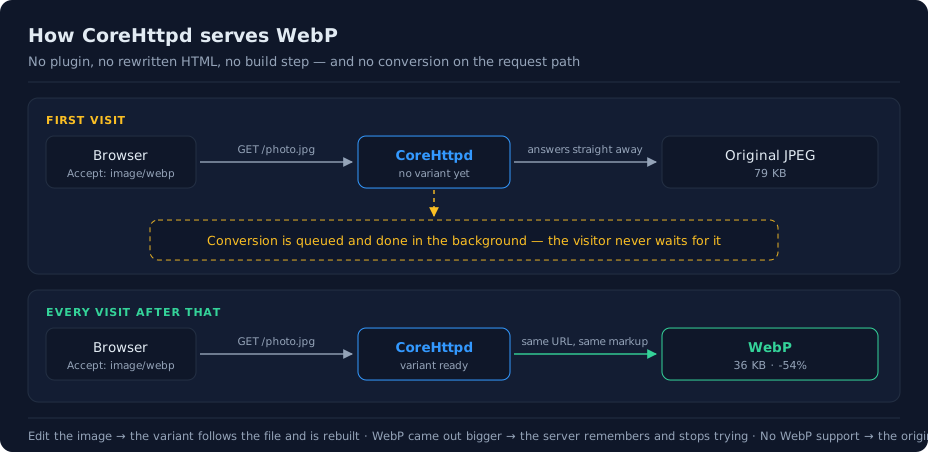
The first visitor is never charged for the conversion — and the URL in your HTML never changes.
Four things matter here:
- **The URL never changes.** Your HTML keeps pointing at `/photo.jpg`. Browsers
announce what they can read (`Accept: image/webp`) and CoreHttpd answers accordingly.
Nothing rewrites your markup, so there is nothing to conflict with your theme, your
page builder or your caching plugin.
- **Nobody waits for a conversion.** The first request for an image is answered with
the original, immediately; the conversion happens in the background, off the request
path, and a small number run at a time so a burst of new images can't starve PHP.
- **The variant is tied to the file.** Re-crop the photo and the old WebP goes with it.
There is no "clear image cache" button, because there is no step where you have to
remember to press one.
- **It gives up when it should.** WebP isn't always smaller — that 128×128 icon barely
moved, and some images come out *larger*. When that happens CoreHttpd keeps the
original and remembers not to try that file again.
And when a browser doesn't advertise WebP support, it gets the original file, byte for
byte. The feature is invisible in both directions.
## What you have to do
Nothing. It is on by default for every site, on every edition, including the free one.
If a particular site needs it off — a photography portfolio shipping deliberately
untouched files, say — there is a per-site switch in the panel's
[Optimizations](https://www.corepanel.net/docs/web/optimizations) section.
If you want to see it working, ask for an image the way a browser does and look at what
comes back:
```bash
curl -s -o /dev/null -D - -H 'Accept: image/webp' \
https://yoursite.com/wp-content/uploads/2026/01/photo.jpg | grep -i '^content-'
# content-type: image/webp
# content-length: 37304
```
Same URL, different bytes. In your browser's DevTools the Network panel shows the same
thing: your `.jpg` files arriving as `image/webp`, at about half the weight.
## Questions people ask
**Does it degrade my images?** Photographs are re-encoded at quality 80 — the same
ballpark as the quality 82 WordPress itself uses when it generates your resized copies,
and WebP holds detail better than JPEG at a given quality. Small PNGs are converted
losslessly, not re-encoded at all.
**Does it double my storage?** No. The variant lives in the server's cache, not in your
media library, and it isn't kept at all when it doesn't beat the original.
**Does it work with my caching plugin?** Yes, because it doesn't touch your HTML. The
negotiation happens below everything your site does.
**What about AVIF?** CoreHttpd doesn't produce AVIF today. It compresses better than
WebP but costs substantially more CPU to encode, and WebP already covers effectively
every browser in use. If that trade-off changes, the same mechanism applies.
**I put a CDN in front of my site.** Then the CDN is the one answering your visitors,
and it needs to be configured to cache image responses by the `Accept` header —
otherwise it will hand one visitor's variant to everybody. Serving straight from
CoreHttpd needs no such care.
---
Faster images are not a growth hack; they're a thing that should have been handled by
the server all along, like gzip. [CorePanel Personal](https://www.corepanel.net/pricing) is free, ships
CoreHttpd with WebP and [Early Hints](https://www.corepanel.net/docs/web/optimizations) on out of the box, and
[imports cPanel accounts](https://www.corepanel.net/docs/cpanel-import) with their sites intact.
**Method.** Every figure above is a median of five conversions of a real file
through CoreHttpd's production image converter (libwebp 1.5.0, JPEG at quality 80,
PNG lossy above 30 KB), measured on an Intel Core Ultra 9 185H; serving cost is a warm
read of the same file. A shared vCPU will be slower than this hardware, which makes the
conversion-per-request numbers conservative, not generous.