# Piping incoming email to a script, without handing over the server
> Help desks and order systems read mail through a pipe to a script. How it is wired by hand on Postfix, and how CorePanel runs it as the account, under SELinux.
Source: https://www.corepanel.net/blog/pipe-incoming-mail-to-a-script
Author: CorePanel Team
Published: 2026-10-15
Tags: email, security, selinux, cpanel
From the CorePanel blog — https://www.corepanel.net/blog
---
`support@example.com` arrives, and instead of landing in a mailbox it opens a ticket.
That is a **pipe to a program**: the mail server starts a script and hands it the whole
message on standard input. osTicket, WHMCS, HESK, Mautic bounce handlers, a dozen
order-import scripts — they all expect it, and cPanel has offered it for twenty years,
so anyone moving off cPanel expects it too.
It is also one of the few features in a hosting panel where **an email from a
stranger makes the server run code**. Done carelessly, it is the shortest path from the
public internet to a process on your machine. So we treated it that way.
## The manual way
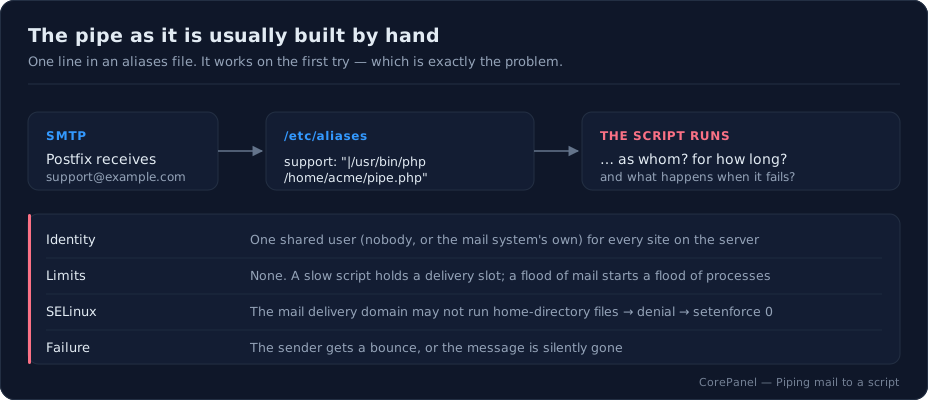
On a plain Postfix server, the classic recipe is one line in `/etc/aliases`:
```bash
# /etc/aliases
support: "|/usr/bin/php -q /home/acme/public_html/helpdesk/pipe.php"
```
```bash
newaliases
```
Send a message to `support@`, and Postfix's `local` delivery agent runs the command.
It works on the first try. Then the questions start:
- **As whom?** A command in `/etc/aliases` runs as Postfix's `default_privs` user —
`nobody`. Every account's pipe runs as the same user, so the script cannot write to
its own site's files without loosening their permissions, and every pipe on the
server can touch whatever the others leave behind.
- **Virtual domains.** Hosting domains are virtual, and `/etc/aliases` only covers the
local ones. The usual answer is a `pipe(8)` transport in `master.cf` with a fixed
`user=` — one transport per account, if you want each to run as its owner.
- **Limits.** Nothing stops a script that hangs, forks into the background or eats all
the memory. A burst of mail becomes a burst of processes.
- **Failure.** If the script exits with an error, the sender gets a bounce. Depending on
how it is wired, the message may simply be gone.
- **SELinux.** On RHEL, AlmaLinux and Rocky, the mail delivery domain is not allowed to
execute files from a user's home directory, and it is right not to be. The first
delivery produces an AVC denial, and the advice on every forum is the same:
`setenforce 0`. Which switches off the protection for the whole server to make one
helpdesk work.
Every item on the bottom list is a decision the one-line recipe makes for you, silently.
A cleaner manual option is Dovecot's Sieve `vnd.dovecot.pipe` extension, which only runs
programs from one configured directory. That is the right building block — and it is the
one we started from — but on its own it still leaves identity, limits, SELinux and who is
allowed to write the rule as your problem.
## How CorePanel does it
In CorePanel a pipe is set up where the account already manages its mail: on a
**forwarder**, on the domain's **catch-all**, or as an action in a mailbox's **filters**.
You pick the script — usually a PHP file inside the site — and that is it. No execute
bit, no `#!` line, no moving the script to a special folder: it runs where it is, with
the account's own PHP version, the way cPanel users are used to.
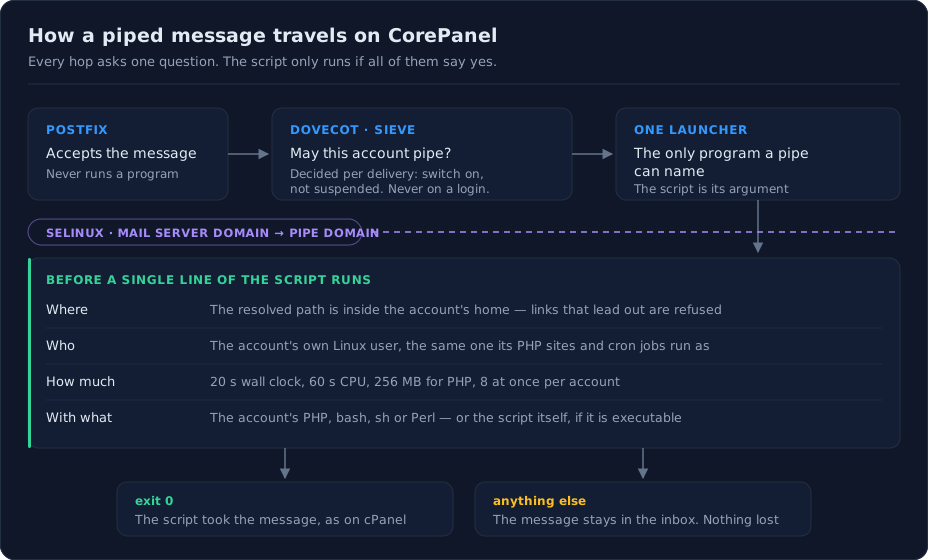
What happens underneath is a chain where every hop asks one question, and the script
only runs if all of them answer yes.
Postfix never runs a program. Dovecot only ever runs one: the launcher.
### Who may create a pipe
Running code is the **account's** decision, not every mailbox user's. A pipe can be set
up from the panel, or by the account writing its own filter files in its home. Someone
who only knows a mailbox password — and can connect a mail client to manage that
mailbox's filters — cannot add one. The permission to pipe is granted by the mail
server when it *delivers* a message, never when somebody signs in.
The operator has a **switch per account**, and a suspended account never runs a pipe,
whatever the switch says. Turning it off does not break the account's other filters:
they keep running, and messages that would have been piped simply stay in the inbox.
### One door in
Dovecot can run exactly one program for a pipe: CorePanel's launcher. The account's
script is an *argument* to it, never something the mail server executes directly. That
single door is where every check lives, so there is no second path that skips them.
Before a single line of the script runs, the launcher:
- **resolves the path** and refuses anything outside the account's home, including a
symbolic link that leads out of it. The panel checks this when the pipe is saved, and
the launcher checks it again on every message;
- **becomes the account's own Linux user** — the same one its PHP sites and cron jobs
run as. A pipe can do what the account can do, and nothing an account next door can;
- **picks the interpreter** from a short, closed list (the account's PHP, bash, sh,
Perl), or runs the script itself if it is executable with its own `#!` line;
- **sets the limits**, because the pipe runs inside the mail server and one account's
scripts must not slow down everyone's mail.
| Limit | Value |
|---|---|
| Running time | 20 seconds, then the script and everything it started are stopped |
| CPU time | 60 seconds per process |
| PHP `memory_limit` | 256 MB |
| Scripts running at once | 8 per account; a message that finds all 8 busy waits up to 4 seconds for one to finish |
| Processes left behind | killed as soon as the script ends — `&`, `nohup` and `setsid` do not outlive it |
### SELinux stays enforcing
CorePanel does not ask you to switch SELinux off, here or anywhere else. Instead, the
pipe has a **domain of its own**. The launcher carries a dedicated SELinux label, and
executing it moves the process *out* of the mail server's domain into the pipe's. The
script never runs with the mail server's privileges, and the mail server's policy never
has to be widened to "may run anything in any home directory" for a helpdesk to work.
The policy ships in the CorePanel RPM, like the rest of our SELinux modules, so a
server gets it on install and keeps it current on every update. Our acceptance suite
pipes real messages to PHP and shell scripts, on a main domain and an addon domain, and
fails on a single AVC denial.
### A failing script never loses mail
We measured this one rather than trusting the documentation. Sieve offers a "try" form
of `pipe` that sounds like the safe choice; on a failing script, it reports the message
as delivered — and it is gone. CorePanel uses the plain form, so the contract is simple:
- the script **exits 0** → it has taken the message, which is not also stored, exactly
as on cPanel;
- **anything else** — an error, a PHP fatal, a missing file, the 20-second limit, all
8 of the account's pipes still busy after 4 seconds → the message **stays in the inbox**, and the
reason is in the mail log.
A forwarder that pipes has no inbox of its own, so its failed messages go to a folder
in the account's home instead, and the panel shows how much is waiting there.
## Compatible with cPanel, across two different mail systems
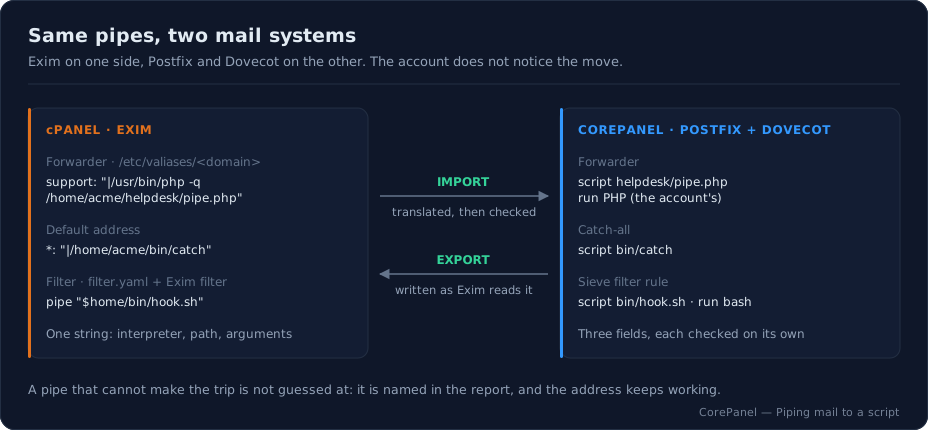
cPanel delivers mail with **Exim**. CorePanel uses **Postfix and Dovecot**. The two
describe a pipe in completely different ways: cPanel keeps a single command string —
`"|/usr/bin/php -q /home/acme/helpdesk/pipe.php"` — in `/etc/valiases`, on the default
address line, or inside an Exim filter generated from the account's `filter.yaml`.
CorePanel stores a script path in the home, an interpreter and a list of arguments, and
checks each of them on its own.
We kept both directions working anyway.
The account keeps its helpdesk. The mail system underneath is a different one.
**Importing from cPanel** — an account from a `cpmove` archive, a whole server through
the [cPanel import](https://www.corepanel.net/docs/cpanel-import), or an in-place
[transformation](https://www.corepanel.net/docs/cpanel-transform) — brings its forwarders, catch-alls and filters
that pipe. The command is translated: `/usr/bin/php -q`, an EasyApache or LiteSpeed PHP,
`/usr/bin/env bash` or `perl` become the interpreter, `$home/…` and `/home/user/…` become
the path in the home, and whatever follows becomes the arguments. Each pipe is checked
before it is saved, and the one that cannot run here — a program outside the home, one of
cPanel's own tools, a shell one-liner — is named in the report, while the address keeps
receiving mail.
**Exporting to cPanel** works the other way: an account
[exported as a cPanel backup](https://www.corepanel.net/docs/backups/export-cpanel) carries its pipes, filters and
autoresponders written the way cPanel's restore and Exim read them — both `filter.yaml`
and the Exim filter, because cPanel does not regenerate one from the other. We restored
those archives on a real cPanel server and watched the pipes run there.
That matters for a reason beyond convenience: a panel you can leave with your helpdesk
intact is a panel you can try without betting the business on it.
## In short
Piping mail to a script is a five-minute job by hand, and a five-minute job is exactly
what attackers count on: a shared user, no limits, a bounce or a lost message on failure,
and SELinux switched off to make it go. In CorePanel it is a field in a forwarder or a
filter — and behind that field, one door, the account's own user, hard limits, a
dedicated SELinux domain, and a guarantee that a broken script never costs you an email.
The full reference is in the docs: [Pipe to a script](https://www.corepanel.net/docs/email/mailboxes#pipe-to-a-script).