# Why trust a new web server? What every CoreHttpd release has to survive
> About 1,750 test cases across two layers, wire-level protocol checks, zero-allocation rules on the hot path and 76 tests on real servers: how CoreHttpd ships.
Source: https://www.corepanel.net/blog/how-a-corehttpd-release-is-made
Author: CorePanel Team
Published: 2026-10-09
Tags: engineering, testing, corehttpd, performance
From the CorePanel blog — https://www.corepanel.net/blog
---
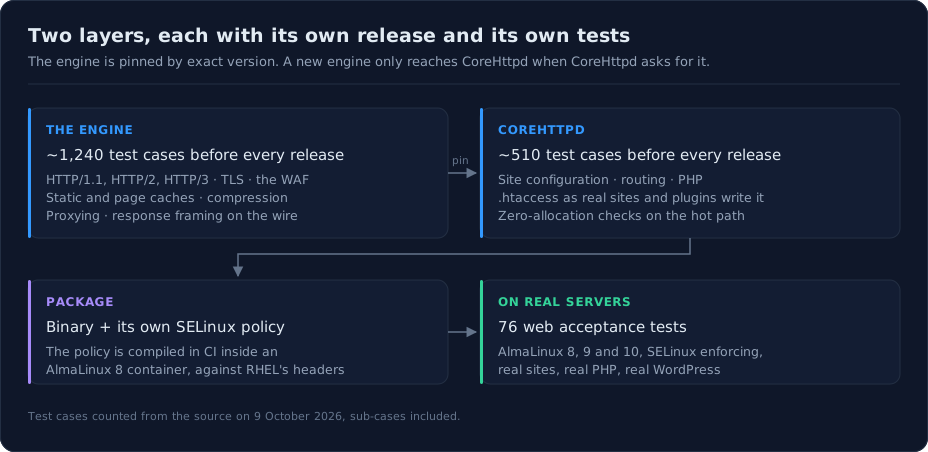
> **In short:** CoreHttpd is built in two layers — an engine that speaks HTTP/1.1,
> HTTP/2, HTTP/3 and TLS, and the server that turns your sites into configuration —
> and each layer ships only after its own suite passes: about **1,240 test cases** for
> the engine, about **510** for CoreHttpd. Protocol tests talk raw bytes over a socket,
> performance is held by tests that fail if the hot path allocates memory, and the
> finished package then goes through **76 web tests** on fresh AlmaLinux 8, 9 and 10
> servers with SELinux enforcing.
Asking someone to run a new control panel is a big ask. Asking them to put their sites
behind a web server that is neither Apache nor nginx is a bigger one. The web server is
the most exposed process on the machine: it answers every request from the internet, in
three versions of HTTP, over TLS, for every site at once. When it breaks, it doesn't
break one site. It breaks all of them.
We covered [why CorePanel has its own web server](https://www.corepanel.net/blog/we-had-to-build-our-own-web-server)
already. This post is about the other half of the question: how a new version of it is
made, and what it has to get through before it is allowed to serve your traffic. It
follows the same idea as [how a CorePanel release is made](https://www.corepanel.net/blog/how-a-corepanel-release-is-made),
applied to the one component where a mistake is visible to every visitor of every site.
## Two layers, two releases
CoreHttpd is two pieces of software stacked on top of each other.
**The engine** does the work that has nothing to do with hosting panels: parsing HTTP
in its three versions, terminating TLS, compressing, caching, proxying, and running the
WAF. It has years of production traffic behind it, and its own release cycle.
**CoreHttpd itself** is what makes that engine a hosting web server: it reads each
site's configuration, routes requests to PHP, understands `.htaccess`, applies the
panel's settings, and runs confined under its own SELinux policy.
The line between them matters. CoreHttpd never builds against "the latest engine". It
names one exact engine version, so a change in the engine only reaches your server when
a CoreHttpd release deliberately takes it, and that release runs its own suite on top.
Every engine release has to pass its full suite first; every CoreHttpd release does the
same with its own. No exceptions for small fixes. Small fixes are where nobody looks.
## The engine: tested on the wire
A web server can be correct in every function and still wrong on the wire. Most of the
engine's tests start a real server on a local port and talk to it like a client would,
and a good part of them don't use an HTTP client library at all.
That is deliberate. Client libraries are forgiving: they will happily read a response
whose length doesn't match what the headers announced, or quietly paper over a
connection the server should have closed. A forgiving client is the one tool that is
guaranteed to hide a framing bug. So the tests that check how a response is delimited
write the request as raw bytes on a plain socket and read back exactly what the server
sent.
They have plenty to cover. A response can come from four places — a file on disk, PHP
over FastCGI, a proxied backend or the cache — and each has to be framed correctly for
clients that need different answers. A file has a known length, so it goes out with
`Content-Length`. Compress it and the length is no longer known in advance, so an
HTTP/1.1 client gets chunked encoding, while an HTTP/1.0 client, which doesn't
understand chunks, has to get the connection closed instead. Get any of those wrong
and the symptom ranges from a page cut in half to a request smuggled into the next one.
Around that, the suite covers:
- **HTTP/1.1, HTTP/2 and HTTP/3 separately**, including caching on each, because the
same cached object travels very differently over a multiplexed QUIC connection than
over a keep-alive socket.
- **A TLS matrix** of plaintext and TLS clients against plaintext and TLS backends, so
every combination of "secure in front" and "secure behind" is exercised.
- **The edges attackers like**: oversized headers, proxy loops, malformed requests,
compressed files that must arrive byte-for-byte intact.
- **The WAF**, with the requests it must stop and, just as important, the ones it must
let through. A WAF that blocks a legitimate checkout is a broken WAF.
## CoreHttpd: compatible with what your sites already do
CoreHttpd's own tests are less about protocols and more about the mess real sites
bring with them. The biggest group is `.htaccess`, written the way people actually
write it: rules copied from a WordPress guide in 2014, cache plugins that generate
hundreds of lines, cPanel accounts that accumulated a decade of redirects.
A good example is the disk cache that most WordPress cache plugins keep. They store
each page already compressed, under file names they invent, and use `.htaccess` rules
to point visitors at those files. CoreHttpd serves them the way the plugin intended,
bytes untouched, but only when the directory declares both what the file is and how it
is compressed, and only to a browser that accepts that compression. If anything is
missing, it ignores the shortcut and lets PHP generate the page. A slow page is a
nuisance; a page served as a binary download because the server guessed wrong is an
outage. The tests pin both halves of that rule.
## Performance is a test, not a promise
Every web server says it is fast. The question is what stops it from getting slower,
one reasonable-looking change at a time.
In CoreHttpd the answer is in the test suite. There are **49 benchmarks** on the paths
that matter, and **30 assertions across the two codebases that fail the build if a hot
path allocates memory**. Allocation is the cost that doesn't show up in a quick test and
does show up under load: each one is work for the garbage collector, multiplied by every
request on every site. The code that decides a static file's cache lifetime, for
example, runs for every image, script and stylesheet served, and it has a test that
fails if it allocates even once.
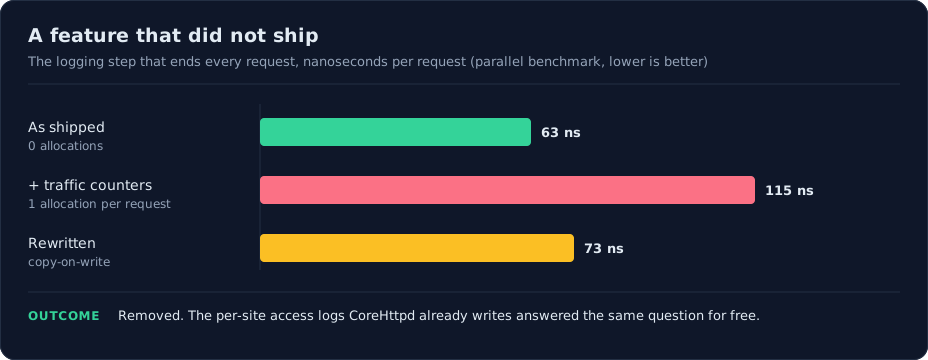
That discipline has a cost, and we pay it. A few weeks ago we added per-site traffic
counters, a small feature for a dashboard graph. The counters lived in the logging step
that runs at the end of **every request** CoreHttpd serves.
Measured with a parallel benchmark, that step went from 63 nanoseconds and zero
allocations to 115 nanoseconds and one allocation per request. A rewrite brought it down
to 73. Ten nanoseconds sounds like nothing, and on one request it is. But it was a cost
added to every request on every site, forever, in exchange for a graph — and CoreHttpd
already writes a separate access log for each site, which answers the same question for
free. So the feature came out entirely.
That's the rule now: a change on the hot path arrives with its benchmark number, and the
number decides.
## Then on real servers, with SELinux enforcing
Unit tests prove the parts. The package still has to prove itself as a whole, installed
on a real system next to everything else it works with.
CoreHttpd runs confined in its own SELinux domain, so the build compiles its policy
module as part of the release, inside an AlmaLinux 8 container against RHEL's own
policy headers, and ships it in the same package as the binary. Then the package goes
through CorePanel's acceptance suite: **76 tests on web serving, PHP, `.htaccess`, the
caches and WordPress**, on freshly installed AlmaLinux 8, 9 and 10 servers with SELinux
enforcing. They create real sites, upload real files, run real PHP and install real
WordPress, then request pages the way a browser would and check what comes back.
This is the layer that catches what no unit test can: the web server running in the
wrong security domain, a policy that lets it read cache files but not map them into
memory, a certificate the mail server can no longer read after a renewal. We wrote
about those cases in [the CorePanel release post](https://www.corepanel.net/blog/how-a-corepanel-release-is-made).
All three involved CoreHttpd, and each one now has a test.
## What it adds up to
About 1,750 test cases on the code, 76 on real servers, a pinned engine, a policy built
with the binary, and a performance budget enforced by the test suite rather than by good
intentions. None of it is exotic. It is the same discipline the projects you already
trust follow, applied to a web server that is new to you but not new to production.
If you want to see what it does with your own sites, the numbers against Apache are in
[Apache as cPanel ships it vs CoreHttpd](https://www.corepanel.net/blog/apache-as-cpanel-ships-it-vs-corehttpd),
and the switches it gives you per site are in the
[web optimizations documentation](https://www.corepanel.net/docs/web/optimizations). The fastest way to judge it,
though, is to point a spare VPS at it and import one real account.