# Apache as cPanel® configures it, next to corehttpd, on the same server
> One server, one WordPress site, one PHP-FPM pool. We swapped Apache — configured the way cPanel sets it up — for corehttpd and measured pages, crowds and bytes.
Source: https://www.corepanel.net/blog/apache-as-cpanel-ships-it-vs-corehttpd
Author: CorePanel Team
Published: 2026-09-29
Tags: performance, benchmark, corehttpd, apache, wordpress
From the CorePanel blog — https://www.corepanel.net/blog
---
> **In short:** on a 4-vCPU server we ran the same WordPress site behind Apache, set up
> exactly the way cPanel® sets it up, and behind corehttpd, the web server CorePanel ships.
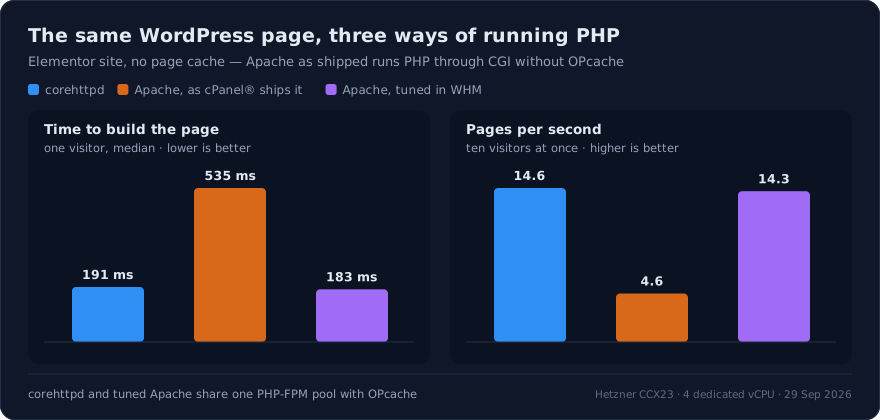
> A WordPress page took **535 ms** behind Apache and **191 ms** behind corehttpd, and the
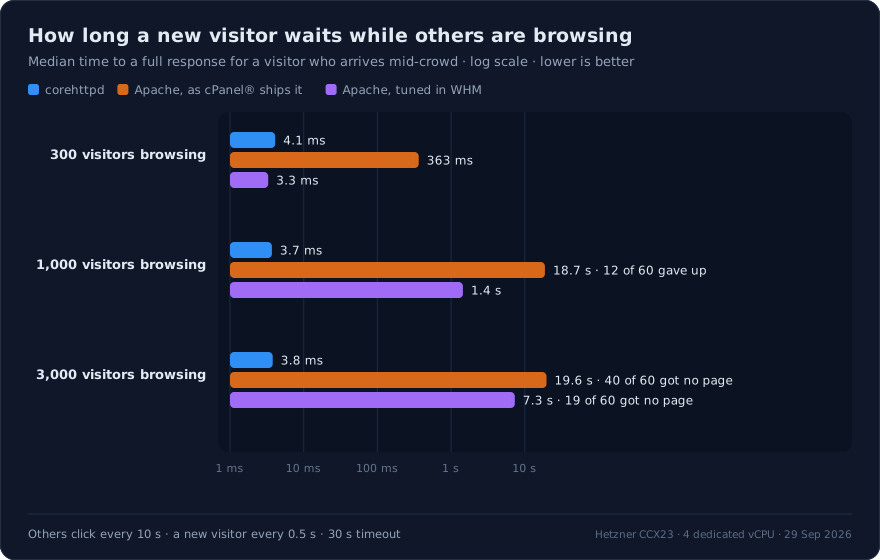
> server delivered **4.6 pages per second instead of 14.6**. With 1,000 visitors browsing,
> a newly arriving visitor waited **18.7 seconds** for Apache and **3.7 milliseconds** for
> corehttpd. When we turned Apache's PHP-FPM, HTTP/2 and compression on in WHM, the
> WordPress numbers matched — and the crowd and compression numbers did not.
corehttpd is the web server that sits at the front of every CorePanel server. We have
written about [why we built it](https://www.corepanel.net/blog/we-had-to-build-our-own-web-server); this post is
what happens when you put it next to the web server most hosting servers still run, on the
same machine, and measure.
The comparison that matters to a hosting provider is not "Apache in the abstract" — it
is Apache as it is actually deployed. On most shared hosting servers, that means Apache
configured by cPanel. So we copied that configuration directive by directive from a
cPanel 138 server, and we measured it twice: once exactly as shipped, and once with every
performance switch that WHM offers turned on.
## The setup
One Hetzner CCX23 — 4 dedicated AMD EPYC vCPUs, 16 GB of RAM, AlmaLinux 9.8 — running
CorePanel, with a second, identical machine in the same datacenter generating the load.
The site is the `agency` profile of [wp-test](https://github.com/pyxsoft/wp-test), our
public, deterministic WordPress generator: WordPress 7.1.2 with Elementor 4.3.2 and seven
other plugins, 30 builder pages and 2,399 widgets, PHP 8.4. No page cache, anywhere.
The web server was the only thing that changed. Apache 2.4 was installed on the same
machine and swapped with corehttpd on ports 80 and 443, serving the same files with the
same certificate, and — where PHP-FPM was involved — talking to **the same PHP-FPM pool**:
| | Apache, as cPanel ships it | Apache, tuned in WHM | corehttpd |
|---|---|---|---|
| Process model | MPM prefork + mod_ruid2 | MPM event | event-driven, one process |
| PHP | CGI, no OPcache | PHP-FPM with OPcache | PHP-FPM with OPcache |
| `MaxRequestWorkers` | 150 | 150 | no per-connection worker |
| Compression | none | mod_deflate ("Compress all content") | gzip |
| Protocols | HTTP/1.1 | HTTP/1.1, HTTP/2 | HTTP/1.1, HTTP/2, HTTP/3 |
The first column is what a fresh cPanel server runs: its default EasyApache 4 profile
installs mod_ruid2, which requires prefork, and hands PHP to CGI with no OPcache package.
`KeepAlive On`, `KeepAliveTimeout 5`, `MaxKeepAliveRequests 100` and `Timeout 300` are
cPanel's values and apply to both Apache columns. The second column is every switch an
administrator can flip in WHM without leaving the interface: event MPM, PHP-FPM for the
domain, mod_http2, and *Optimize Website → Compress all content*.
Each visitor gets its own connection, and the load generator asks for bytes the same way
from every server. Rates are counted over the time that actually elapsed, and a request
that never came back is counted as a failure, not dropped.
## A WordPress page
Behind Apache as shipped, every page view starts a new `php-cgi` process that loads
PHP, compiles WordPress, Elementor and eight plugins from source, answers, and exits.
That is **0.87 seconds of CPU per page**, against 0.26 seconds behind corehttpd, where
PHP-FPM keeps its workers alive and OPcache keeps the compiled code in memory. On four
cores the difference is 4.6 pages per second against 14.6.
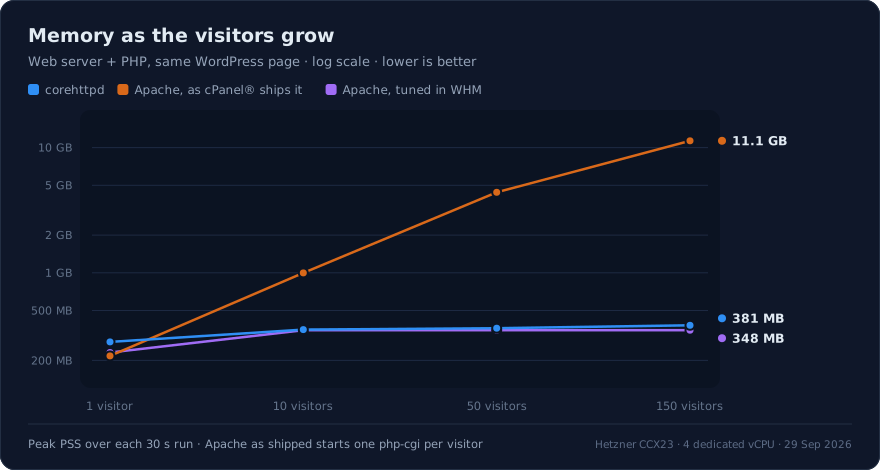
Concurrency turns it into memory, because every visitor gets a PHP process of its own:
With 150 visitors, Apache ran 150 `php-cgi` processes at once: **11.1 GB** for web
server and PHP together, on a 16 GB server. corehttpd served the same 150 visitors in
**381 MB**, sending them through PHP-FPM's eight workers; the rest waited in line, and
every one of them got a page.
Tuned Apache is the control that makes this measurement mean something: pointed at the
same PHP-FPM pool, it built the page in 183 ms and served 14.3 pages per second, the
same as corehttpd. When PHP does the work, the web server in front of it barely moves
the number. What moved it was the way cPanel runs PHP by default.
## A new visitor, while others are browsing
This is where the architecture shows. We kept a crowd of visitors on the site, each
clicking every 10 seconds, and every half second a new visitor arrived, opened a fresh
connection and asked for a file. The question is simple: how long does the new visitor
wait?
corehttpd answered in under 5 ms whether 300, 1,000 or 3,000 visitors were connected. It
held all 3,000 connections in **381 MB** at **2% CPU**.
Apache as shipped has 150 processes, and a process that is holding a connection — even
an idle one, waiting out `KeepAliveTimeout` — cannot serve anyone else. With 1,000
visitors browsing, the new visitor queued for 18.7 seconds, and 12 of 60 gave up after
30. With 3,000, only 20 of the 60 got a response at all. The server's CPU sat at 3%
the whole time: it was not busy, it was full.
Event MPM releases the thread while a connection sits idle, which is why tuned Apache
matched corehttpd at 300 visitors. At 1,000 it ran into the same `MaxRequestWorkers
150` and the wait rose to 1.4 seconds. Raising the limit moves the wall rather than
removing it: at 400 workers, the 1,000-visitor case dropped to 3.2 ms, and with 3,000
visitors the median wait was back up at 2.1 seconds. corehttpd has no such number to
tune, because it does not assign a worker to a connection.
## Static files under a crowd
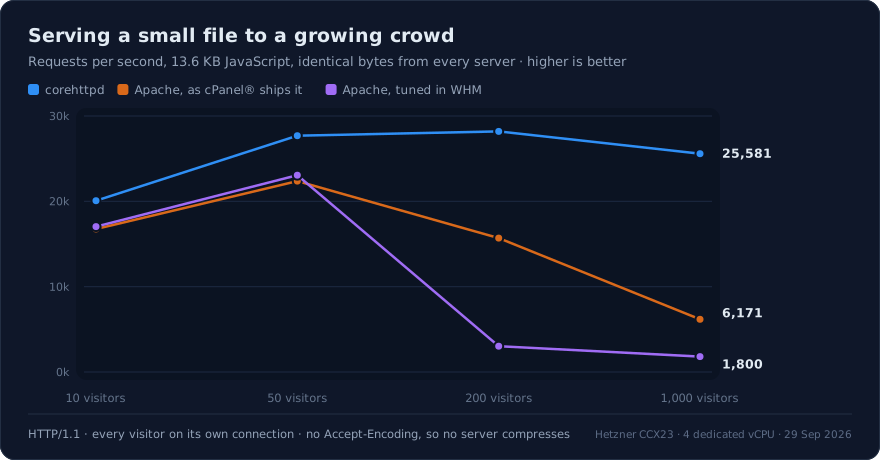
For a small JavaScript file with identical bytes from every server, corehttpd led from
the first data point — 20,069 requests per second at 10 visitors against 16,759 — and
held its line as the crowd grew: **25,581 requests per second at 1,000 visitors, p99 of
107 ms**. Apache as shipped fell to 6,171, and its slowest visitor waited 41.6 seconds.
Tuned Apache fell off earlier, at 200 visitors, where `MaxRequestWorkers 150` meant more
active connections than threads; with the limit raised to 400 it served 22,907 requests
per second at 200 visitors and dropped to 2,764 at 1,000.
## Compression
Browsers ask for compressed responses, and how a server answers is a real part of what
it costs to serve a page.
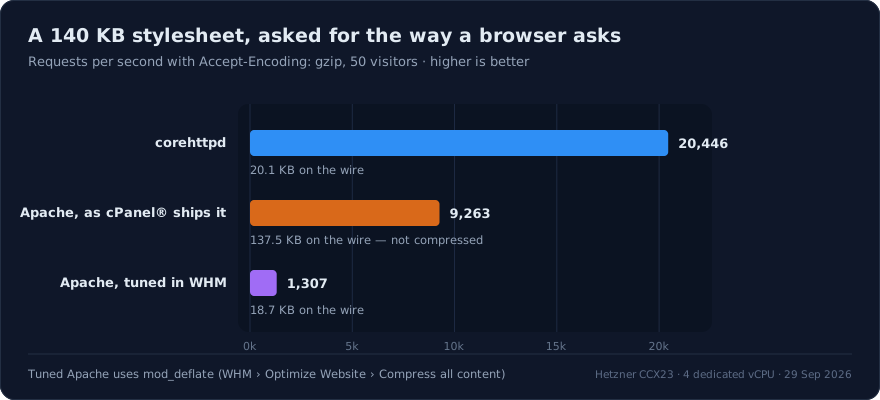
Apache as shipped does not compress at all. mod_deflate is loaded, but no filter is
configured; compression is enabled per account under *Optimize Website*, or by a caching
plugin that writes the rules into `.htaccess`. Out of the box, that 140 KB stylesheet
travels uncompressed to every visitor: 137.5 KB on the wire, nearly seven times what it has to be.
Turn compression on, and Apache compresses the file again on every request: 1,307
requests per second. corehttpd compresses each compressible static file — CSS,
JavaScript, SVG and the like — once per version and serves the stored copy — **20,446 requests per second**, fifteen times
more, and at 1,000 visitors still **19,691** against Apache's 629. The same holds for
the small JavaScript file: 21,959 requests per second against 10,046.
## What each request costs the server
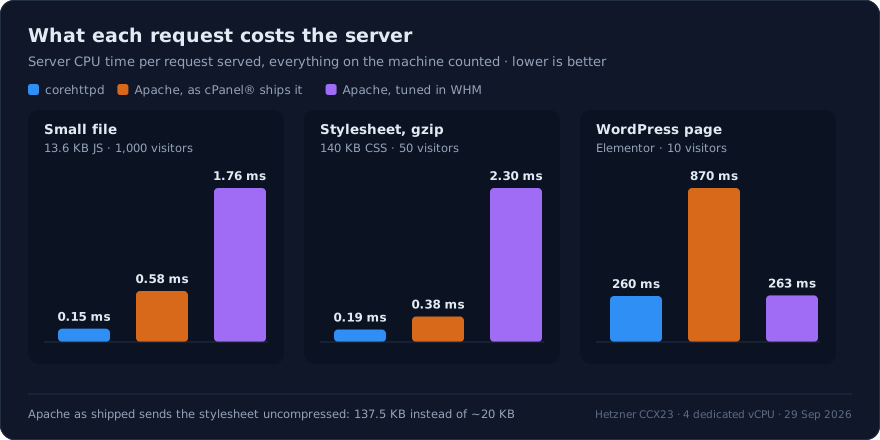
Throughput says how much a server can take; CPU per request says what every visitor
costs while it does. We took the server's CPU time over each measured window — web
server, PHP, database and kernel, everything on the machine — and divided it by the
requests answered.
At a comfortable load the three servers are close, with corehttpd ahead: 0.135 ms of
CPU for the small file at 50 visitors, against 0.167 ms for Apache as shipped and
0.153 ms tuned. The gap opens under a crowd. At 1,000 visitors corehttpd still spent
**0.15 ms** per request, while Apache as shipped spent 0.58 ms and tuned Apache 1.76 ms:
the extra time goes into juggling connections that are waiting for a worker, so Apache
spends more CPU to serve fewer requests.
Compression is where stored copies pay off. corehttpd served the compressed stylesheet
for **0.19 ms** of CPU; Apache with mod_deflate spent 2.30 ms compressing it again
every time, twelve times as much. Apache as shipped spent 0.38 ms — and that is for
sending it uncompressed.
On a WordPress page the web server's share disappears into PHP's: 260 ms for corehttpd
and 263 ms for tuned Apache on the same PHP-FPM pool, 870 ms when PHP runs through CGI.
## HTTP/2 and HTTP/3
corehttpd serves HTTP/1.1, HTTP/2 and HTTP/3 on every site, with nothing to enable.
Apache as cPanel ships it speaks HTTP/1.1 only: its default profile does not install
mod_http2. Switching to event MPM and adding it brings HTTP/2. HTTP/3 is not available in Apache at all.
## Where the numbers come from
- **One load generator.** Every visitor in these tests arrives from the same machine.
That is fine for the tests above, and it is why we left one out: serving a 105 KB image
pushes up to 1.2 GB/s through the link between two virtual machines, and from 50
visitors on the numbers describe Hetzner's network rather than either server.
- **One run per data point**, 15 seconds each after a 3-second warm-up (30 seconds for
WordPress), with CPU and memory sampled from `/proc` on the server during the window.
Memory is PSS, so pages shared by Apache's children are not counted twice. CPU per
request is the whole machine's CPU time over the window divided by the requests
answered in it.
- **Versions.** CorePanel 1.6.20 with corehttpd 1.3.1, Apache 2.4.62 from
AlmaLinux AppStream (cPanel ships 2.4.68) with mod_ruid2 0.9.8, the same version cPanel
uses. PHP 8.4.26 for every server.
- **What we left out of cPanel's Apache**, all of which would have slowed it down: the
`splitlogs` pipe every access log goes through, mod_security without rules, and
mod_bwlimited. Apache also ran without SELinux confinement, as cPanel requires;
corehttpd ran confined, as it always does.
- **The fixture and the tools are public.** [wp-test](https://github.com/pyxsoft/wp-test)
builds the same site from the same seed on any server; the manifest of this run carries
pixels hash `1582e21c6e231bb982d5129b83cdf578`. The load generator,
[`benchgen`](https://github.com/pyxsoft/wp-test/tree/main/bench/benchgen), and the
server-side sampler, `srvstat.py`, live in the same repository's `bench/` directory.
---
cPanel® is a registered trademark of WebPros International LLC. CorePanel is not
affiliated with, sponsored or endorsed by WebPros International LLC.